
Dấu trang
| Nhà phát triển: | sumalab studio (1) | ||
| Giá: | $9.99 Mới | ||
| Điểm tổng hợp: | 600 Bạc | ||
| Bảng xếp hạng: | 0 | ||
| Bình luận: | 0 Đăng bình luận | ||
| Danh sách: | 0 0 | ||
| Điểm: | 0 | ||
| +1 Điểm | |||
Tóm tắt
RsyncZilla là ứng dụng thuộc danh mục Công cụ cho nhà phát triển của sumalab studio.
Mới toanh, ra mắt . Vẫn còn thơm mùi code mới.
$9.99. Chưa từng giảm giá trên AppAgg, không một lần nào. Đặt thông báo giá. Bạn có quên thì chúng tôi cũng không quên.
Microsoft Store có sẵn trong Windows, nên cài chỉ mất vài cú nhấp.
Điểm tổng hợp AppAgg là 600. Hạng Bạc, vậy là không tệ chút nào.
Xếp hạng độ tuổi “EVERYONE”, nên trẻ em cũng dùng được.
Biết 2 thứ tiếng, nhưng vẫn chưa có tiếng Việt.
Ở đây vẫn im phăng phắc, chưa có đánh giá, chưa có bình luận. Hãy phá vỡ sự im lặng.
Đây là ứng dụng duy nhất của nhà phát triển trên AppAgg. Tạm thời là vậy.
Muốn biết sớm nhất về giảm giá, cập nhật và ứng dụng mới? Hãy đặt thông báo giá, theo dõi nhà phát triển hoặc đăng ký nguồn RSS. Thông báo đẩy được gửi qua ứng dụng AppAgg Alerts cho Android và iOS.
Ảnh chụp màn hình 3
Nền tảng khác 0
Lịch sử giá 0
- Giá hiện tại: $9.99
- Tối thiểu: $9.99
- Tối đa: $9.99
Bảng tin riêng của bạn trên trang chủ
Mô tả

Connect Claude, ChatGPT, Cursor, Antigravity, or your own local AI model directly to your live SSH terminal sessions without ever sharing your server passwords. Let your AI inspect logs, run commands, read or edit remote files, and upload/download data while you watch everything happen live on screen with strict per-tab permissions (AI: Off, AI: Confirm with one-click Allow/Deny, or AI: Auto).
Instead of re-uploading entire folders or leaving broken half-transferred files on your server, RsyncZilla uses bundled rsync over SSH so only changed blocks are transferred with automatic resume, real error reporting, and atomic file updates.
Key highlights:
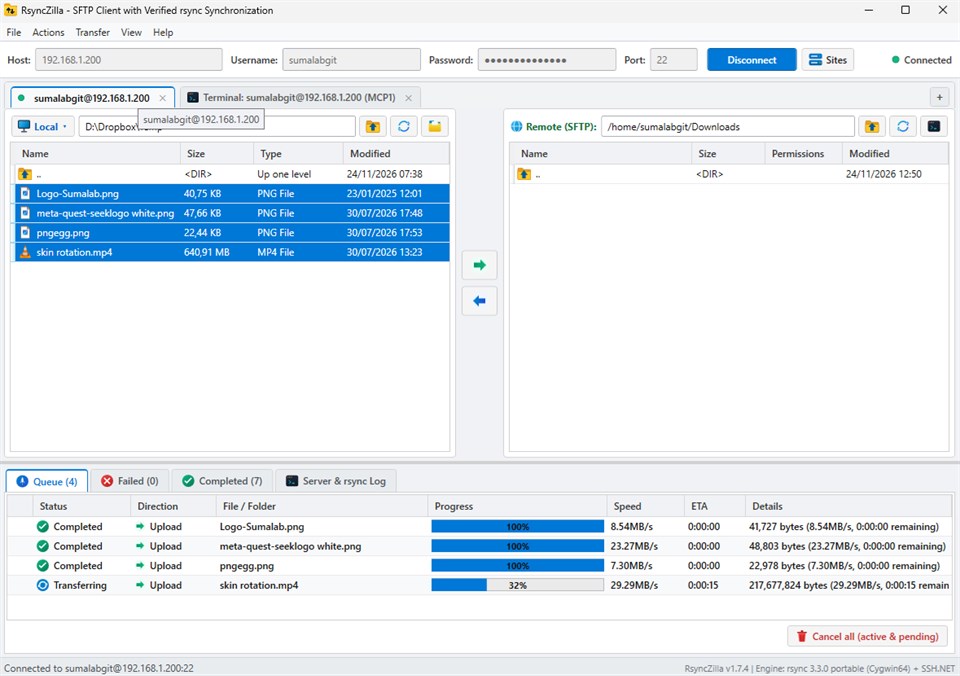
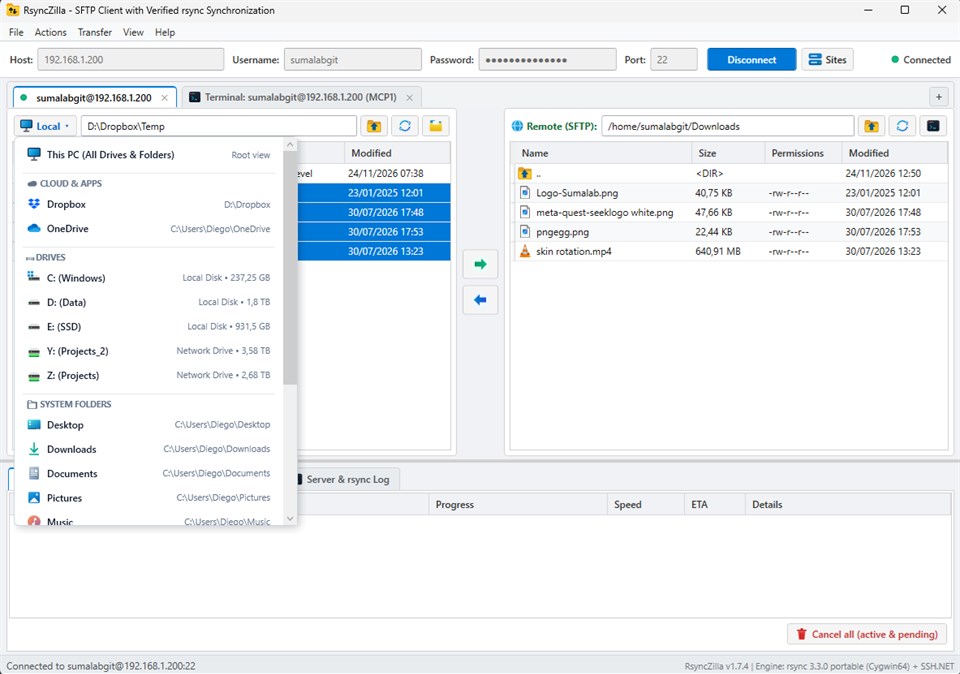
• Dual-pane Local & Remote SFTP Explorer with drag-and-drop (including dragging directly to Windows Explorer / Desktop), Windows 11 native icons, and quick navigation to Drives, Cloud folders (Dropbox, OneDrive...), and Quick Access.
• Resumable rsync over SSH Transfer Queue with live progress, speed stats, overwrite rules (--update, --checksum, --ignore-times), and automatic retry.
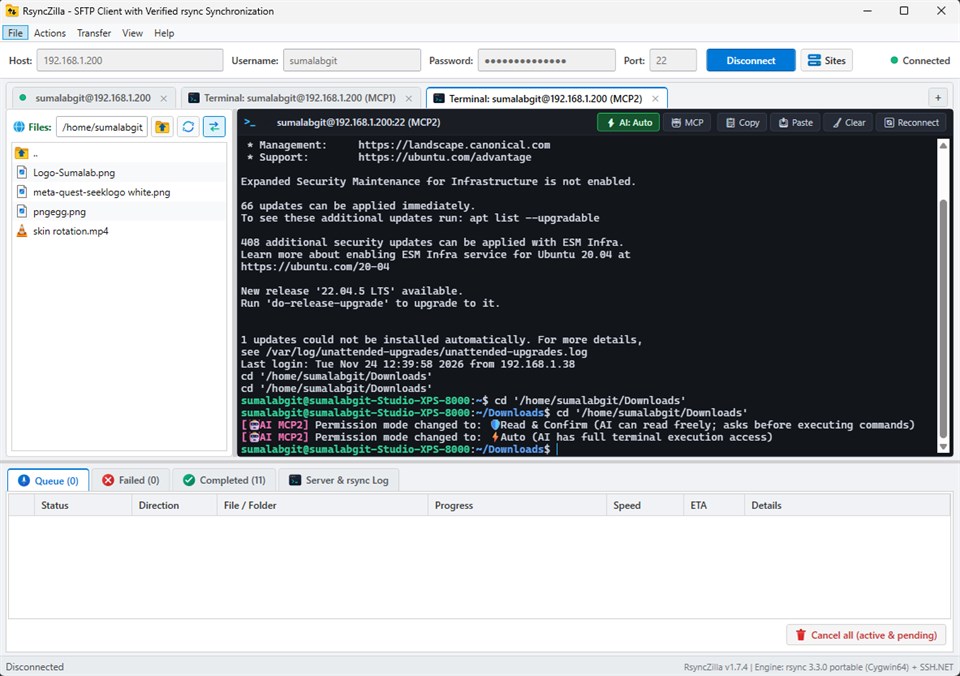
• Integrated Interactive SSH Terminal (xterm.js) with a synchronized remote file tree that tracks your `cd` commands in real time.
• Optional Local AI MCP Server (Model Context Protocol): disabled by default per tab (AI: Off / AI: Confirm / AI: Auto), letting AI assistants like Claude, ChatGPT, Cursor, or Antigravity assist with your live terminal sessions under your explicit control.
• Site Manager with FileZilla XML Import & Optional AES-256-GCM Encrypted Password Vault (PBKDF2 key derivation, zero plaintext storage).
• Remote File Editing ("View/Edit" & "Open with...") with automatic upload sync on save.
RsyncZilla is free and open source (MIT license) on GitHub. Purchasing it on the Microsoft Store provides a Microsoft-signed package with automatic updates and directly supports ongoing development by Sumalab.
Từ nhà phát triển
Nhà phát triển
- sumalab studio
- Người theo dõi: 0
- Nền tảng: Windows Ứng dụng (1)
- Giảm giá: 0
- Danh sách: 0 0
- Điểm: 0
- Bảng xếp hạng: 0
- Bình luận: 0
- Video: 0
- RSS: Đăng ký
Danh sách 0
-
 RsyncZilla
Điểm 0
-

- +1 Điểm

Bảng xếp hạng 0
-
- Điểm bạn chấm
Tính năng mới
- Phiên bản: PC
- Cập nhật lần cuối:
- Version 1.7.4:
- Formatted Markdown release notes viewer and new Help -> Release Notes menu.
- Terminal toolbar buttons now immediately return keyboard focus to the live terminal.
- Shell prompt is automatically preserved and restored after MCP commands and notices.
- Local Quick Navigation panel (This PC, Cloud folders like Dropbox/OneDrive, Drives, and Explorer Quick Access).
- Integrated AI MCP server (per-tab Off / Confirm / Auto permissions) with multi-tab support (MCP1, MCP2...).
Thông tin bổ sung
- Ngày phát hành:
- Danh mục:
Ứng dụng cho Windows›Công cụ cho nhà phát triển - HĐH:
PC - Kích thước:
79 Mb - Ngôn ngữ được hỗ trợ:
Tiếng Anh,Tiếng Tây Ban Nha - Xếp hạng nội dung:
EVERYONE - Windows Store Điểm đánh giá: ¡
0 - Trang web:
 https://www.sumalab.com/
Bình luận 0 ¡
Điểm tổng hợp AppAgg
Điểm tổng hợp AppAgg ước tính cho
RsyncZilla
Nhà phát triển: sumalab studio
Điểm cao hơn thường cho thấy các chỉ số trên AppAgg tốt hơn.
Dựa trên: độ phổ biến · đánh giá của người dùng · độ mới · ưu đãi · dữ liệu cửa hàng · hoạt động cộng đồng
Được tính lại hằng ngày từ dữ liệu AppAgg mới nhất.
RsyncZilla URL ngắn: Đã sao chép!- Windows Store

