
Könyvjelzők
| Fejlesztő: | Villi Development (7) | ||
| Ár: | $9.99 Új | ||
| Pontszám: | 1530 Arany | ||
| Rangsorok: | 0 | ||
| Hozzászólások: | 0 Hozzászólás közzététele | ||
| Listák: | 0 0 | ||
| Pontok: | 0 | ||
| +1 Pont | |||
Röviden
Íme Scribbit, „Fejlesztői eszközök” kategóriájú alkalmazás, fejlesztője: Villi Development.
Még csak jelent meg, így fiatalabb a hűtődben lévő tejnél.
$9.99, és az AppAggon eddig egyszer sem volt akciós. Kemény dió.
A Microsoft Store a Windows beépített része, így pár kattintással felteheted.
Az AppAgg-pontszáma 1530. Ez „Arany” szint.
Csak 6 megabájt, még egy teletömött meghajtóra is felfér.
„EVERYONE” besorolású, vagyis gyerekeknek is megfelel.
Csak egy nyelven beszél, és az nem a magyar.
Az AppAggon még senki sem értékelte. Most te lehetsz az első.
A fejlesztőnek még 6 alkalmazása van az AppAggon. Érdemes megnézni.
Egyébként ennek a fejlesztőnek most 1 akciós terméke van.
Szeretnél elsőként értesülni az akciókról, a frissítésekről és az új alkalmazásokról? Állíts be árfigyelőt, kövesd a fejlesztőt vagy az RSS-hírcsatornát. A push-értesítések az AppAgg Alerts alkalmazásban érkeznek Android és iOS rendszerre.
Képernyőképek 10
Más platformok 0
Videó 1
Ártörténet 0
- Jelenlegi ár: $9.99
- Minimális: $9.99
- Maximális: $9.99
Saját hírfolyam a kezdőlapon
Ismertető

THE NOTEPAD THAT UNDERSTANDS WHAT YOU PASTE
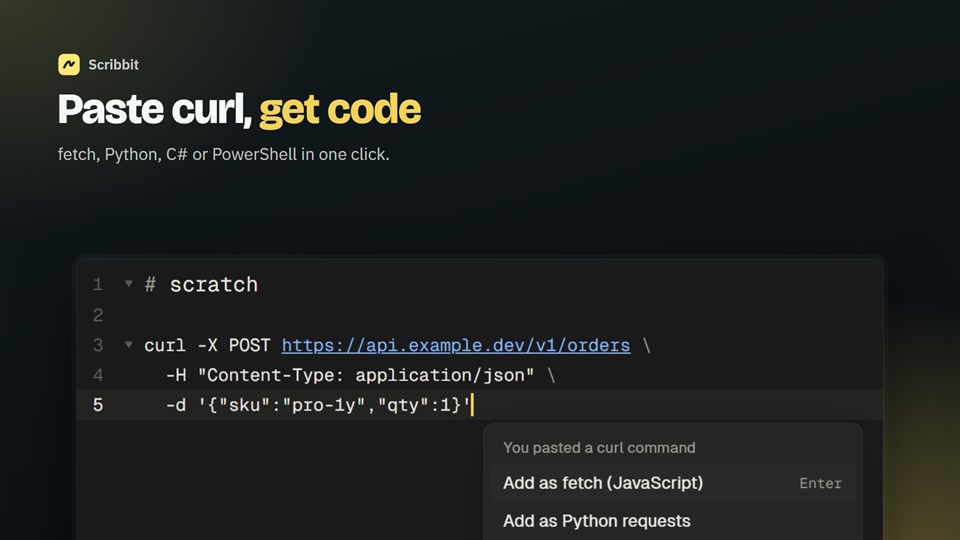
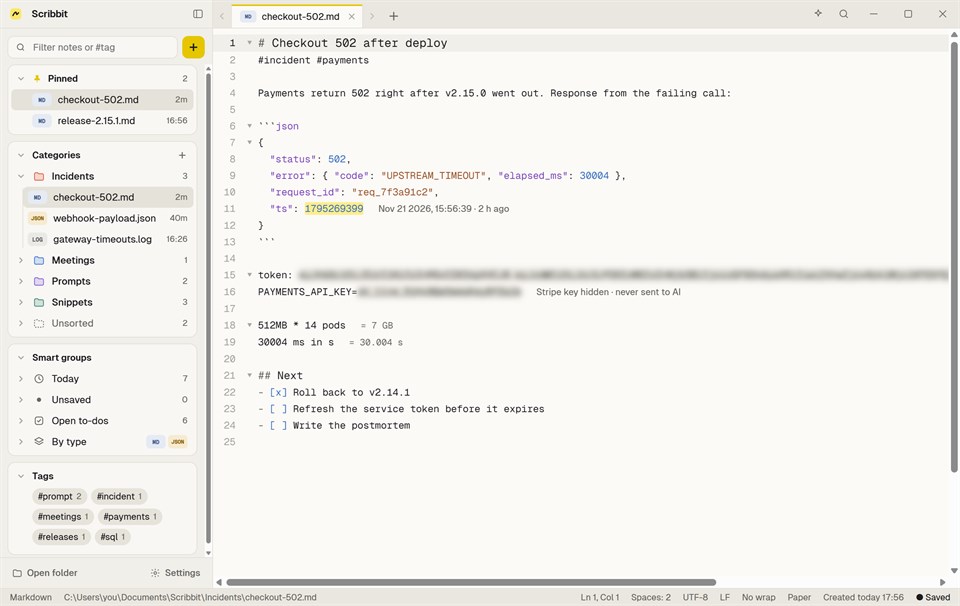
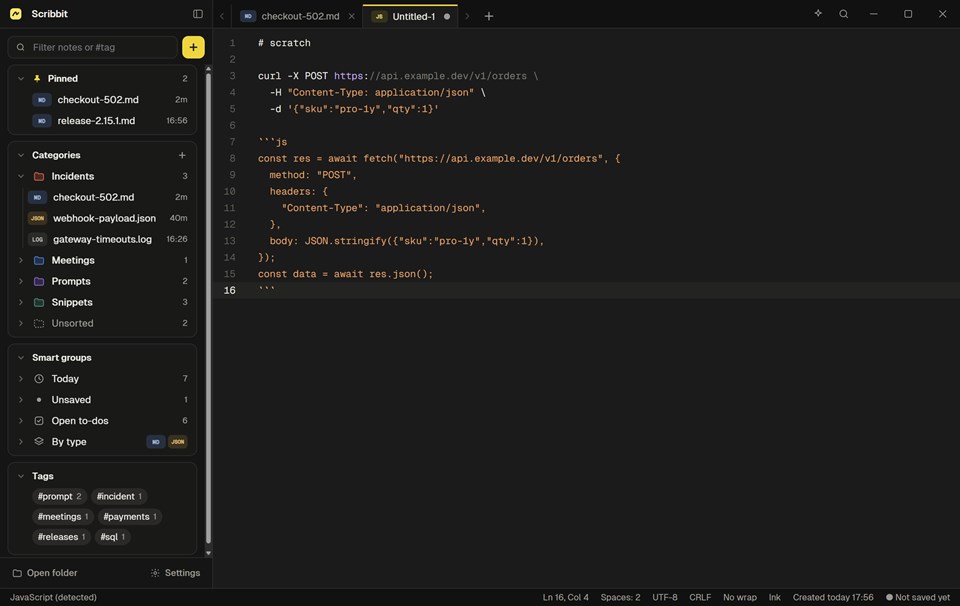
• Paste JSON and format it with one key. Paste curl and get fetch, Python, C# or PowerShell. Paste a stack trace and keep only your own frames, or open the line in VS Code.
• Unix timestamps show the date, JWTs show who they're for and when they expire, colors show a swatch and contrast, Base64 shows what it says, hex shows its number.
• Math lines work like a calculator: "512MB * 14 pods" shows "= 7 GB".
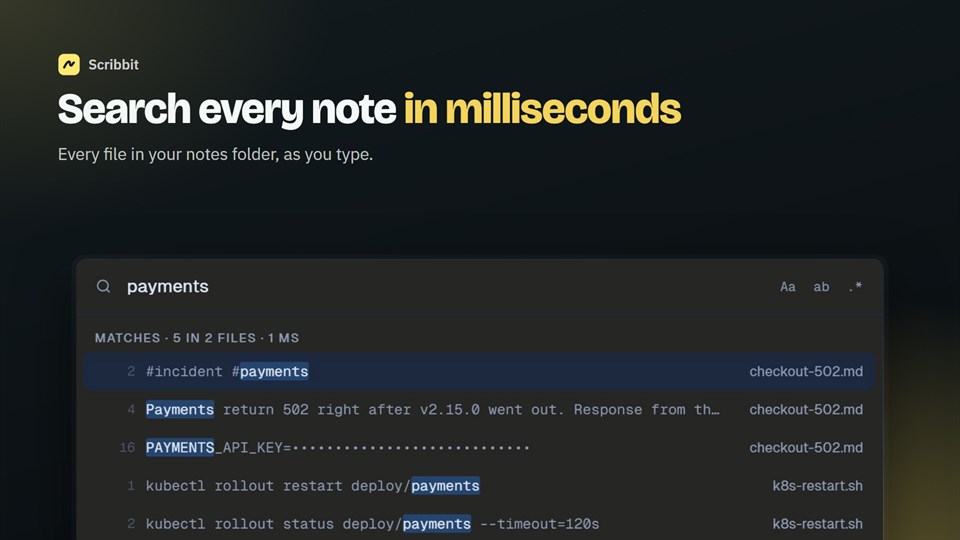
• Secrets like API keys and passwords are blurred on screen, hidden in search results, and never sent to AI.
A REAL EDITOR FOR DEVELOPERS
• Syntax colors for about 40 languages, line numbers, multi-cursor, column selection, bracket matching, code folding and regex find and replace.
• Format document for 20+ languages: JavaScript, TypeScript, JSON, CSS, SCSS, HTML, Vue, Markdown, YAML, GraphQL, SQL and XML built in, plus Python, Go, Rust, C, C++, Java, C#, Shell, Dart, Lua, Swift, Kotlin and TOML with your installed formatter.
• Line tools: sort, remove duplicates, trim, join, number, change case (camelCase, snake_case, kebab-case…).
• Converters: Base64, URL, JSON escape, HTML, hex, SHA-256, Unix time and more.
• Keeps each file's encoding (UTF-8, UTF-16, ANSI) and line endings (CRLF or LF).
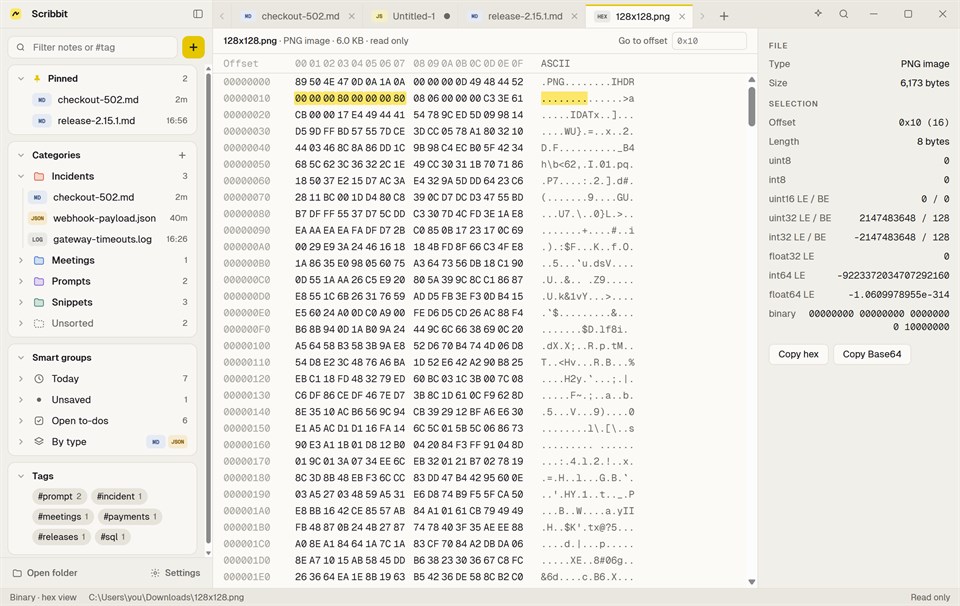
• Hex view for binary files, with file type detection and a byte inspector.
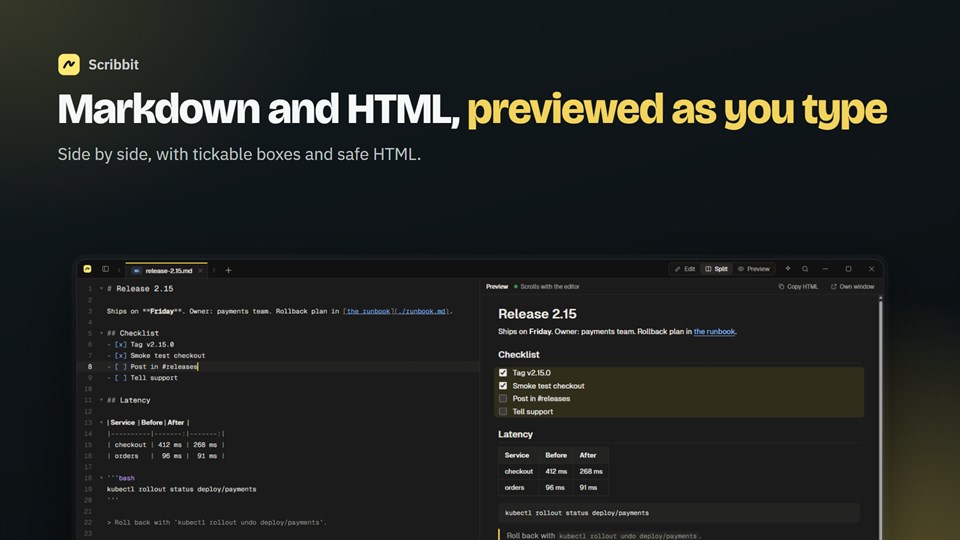
MARKDOWN AND HTML, PREVIEWED AS YOU TYPE
• Edit, Split or Preview with one click or Ctrl+Shift+V. The preview scrolls with the editor and marks the part you're writing.
• Tick a checkbox in the preview and the file updates. Tables, code blocks, links and images from the note's folder all show.
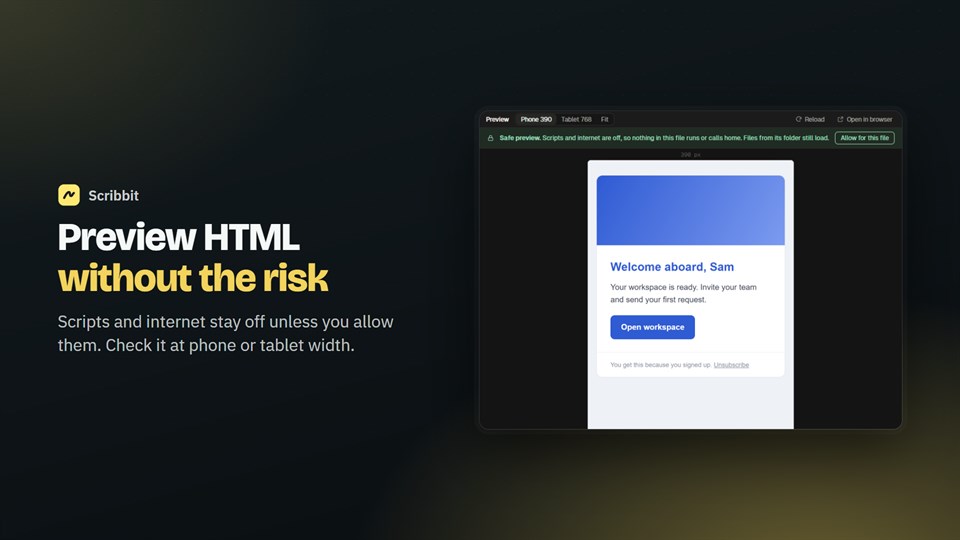
• HTML files preview safely: scripts and internet are off, so nothing in the file runs or calls home. Allow them for one file when you trust it, and check the page at phone or tablet width.
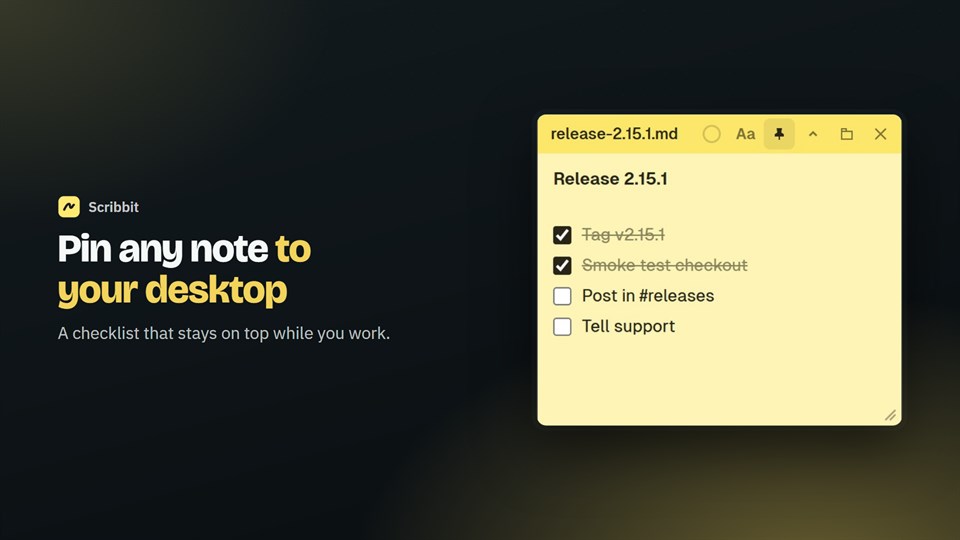
• Pinned Markdown notes show clean text with tickable boxes instead of # and - [ ].
ORGANIZED
• Notes are plain files in your Documents folder. Group them in color-coded categories, pin the important ones, and find them with tags you write right in the note.
• Smart groups: today, unsaved, open to-dos, by type.
• Search everything (Ctrl+P): names and text across all notes and opened folders, with regex.
• Version history: every save keeps the version before it, side by side, one click to restore. Compare any two tabs.
ON YOUR DESKTOP
• Pin any note to the desktop as a sticky note. Move it, resize it, edit it there or in the tab, check off to-dos, pick a color and font, keep it on top or behind your windows.
• Lives in the tray: close the window and your sticky notes and quick capture keep working. Start with Windows if you like.
• Quick capture: Ctrl+Alt+N opens a small note box from any app.
• Shows in "Open with" for .txt, .md, .json, .log, .yaml, .env, .sql and about 50 file types.
AI WHEN YOU WANT IT
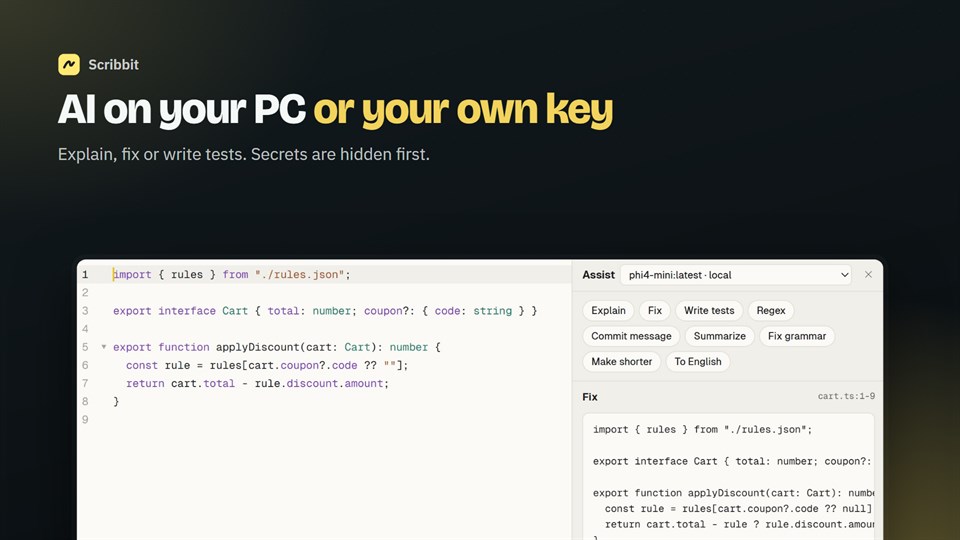
• AI Assist explains code, fixes bugs, writes tests, regexes and commit messages, summarizes logs and fixes grammar.
• Runs on Ollama on your PC, or with your own OpenAI, Anthropic or Gemini key, stored in Windows Credential Manager. Off until you turn it on. Secrets are masked before anything is sent.
MAKE IT YOURS
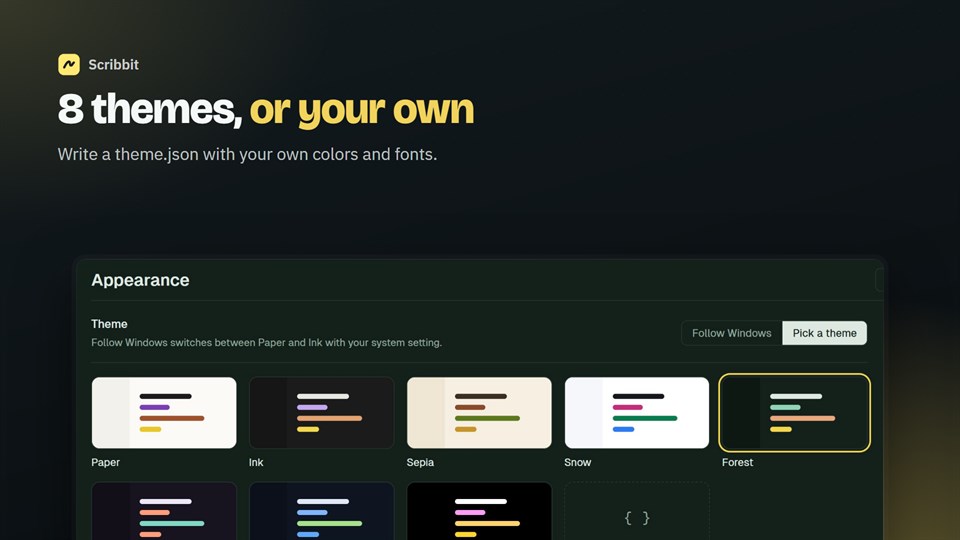
• 8 built-in themes (Paper, Ink, Sepia, Snow, Forest, Dusk, Midnight, High contrast), Follow Windows, or your own theme.json with any colors and fonts.
• Pick the editor font (Cascadia Code, JetBrains Mono, Consolas or any font you have) and text size.
• Custom title bar, left-aligned tabs, and a clean layout that stays out of the way. A short welcome tour shows you around.
PRIVATE
• No account, no analytics, no tracking. Your notes never leave your PC unless you send them to an AI provider yourself.
TRY IT FREE FOR 7 DAYS
After the trial, opening, writing and saving files keep working forever. Buy once to keep the Pro features. No subscription.
A fejlesztőtől
Fejlesztő
- Villi Development
- Követők: 0
- Platformok: Windows Alkalmazások (7)
- Akciók: 1
- Listák: 0 0
- Pontok: 0
- Rangsorok: 0
- Hozzászólások: 0
- Videók: 3
- RSS: Feliratkozás
Listák 0
-
 Scribbit
Pontok 0
-

- +1 Pont

Rangsorok 0
-
- Az értékelésed
Újdonságok
- Verzió: PC
- Utolsó frissítés:
- Markdown and HTML preview. Switch between Edit, Split and Preview with Ctrl+Shift+V. Tick checkboxes right in the preview, check HTML at phone or tablet width with scripts and internet off by default, and see pinned Markdown notes as clean text.
További információk
- Megjelenési dátum:
- Kategória:
Windows-alkalmazások›Fejlesztői eszközök - Operációs rendszer:
PC - Méret:
6 Mb - Támogatott nyelvek:
Angol - Tartalom besorolása:
EVERYONE - Windows Store Értékelés: ¡
0 - Weboldal:
 https://villi.dev/solutions/scribbit
Hozzászólások 0 ¡
AppAgg-pontszám
Becsült AppAgg-pontszám:
Scribbit
Fejlesztő: Villi Development
A magasabb pontszám általában jobb eredményeket tükröz az AppAgg által figyelt mutatókban.
Alapja: népszerűség · felhasználói értékelések · frissesség · akciók · áruházi adatok · közösségi aktivitás
Naponta újraszámítjuk a friss AppAgg-adatok alapján.
Scribbit Rövid URL: Másolva!- Windows Store

