
북마크
이 북마크의 제목을 입력하세요.
북마크가 저장되었습니다
| 개발자: | Villi Development (7) | ||
| 가격: | $9.99 신규 | ||
| 종합 점수: | 1,530 골드 | ||
| 순위: | 0 | ||
| 댓글: | 0 댓글 게시 | ||
| 목록: | 0 0 | ||
| 포인트: | 0 | ||
| +1 포인트 | |||
요약
소개합니다. Villi Development에서 만든 ‘개발자 도구’ 카테고리 앱, Scribbit.
에 나왔으니, 냉장고 속 우유보다 어려요.
$9.99, 그리고 AppAgg에서 지금까지 할인이 단 한 번도 없었어요. 만만치 않은 상대네요.
Microsoft Store는 Windows에 기본으로 들어 있어서 클릭 몇 번이면 설치돼요.
AppAgg 점수는 1,530. 골드 등급이에요.
겨우 6메가바이트. 꽉 찬 드라이브에도 쏙 들어가요.
연령 등급은 ‘EVERYONE’, 아이들에게도 괜찮아요.
지원 언어는 딱 하나, 그런데 한국어는 아니에요.
AppAgg에서는 아직 아무도 평가하지 않았어요. 첫 번째가 될 기회는 바로 지금이에요.
이 개발자의 앱이 AppAgg에 6개 더 있어요. 한번 둘러보세요.
참고로, 이 개발자는 지금 할인 1건 진행 중이에요.
할인, 업데이트, 새 앱 소식을 가장 먼저 받고 싶나요? 가격 알림을 설정하거나 개발자를 팔로우하거나 RSS 피드를 구독하세요. 푸시 알림은 Android와 iOS용 AppAgg Alerts 앱으로 받을 수 있어요.
광고
스크린샷 10
다른 플랫폼 0
동영상 1
가격 기록 0
- 현재 가격: $9.99
- 최소: $9.99
- 최대: $9.99
홈 화면의 나만의 피드
“신규 및 업데이트” 피드의 플랫폼을 선택하면 홈 화면에 필요한 앱과 게임만 표시됩니다.
설명

THE NOTEPAD THAT UNDERSTANDS WHAT YOU PASTE
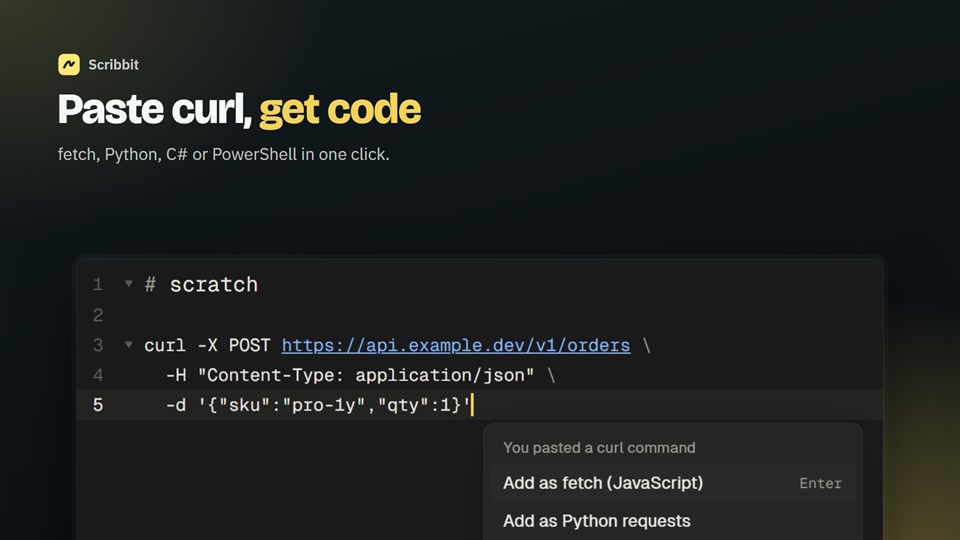
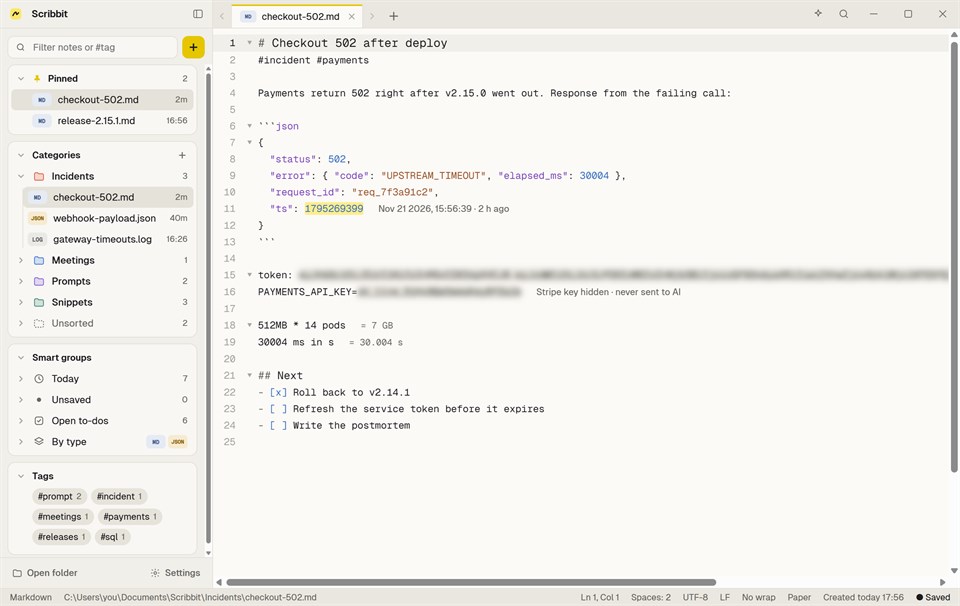
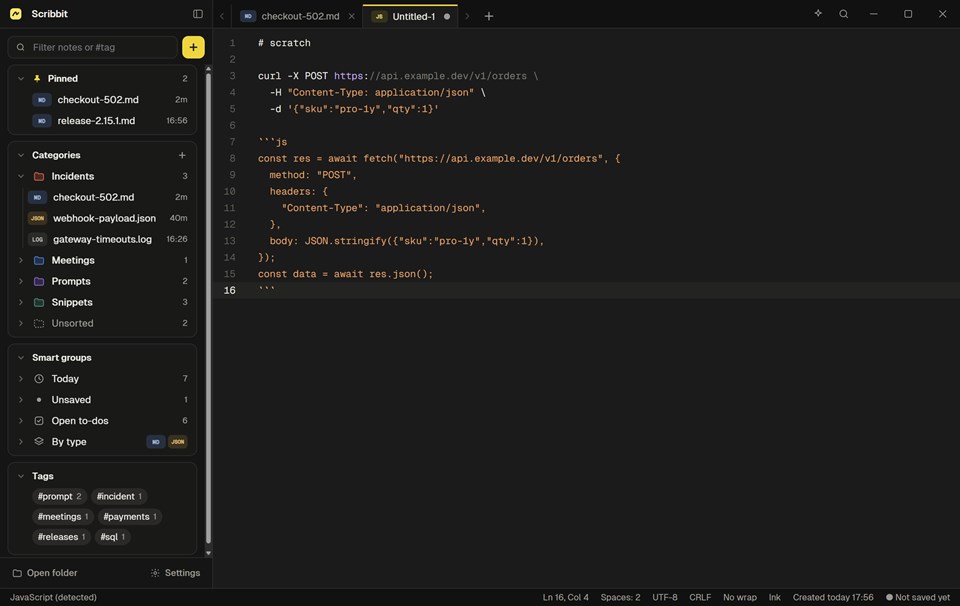
• Paste JSON and format it with one key. Paste curl and get fetch, Python, C# or PowerShell. Paste a stack trace and keep only your own frames, or open the line in VS Code.
• Unix timestamps show the date, JWTs show who they're for and when they expire, colors show a swatch and contrast, Base64 shows what it says, hex shows its number.
• Math lines work like a calculator: "512MB * 14 pods" shows "= 7 GB".
• Secrets like API keys and passwords are blurred on screen, hidden in search results, and never sent to AI.
A REAL EDITOR FOR DEVELOPERS
• Syntax colors for about 40 languages, line numbers, multi-cursor, column selection, bracket matching, code folding and regex find and replace.
• Format document for 20+ languages: JavaScript, TypeScript, JSON, CSS, SCSS, HTML, Vue, Markdown, YAML, GraphQL, SQL and XML built in, plus Python, Go, Rust, C, C++, Java, C#, Shell, Dart, Lua, Swift, Kotlin and TOML with your installed formatter.
• Line tools: sort, remove duplicates, trim, join, number, change case (camelCase, snake_case, kebab-case…).
• Converters: Base64, URL, JSON escape, HTML, hex, SHA-256, Unix time and more.
• Keeps each file's encoding (UTF-8, UTF-16, ANSI) and line endings (CRLF or LF).
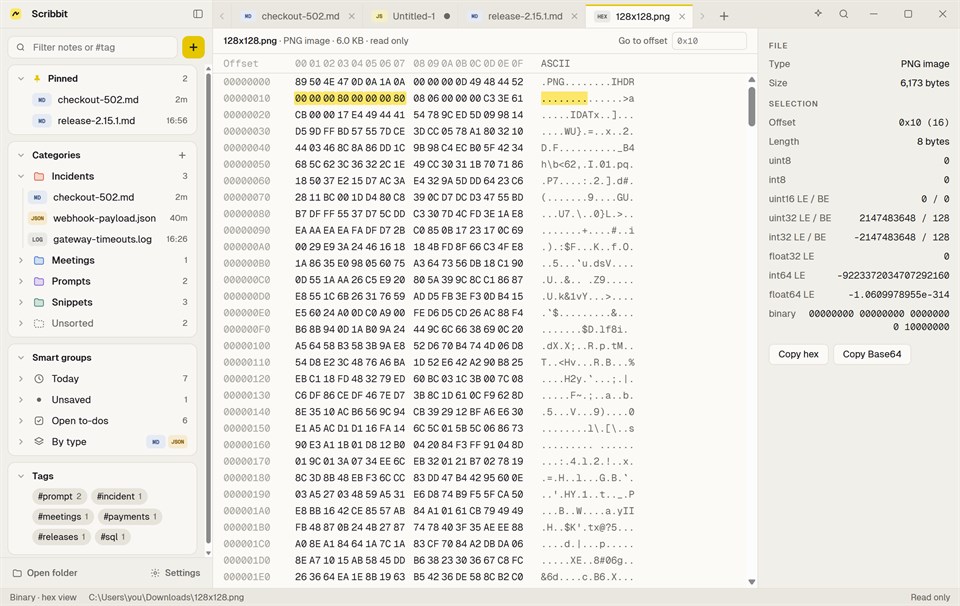
• Hex view for binary files, with file type detection and a byte inspector.
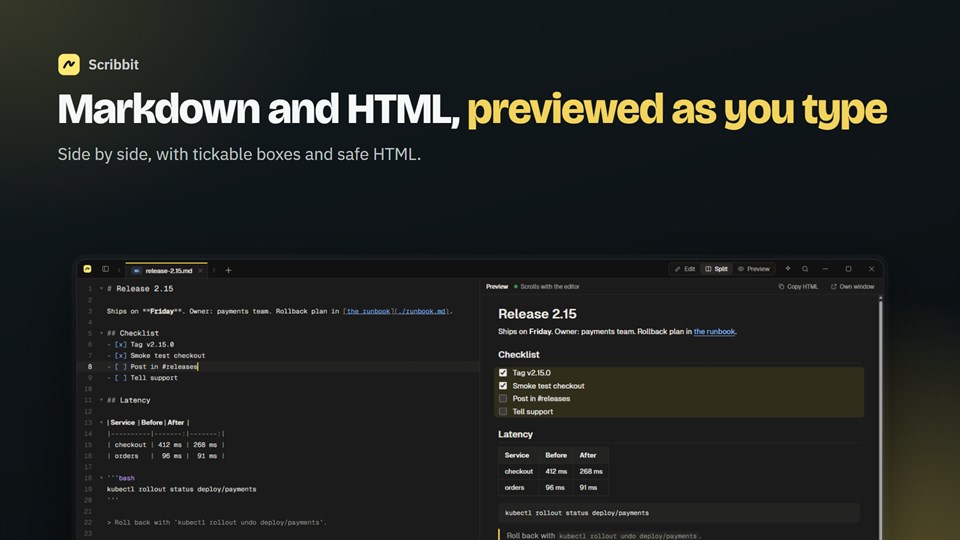
MARKDOWN AND HTML, PREVIEWED AS YOU TYPE
• Edit, Split or Preview with one click or Ctrl+Shift+V. The preview scrolls with the editor and marks the part you're writing.
• Tick a checkbox in the preview and the file updates. Tables, code blocks, links and images from the note's folder all show.
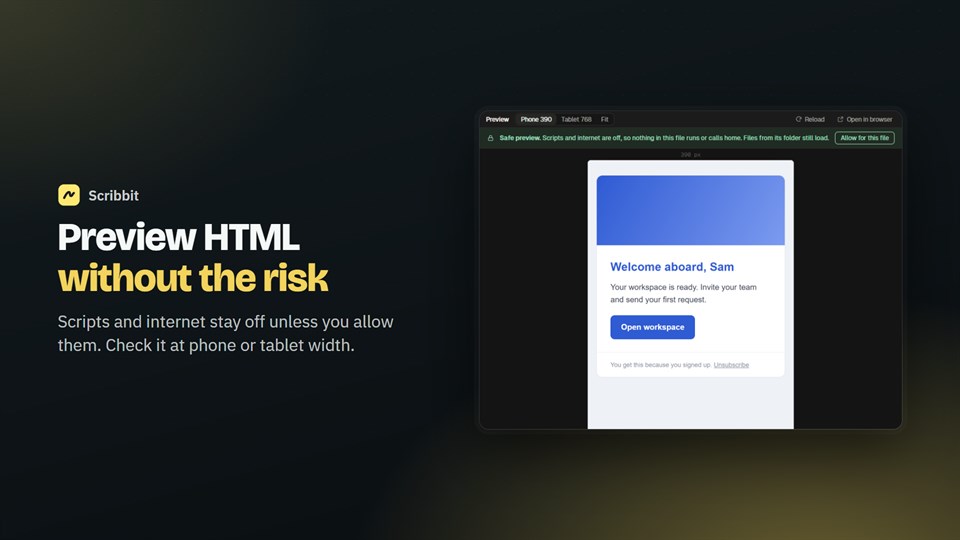
• HTML files preview safely: scripts and internet are off, so nothing in the file runs or calls home. Allow them for one file when you trust it, and check the page at phone or tablet width.
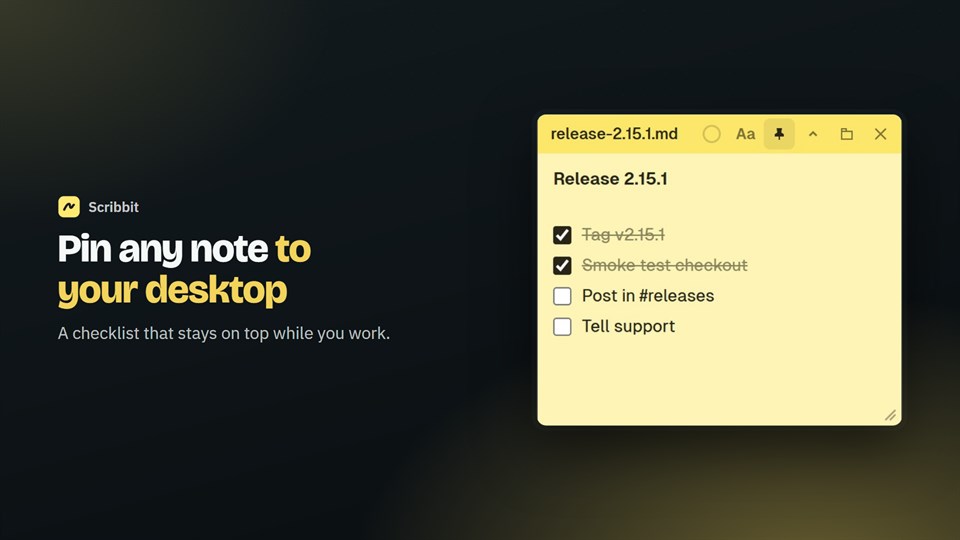
• Pinned Markdown notes show clean text with tickable boxes instead of # and - [ ].
ORGANIZED
• Notes are plain files in your Documents folder. Group them in color-coded categories, pin the important ones, and find them with tags you write right in the note.
• Smart groups: today, unsaved, open to-dos, by type.
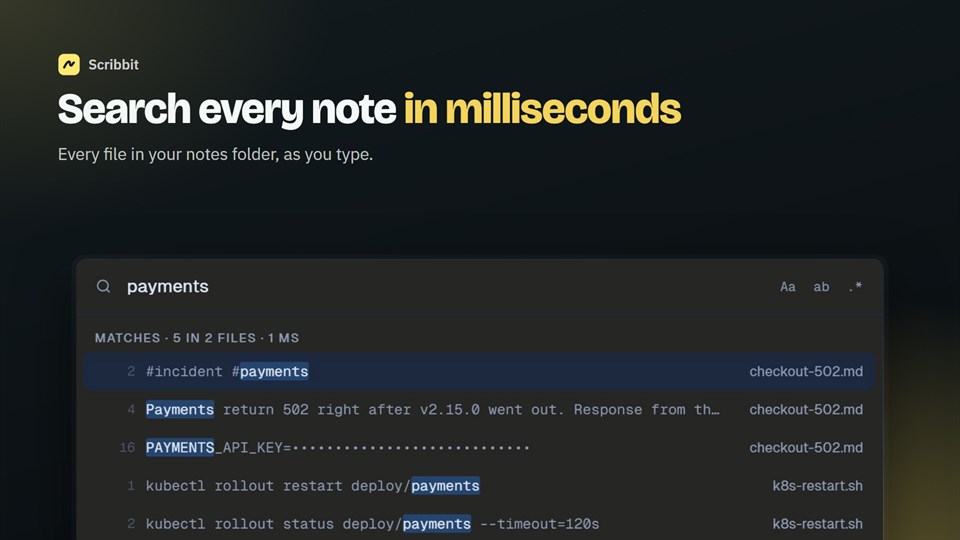
• Search everything (Ctrl+P): names and text across all notes and opened folders, with regex.
• Version history: every save keeps the version before it, side by side, one click to restore. Compare any two tabs.
ON YOUR DESKTOP
• Pin any note to the desktop as a sticky note. Move it, resize it, edit it there or in the tab, check off to-dos, pick a color and font, keep it on top or behind your windows.
• Lives in the tray: close the window and your sticky notes and quick capture keep working. Start with Windows if you like.
• Quick capture: Ctrl+Alt+N opens a small note box from any app.
• Shows in "Open with" for .txt, .md, .json, .log, .yaml, .env, .sql and about 50 file types.
AI WHEN YOU WANT IT
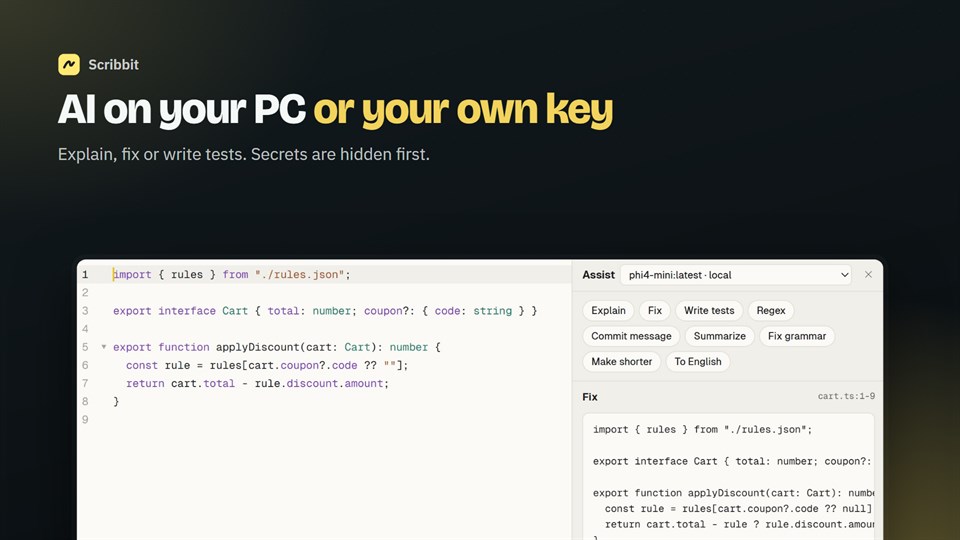
• AI Assist explains code, fixes bugs, writes tests, regexes and commit messages, summarizes logs and fixes grammar.
• Runs on Ollama on your PC, or with your own OpenAI, Anthropic or Gemini key, stored in Windows Credential Manager. Off until you turn it on. Secrets are masked before anything is sent.
MAKE IT YOURS
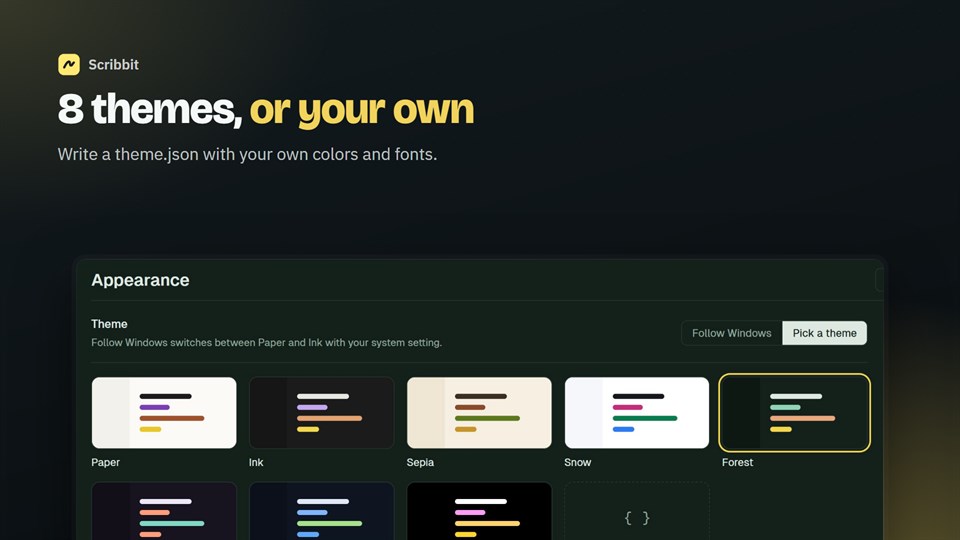
• 8 built-in themes (Paper, Ink, Sepia, Snow, Forest, Dusk, Midnight, High contrast), Follow Windows, or your own theme.json with any colors and fonts.
• Pick the editor font (Cascadia Code, JetBrains Mono, Consolas or any font you have) and text size.
• Custom title bar, left-aligned tabs, and a clean layout that stays out of the way. A short welcome tour shows you around.
PRIVATE
• No account, no analytics, no tracking. Your notes never leave your PC unless you send them to an AI provider yourself.
TRY IT FREE FOR 7 DAYS
After the trial, opening, writing and saving files keep working forever. Buy once to keep the Pro features. No subscription.
개발자 소식
개발자이신가요?
페이지 맨 위에 소식을 올리면 팔로워에게 이메일로 전달됩니다. YouTube 동영상을 추가하면 “동영상” 블록 맨 앞에 표시됩니다.
개발자
- Villi Development
- 팔로워: 0
- 플랫폼: Windows 앱 (7)
- 할인: 1
- 목록: 0 0
- 포인트: 0
- 순위: 0
- 댓글: 0
- 동영상: 3
- RSS: 구독
목록 0
-
 Scribbit
포인트 0
-

- +1 포인트

순위 0
-
- 내 평점
새로운 기능
- 버전: PC
- 마지막 업데이트:
- Markdown and HTML preview. Switch between Edit, Split and Preview with Ctrl+Shift+V. Tick checkboxes right in the preview, check HTML at phone or tablet width with scripts and internet off by default, and see pinned Markdown notes as clean text.
추가 정보
 https://villi.dev/solutions/scribbit
댓글 0 ¡
가장 먼저 댓글을 남겨주세요
AppAgg 점수
1,530
AppAgg 예상 점수:
Scribbit
개발자: Villi Development
1,530 골드
점수가 높을수록 대체로 AppAgg의 여러 지표에서 좋은 결과를 보인다는 뜻입니다.
기준: 인기 · 사용자 평점 · 최신성 · 할인 · 스토어 데이터 · 커뮤니티 활동
최신 AppAgg 데이터를 바탕으로 매일 다시 계산됩니다.
웹사이트용 배지:  복사됨!
Scribbit 단축 URL: 복사됨!- Windows Store


