
Dấu trang
| Nhà phát triển: | Villi Development (7) | ||
| Giá: | $9.99 Mới | ||
| Điểm tổng hợp: | 1.530 Vàng | ||
| Bảng xếp hạng: | 0 | ||
| Bình luận: | 0 Đăng bình luận | ||
| Danh sách: | 0 0 | ||
| Điểm: | 0 | ||
| +1 Điểm | |||
Tóm tắt
Làm quen với Scribbit, ứng dụng thuộc danh mục Công cụ cho nhà phát triển đến từ Villi Development.
Ra mắt , nên còn trẻ hơn cả hộp sữa trong tủ lạnh nhà bạn.
$9.99, và chưa từng giảm giá lần nào trên AppAgg. Đúng là khó nhằn.
Microsoft Store có sẵn trong Windows, nên cài chỉ mất vài cú nhấp.
Điểm tổng hợp AppAgg là 1.530. Đó là hạng Vàng.
Chỉ 6 megabyte, ổ đĩa đầy vẫn chứa vừa.
Xếp hạng độ tuổi “EVERYONE”, nên trẻ em cũng dùng được.
Chỉ biết một thứ tiếng, và đó không phải tiếng Việt.
Chưa ai trên AppAgg đánh giá. Cơ hội làm người đầu tiên là ngay bây giờ.
Nhà phát triển còn 6 ứng dụng khác trên AppAgg. Đáng xem đấy.
Nhân tiện, nhà phát triển này đang có 1 ưu đãi giảm giá.
Muốn biết sớm nhất về giảm giá, cập nhật và ứng dụng mới? Hãy đặt thông báo giá, theo dõi nhà phát triển hoặc đăng ký nguồn RSS. Thông báo đẩy được gửi qua ứng dụng AppAgg Alerts cho Android và iOS.
Ảnh chụp màn hình 10
Nền tảng khác 0
Video 1
Lịch sử giá 0
- Giá hiện tại: $9.99
- Tối thiểu: $9.99
- Tối đa: $9.99
Bảng tin riêng của bạn trên trang chủ
Mô tả

THE NOTEPAD THAT UNDERSTANDS WHAT YOU PASTE
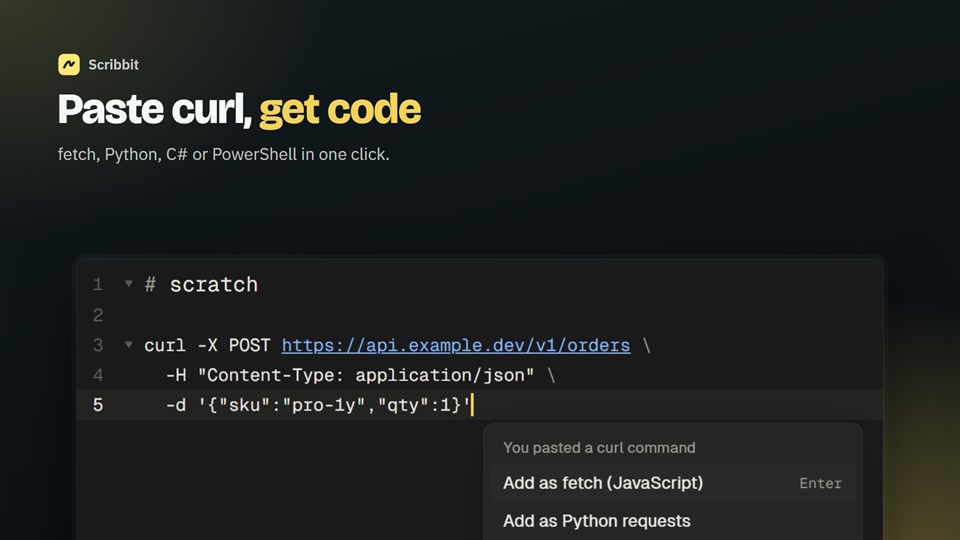
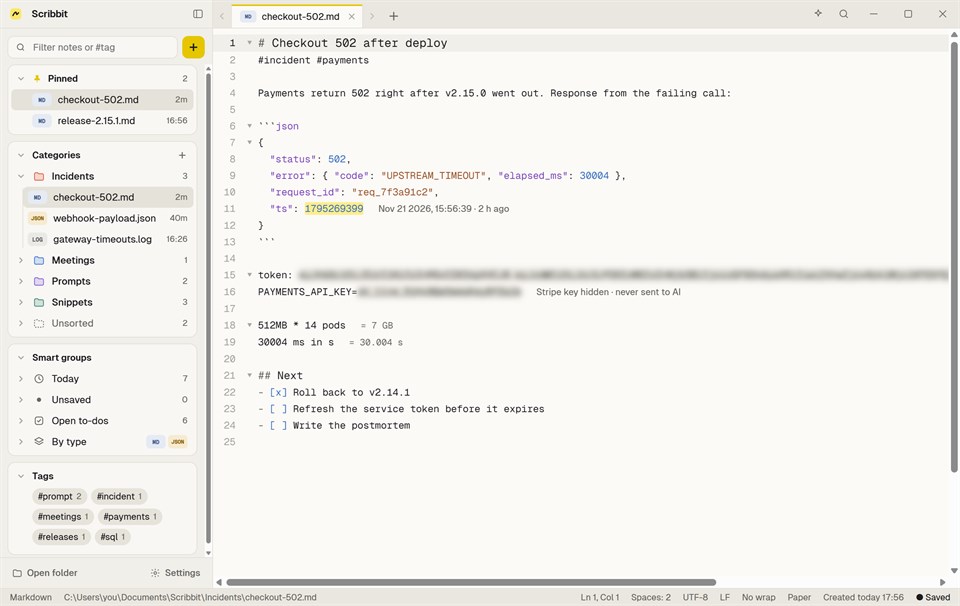
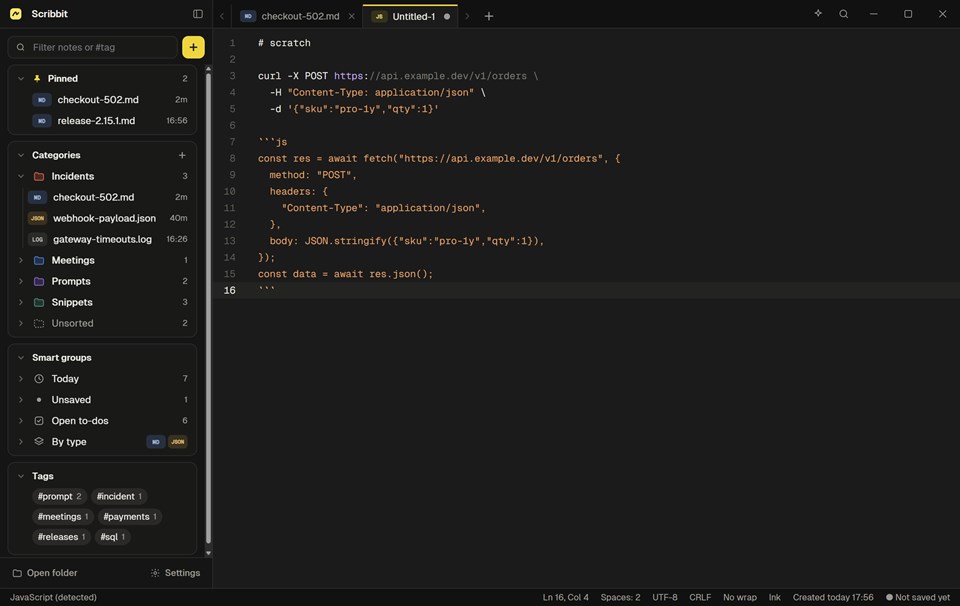
• Paste JSON and format it with one key. Paste curl and get fetch, Python, C# or PowerShell. Paste a stack trace and keep only your own frames, or open the line in VS Code.
• Unix timestamps show the date, JWTs show who they're for and when they expire, colors show a swatch and contrast, Base64 shows what it says, hex shows its number.
• Math lines work like a calculator: "512MB * 14 pods" shows "= 7 GB".
• Secrets like API keys and passwords are blurred on screen, hidden in search results, and never sent to AI.
A REAL EDITOR FOR DEVELOPERS
• Syntax colors for about 40 languages, line numbers, multi-cursor, column selection, bracket matching, code folding and regex find and replace.
• Format document for 20+ languages: JavaScript, TypeScript, JSON, CSS, SCSS, HTML, Vue, Markdown, YAML, GraphQL, SQL and XML built in, plus Python, Go, Rust, C, C++, Java, C#, Shell, Dart, Lua, Swift, Kotlin and TOML with your installed formatter.
• Line tools: sort, remove duplicates, trim, join, number, change case (camelCase, snake_case, kebab-case…).
• Converters: Base64, URL, JSON escape, HTML, hex, SHA-256, Unix time and more.
• Keeps each file's encoding (UTF-8, UTF-16, ANSI) and line endings (CRLF or LF).
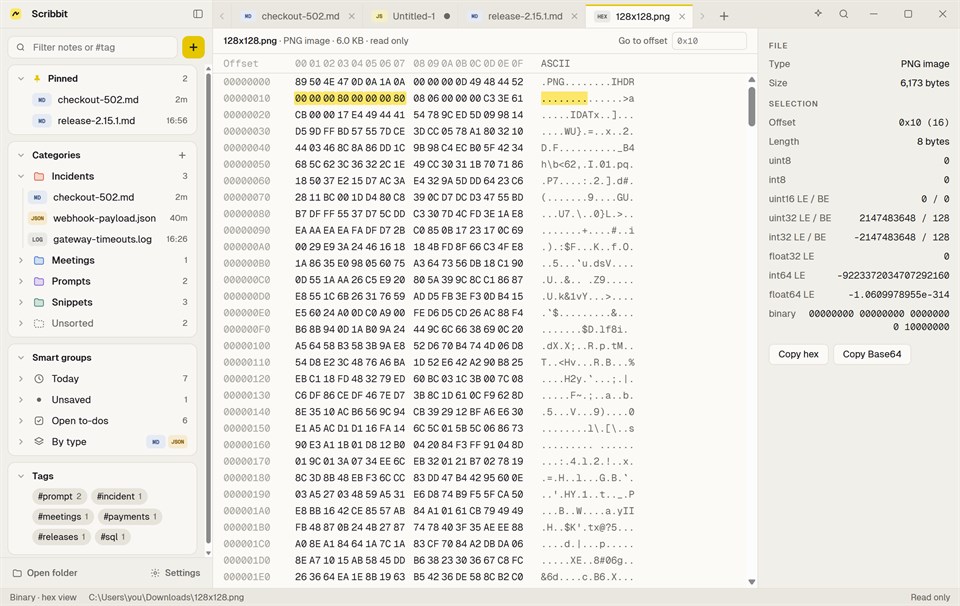
• Hex view for binary files, with file type detection and a byte inspector.
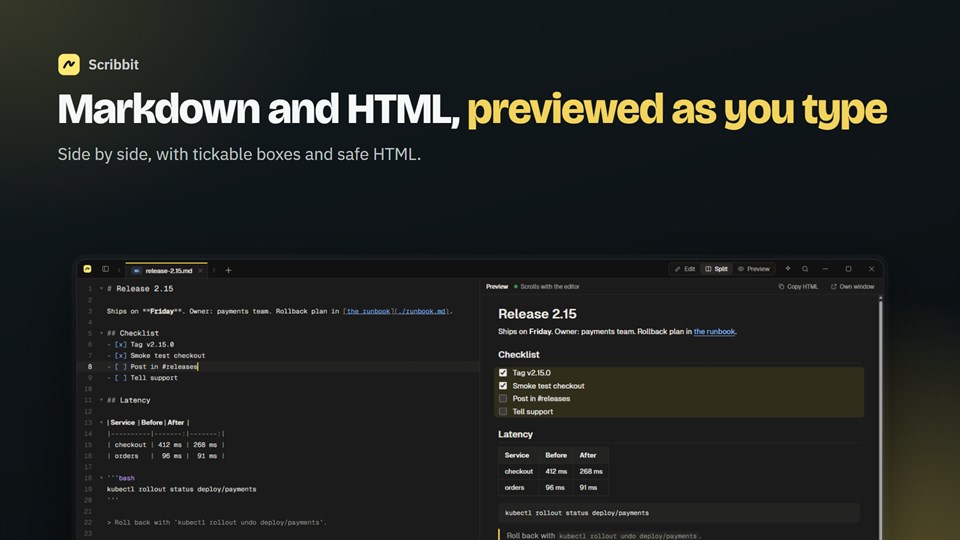
MARKDOWN AND HTML, PREVIEWED AS YOU TYPE
• Edit, Split or Preview with one click or Ctrl+Shift+V. The preview scrolls with the editor and marks the part you're writing.
• Tick a checkbox in the preview and the file updates. Tables, code blocks, links and images from the note's folder all show.
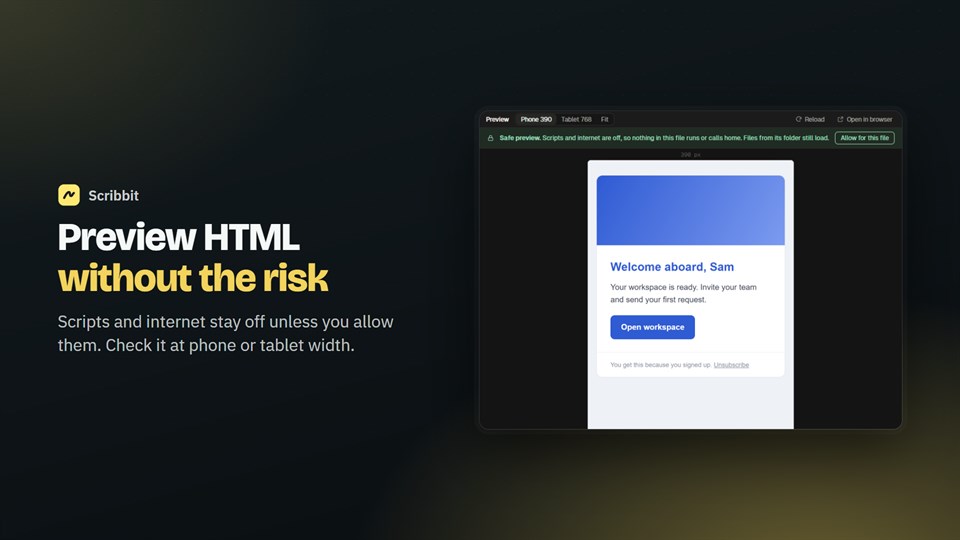
• HTML files preview safely: scripts and internet are off, so nothing in the file runs or calls home. Allow them for one file when you trust it, and check the page at phone or tablet width.
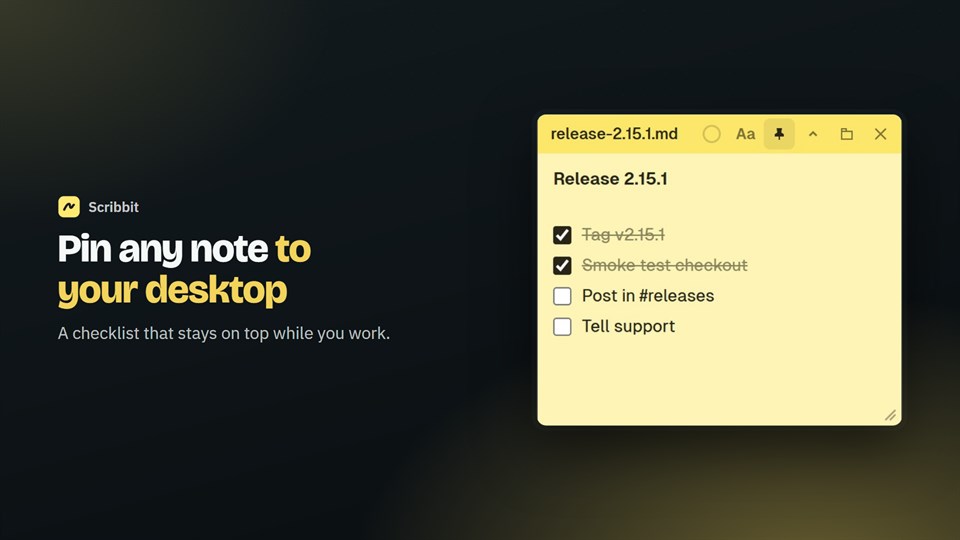
• Pinned Markdown notes show clean text with tickable boxes instead of # and - [ ].
ORGANIZED
• Notes are plain files in your Documents folder. Group them in color-coded categories, pin the important ones, and find them with tags you write right in the note.
• Smart groups: today, unsaved, open to-dos, by type.
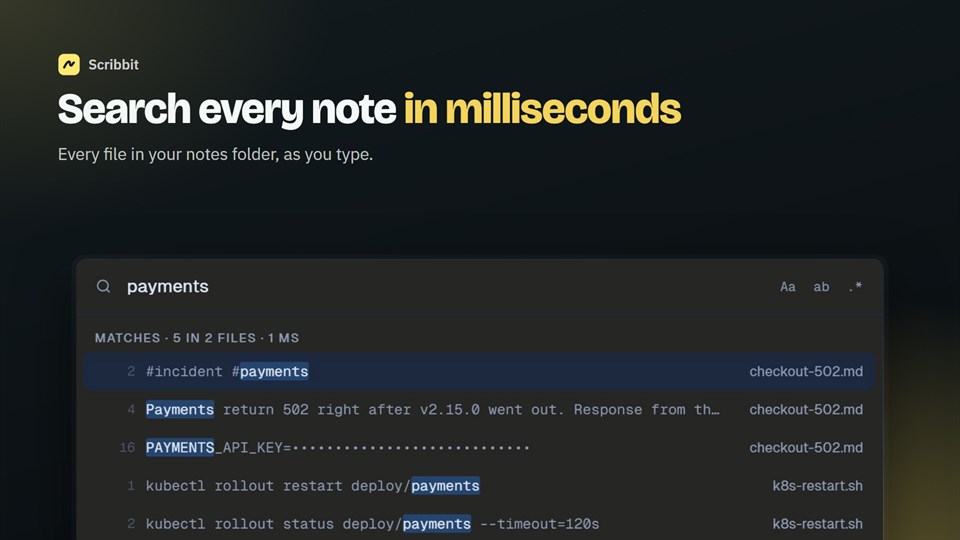
• Search everything (Ctrl+P): names and text across all notes and opened folders, with regex.
• Version history: every save keeps the version before it, side by side, one click to restore. Compare any two tabs.
ON YOUR DESKTOP
• Pin any note to the desktop as a sticky note. Move it, resize it, edit it there or in the tab, check off to-dos, pick a color and font, keep it on top or behind your windows.
• Lives in the tray: close the window and your sticky notes and quick capture keep working. Start with Windows if you like.
• Quick capture: Ctrl+Alt+N opens a small note box from any app.
• Shows in "Open with" for .txt, .md, .json, .log, .yaml, .env, .sql and about 50 file types.
AI WHEN YOU WANT IT
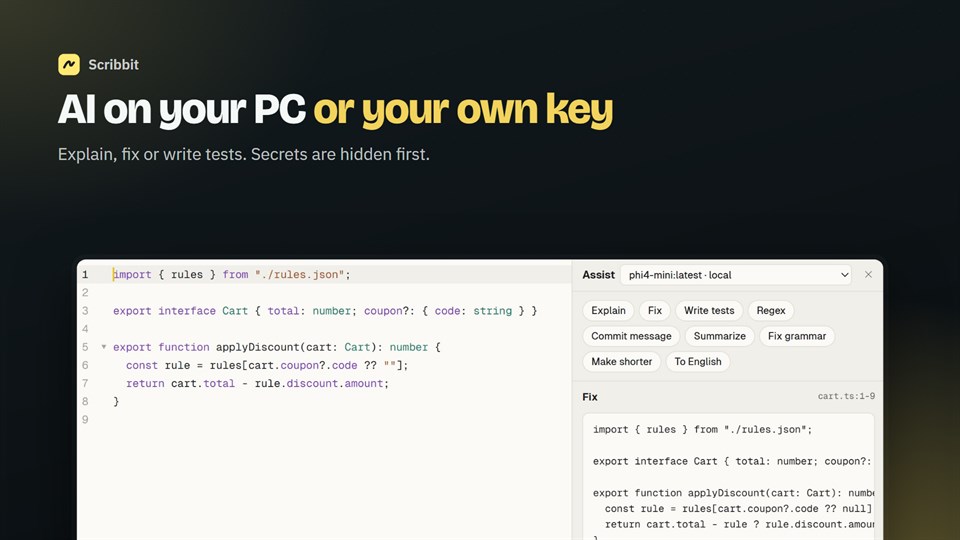
• AI Assist explains code, fixes bugs, writes tests, regexes and commit messages, summarizes logs and fixes grammar.
• Runs on Ollama on your PC, or with your own OpenAI, Anthropic or Gemini key, stored in Windows Credential Manager. Off until you turn it on. Secrets are masked before anything is sent.
MAKE IT YOURS
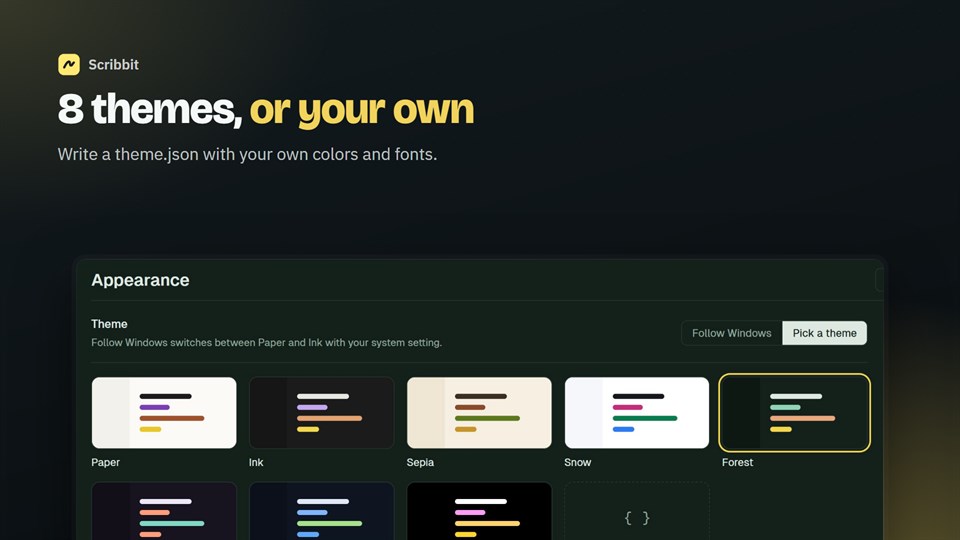
• 8 built-in themes (Paper, Ink, Sepia, Snow, Forest, Dusk, Midnight, High contrast), Follow Windows, or your own theme.json with any colors and fonts.
• Pick the editor font (Cascadia Code, JetBrains Mono, Consolas or any font you have) and text size.
• Custom title bar, left-aligned tabs, and a clean layout that stays out of the way. A short welcome tour shows you around.
PRIVATE
• No account, no analytics, no tracking. Your notes never leave your PC unless you send them to an AI provider yourself.
TRY IT FREE FOR 7 DAYS
After the trial, opening, writing and saving files keep working forever. Buy once to keep the Pro features. No subscription.
Từ nhà phát triển
Nhà phát triển
- Villi Development
- Người theo dõi: 0
- Nền tảng: Windows Ứng dụng (7)
- Giảm giá: 1
- Danh sách: 0 0
- Điểm: 0
- Bảng xếp hạng: 0
- Bình luận: 0
- Video: 3
- RSS: Đăng ký
Danh sách 0
-
 Scribbit
Điểm 0
-

- +1 Điểm

Bảng xếp hạng 0
-
- Điểm bạn chấm
Tính năng mới
- Phiên bản: PC
- Cập nhật lần cuối:
- Markdown and HTML preview. Switch between Edit, Split and Preview with Ctrl+Shift+V. Tick checkboxes right in the preview, check HTML at phone or tablet width with scripts and internet off by default, and see pinned Markdown notes as clean text.
Thông tin bổ sung
- Ngày phát hành:
- Danh mục:
Ứng dụng cho Windows›Công cụ cho nhà phát triển - HĐH:
PC - Kích thước:
6 Mb - Ngôn ngữ được hỗ trợ:
Tiếng Anh - Xếp hạng nội dung:
EVERYONE - Windows Store Điểm đánh giá: ¡
0 - Trang web:
 https://villi.dev/solutions/scribbit
Bình luận 0 ¡
Điểm tổng hợp AppAgg
Điểm tổng hợp AppAgg ước tính cho
Scribbit
Nhà phát triển: Villi Development
Điểm cao hơn thường cho thấy các chỉ số trên AppAgg tốt hơn.
Dựa trên: độ phổ biến · đánh giá của người dùng · độ mới · ưu đãi · dữ liệu cửa hàng · hoạt động cộng đồng
Được tính lại hằng ngày từ dữ liệu AppAgg mới nhất.
Scribbit URL ngắn: Đã sao chép!- Windows Store

