
書籤
為此書籤設定標題。
書籤已儲存
| 開發者: | Villi Development (7) | ||
| 價格: | $9.99 全新 | ||
| 評分: | 1,530 黃金 | ||
| 排名: | 0 | ||
| 留言: | 0 發表留言 | ||
| 清單: | 0 0 | ||
| 點數: | 0 | ||
| +1 點 | |||
摘要
來認識一下 Scribbit,Villi Development 打造的應用程式,歸在「開發人員工具」分類。
推出,比你冰箱裡的鮮奶還新鮮。
$9.99,在 AppAgg 上到現在一次折扣都沒有。真是塊難啃的骨頭。
Microsoft Store 內建在 Windows 裡,點幾下就裝好了。
AppAgg 評分 1,530,達到黃金級。
只有 6 MB,硬碟塞爆了也裝得下。
年齡分級為「EVERYONE」,小朋友也適合。
只會一種語言,而且不是中文。
AppAgg 上還沒有人給它評分。現在就來搶頭香吧。
這位開發者在 AppAgg 上還有 6 款 App,值得逛逛。
對了,這位開發者現在有 1 款作品在特價。
想搶先知道折扣、更新和新應用程式?設定降價提醒、追蹤開發者或訂閱RSS 訂閱來源。推播通知會透過 AppAgg Alerts App 傳送,支援 Android 和 iOS。
廣告
螢幕擷取畫面 10
其他平台 0
影片 1
價格紀錄 0
- 目前價格: $9.99
- 最小值: $9.99
- 最大值: $9.99
首頁專屬動態
為「最新與更新」選擇平台,首頁就只會顯示你需要的 App 和遊戲。
描述

THE NOTEPAD THAT UNDERSTANDS WHAT YOU PASTE
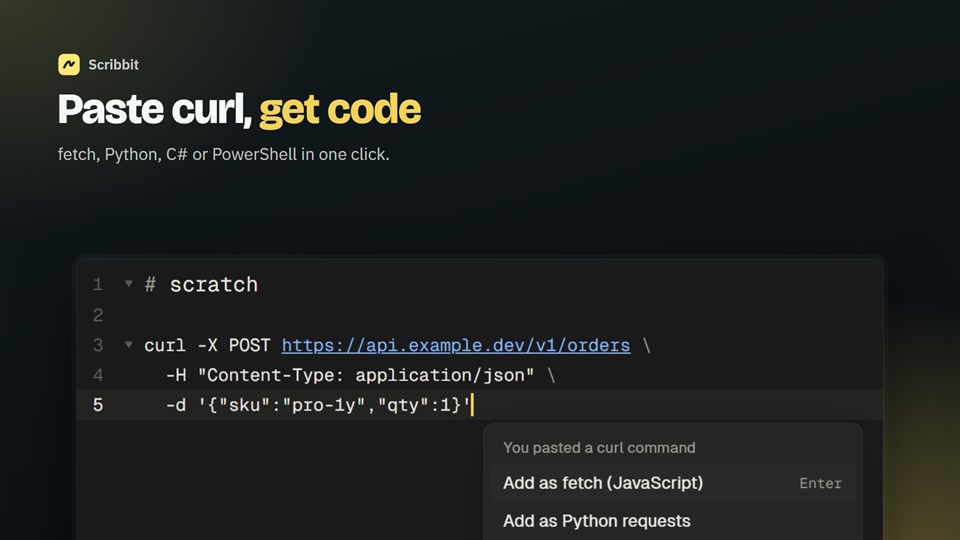
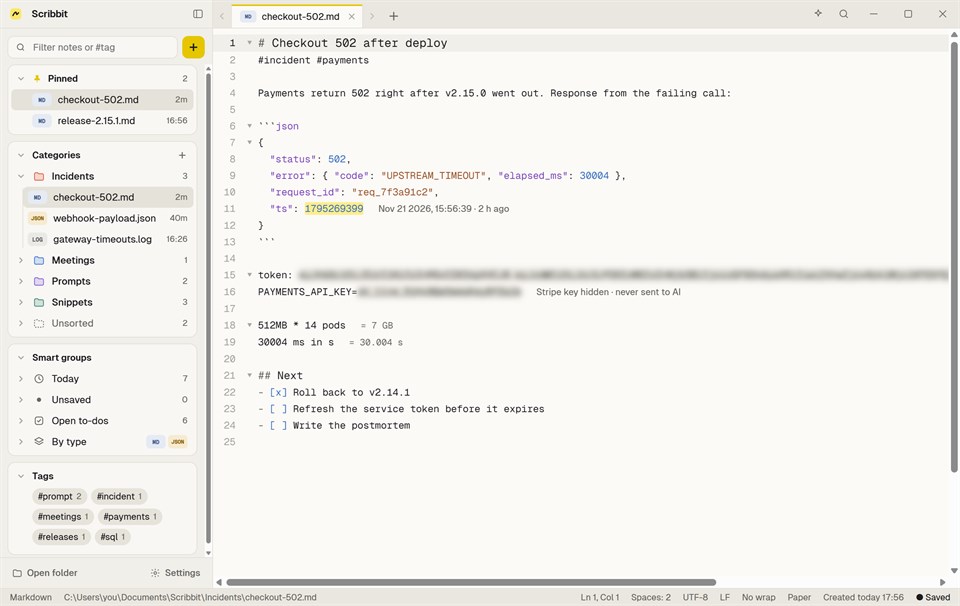
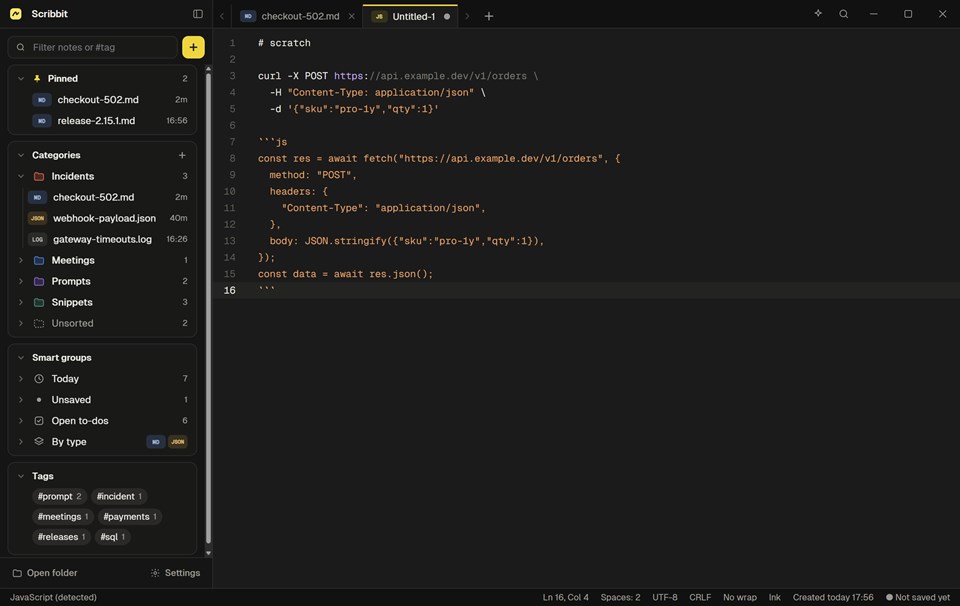
• Paste JSON and format it with one key. Paste curl and get fetch, Python, C# or PowerShell. Paste a stack trace and keep only your own frames, or open the line in VS Code.
• Unix timestamps show the date, JWTs show who they're for and when they expire, colors show a swatch and contrast, Base64 shows what it says, hex shows its number.
• Math lines work like a calculator: "512MB * 14 pods" shows "= 7 GB".
• Secrets like API keys and passwords are blurred on screen, hidden in search results, and never sent to AI.
A REAL EDITOR FOR DEVELOPERS
• Syntax colors for about 40 languages, line numbers, multi-cursor, column selection, bracket matching, code folding and regex find and replace.
• Format document for 20+ languages: JavaScript, TypeScript, JSON, CSS, SCSS, HTML, Vue, Markdown, YAML, GraphQL, SQL and XML built in, plus Python, Go, Rust, C, C++, Java, C#, Shell, Dart, Lua, Swift, Kotlin and TOML with your installed formatter.
• Line tools: sort, remove duplicates, trim, join, number, change case (camelCase, snake_case, kebab-case…).
• Converters: Base64, URL, JSON escape, HTML, hex, SHA-256, Unix time and more.
• Keeps each file's encoding (UTF-8, UTF-16, ANSI) and line endings (CRLF or LF).
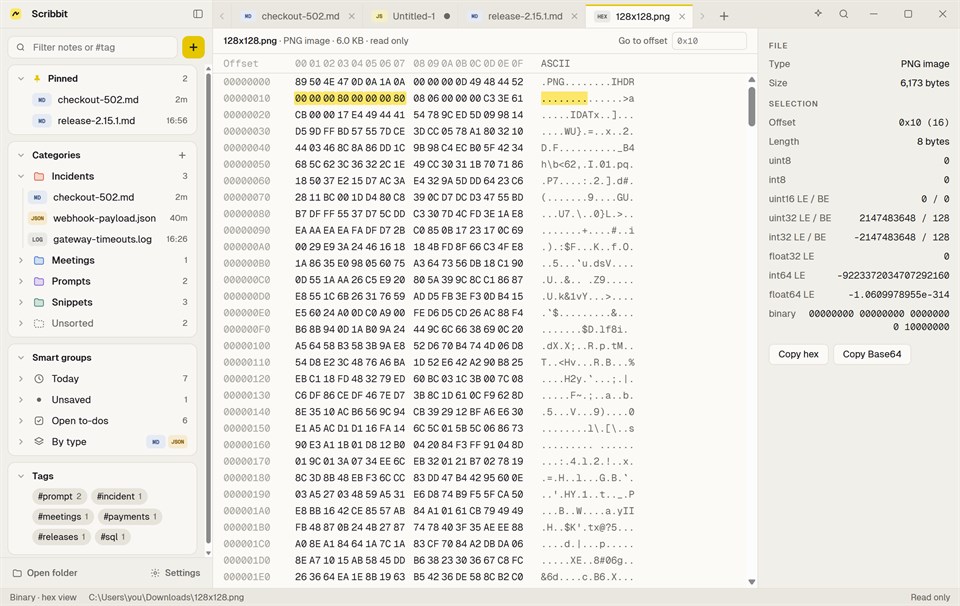
• Hex view for binary files, with file type detection and a byte inspector.
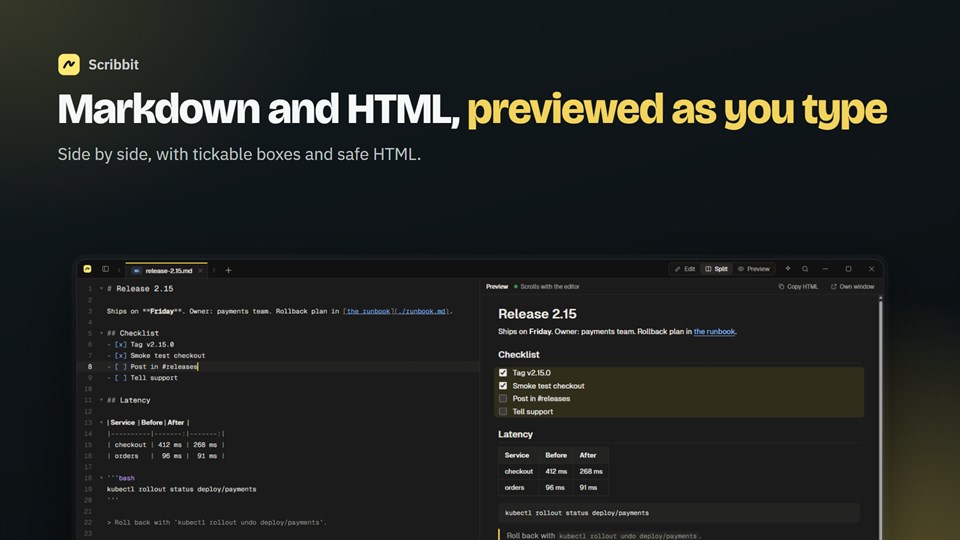
MARKDOWN AND HTML, PREVIEWED AS YOU TYPE
• Edit, Split or Preview with one click or Ctrl+Shift+V. The preview scrolls with the editor and marks the part you're writing.
• Tick a checkbox in the preview and the file updates. Tables, code blocks, links and images from the note's folder all show.
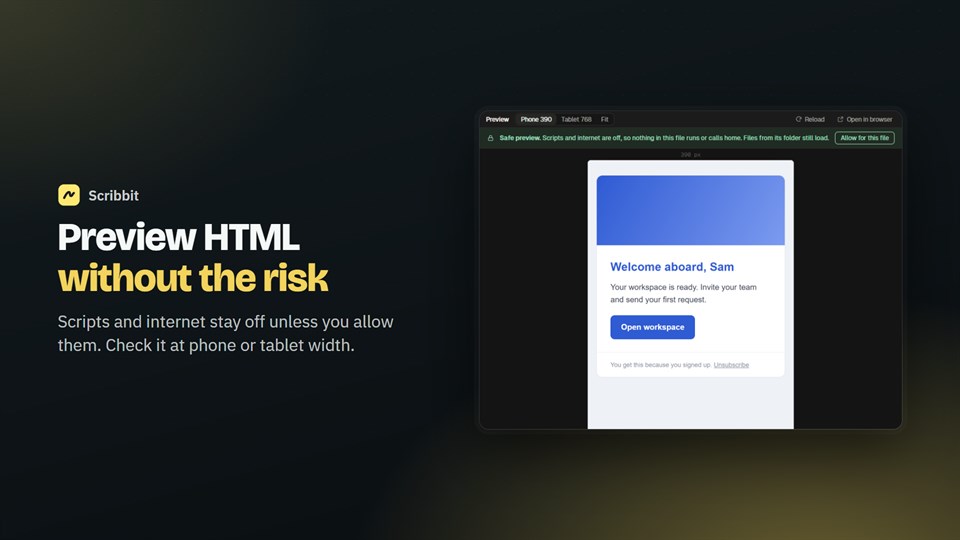
• HTML files preview safely: scripts and internet are off, so nothing in the file runs or calls home. Allow them for one file when you trust it, and check the page at phone or tablet width.
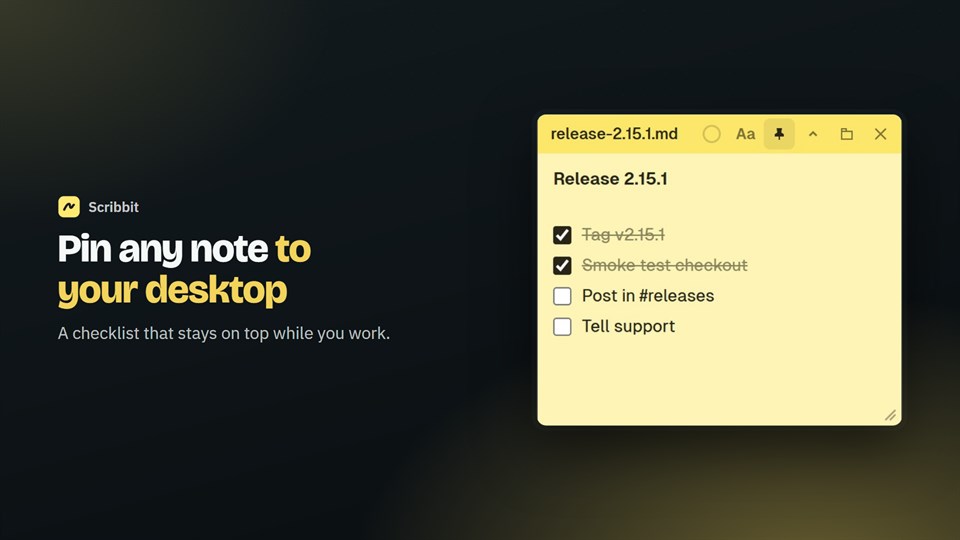
• Pinned Markdown notes show clean text with tickable boxes instead of # and - [ ].
ORGANIZED
• Notes are plain files in your Documents folder. Group them in color-coded categories, pin the important ones, and find them with tags you write right in the note.
• Smart groups: today, unsaved, open to-dos, by type.
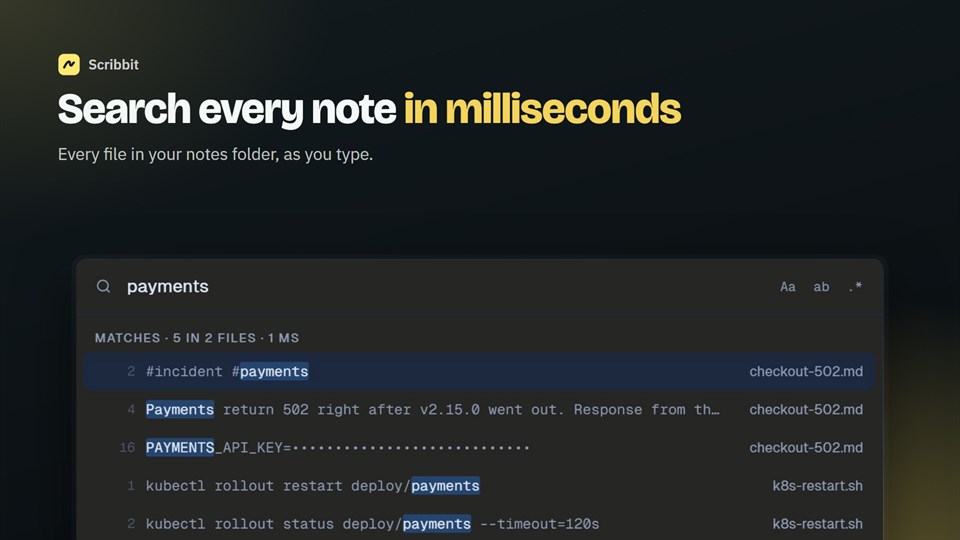
• Search everything (Ctrl+P): names and text across all notes and opened folders, with regex.
• Version history: every save keeps the version before it, side by side, one click to restore. Compare any two tabs.
ON YOUR DESKTOP
• Pin any note to the desktop as a sticky note. Move it, resize it, edit it there or in the tab, check off to-dos, pick a color and font, keep it on top or behind your windows.
• Lives in the tray: close the window and your sticky notes and quick capture keep working. Start with Windows if you like.
• Quick capture: Ctrl+Alt+N opens a small note box from any app.
• Shows in "Open with" for .txt, .md, .json, .log, .yaml, .env, .sql and about 50 file types.
AI WHEN YOU WANT IT
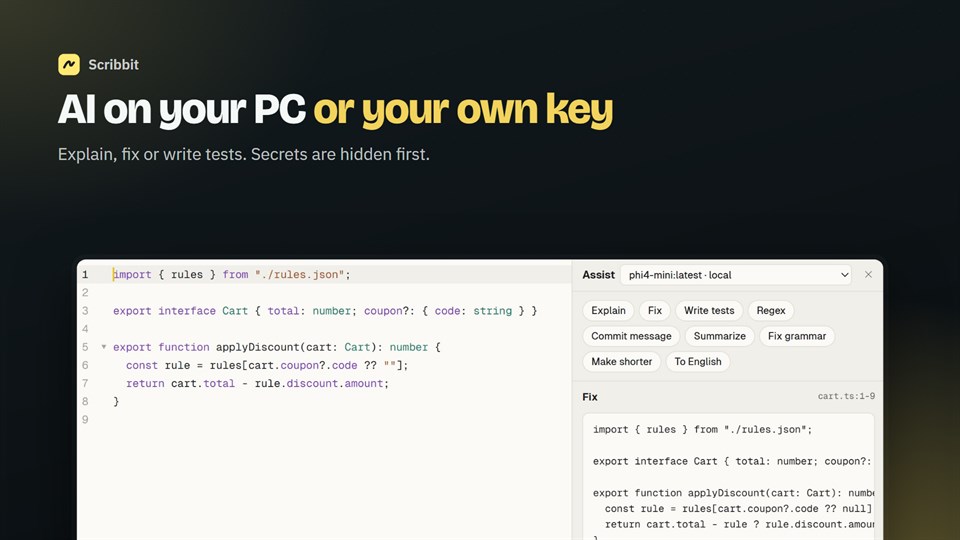
• AI Assist explains code, fixes bugs, writes tests, regexes and commit messages, summarizes logs and fixes grammar.
• Runs on Ollama on your PC, or with your own OpenAI, Anthropic or Gemini key, stored in Windows Credential Manager. Off until you turn it on. Secrets are masked before anything is sent.
MAKE IT YOURS
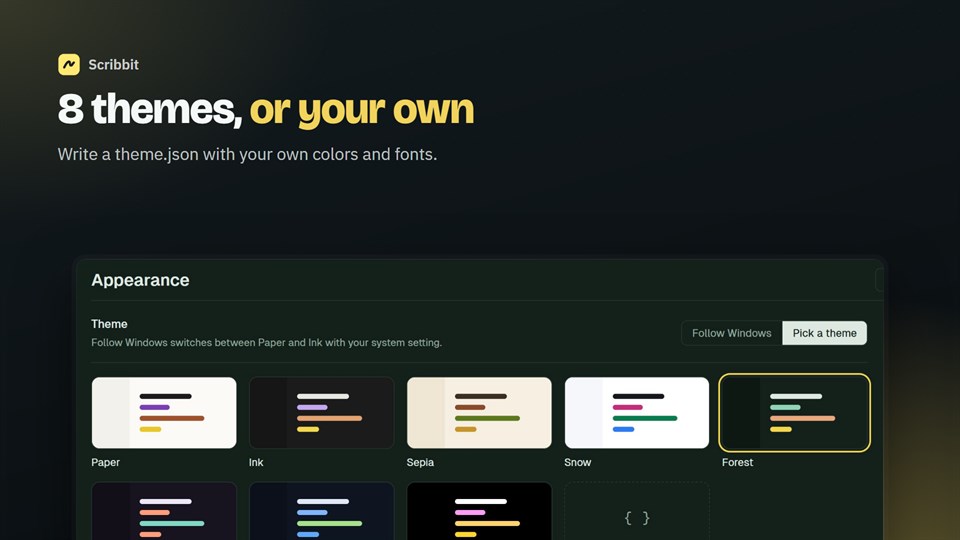
• 8 built-in themes (Paper, Ink, Sepia, Snow, Forest, Dusk, Midnight, High contrast), Follow Windows, or your own theme.json with any colors and fonts.
• Pick the editor font (Cascadia Code, JetBrains Mono, Consolas or any font you have) and text size.
• Custom title bar, left-aligned tabs, and a clean layout that stays out of the way. A short welcome tour shows you around.
PRIVATE
• No account, no analytics, no tracking. Your notes never leave your PC unless you send them to an AI provider yourself.
TRY IT FREE FOR 7 DAYS
After the trial, opening, writing and saving files keep working forever. Buy once to keep the Pro features. No subscription.
來自開發者
你是開發者嗎?
在頁面頂部發布消息,追蹤者會透過電子郵件收到。新增你的 YouTube 影片,它們會排在「影片」區塊最前面。
開發者
- Villi Development
- 追蹤者: 0
- 平台: Windows 應用程式 (7)
- 折扣: 1
- 清單: 0 0
- 點數: 0
- 排名: 0
- 留言: 0
- 影片: 3
- RSS: 訂閱
清單 0
-
 Scribbit
點數 0
-

- +1 點

排名 0
-
- 您的評分
新功能
- 版本: PC
- 最後更新:
- Markdown and HTML preview. Switch between Edit, Split and Preview with Ctrl+Shift+V. Tick checkboxes right in the preview, check HTML at phone or tablet width with scripts and internet off by default, and see pinned Markdown notes as clean text.
其他資訊
 https://villi.dev/solutions/scribbit
留言 0 ¡
搶先留下第一則留言
AppAgg 評分
1,530
AppAgg 預估評分:
Scribbit
開發者: Villi Development
1,530 黃金
評分越高,通常代表其在 AppAgg 上的各項指標表現越好。
基於: 人氣 · 使用者評分 · 新鮮度 · 優惠 · 商店資料 · 社群活躍度
根據最新 AppAgg 資料每日重新計算。
網站徽章:  已複製!
Scribbit 短網址: 已複製!- Windows Store

