
ブックマーク
このブックマークのタイトルを入力してください。
ブックマークを保存しました
| 開発者: | Dhiva-Labs (9) | ||
| 価格: | 無料 新着 | ||
| スコア: | 630 シルバー | ||
| ランキング: | 0 | ||
| コメント: | 0 コメントを投稿する | ||
| リスト: | 0 0 | ||
| ポイント: | 0 | ||
| +1 ポイント | |||
概要
SecureShell Goは、Dhiva-Labsが手がける「開発者ツール」カテゴリのアプリです。
に出たばかりの新作。今なら一番乗りのひとりです。
無料。広告なし、アプリ内課金なし。あなたとアプリだけです。
Microsoft StoreはWindowsに組み込まれているので、数クリックでインストールできます。
AppAggスコアは630。「シルバー」なら、なかなかのものです。
たった23メガバイト。空きの少ないドライブにも収まります。
年齢区分は「EVERYONE」なので、子どもでも安心です。
対応言語はひとつだけ、しかも日本語ではありません。
使ってみましたか?あなたのレビューがここで最初の一件になります。
この開発者のアプリは、AppAggにほかに8個あります。のぞいてみては?
アップデートや新しいアプリを誰よりも早く知りたい?開発者をフォローするか、RSS フィードを購読しましょう。プッシュ通知は Android と iOS 向けの AppAgg Alerts アプリで届きます。
広告
スクリーンショット 4
他のプラットフォーム 0
価格履歴 0
- 現在の価格: 無料
- 最小値: 無料
- 最大値: 無料
ホームに自分だけのフィード
「新着・アップデート」のプラットフォームを選ぶと、ホームには必要なアプリとゲームだけが表示されます。
説明

The same app is on Android, and an encrypted backup made on one can be imported on the other.
TERMINAL
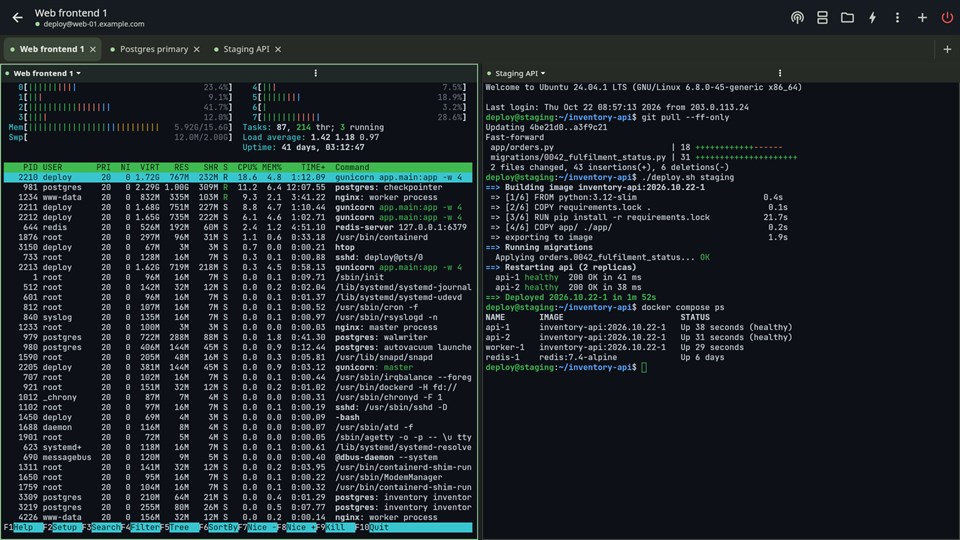
• xterm-256color terminal with ten colour schemes and a bundled JetBrains Mono font
• Ctrl+Shift+C and Ctrl+Shift+V to copy and paste, Ctrl+= and Ctrl+− to zoom, and a right-click menu
• Ctrl+Shift+F searches the whole scrollback, with match case and regular expressions
• Ctrl+click a web address to open it in your browser. Only http and https addresses open
• Record a session log to a file you choose, as plain text or exactly as received
• A "Paste N lines?" check before a multi-line paste reaches the shell
• Split the terminal area into up to four panes, each on a different server. Broadcast input types into every visible pane at once; it is off by default and turns itself off when the split closes
SESSIONS THAT STAY UP
• A dead connection is noticed and reconnected, including after the PC wakes from sleep or moves to another network
• When the shell exits but the connection is fine, Restart opens a new shell in the same tab without signing in again
• Keep a host's shell in tmux or GNU screen, so a reconnect, or reopening the app, lands back in the same shell
• Mosh: the app starts mosh-server over SSH and runs the terminal over UDP, so it carries on through network changes and sleep. No Mosh program is needed on Windows. The server needs mosh-server, a UTF-8 locale and its UDP ports open; otherwise the terminal opens over SSH and says why
SIGN-IN
• Password, private key (OpenSSH or PEM; RSA, ECDSA, ed25519; with passphrase), or keyboard-interactive for servers that ask for a one-time code
• Your SSH agent: the Windows OpenSSH agent, Pageant, or an agent pipe named by SSH_AUTH_SOCK. Pageant is used only when its pipe belongs to your account, the way PuTTY checks. The private key stays in the agent
• FIDO2 security keys such as a YubiKey (sk-ed25519, sk-ecdsa), through the agent
• OpenSSH user certificates, with the key ID, principals, validity and options shown, and a warning for a forced command or an expired certificate
• Generate an ed25519 key and install it on a server
• Jump hosts, each hop checked against its own host key
• Import servers from your .ssh\config file: HostName, User, Port, CertificateFile, ForwardAgent and ForwardX11
• A per-host switch for old routers and NAS boxes that only speak legacy algorithms
FORWARDING
• Agent forwarding, per host, so git and ssh on the server can use your agent's keys without copying them there
• X11 forwarding, per host: graphical programs on the server open their windows on your screen. You need an X server running on Windows, such as VcXsrv or X410. Windows X servers have no restricted mode, so while you are connected the server can see and control every window on that display, as with ssh -Y. Use it only with servers you trust; the host's X11 switch says so
• Local, remote and dynamic (SOCKS5) port forwards with live byte counters, listening on localhost unless you choose otherwise
REMOTE DESKTOP
• See and control a server's desktop over the SSH connection you already have: GNOME on Wayland, X11 desktops and Windows, and Macs through their built-in Screen Sharing
• A small agent runs on the server only while you are connected, listening on the server's loopback, so no port is opened and SSH stays the only way in
• On a server with no screen, start a virtual desktop, or one program on its own, and keep it running to come back to later. What the server is missing can be installed in a click
• Open one program from the server in a window of its own on this PC, through X11 forwarding (needs an X server such as VcXsrv or X410)
SECURITY
• Trust on first use, with the SHA256 fingerprint shown. A changed host key blocks the connection unless you acknowledge the change
• Saved passwords and keys are encrypted with Windows Data Protection for your Windows account, never stored in plain text. The trusted-key store is sealed against tampering
• Optional app lock with Windows Hello: your PIN, fingerprint or face. If the Hello prompt cannot be shown, the app stays locked
• Encrypted backups (Argon2id, AES-256-GCM) saved to any folder or cloud drive you pick; saved passwords and trusted host keys are included only if you tick them
• An optional diagnostics log for bug reports, off by default, kept on this PC with secrets removed
FILES
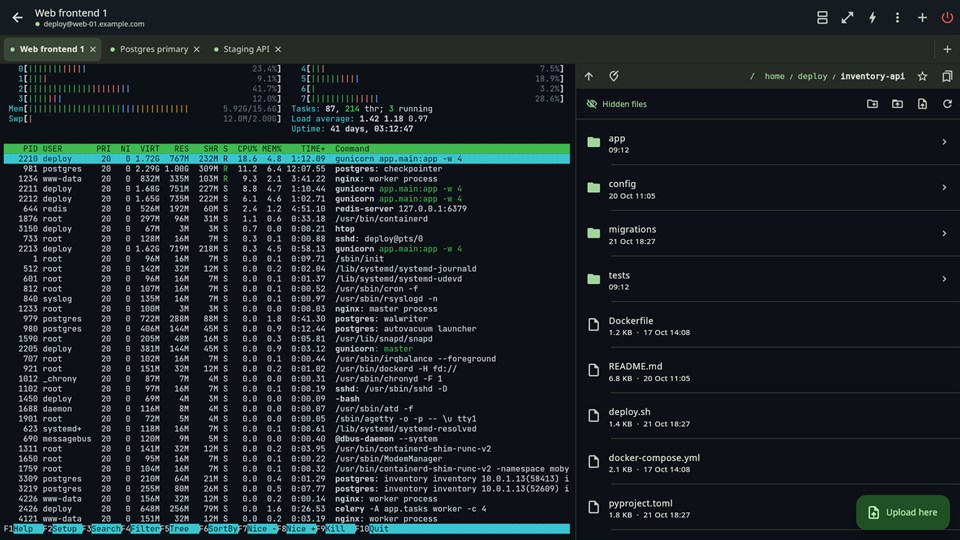
• SFTP browser on the same connection as the terminal
• Upload files and whole folders; download files and folders to your Downloads folder, and open a download with its usual app
• Rename, delete, new folder, permissions, change owner, duplicate
• Compress to .tar.gz or .zip and extract archives on the server; search the server by name or content. Actions the server's tools cannot do are not offered
• Drag a file onto another session's tab to copy it between servers, directly from one to the other or through this PC. Direct copies, compress and extract keep running on the server if the app closes
• Built-in editor with syntax colouring for 20 languages, find and replace, tabs for several files, and a save that checks nobody changed the file first and keeps its permissions
ACROSS YOUR SERVERS
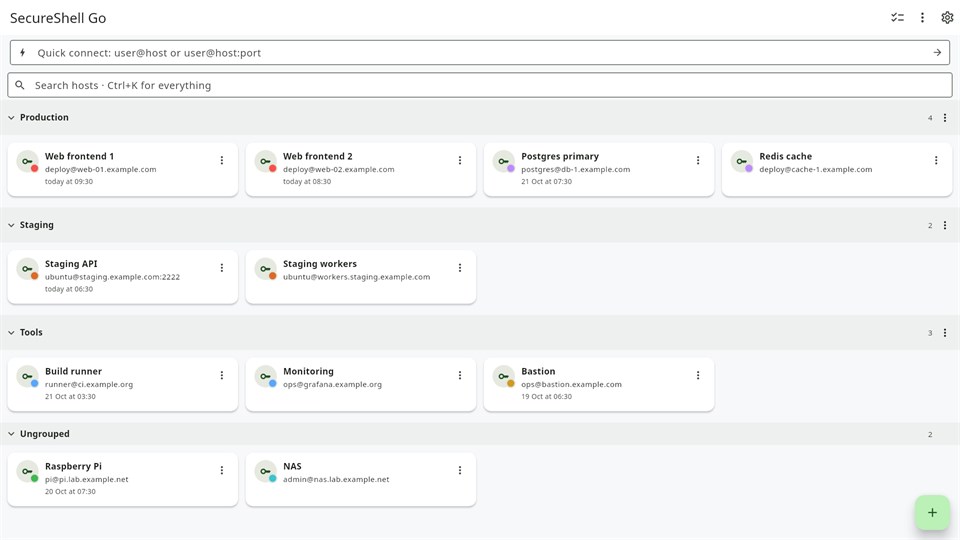
• Groups, colour tags and search, with a Ctrl+K command palette over hosts, snippets and actions
• Quick connect with user@host:port, or paste a whole ssh command
• Snippets with {placeholders}, and a startup command per host
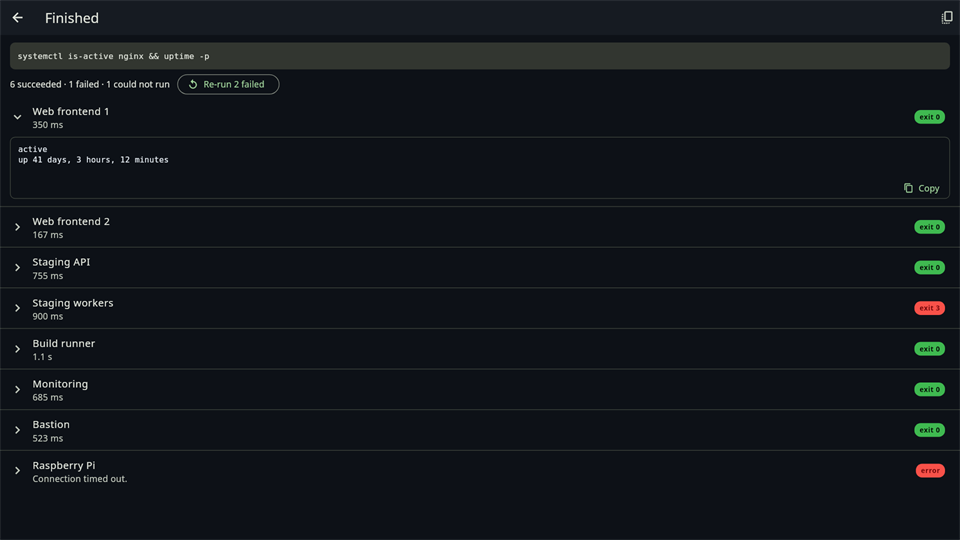
• Run a command on many servers at once and see each one's output, exit code and running time; push a file to many servers
• Server stats, a live log tail with filtering, systemd services and processes
MOUSE, KEYBOARD AND TOUCH
Layouts follow how you use the device rather than its operating system. With a mouse you get split panes, right-click menus and drag and drop; on a Windows tablet used by touch you get larger touch targets and the extra keys row (Esc, Tab, Ctrl, arrows and more) above the on-screen keyboard. Keyboard shortcuts: Ctrl+Shift+T for a new session, Ctrl+Tab between sessions, Ctrl+Shift+E between terminal and files, Ctrl+Shift+Enter for a full-width terminal.
Open source under the MIT licence.
デベロッパーから
デベロッパーの方ですか?
ページの一番上にニュースを投稿すると、フォロワーにメールで届きます。YouTube 動画を追加すると、「動画」の一番上に表示されます。
リスト 0
-
 SecureShell Go
ポイント 0
-

- +1 ポイント

ランキング 0
-
- あなたの評価
開発者 9
- Dhiva-Labs
- フォロワー: 0
- プラットフォーム: Windows アプリ (9)
- セール: 0
- リスト: 0 0
- ポイント: 0
- ランキング: 0
- コメント: 0
- 動画: 0
- RSS: 購読する
新機能
- バージョン: PC
- 最終更新:
情報
 https://github.com/Dhiva-Labs/SecureShellGo
AppAggスコア
630
AppAgg推定スコア:
SecureShell Go
開発者: Dhiva-Labs
630 シルバー
スコアが高いほど、AppAgg上の各指標が良好な傾向にあります。
基準: 人気 · ユーザー評価 · 新しさ · セール · ストアデータ · コミュニティ活動
最新のAppAggデータに基づいて毎日再計算されます。
ウェブサイト用バッジ:  コピーしました!
コメント 0 ¡
最初のコメントを書きましょう
シェア
SecureShell Go 短縮 URL: コピーしました!- Windows Store

