
Bookmark
| Pengembang: | talktozebra (4) | ||
| Harga: | * Gratis Baru | ||
| Skor: | 580 Perunggu | ||
| Peringkat: | 0 | ||
| Komentar: | 0 Kirimkan komentar | ||
| Daftar: | 0 0 | ||
| Poin: | 0 | ||
| +1 Poin | |||
Ringkasan
Kenalan dulu dengan Shift C copy path, aplikasi buatan talktozebra di kategori Alat pengembang.
Rilis , jadi umurnya lebih muda dari susu di kulkasmu.
Gratis diunduh. Selanjutnya terserah kamu, ada pembelian dalam aplikasi.
Microsoft Store sudah jadi bawaan Windows, jadi bisa dipasang dalam beberapa klik.
Skor AppAgg-nya 580. Untuk sekarang Perunggu, dan masih banyak ruang untuk naik.
Rating usia “EVERYONE”, jadi aman juga untuk anak-anak.
Cuma bisa satu bahasa, dan itu bukan bahasa Indonesia.
Belum ada yang menilainya di AppAgg. Kesempatanmu jadi yang pertama ada sekarang.
Pengembang ini punya 3 aplikasi lagi di AppAgg. Layak dilihat.
Mau jadi yang pertama tahu soal pembaruan dan aplikasi baru? Ikuti pengembang atau berlangganan lewat Umpan RSS. Notifikasi push dikirim lewat aplikasi AppAgg Alerts untuk Android dan iOS.
Jepretan layar 1
Platform lain 0
 | Shift C copy pathWindows Store580 PerungguWindowsPembelian Dalam Aplikasi | Gratis |
Saat ini hanya ada di toko ini.
Video 1
Riwayat harga 0
- Harga saat ini: Gratis
- Minimum: Gratis
- Maksimum: Gratis
Feed Anda sendiri di beranda
Deskripsi
Press Shift + C in Windows Explorer to copy the full path of the selected file(s)/folder(s) to the clipboard.
System Requirements
Windows 10 / 11 (x64). The .exe is a portable single file—no installation, no administrator privileges, and no registry modifications required. To run the source code directly, you must install AutoHotkey v2 first.
Quick Start
Place CopyFilePath.exe in any directory and double-click to run. It's ready to use once the icon appears in the system tray.
Select a file/folder in Windows Explorer and press Shift + C. A notification toast will pop up in the bottom right corner showing the copied path. You can then paste it using Ctrl + V.
Auto-start on boot: System tray icon → Settings → Check "Run at startup".
Copy Rules
One item selected: Copies its full path.
Multiple items selected: Copies one path per line.
Nothing selected: Copies the current folder path.
Focus in address/search bar: The shortcut is not intercepted, allowing you to type the letter "C" normally.
Outside Windows Explorer: The hotkey is inactive; Ctrl + C retains its native system behavior.
Hotkeys
Shift + C: Copy path (Only works within Windows Explorer; customizable after unlocking).
Ctrl + Shift + Alt + R: Reload the script.
Customization
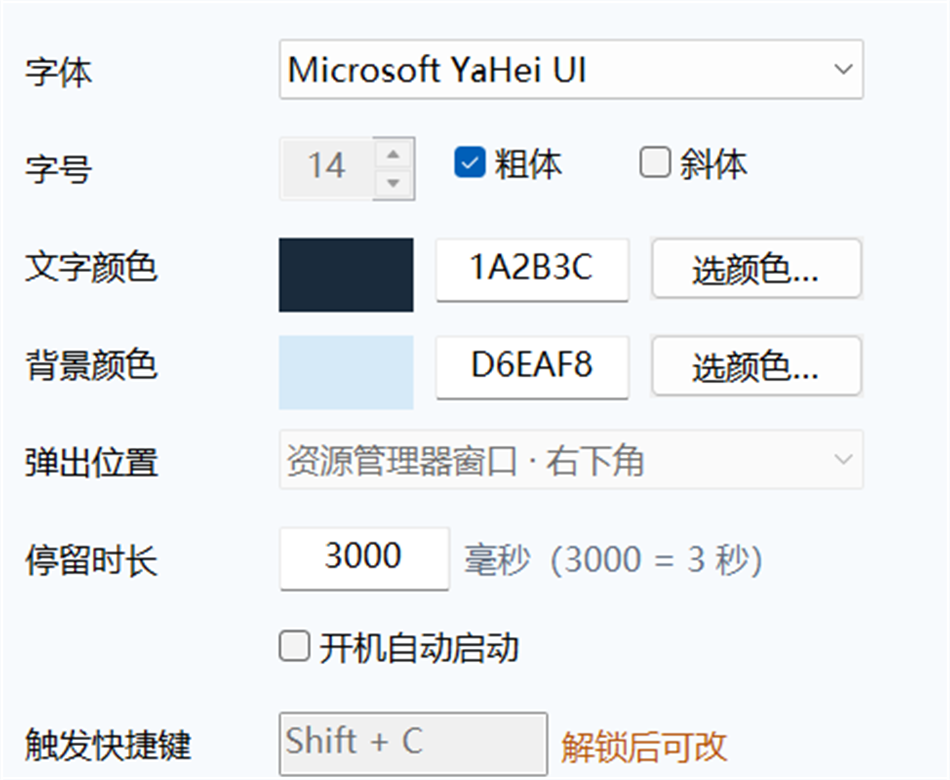
Go to System tray icon → Settings to modify the font/size/bold & italic styles, text and background colors, toast position and display duration, and UI language (8 languages available) with real-time preview. Changes take effect immediately after saving and applying. You can also run CopyFilePath.exe --settings to open the settings window directly. Once unlocked, you can also customize the trigger key (must include Ctrl or Alt).
Uninstallation
Exit the program and delete the .exe file. To completely clear configurations, delete the %APPDATA%\CopyFilePath folder.
License
Free for personal, non-commercial use. A license must be purchased for enterprise/commercial use. See README.md and LICENSE for details.
Dari developer
Pengembang
- talktozebra
- Pengikut: 0
- Platform: Windows Aplikasi (4)
- Diskon: 0
- Daftar: 0 0
- Poin: 0
- Peringkat: 0
- Komentar: 0
- Video: 1
- RSS: Berlangganan
Daftar 0
-
 Shift C copy path
Poin 0
-

- +1 Poin

Peringkat 0
-
- Rating Anda
Yang Baru
- Versi: PC
- Terakhir diperbarui:
Info tambahan
- Tanggal rilis:
- Kategori:
Aplikasi Windows›Alat pengembang - OS:
PC - Ukuran:
951 Kb - Bahasa yang didukung:
Inggris - Rating Konten:
EVERYONE - Windows Store Rating: ¡
0
Komentar 0 ¡
Skor AppAgg
Perkiraan Skor AppAgg untuk
Shift C copy path
Pengembang: talktozebra
Skor yang lebih tinggi biasanya menunjukkan indikator yang lebih kuat di AppAgg.
Berdasarkan: popularitas · rating pengguna · kebaruan · promo · data toko · aktivitas komunitas
Dihitung ulang setiap hari dari data AppAgg terbaru.
Shift C copy path URL singkat: Disalin!- Windows Store

