
북마크
이 북마크의 제목을 입력하세요.
북마크가 저장되었습니다
| 개발자: | talktozebra (4) | ||
| 가격: | * 무료 신규 | ||
| 종합 점수: | 580 브론즈 | ||
| 순위: | 0 | ||
| 댓글: | 0 댓글 게시 | ||
| 목록: | 0 0 | ||
| 포인트: | 0 | ||
| +1 포인트 | |||
요약
소개합니다. talktozebra에서 만든 ‘개발자 도구’ 카테고리 앱, Shift C copy path.
에 나왔으니, 냉장고 속 우유보다 어려요.
다운로드는 무료. 그다음은 마음대로예요. 인앱 구매가 있거든요.
Microsoft Store는 Windows에 기본으로 들어 있어서 클릭 몇 번이면 설치돼요.
AppAgg 점수는 580. 지금은 브론즈 등급이지만, 성장할 여지가 충분해요.
연령 등급은 ‘EVERYONE’, 아이들에게도 괜찮아요.
지원 언어는 딱 하나, 그런데 한국어는 아니에요.
AppAgg에서는 아직 아무도 평가하지 않았어요. 첫 번째가 될 기회는 바로 지금이에요.
이 개발자의 앱이 AppAgg에 3개 더 있어요. 한번 둘러보세요.
업데이트와 새 앱 소식을 가장 먼저 받고 싶나요? 개발자를 팔로우하거나 RSS 피드를 구독하세요. 푸시 알림은 Android와 iOS용 AppAgg Alerts 앱으로 받을 수 있어요.
광고
스크린샷 1
다른 플랫폼 0
동영상 1
가격 기록 0
- 현재 가격: 무료
- 최소: 무료
- 최대: 무료
홈 화면의 나만의 피드
“신규 및 업데이트” 피드의 플랫폼을 선택하면 홈 화면에 필요한 앱과 게임만 표시됩니다.
설명

Press Shift + C in Windows Explorer to copy the full path of the selected file(s)/folder(s) to the clipboard.
System Requirements
Windows 10 / 11 (x64). The .exe is a portable single file—no installation, no administrator privileges, and no registry modifications required. To run the source code directly, you must install AutoHotkey v2 first.
Quick Start
Place CopyFilePath.exe in any directory and double-click to run. It's ready to use once the icon appears in the system tray.
Select a file/folder in Windows Explorer and press Shift + C. A notification toast will pop up in the bottom right corner showing the copied path. You can then paste it using Ctrl + V.
Auto-start on boot: System tray icon → Settings → Check "Run at startup".
Copy Rules
One item selected: Copies its full path.
Multiple items selected: Copies one path per line.
Nothing selected: Copies the current folder path.
Focus in address/search bar: The shortcut is not intercepted, allowing you to type the letter "C" normally.
Outside Windows Explorer: The hotkey is inactive; Ctrl + C retains its native system behavior.
Hotkeys
Shift + C: Copy path (Only works within Windows Explorer; customizable after unlocking).
Ctrl + Shift + Alt + R: Reload the script.
Customization
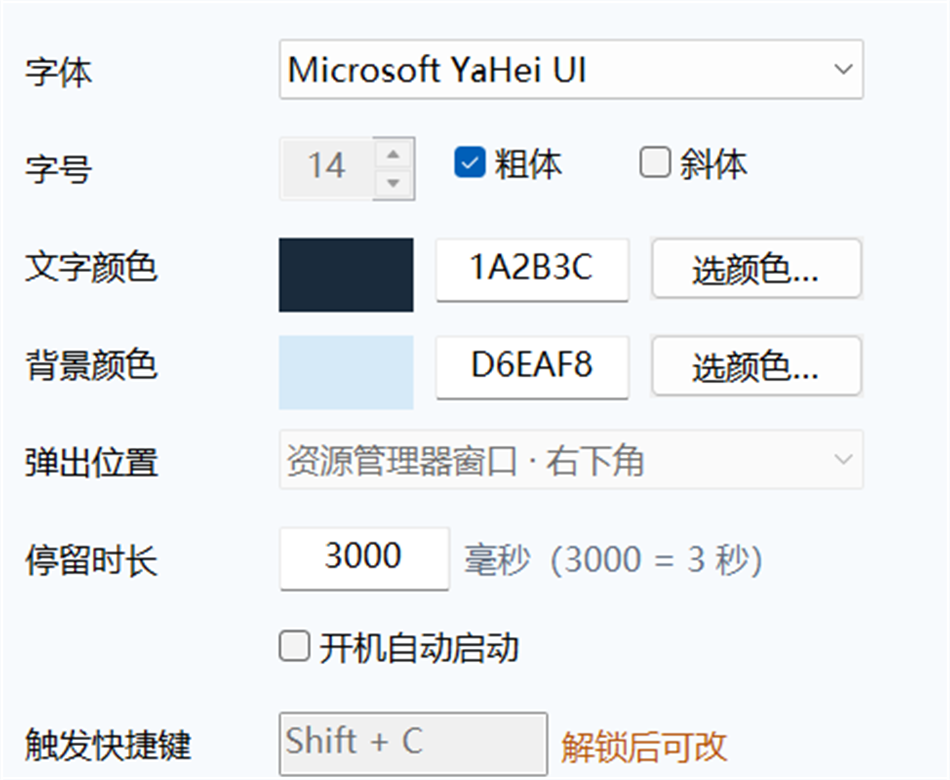
Go to System tray icon → Settings to modify the font/size/bold & italic styles, text and background colors, toast position and display duration, and UI language (8 languages available) with real-time preview. Changes take effect immediately after saving and applying. You can also run CopyFilePath.exe --settings to open the settings window directly. Once unlocked, you can also customize the trigger key (must include Ctrl or Alt).
Uninstallation
Exit the program and delete the .exe file. To completely clear configurations, delete the %APPDATA%\CopyFilePath folder.
License
Free for personal, non-commercial use. A license must be purchased for enterprise/commercial use. See README.md and LICENSE for details.
개발자 소식
개발자이신가요?
페이지 맨 위에 소식을 올리면 팔로워에게 이메일로 전달됩니다. YouTube 동영상을 추가하면 “동영상” 블록 맨 앞에 표시됩니다.
개발자
- talktozebra
- 팔로워: 0
- 플랫폼: Windows 앱 (4)
- 할인: 0
- 목록: 0 0
- 포인트: 0
- 순위: 0
- 댓글: 0
- 동영상: 1
- RSS: 구독
목록 0
-
 Shift C copy path
포인트 0
-

- +1 포인트

순위 0
-
- 내 평점
새로운 기능
- 버전: PC
- 마지막 업데이트:
추가 정보
댓글 0 ¡
가장 먼저 댓글을 남겨주세요
AppAgg 점수
580
AppAgg 예상 점수:
Shift C copy path
개발자: talktozebra
580 브론즈
점수가 높을수록 대체로 AppAgg의 여러 지표에서 좋은 결과를 보인다는 뜻입니다.
기준: 인기 · 사용자 평점 · 최신성 · 할인 · 스토어 데이터 · 커뮤니티 활동
최신 AppAgg 데이터를 바탕으로 매일 다시 계산됩니다.
웹사이트용 배지:  복사됨!
Shift C copy path 단축 URL: 복사됨!- Windows Store


