
Bokmerker
| Utvikler: | talktozebra (4) | ||
| Pris: | * Gratis Ny | ||
| Score: | 580 Bronse | ||
| Rangeringer: | 0 | ||
| Kommentarer: | 0 Legg inn kommentar | ||
| Lister: | 0 0 | ||
| Poeng: | 0 | ||
| +1 Poeng | |||
Kort fortalt
Møt Shift C copy path, en app fra talktozebra i kategorien «Utviklerverktøy».
Den kom ut , så den er yngre enn melka i kjøleskapet ditt.
Gratis å laste ned. Etter det er det opp til deg: det finnes kjøp i appen.
Microsoft Store er innebygd i Windows, så installasjonen er unnagjort med et par klikk.
AppAgg-scoren er 580. Bronse foreløpig, med god plass til å vokse.
Aldersgrense «EVERYONE»: passer også for barn.
Snakker bare ett språk, og det er ikke norsk.
Ingen på AppAgg har vurdert den ennå. Sjansen til å bli den første er nå.
Utvikleren har 3 apper til på AppAgg. Verdt en titt.
Vil du høre om oppdateringer og nye apper først? Følg utvikleren eller abonner på vår RSS-feed. Push-varsler kommer via appen AppAgg Alerts for Android og iOS.
Skjermbilder 1
Andre plattformer 0
Video 1
Prishistorikk 0
- Gjeldende pris: Gratis
- Minimum: Gratis
- Maksimum: Gratis
Din egen strøm på forsiden
Beskrivelse

Press Shift + C in Windows Explorer to copy the full path of the selected file(s)/folder(s) to the clipboard.
System Requirements
Windows 10 / 11 (x64). The .exe is a portable single file—no installation, no administrator privileges, and no registry modifications required. To run the source code directly, you must install AutoHotkey v2 first.
Quick Start
Place CopyFilePath.exe in any directory and double-click to run. It's ready to use once the icon appears in the system tray.
Select a file/folder in Windows Explorer and press Shift + C. A notification toast will pop up in the bottom right corner showing the copied path. You can then paste it using Ctrl + V.
Auto-start on boot: System tray icon → Settings → Check "Run at startup".
Copy Rules
One item selected: Copies its full path.
Multiple items selected: Copies one path per line.
Nothing selected: Copies the current folder path.
Focus in address/search bar: The shortcut is not intercepted, allowing you to type the letter "C" normally.
Outside Windows Explorer: The hotkey is inactive; Ctrl + C retains its native system behavior.
Hotkeys
Shift + C: Copy path (Only works within Windows Explorer; customizable after unlocking).
Ctrl + Shift + Alt + R: Reload the script.
Customization
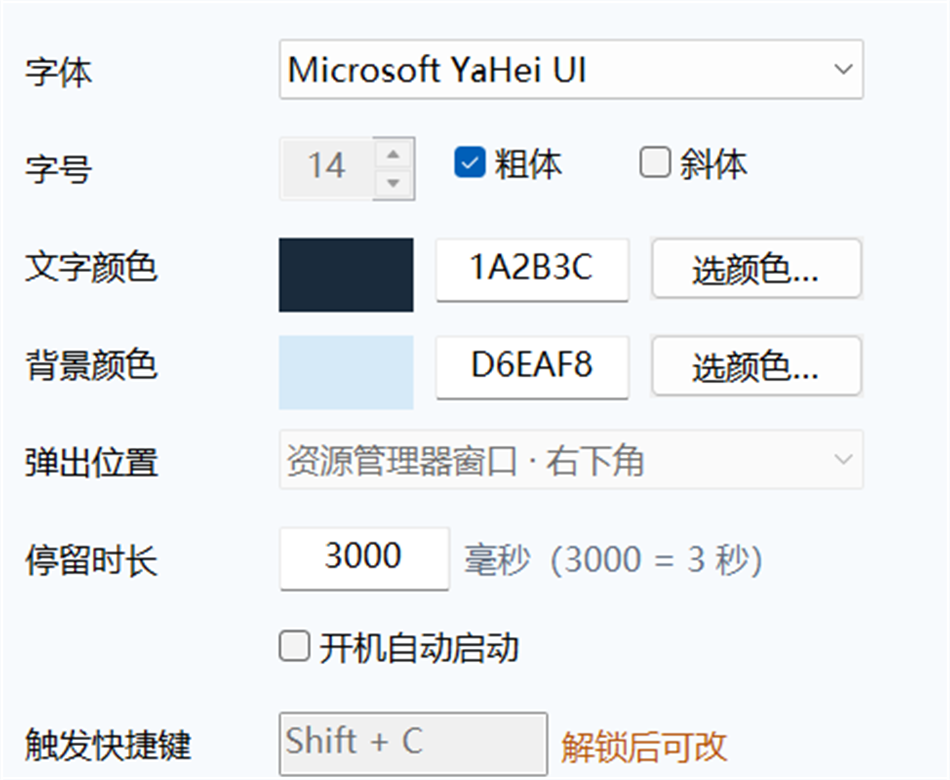
Go to System tray icon → Settings to modify the font/size/bold & italic styles, text and background colors, toast position and display duration, and UI language (8 languages available) with real-time preview. Changes take effect immediately after saving and applying. You can also run CopyFilePath.exe --settings to open the settings window directly. Once unlocked, you can also customize the trigger key (must include Ctrl or Alt).
Uninstallation
Exit the program and delete the .exe file. To completely clear configurations, delete the %APPDATA%\CopyFilePath folder.
License
Free for personal, non-commercial use. A license must be purchased for enterprise/commercial use. See README.md and LICENSE for details.
Fra utvikleren
Utvikler
- talktozebra
- Følgere: 0
- Plattformer: Windows Apper (4)
- Tilbud: 0
- Lister: 0 0
- Poeng: 0
- Rangeringer: 0
- Kommentarer: 0
- Videoer: 1
- RSS: Abonner
Lister 0
-
 Shift C copy path
Poeng 0
-

- +1 Poeng

Rangeringer 0
-
- Din vurdering
Dette er nytt
- Versjon: PC
- Sist oppdatert:
Tilleggsinformasjon
- Utgivelsesdato:
- Kategori:
Windows-apper›Utviklerverktøy - Operativsystem:
PC - Størrelse:
951 Kb - Språk som støttes:
Engelsk - Aldersgrense:
EVERYONE - Windows Store Vurdering: ¡
0
Kommentarer 0 ¡
AppAgg-score
Estimert AppAgg-score for
Shift C copy path
Utvikler: talktozebra
En høyere score gjenspeiler vanligvis bedre resultater på områdene AppAgg måler.
Basert på: popularitet · brukervurderinger · aktualitet · tilbud · butikkdata · fellesskapsaktivitet
Beregnes på nytt hver dag med ferske AppAgg-data.
Shift C copy path Kort nettadresse: Kopiert!- Windows Store

