
Bladwijzers
| Ontwikkelaar: | talktozebra (4) | ||
| Prijs: | * Gratis Nieuw | ||
| Score: | 580 Brons | ||
| Ranglijsten: | 0 | ||
| Reacties: | 0 Plaats reactie | ||
| Lijsten: | 0 0 | ||
| Punten: | 0 | ||
| +1 Punt | |||
Samenvatting
Maak kennis met Shift C copy path, een app van talktozebra in de categorie “Ontwikkelhulpprogramma's”.
Pas uitgekomen, dus jonger dan de melk in je koelkast.
Gratis te downloaden. Daarna bepaal je het zelf, er zijn in-app-aankopen.
De Microsoft Store zit ingebouwd in Windows, dus installeren doe je in een paar klikken.
De AppAgg-score is 580. Voorlopig Brons, met nog volop ruimte om te groeien.
Leeftijdsclassificatie “EVERYONE”, dus ook prima voor kinderen.
Spreekt maar één taal, en dat is geen Nederlands.
Op AppAgg heeft nog niemand de app beoordeeld. Dit is je kans om de eerste te zijn.
De ontwikkelaar heeft nog 3 andere apps op AppAgg. Neem gerust een kijkje.
Wil je als eerste horen over updates en nieuwe apps? Volg de ontwikkelaar of abonneer je op de RSS-feed. Pushmeldingen komen binnen via de app AppAgg Alerts voor Android en iOS.
Screenshots 1
Andere platforms 0
Video 1
Prijsgeschiedenis 0
- Huidige prijs: Gratis
- Minimum: Gratis
- Maximum: Gratis
Je eigen feed op de startpagina
Beschrijving

Press Shift + C in Windows Explorer to copy the full path of the selected file(s)/folder(s) to the clipboard.
System Requirements
Windows 10 / 11 (x64). The .exe is a portable single file—no installation, no administrator privileges, and no registry modifications required. To run the source code directly, you must install AutoHotkey v2 first.
Quick Start
Place CopyFilePath.exe in any directory and double-click to run. It's ready to use once the icon appears in the system tray.
Select a file/folder in Windows Explorer and press Shift + C. A notification toast will pop up in the bottom right corner showing the copied path. You can then paste it using Ctrl + V.
Auto-start on boot: System tray icon → Settings → Check "Run at startup".
Copy Rules
One item selected: Copies its full path.
Multiple items selected: Copies one path per line.
Nothing selected: Copies the current folder path.
Focus in address/search bar: The shortcut is not intercepted, allowing you to type the letter "C" normally.
Outside Windows Explorer: The hotkey is inactive; Ctrl + C retains its native system behavior.
Hotkeys
Shift + C: Copy path (Only works within Windows Explorer; customizable after unlocking).
Ctrl + Shift + Alt + R: Reload the script.
Customization
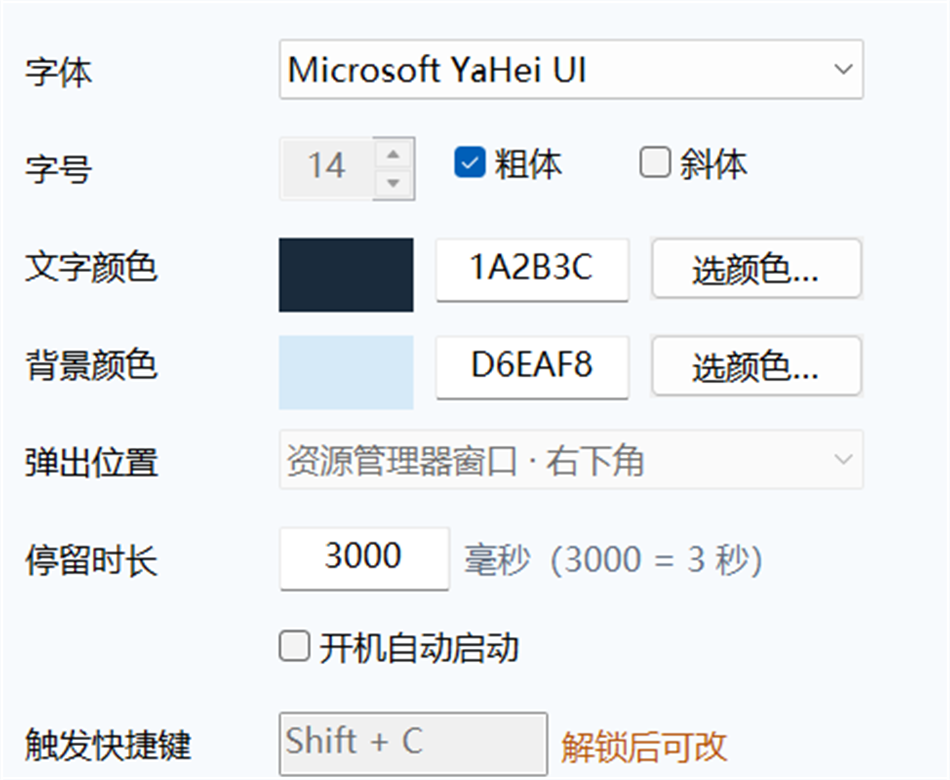
Go to System tray icon → Settings to modify the font/size/bold & italic styles, text and background colors, toast position and display duration, and UI language (8 languages available) with real-time preview. Changes take effect immediately after saving and applying. You can also run CopyFilePath.exe --settings to open the settings window directly. Once unlocked, you can also customize the trigger key (must include Ctrl or Alt).
Uninstallation
Exit the program and delete the .exe file. To completely clear configurations, delete the %APPDATA%\CopyFilePath folder.
License
Free for personal, non-commercial use. A license must be purchased for enterprise/commercial use. See README.md and LICENSE for details.
Van de ontwikkelaar
Ontwikkelaar
- talktozebra
- Volgers: 0
- Platforms: Windows Apps (4)
- Aanbiedingen: 0
- Lijsten: 0 0
- Punten: 0
- Ranglijsten: 0
- Reacties: 0
- Video’s: 1
- RSS: Abonneren
Lijsten 0
-
 Shift C copy path
Punten 0
-

- +1 Punt

Ranglijsten 0
-
- Jouw beoordeling
Wat is er nieuw?
- Versie: PC
- Laatst bijgewerkt:
Aanvullende informatie
- Releasedatum:
- Categorie:
Windows-apps›Ontwikkelhulpprogramma's - Besturingssysteem:
PC - Grootte:
951 Kb - Ondersteunde talen:
Engels - Inhoudsclassificatie:
EVERYONE - Windows Store Beoordeling: ¡
0
Reacties 0 ¡
AppAgg-score
Geschatte AppAgg-score voor
Shift C copy path
Ontwikkelaar: talktozebra
Een hogere score betekent meestal betere resultaten voor de factoren die AppAgg beoordeelt.
Gebaseerd op: populariteit · gebruikersbeoordelingen · actualiteit · aanbiedingen · winkelgegevens · community-activiteit
Wordt dagelijks opnieuw berekend met actuele AppAgg-gegevens.
Shift C copy path Korte URL: Gekopieerd!- Windows Store

