
บุ๊กมาร์ก
| ผู้พัฒนา: | talktozebra (4) | ||
| ราคา: | * ฟรี ใหม่ | ||
| คะแนน: | 580 บรอนซ์ | ||
| การจัดอันดับ: | 0 | ||
| ความคิดเห็น: | 0 โพสต์ความคิดเห็น | ||
| รายการ: | 0 0 | ||
| แต้ม: | 0 | ||
| +1 แต้ม | |||
สรุป
มาทำความรู้จัก Shift C copy path แอปในหมวด “เครื่องมือสำหรับนักพัฒนา” จาก talktozebra
ออกเมื่อ อายุน้อยกว่านมในตู้เย็นของคุณอีก
ดาวน์โหลดฟรี หลังจากนั้นแล้วแต่คุณ เพราะมีการซื้อภายในแอป
Microsoft Store มีมาในตัว Windows อยู่แล้ว ติดตั้งได้ในไม่กี่คลิก
คะแนน AppAgg คือ 580 ตอนนี้อยู่ระดับ “บรอนซ์” ยังไปได้อีกไกล
จัดเรต “EVERYONE” เหมาะกับเด็ก ๆ ด้วย
รองรับแค่ภาษาเดียว และไม่ใช่ภาษาไทย
ยังไม่มีใครบน AppAgg ให้คะแนนเลย โอกาสเป็นคนแรกอยู่ตรงนี้แล้ว
ผู้พัฒนารายนี้มีแอปอื่นบน AppAgg อีก 3 แอป ลองไปดูกัน
อยากรู้เรื่องอัปเดตและแอปใหม่ก่อนใครไหม? ติดตาม ผู้พัฒนา หรือกดติดตาม ฟีด RSS ได้เลย การแจ้งเตือนแบบพุชส่งผ่านแอป AppAgg Alerts สำหรับ Android และ iOS
ภาพหน้าจอ 1
แพลตฟอร์มอื่น 0
วิดีโอ 1
ประวัติราคา 0
- ราคาปัจจุบัน: ฟรี
- ต่ำสุด: ฟรี
- สูงสุด: ฟรี
ฟีดของคุณเองบนหน้าแรก
คำอธิบาย

Press Shift + C in Windows Explorer to copy the full path of the selected file(s)/folder(s) to the clipboard.
System Requirements
Windows 10 / 11 (x64). The .exe is a portable single file—no installation, no administrator privileges, and no registry modifications required. To run the source code directly, you must install AutoHotkey v2 first.
Quick Start
Place CopyFilePath.exe in any directory and double-click to run. It's ready to use once the icon appears in the system tray.
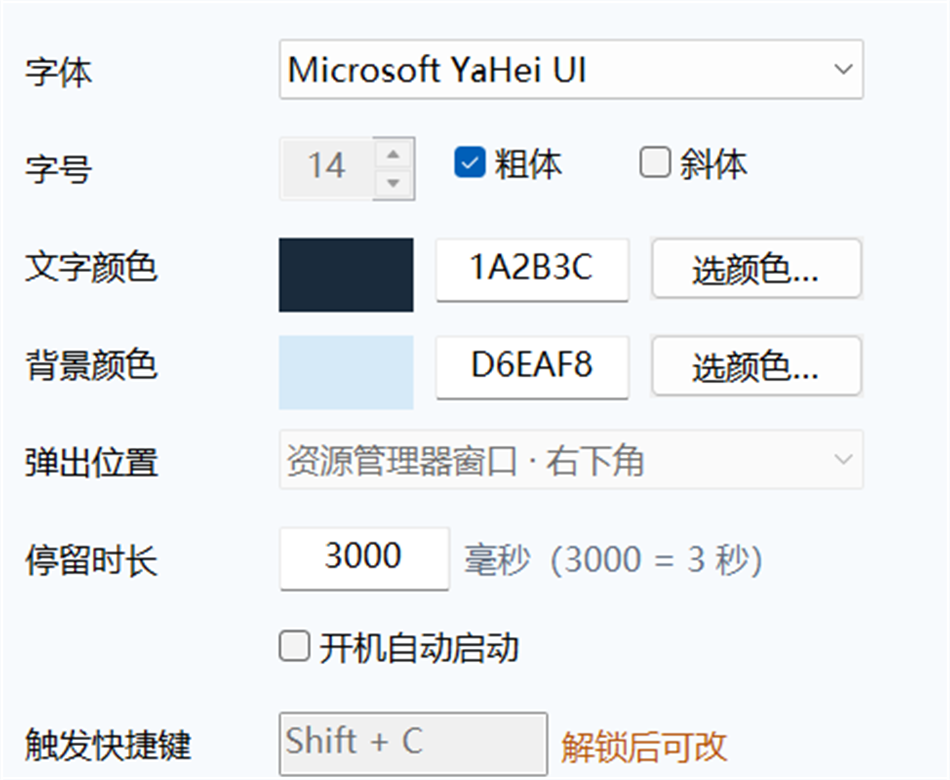
Select a file/folder in Windows Explorer and press Shift + C. A notification toast will pop up in the bottom right corner showing the copied path. You can then paste it using Ctrl + V.
Auto-start on boot: System tray icon → Settings → Check "Run at startup".
Copy Rules
One item selected: Copies its full path.
Multiple items selected: Copies one path per line.
Nothing selected: Copies the current folder path.
Focus in address/search bar: The shortcut is not intercepted, allowing you to type the letter "C" normally.
Outside Windows Explorer: The hotkey is inactive; Ctrl + C retains its native system behavior.
Hotkeys
Shift + C: Copy path (Only works within Windows Explorer; customizable after unlocking).
Ctrl + Shift + Alt + R: Reload the script.
Customization
Go to System tray icon → Settings to modify the font/size/bold & italic styles, text and background colors, toast position and display duration, and UI language (8 languages available) with real-time preview. Changes take effect immediately after saving and applying. You can also run CopyFilePath.exe --settings to open the settings window directly. Once unlocked, you can also customize the trigger key (must include Ctrl or Alt).
Uninstallation
Exit the program and delete the .exe file. To completely clear configurations, delete the %APPDATA%\CopyFilePath folder.
License
Free for personal, non-commercial use. A license must be purchased for enterprise/commercial use. See README.md and LICENSE for details.
จากนักพัฒนา
ผู้พัฒนา
- talktozebra
- ผู้ติดตาม: 0
- แพลตฟอร์ม: Windows แอป (4)
- ลดราคา: 0
- รายการ: 0 0
- แต้ม: 0
- การจัดอันดับ: 0
- ความคิดเห็น: 0
- วิดีโอ: 1
- RSS: ติดตาม
รายการ 0
-
 Shift C copy path
แต้ม 0
-

- +1 แต้ม

การจัดอันดับ 0
-
- คะแนนของคุณ
มีอะไรใหม่
- เวอร์ชัน: PC
- อัปเดตล่าสุด:
ข้อมูลเพิ่มเติม
- วันที่วางจำหน่าย:
- หมวดหมู่:
แอปสำหรับ Windows›เครื่องมือสำหรับนักพัฒนา - ระบบปฏิบัติการ:
PC - ขนาด:
951 Kb - ภาษาที่รองรับ:
อังกฤษ - การจัดประเภทเนื้อหา:
EVERYONE - Windows Store คะแนน: ¡
0
ความคิดเห็น 0 ¡
คะแนน AppAgg
คะแนน AppAgg โดยประมาณของ
Shift C copy path
ผู้พัฒนา: talktozebra
คะแนนที่สูงขึ้นมักสะท้อนตัวชี้วัดที่ดีกว่าบน AppAgg
อิงจาก: ความนิยม · คะแนนจากผู้ใช้ · ความสดใหม่ · ดีล · ข้อมูลร้านค้า · กิจกรรมชุมชน
คำนวณใหม่ทุกวันจากข้อมูล AppAgg ล่าสุด
Shift C copy path URL แบบสั้น: คัดลอกแล้ว!- Windows Store

