
Yer imleri
| Geliştirici: | talktozebra (4) | ||
| Fiyat: | * Ücretsiz Yeni | ||
| Skor: | 580 Bronz | ||
| Sıralamalar: | 0 | ||
| Yorumlar: | 0 Yorum gönder | ||
| Listeler: | 0 0 | ||
| Puanlar: | 0 | ||
| +1 Puan | |||
Özet
Karşında Shift C copy path, talktozebra imzalı, Geliştirici araçları kategorisinde bir uygulama.
Daha çıktı, yani buzdolabındaki sütten bile genç.
İndirmesi ücretsiz. Sonrası sana kalmış, uygulama içi satın alma var.
Microsoft Store, Windows’a yerleşik. Birkaç tıkla kuruluyor.
AppAgg skoru 580. Şimdilik Bronz, ama yükselmek için bolca yer var.
Yaş sınırı “EVERYONE”, yani çocuklar için de uygun.
Tek bir dil konuşuyor, o da Türkçe değil.
AppAgg’de henüz kimse puan vermedi. İlk olma şansın tam şu an.
Geliştiricinin AppAgg’de 3 uygulaması daha var. Bir göz at.
Güncellemeleri ve yeni uygulamaları ilk sen mi duymak istiyorsun? Hemen geliştiriciyi takip et ya da RSS akışı ile haberdar ol. Push bildirimleri Android ve iOS için AppAgg Alerts uygulamasıyla gelir.
Ekran görüntüleri 1
Diğer platformlar 0
 | Shift C copy pathWindows Store580 BronzWindowsUygulama içi satın almalar | Ücretsiz |
Şu anda yalnızca bu mağazada.
Video 1
Fiyat Geçmişi 0
- Güncel fiyat: Ücretsiz
- En az: Ücretsiz
- En fazla: Ücretsiz
Ana sayfada kendi akışınız
Açıklama
Press Shift + C in Windows Explorer to copy the full path of the selected file(s)/folder(s) to the clipboard.
System Requirements
Windows 10 / 11 (x64). The .exe is a portable single file—no installation, no administrator privileges, and no registry modifications required. To run the source code directly, you must install AutoHotkey v2 first.
Quick Start
Place CopyFilePath.exe in any directory and double-click to run. It's ready to use once the icon appears in the system tray.
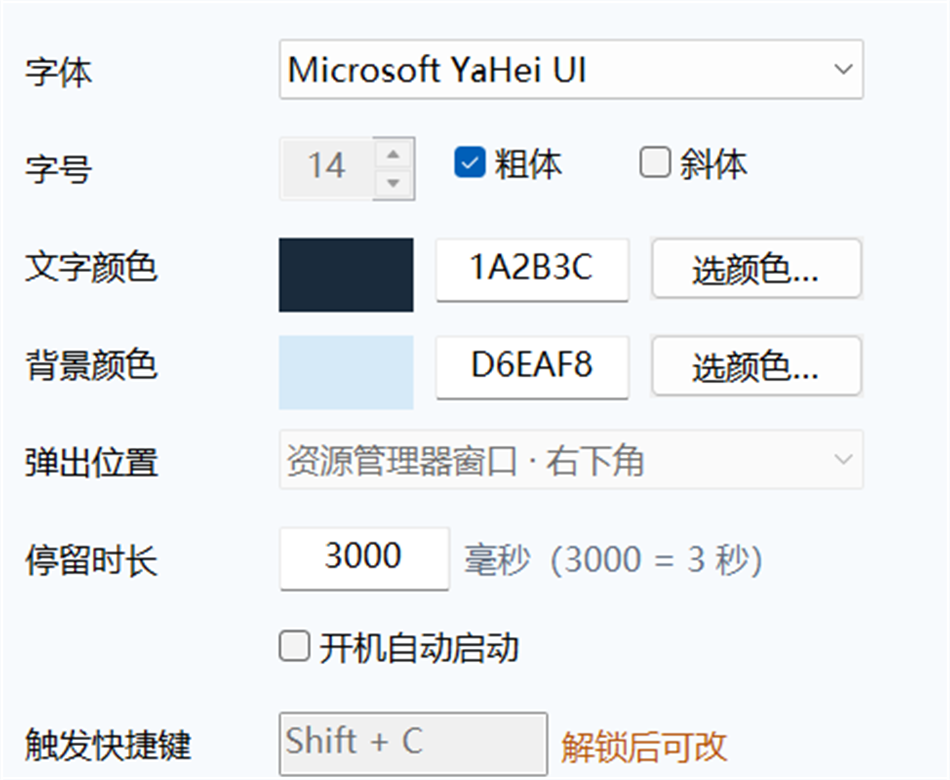
Select a file/folder in Windows Explorer and press Shift + C. A notification toast will pop up in the bottom right corner showing the copied path. You can then paste it using Ctrl + V.
Auto-start on boot: System tray icon → Settings → Check "Run at startup".
Copy Rules
One item selected: Copies its full path.
Multiple items selected: Copies one path per line.
Nothing selected: Copies the current folder path.
Focus in address/search bar: The shortcut is not intercepted, allowing you to type the letter "C" normally.
Outside Windows Explorer: The hotkey is inactive; Ctrl + C retains its native system behavior.
Hotkeys
Shift + C: Copy path (Only works within Windows Explorer; customizable after unlocking).
Ctrl + Shift + Alt + R: Reload the script.
Customization
Go to System tray icon → Settings to modify the font/size/bold & italic styles, text and background colors, toast position and display duration, and UI language (8 languages available) with real-time preview. Changes take effect immediately after saving and applying. You can also run CopyFilePath.exe --settings to open the settings window directly. Once unlocked, you can also customize the trigger key (must include Ctrl or Alt).
Uninstallation
Exit the program and delete the .exe file. To completely clear configurations, delete the %APPDATA%\CopyFilePath folder.
License
Free for personal, non-commercial use. A license must be purchased for enterprise/commercial use. See README.md and LICENSE for details.
Geliştiriciden
Geliştirici
- talktozebra
- Takipçiler: 0
- Platformlar: Windows Uygulamalar (4)
- İndirimler: 0
- Listeler: 0 0
- Puanlar: 0
- Sıralamalar: 0
- Yorumlar: 0
- Video: 1
- RSS: Abone ol
Listeler 0
-
 Shift C copy path
Puanlar 0
-

- +1 Puan

Sıralamalar 0
-
- Puanınız
Yenilikler
- Sürüm: PC
- Son güncelleme:
Ek Bilgi
- Çıkış tarihi:
- Kategori:
Windows uygulamaları›Geliştirici araçları - İşletim Sistemleri:
PC - Boyut:
951 Kb - Desteklenen diller:
İngilizce - İçerik Derecelendirmesi:
EVERYONE - Windows Store Puan: ¡
0
Yorumlar 0 ¡
AppAgg Skoru
Tahmini AppAgg skoru:
Shift C copy path
Geliştirici: talktozebra
Daha yüksek skorlar genellikle AppAgg’deki göstergelerin daha güçlü olduğunu belirtir.
Şunlara göre: popülerlik · kullanıcı puanları · güncellik · fırsatlar · mağaza verileri · topluluk etkinliği
Güncel AppAgg verileriyle her gün yeniden hesaplanır.
Shift C copy path Kısa URL: Kopyalandı!- Windows Store

