
북마크
이 북마크의 제목을 입력하세요.
북마크가 저장되었습니다
| 개발자: | Simplehire (1) | ||
| 가격: | 무료 | ||
| 종합 점수: | 1,060 실버 | ||
| 순위: | 0 | ||
| 댓글: | 0 댓글 게시 | ||
| 목록: | 0 0 | ||
| 포인트: | 0 | ||
| +1 포인트 | |||
요약
Simplehire: Simplehire에서 만든 ‘개발자 도구’ 카테고리의 앱이에요.
에 출시됐어요. 아직 꽤 따끈따끈해요.
무료. 광고도 인앱 구매도 없어요. 앱에만 집중하면 돼요.
Microsoft Store는 Windows에 기본으로 들어 있어서 클릭 몇 번이면 설치돼요.
AppAgg 점수는 1,060. 실버 등급, 이 정도면 꽤 괜찮아요.
겨우 2메가바이트. 꽉 찬 드라이브에도 쏙 들어가요.
연령 등급은 ‘EVERYONE’, 아이들에게도 괜찮아요.
지원 언어는 딱 하나, 그런데 한국어는 아니에요.
AppAgg에서는 아직 아무도 평가하지 않았어요. 첫 번째가 될 기회는 바로 지금이에요.
AppAgg에 있는 이 개발자의 유일한 앱이에요. 아직까지는요.
업데이트와 새 앱 소식을 가장 먼저 받고 싶나요? 개발자를 팔로우하거나 RSS 피드를 구독하세요. 푸시 알림은 Android와 iOS용 AppAgg Alerts 앱으로 받을 수 있어요.
광고
다른 플랫폼 0
가격 기록 0
- 현재 가격: 무료
- 최소: 무료
- 최대: 무료
홈 화면의 나만의 피드
“신규 및 업데이트” 피드의 플랫폼을 선택하면 홈 화면에 필요한 앱과 게임만 표시됩니다.
스크린샷 9
설명

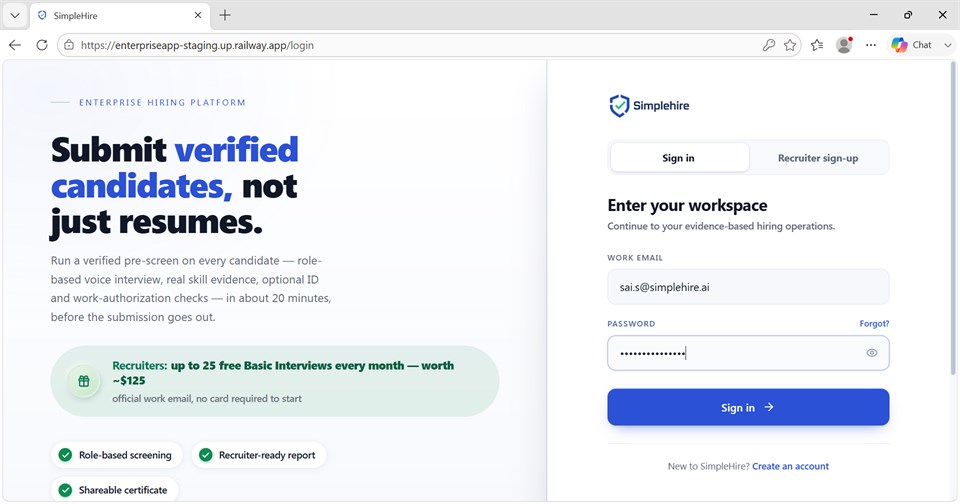
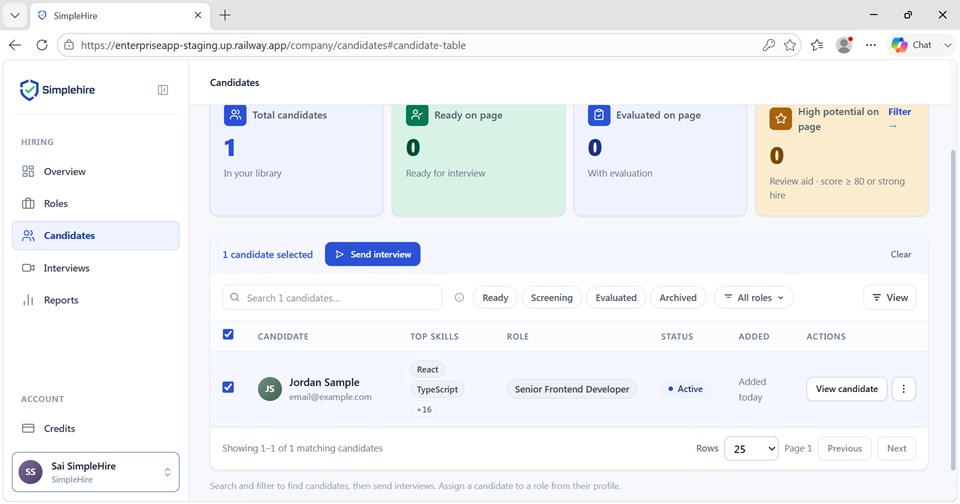
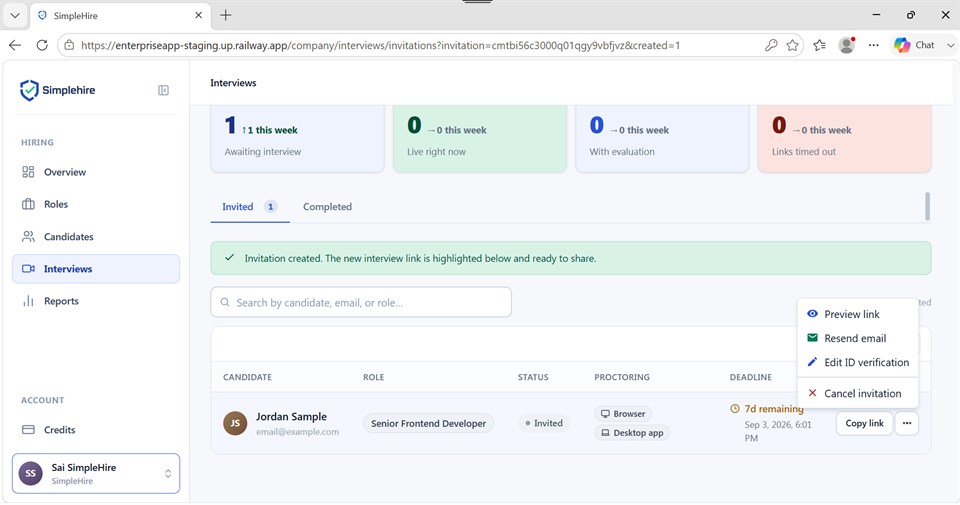
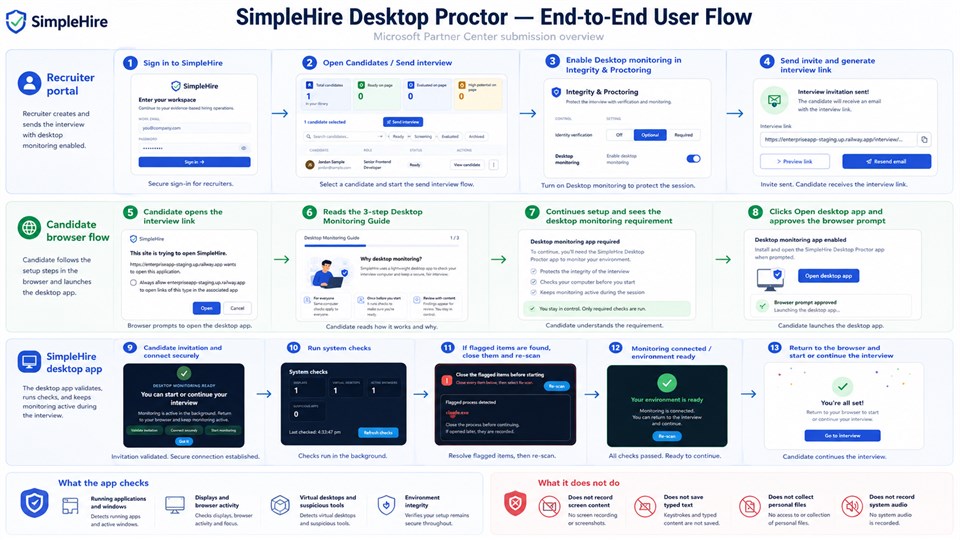
SimpleHire is a companion app. It does nothing on its own, and there is
nothing to sign up for here. You only need it if an employer has invited you to a SimpleHire interview and asked for desktop monitoring. Everything else — your interview, your questions, your answers — happens in your web browser.
WHAT SIMPLEHIRE IS TRYING TO DO
Hiring teams receive far more applicants than they can interview in person, so
first-round interviews have moved online. That created a fairness problem in both directions. Employers cannot tell whether an online interview reflects the
candidate's own ability. Candidates who prepare honestly end up competing against people who did not, and get no credit for having done it properly.
SimpleHire runs a structured, AI-led first-round interview in the browser and
gives the employer a clear, evidence-backed summary. SimpleHire Desktop App is the part that makes that summary trustworthy — so that a genuine candidate's result stands up, and an employer can rely on it.
HOW THE WEB APP AND THIS DESKTOP APP WORK TOGETHER
Think of them as two halves of one interview.
The web app (the interview portal, in your browser) is where the interview
actually happens:
• you open the invitation link your employer emailed you
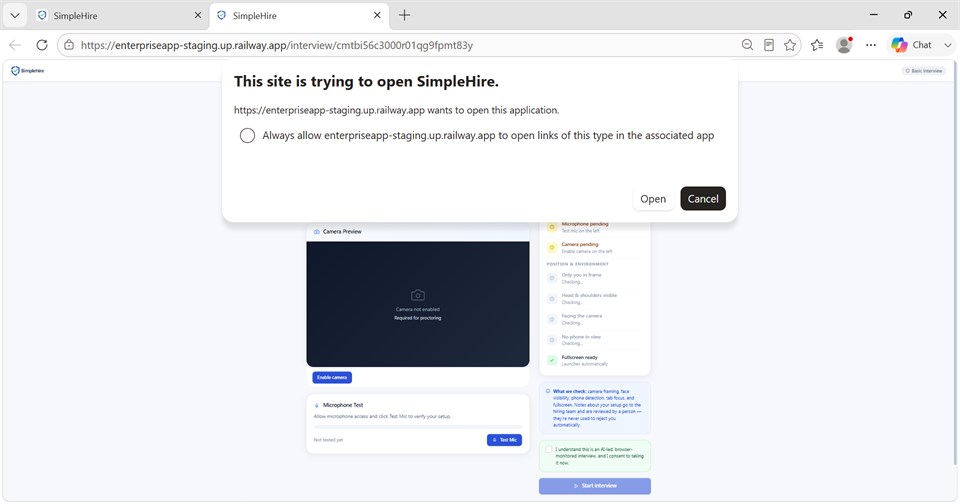
• you read and accept a consent screen that explains exactly what is monitored
• you check your camera and microphone
• you talk with the AI interviewer and answer its questions
• you see your progress, and when it is finished
This desktop app is the part your browser cannot do. A web page can only see itself. It cannot tell whether a second monitor is attached, whether a
screen-sharing tool is running behind it, or whether the interview has been moved onto another virtual desktop. Those checks need to run on the computer itself.
That is the app's entire job.
The two are joined by a one-time pairing link:
1. In the browser, on the setup screen, you select "Open SimpleHire Proctor".
2. Windows opens this app and pairs it to that single interview session. You do not type a password or create an account — the link carries a token that is
valid only for your interview.
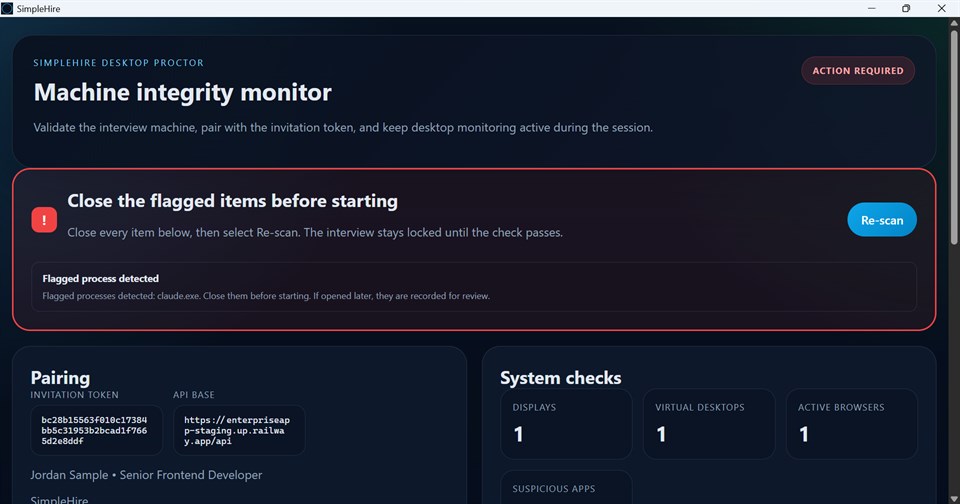
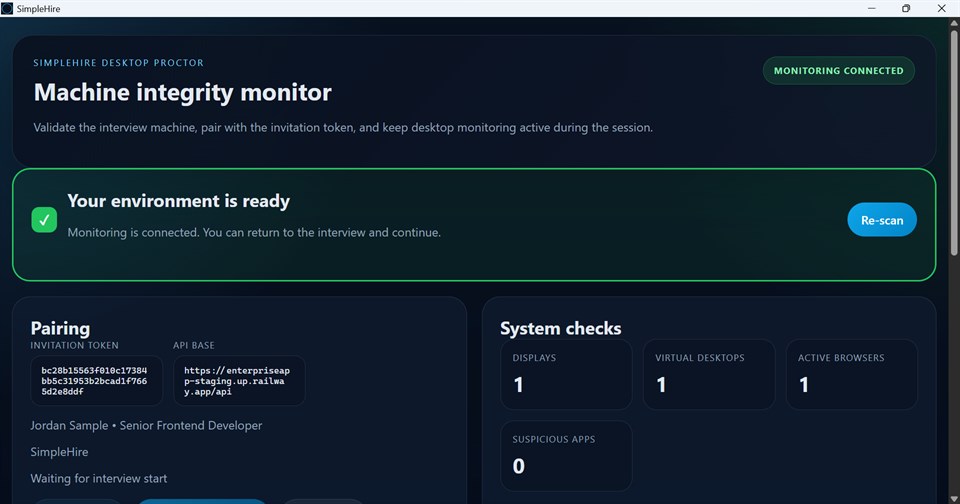
3. The app runs an environment check and shows you the result in plain language. If something needs fixing (for example, a screen-recording tool is open), it tells you what to close, and you re-run the check yourself.
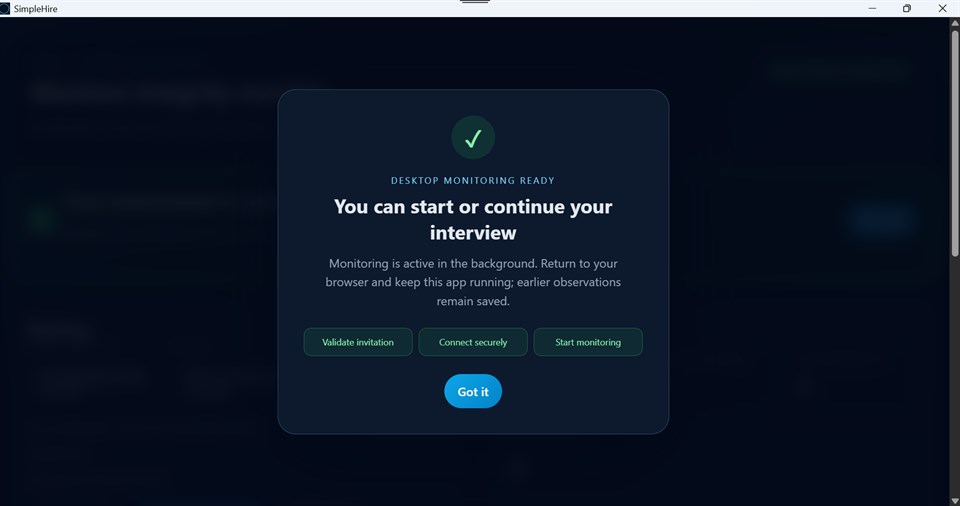
4. Once the check passes, you return to the browser and start the interview. The app keeps running quietly alongside it.
5. When the interview ends, the app stops monitoring and closes. Nothing is left running in the background.
Because the two are paired, they help each other. If your interview browser tab is closed by accident, this app tells you that your interview is still open and that you can reopen it within a few minutes and carry on. If monitoring drops out, the browser lets you know rather than silently failing the check.
WHAT THE APP CHECKS DURING AN INTERVIEW
While the interview is live, and only then, the app periodically reports:
• how many displays are connected, and whether an extra one appears
• how many virtual desktops exist
• whether more than one browser session has the interview open
• whether applications associated with screen sharing, remote control, virtual
cameras or AI assistants are running
• whether a physical keyboard and mouse are present (by device type only)
If the interview service specifically requests it, the app can take a single
screenshot as supporting evidence. This is always a response to an explicit
request — there is no continuous capture and no recording timer.
WHAT THE APP DOES NOT DO
This matters, so it is stated plainly:
• it does not record your keystrokes and contains no keylogger
• it does not read your documents, photos, emails or personal files
• it does not read your browsing history or the contents of other tabs
• it does not continuously record your screen, camera, microphone or audio
• it does not stay resident after the interview ends, and does not start with
Windows
• it does not track you between interviews or build a profile of you
• it does not decide anything about your application on its own
PRIVACY AND FAIRNESS
The app is only active for a scheduled interview you have been invited to and have consented to. Consent is given in the browser, before anything starts, on a screen that lists what is monitored. If you do not consent, the interview does not begin.
What the app sends is limited to the checks listed above, tied to that one
interview. It is sent over an encrypted connection to SimpleHire and made available to the employer who invited you.
Findings are recorded as neutral observations — "a second display was connected", not "this candidate cheated". They are context for a human reviewer. The app does not score you, does not rank you, and does not reject anyone. Every hiring decision is made by a person at the employer, who can see the observation and judge it. Many observations have ordinary explanations, and a recruiter is expected to weigh them as such.
You can close the app at any time. Doing so ends monitoring; your employer's rules decide what that means for the interview, and the app will tell you before you do it.
WHAT YOU NEED
• Windows 10 or Windows 11, 64-bit
• An interview invitation from an employer using SimpleHire
• A working camera, microphone and internet connection
• No account, no subscription, no payment. The app is free for candidates; the employer pays for SimpleHire.
FOR EMPLOYERS AND IT ADMINISTRATORS
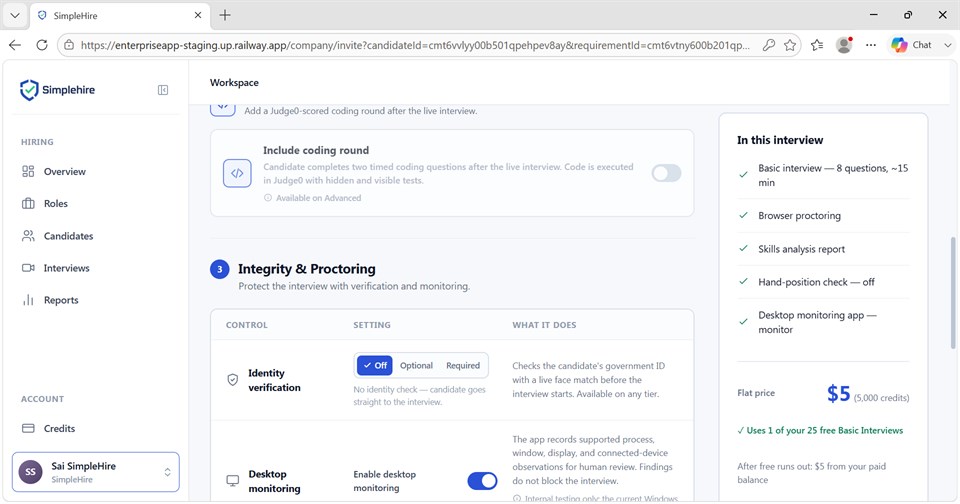
Desktop monitoring is optional and set per interview by the hiring team. Interviews can run with browser-based checks alone, with this app added, or with an optional second-device camera.
The app is a per-user install, needs no administrator rights, and makes no
system-wide changes. It communicates only with SimpleHire's own service, over HTTPS, and only while a paired interview is in progress. It installs no drivers, no services and no browser extensions.
FOR STORE REVIEWERS
Opening the app without an invitation is expected and safe: it shows an unpaired screen explaining that a pairing link is required, and does nothing else. It cannot be exercised meaningfully without an invitation, because it is bound to a scheduled interview. Please contact us at the support address below and we will provide a test interview and a disposable pairing link so the paired state can be reviewed end to end.
SUPPORT
Questions, problems or a privacy request: contact SimpleHire support through the support link on this listing. If you are in the middle of an interview and
something is not working, contact the hiring team who invited you — they can reset or reschedule your interview.
개발자 소식
개발자이신가요?
페이지 맨 위에 소식을 올리면 팔로워에게 이메일로 전달됩니다. YouTube 동영상을 추가하면 “동영상” 블록 맨 앞에 표시됩니다.
목록 0
-
 Simplehire
포인트 0
-

- +1 포인트

순위 0
-
- 내 평점
개발자 1
- Simplehire
- 팔로워: 0
- 플랫폼: Windows 앱 (1)
- 할인: 0
- 목록: 0 0
- 포인트: 0
- 순위: 0
- 댓글: 0
- 동영상: 0
- RSS: 구독
새로운 기능
- 버전: PC
- 마지막 업데이트:
추가 정보
 http://www.simplehire.ai/
AppAgg 점수
1,060
AppAgg 예상 점수:
Simplehire
개발자: Simplehire
1,060 실버
점수가 높을수록 대체로 AppAgg의 여러 지표에서 좋은 결과를 보인다는 뜻입니다.
기준: 인기 · 사용자 평점 · 최신성 · 할인 · 스토어 데이터 · 커뮤니티 활동
최신 AppAgg 데이터를 바탕으로 매일 다시 계산됩니다.
웹사이트용 배지:  복사됨!
댓글 0 ¡
가장 먼저 댓글을 남겨주세요
공유하기
Simplehire 단축 URL: 복사됨!- Windows Store


