
Dấu trang
| Nhà phát triển: | Simplehire (1) | ||
| Giá: | Miễn phí | ||
| Điểm tổng hợp: | 1.060 Bạc | ||
| Bảng xếp hạng: | 0 | ||
| Bình luận: | 0 Đăng bình luận | ||
| Danh sách: | 0 0 | ||
| Điểm: | 0 | ||
| +1 Điểm | |||
Tóm tắt
Simplehire là ứng dụng thuộc danh mục Công cụ cho nhà phát triển của Simplehire.
Ra mắt , vẫn còn khá nóng hổi.
Miễn phí, không quảng cáo, không mua hàng trong ứng dụng. Chỉ có bạn và ứng dụng.
Microsoft Store có sẵn trong Windows, nên cài chỉ mất vài cú nhấp.
Điểm tổng hợp AppAgg là 1.060. Hạng Bạc, vậy là không tệ chút nào.
Chỉ 2 megabyte, ổ đĩa đầy vẫn chứa vừa.
Xếp hạng độ tuổi “EVERYONE”, nên trẻ em cũng dùng được.
Chỉ biết một thứ tiếng, và đó không phải tiếng Việt.
Chưa ai trên AppAgg đánh giá. Cơ hội làm người đầu tiên là ngay bây giờ.
Đây là ứng dụng duy nhất của nhà phát triển trên AppAgg. Tạm thời là vậy.
Muốn biết sớm nhất về cập nhật và ứng dụng mới? Hãy theo dõi nhà phát triển hoặc đăng ký nguồn RSS. Thông báo đẩy được gửi qua ứng dụng AppAgg Alerts cho Android và iOS.
Nền tảng khác 0
Lịch sử giá 0
- Giá hiện tại: Miễn phí
- Tối thiểu: Miễn phí
- Tối đa: Miễn phí
Bảng tin riêng của bạn trên trang chủ
Ảnh chụp màn hình 9
Mô tả

SimpleHire is a companion app. It does nothing on its own, and there is
nothing to sign up for here. You only need it if an employer has invited you to a SimpleHire interview and asked for desktop monitoring. Everything else — your interview, your questions, your answers — happens in your web browser.
WHAT SIMPLEHIRE IS TRYING TO DO
Hiring teams receive far more applicants than they can interview in person, so
first-round interviews have moved online. That created a fairness problem in both directions. Employers cannot tell whether an online interview reflects the
candidate's own ability. Candidates who prepare honestly end up competing against people who did not, and get no credit for having done it properly.
SimpleHire runs a structured, AI-led first-round interview in the browser and
gives the employer a clear, evidence-backed summary. SimpleHire Desktop App is the part that makes that summary trustworthy — so that a genuine candidate's result stands up, and an employer can rely on it.
HOW THE WEB APP AND THIS DESKTOP APP WORK TOGETHER
Think of them as two halves of one interview.
The web app (the interview portal, in your browser) is where the interview
actually happens:
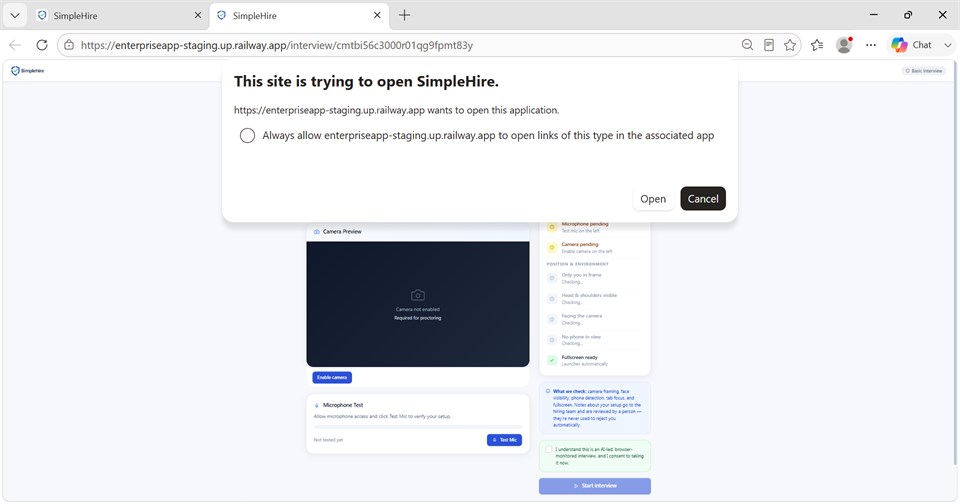
• you open the invitation link your employer emailed you
• you read and accept a consent screen that explains exactly what is monitored
• you check your camera and microphone
• you talk with the AI interviewer and answer its questions
• you see your progress, and when it is finished
This desktop app is the part your browser cannot do. A web page can only see itself. It cannot tell whether a second monitor is attached, whether a
screen-sharing tool is running behind it, or whether the interview has been moved onto another virtual desktop. Those checks need to run on the computer itself.
That is the app's entire job.
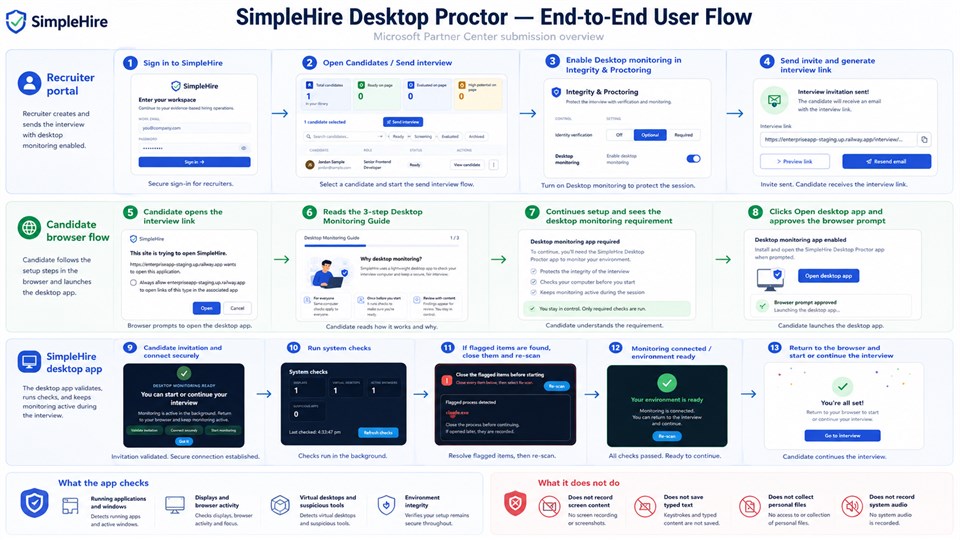
The two are joined by a one-time pairing link:
1. In the browser, on the setup screen, you select "Open SimpleHire Proctor".
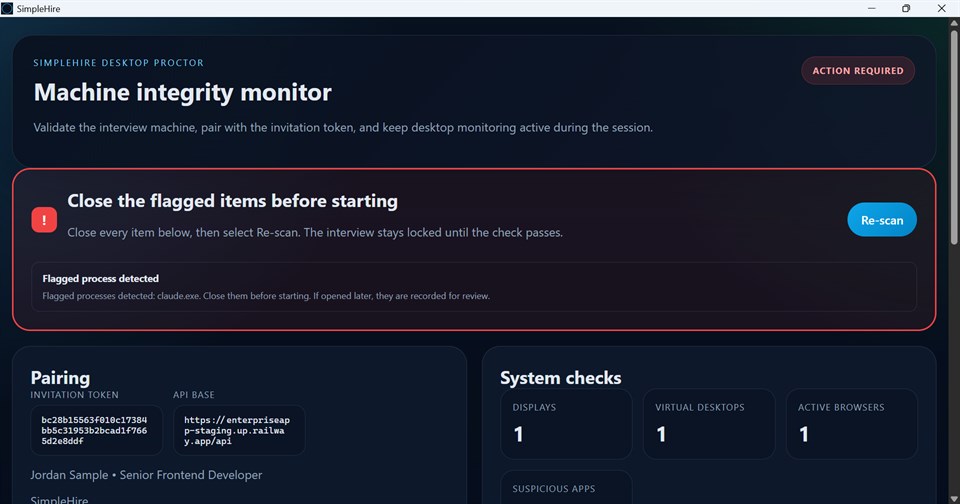
2. Windows opens this app and pairs it to that single interview session. You do not type a password or create an account — the link carries a token that is
valid only for your interview.
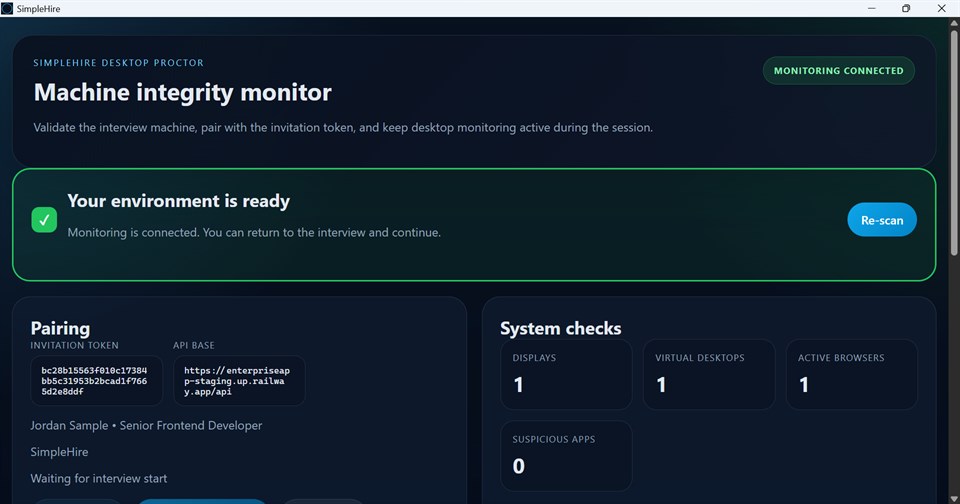
3. The app runs an environment check and shows you the result in plain language. If something needs fixing (for example, a screen-recording tool is open), it tells you what to close, and you re-run the check yourself.
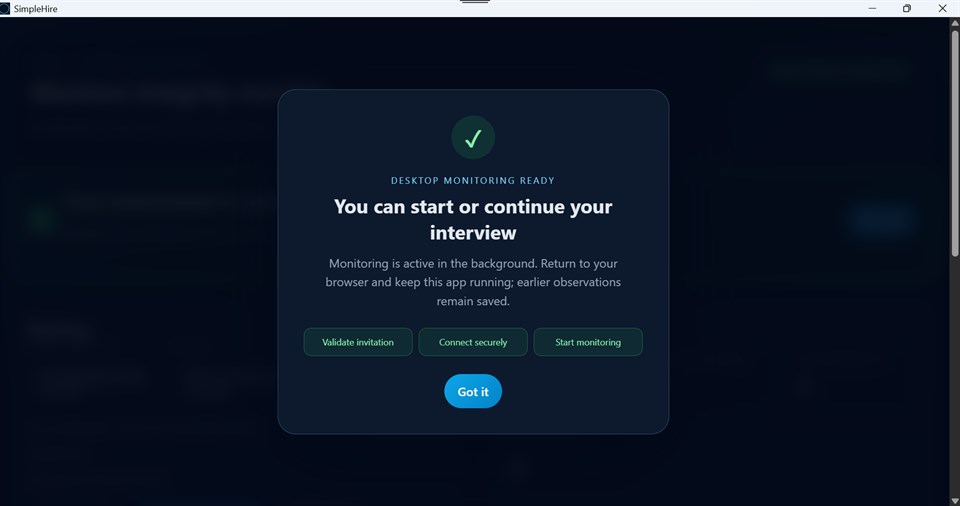
4. Once the check passes, you return to the browser and start the interview. The app keeps running quietly alongside it.
5. When the interview ends, the app stops monitoring and closes. Nothing is left running in the background.
Because the two are paired, they help each other. If your interview browser tab is closed by accident, this app tells you that your interview is still open and that you can reopen it within a few minutes and carry on. If monitoring drops out, the browser lets you know rather than silently failing the check.
WHAT THE APP CHECKS DURING AN INTERVIEW
While the interview is live, and only then, the app periodically reports:
• how many displays are connected, and whether an extra one appears
• how many virtual desktops exist
• whether more than one browser session has the interview open
• whether applications associated with screen sharing, remote control, virtual
cameras or AI assistants are running
• whether a physical keyboard and mouse are present (by device type only)
If the interview service specifically requests it, the app can take a single
screenshot as supporting evidence. This is always a response to an explicit
request — there is no continuous capture and no recording timer.
WHAT THE APP DOES NOT DO
This matters, so it is stated plainly:
• it does not record your keystrokes and contains no keylogger
• it does not read your documents, photos, emails or personal files
• it does not read your browsing history or the contents of other tabs
• it does not continuously record your screen, camera, microphone or audio
• it does not stay resident after the interview ends, and does not start with
Windows
• it does not track you between interviews or build a profile of you
• it does not decide anything about your application on its own
PRIVACY AND FAIRNESS
The app is only active for a scheduled interview you have been invited to and have consented to. Consent is given in the browser, before anything starts, on a screen that lists what is monitored. If you do not consent, the interview does not begin.
What the app sends is limited to the checks listed above, tied to that one
interview. It is sent over an encrypted connection to SimpleHire and made available to the employer who invited you.
Findings are recorded as neutral observations — "a second display was connected", not "this candidate cheated". They are context for a human reviewer. The app does not score you, does not rank you, and does not reject anyone. Every hiring decision is made by a person at the employer, who can see the observation and judge it. Many observations have ordinary explanations, and a recruiter is expected to weigh them as such.
You can close the app at any time. Doing so ends monitoring; your employer's rules decide what that means for the interview, and the app will tell you before you do it.
WHAT YOU NEED
• Windows 10 or Windows 11, 64-bit
• An interview invitation from an employer using SimpleHire
• A working camera, microphone and internet connection
• No account, no subscription, no payment. The app is free for candidates; the employer pays for SimpleHire.
FOR EMPLOYERS AND IT ADMINISTRATORS
Desktop monitoring is optional and set per interview by the hiring team. Interviews can run with browser-based checks alone, with this app added, or with an optional second-device camera.
The app is a per-user install, needs no administrator rights, and makes no
system-wide changes. It communicates only with SimpleHire's own service, over HTTPS, and only while a paired interview is in progress. It installs no drivers, no services and no browser extensions.
FOR STORE REVIEWERS
Opening the app without an invitation is expected and safe: it shows an unpaired screen explaining that a pairing link is required, and does nothing else. It cannot be exercised meaningfully without an invitation, because it is bound to a scheduled interview. Please contact us at the support address below and we will provide a test interview and a disposable pairing link so the paired state can be reviewed end to end.
SUPPORT
Questions, problems or a privacy request: contact SimpleHire support through the support link on this listing. If you are in the middle of an interview and
something is not working, contact the hiring team who invited you — they can reset or reschedule your interview.
Từ nhà phát triển
Danh sách 0
-
 Simplehire
Điểm 0
-

- +1 Điểm

Bảng xếp hạng 0
-
- Điểm bạn chấm
Nhà phát triển 1
- Simplehire
- Người theo dõi: 0
- Nền tảng: Windows Ứng dụng (1)
- Giảm giá: 0
- Danh sách: 0 0
- Điểm: 0
- Bảng xếp hạng: 0
- Bình luận: 0
- Video: 0
- RSS: Đăng ký
Tính năng mới
- Phiên bản: PC
- Cập nhật lần cuối:
Thông tin bổ sung
- Ngày phát hành:
- Danh mục:
Ứng dụng cho Windows›Công cụ cho nhà phát triển - HĐH:
PC - Kích thước:
2 Mb - Các tính năng hiện có:
Mixed reality - Ngôn ngữ được hỗ trợ:
Tiếng Anh - Xếp hạng nội dung:
EVERYONE - Windows Store Điểm đánh giá: ¡
0 - Trang web:
 http://www.simplehire.ai/
Điểm tổng hợp AppAgg
Điểm tổng hợp AppAgg ước tính cho
Simplehire
Nhà phát triển: Simplehire
Điểm cao hơn thường cho thấy các chỉ số trên AppAgg tốt hơn.
Dựa trên: độ phổ biến · đánh giá của người dùng · độ mới · ưu đãi · dữ liệu cửa hàng · hoạt động cộng đồng
Được tính lại hằng ngày từ dữ liệu AppAgg mới nhất.
Bình luận 0 ¡
Chia sẻ
Simplehire URL ngắn: Đã sao chép!- Windows Store

