
북마크
이 북마크의 제목을 입력하세요.
북마크가 저장되었습니다
요약
소개합니다. JerryWang에서 만든 ‘개발자 도구’ 카테고리 앱, SinceArc.
새로 나온 앱이에요. 에 나왔으니 지금 써 보면 얼리어답터예요.
무료. 광고도 인앱 구매도 없어요. 앱에만 집중하면 돼요.
Microsoft Store는 Windows에 기본으로 들어 있어서 클릭 몇 번이면 설치돼요.
AppAgg 점수는 560. 지금은 브론즈 등급이지만, 성장할 여지가 충분해요.
겨우 4메가바이트. 꽉 찬 드라이브에도 쏙 들어가요.
연령 등급은 ‘EVERYONE’, 아이들에게도 괜찮아요.
2개 언어를 지원하지만, 한국어는 아직 없어요.
AppAgg에서는 아직 아무도 평가하지 않았어요. 첫 번째가 될 기회는 바로 지금이에요.
AppAgg에 있는 이 개발자의 유일한 앱이에요. 아직까지는요.
업데이트와 새 앱 소식을 가장 먼저 받고 싶나요? 개발자를 팔로우하거나 RSS 피드를 구독하세요. 푸시 알림은 Android와 iOS용 AppAgg Alerts 앱으로 받을 수 있어요.
광고
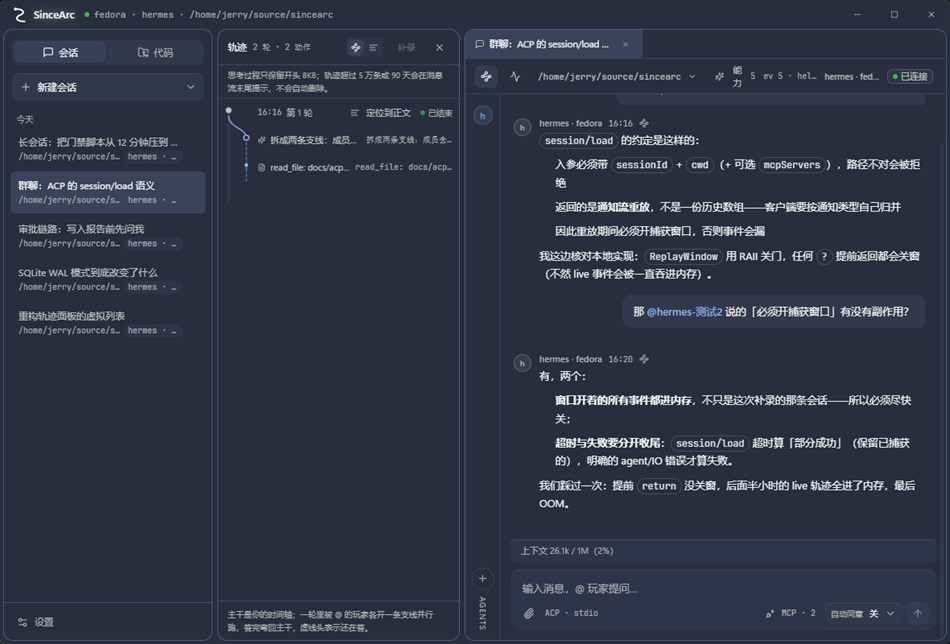
스크린샷 1
다른 플랫폼 0
가격 기록 0
- 현재 가격: 무료
- 최소: 무료
- 최대: 무료
홈 화면의 나만의 피드
“신규 및 업데이트” 피드의 플랫폼을 선택하면 홈 화면에 필요한 앱과 게임만 표시됩니다.
설명

Running one agent in a terminal is fine. Running four — a planner, a coder, a reviewer, plus the one you started yesterday and forgot the working directory of — is not: context gets copied between windows and nobody can say who is doing what. SinceArc puts them on one timeline: one set of sessions, one set of profiles, one place to answer "what is everyone doing right now".
Many agents, one place to manage them A profile describes one agent launch — this machine, a WSL distro, or a host over SSH — with its own working directory, environment and MCP servers. Switching agents means switching sessions, not terminal windows.
Group chat Add agents as members of a session and @ one. It runs in parallel on its own branch, merges back into the trunk when it answers, and its messages stay attributable to it. Working with several agents feels like one conversation instead of four window switches.
One trace per session Each session keeps a trace of what every member did, filterable by member — read just the reviewer's tool calls, or the whole picture.
The rest lives in the same window Approvals, MCP servers and storage are managed there too, instead of in five shell configs. Each agent's own / commands are discovered automatically and kept per session, so the menu follows the agent you are addressing. Chinese and English UI, light and dark themes, separate code colour themes.
Your data stays on your machine Sessions, messages and traces are written to a single local SQLite file. Nothing is uploaded, nothing is synced, there is no telemetry. Delete the file and it is gone.
What you need first SinceArc ships no model of its own. You need an agent that speaks ACP (Agent Client Protocol) — for example hermes-agent — installed and configured as a launch profile. Without one, the app stops at "connect an agent"; that is expected behaviour, not a failure.
개발자 소식
개발자이신가요?
페이지 맨 위에 소식을 올리면 팔로워에게 이메일로 전달됩니다. YouTube 동영상을 추가하면 “동영상” 블록 맨 앞에 표시됩니다.
목록 0
-
 SinceArc
포인트 0
-

- +1 포인트

순위 0
-
- 내 평점
새로운 기능
- 버전: PC
- 마지막 업데이트:
추가 정보
 https://sincearc.com
댓글 0 ¡
가장 먼저 댓글을 남겨주세요
AppAgg 점수
560
AppAgg 예상 점수:
SinceArc
개발자: JerryWang
560 브론즈
점수가 높을수록 대체로 AppAgg의 여러 지표에서 좋은 결과를 보인다는 뜻입니다.
기준: 인기 · 사용자 평점 · 최신성 · 할인 · 스토어 데이터 · 커뮤니티 활동
최신 AppAgg 데이터를 바탕으로 매일 다시 계산됩니다.
웹사이트용 배지:  복사됨!
SinceArc 단축 URL: 복사됨!- Windows Store


