
บุ๊กมาร์ก
| ผู้พัฒนา: | JerryWang (1) | ||
| ราคา: | ฟรี ใหม่ | ||
| คะแนน: | 560 บรอนซ์ | ||
| การจัดอันดับ: | 0 | ||
| ความคิดเห็น: | 0 โพสต์ความคิดเห็น | ||
| รายการ: | 0 0 | ||
| แต้ม: | 0 | ||
| +1 แต้ม | |||
สรุป
มาทำความรู้จัก SinceArc แอปในหมวด “เครื่องมือสำหรับนักพัฒนา” จาก JerryWang
มาใหม่ ออกเมื่อ คุณได้เป็นหนึ่งในคนกลุ่มแรก
ฟรี ไม่มีโฆษณา ไม่มีการซื้อภายในแอป มีแค่คุณกับแอป
Microsoft Store มีมาในตัว Windows อยู่แล้ว ติดตั้งได้ในไม่กี่คลิก
คะแนน AppAgg คือ 560 ตอนนี้อยู่ระดับ “บรอนซ์” ยังไปได้อีกไกล
แค่ 4 เมกะไบต์ ต่อให้ไดรฟ์เต็มก็ยังลงได้
จัดเรต “EVERYONE” เหมาะกับเด็ก ๆ ด้วย
รองรับ 2 ภาษา แต่ยังไม่มีภาษาไทย
ยังไม่มีใครบน AppAgg ให้คะแนนเลย โอกาสเป็นคนแรกอยู่ตรงนี้แล้ว
เป็นแอปเดียวของผู้พัฒนารายนี้บน AppAgg อย่างน้อยก็ตอนนี้
อยากรู้เรื่องอัปเดตและแอปใหม่ก่อนใครไหม? ติดตาม ผู้พัฒนา หรือกดติดตาม ฟีด RSS ได้เลย การแจ้งเตือนแบบพุชส่งผ่านแอป AppAgg Alerts สำหรับ Android และ iOS
ภาพหน้าจอ 1
แพลตฟอร์มอื่น 0
ประวัติราคา 0
- ราคาปัจจุบัน: ฟรี
- ต่ำสุด: ฟรี
- สูงสุด: ฟรี
ฟีดของคุณเองบนหน้าแรก
คำอธิบาย

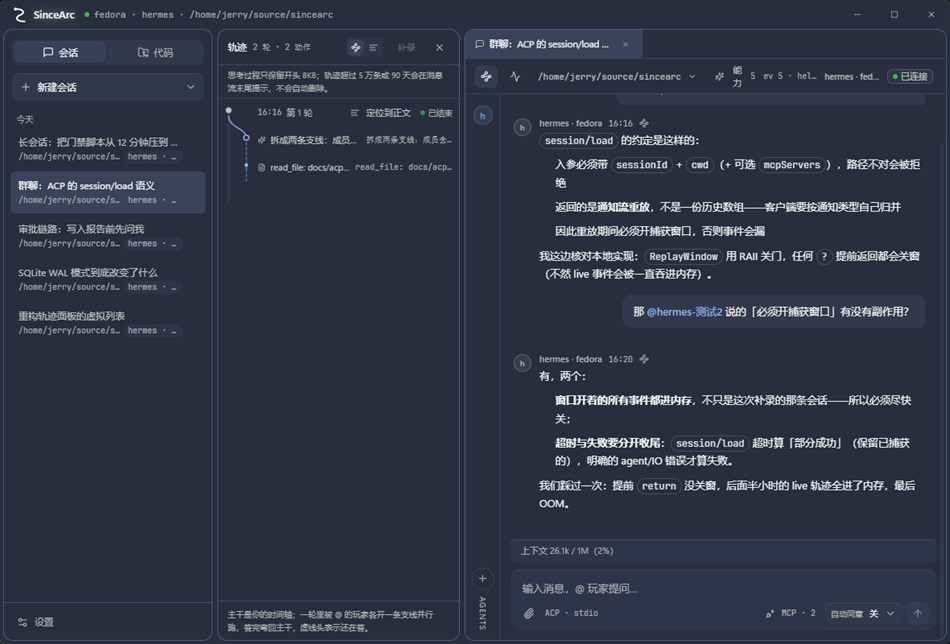
Running one agent in a terminal is fine. Running four — a planner, a coder, a reviewer, plus the one you started yesterday and forgot the working directory of — is not: context gets copied between windows and nobody can say who is doing what. SinceArc puts them on one timeline: one set of sessions, one set of profiles, one place to answer "what is everyone doing right now".
Many agents, one place to manage them A profile describes one agent launch — this machine, a WSL distro, or a host over SSH — with its own working directory, environment and MCP servers. Switching agents means switching sessions, not terminal windows.
Group chat Add agents as members of a session and @ one. It runs in parallel on its own branch, merges back into the trunk when it answers, and its messages stay attributable to it. Working with several agents feels like one conversation instead of four window switches.
One trace per session Each session keeps a trace of what every member did, filterable by member — read just the reviewer's tool calls, or the whole picture.
The rest lives in the same window Approvals, MCP servers and storage are managed there too, instead of in five shell configs. Each agent's own / commands are discovered automatically and kept per session, so the menu follows the agent you are addressing. Chinese and English UI, light and dark themes, separate code colour themes.
Your data stays on your machine Sessions, messages and traces are written to a single local SQLite file. Nothing is uploaded, nothing is synced, there is no telemetry. Delete the file and it is gone.
What you need first SinceArc ships no model of its own. You need an agent that speaks ACP (Agent Client Protocol) — for example hermes-agent — installed and configured as a launch profile. Without one, the app stops at "connect an agent"; that is expected behaviour, not a failure.
จากนักพัฒนา
ผู้พัฒนา
- JerryWang
- ผู้ติดตาม: 0
- แพลตฟอร์ม: Windows แอป (1)
- ลดราคา: 0
- รายการ: 0 0
- แต้ม: 0
- การจัดอันดับ: 0
- ความคิดเห็น: 0
- วิดีโอ: 0
- RSS: ติดตาม
รายการ 0
-
 SinceArc
แต้ม 0
-

- +1 แต้ม

การจัดอันดับ 0
-
- คะแนนของคุณ
มีอะไรใหม่
- เวอร์ชัน: PC
- อัปเดตล่าสุด:
ข้อมูลเพิ่มเติม
- วันที่วางจำหน่าย:
- หมวดหมู่:
แอปสำหรับ Windows›เครื่องมือสำหรับนักพัฒนา - ระบบปฏิบัติการ:
PC - ขนาด:
4 Mb - ภาษาที่รองรับ:
จีน,อังกฤษ - การจัดประเภทเนื้อหา:
EVERYONE - Windows Store คะแนน: ¡
0 - เว็บไซต์:
 https://sincearc.com
ความคิดเห็น 0 ¡
คะแนน AppAgg
คะแนน AppAgg โดยประมาณของ
SinceArc
ผู้พัฒนา: JerryWang
คะแนนที่สูงขึ้นมักสะท้อนตัวชี้วัดที่ดีกว่าบน AppAgg
อิงจาก: ความนิยม · คะแนนจากผู้ใช้ · ความสดใหม่ · ดีล · ข้อมูลร้านค้า · กิจกรรมชุมชน
คำนวณใหม่ทุกวันจากข้อมูล AppAgg ล่าสุด
SinceArc URL แบบสั้น: คัดลอกแล้ว!- Windows Store

