
북마크
이 북마크의 제목을 입력하세요.
북마크가 저장되었습니다
요약
SnapSSH.ai: Mocoplex에서 만든 ‘개발자 도구’ 카테고리의 앱이에요.
에 출시됐어요. 아직 꽤 따끈따끈해요.
Google Play 및 App Store에도 있어요. 편한 곳을 고르세요.
입장은 무료지만, 안에 상점이 열려 있어요.
Microsoft Store는 Windows에 기본으로 들어 있어서 클릭 몇 번이면 설치돼요.
AppAgg 점수는 970. 실버 등급, 이 정도면 꽤 괜찮아요.
연령 등급은 ‘EVERYONE’, 아이들에게도 괜찮아요.
9개 언어를 지원하고, 한국어도 있어요.
사용해 보셨나요? 여기서 첫 리뷰의 주인공이 되어 주세요.
이 개발자의 게임 1개와 앱 20개가 AppAgg에 더 있어요. 한번 둘러보세요.
업데이트와 새 앱 소식을 가장 먼저 받고 싶나요? 개발자를 팔로우하거나 RSS 피드를 구독하세요. 푸시 알림은 Android와 iOS용 AppAgg Alerts 앱으로 받을 수 있어요.
광고
다른 플랫폼 2


가격 기록 0
- 현재 가격: 무료
- 최소: 무료
- 최대: 무료
홈 화면의 나만의 피드
“신규 및 업데이트” 피드의 플랫폼을 선택하면 홈 화면에 필요한 앱과 게임만 표시됩니다.
스크린샷 6
설명

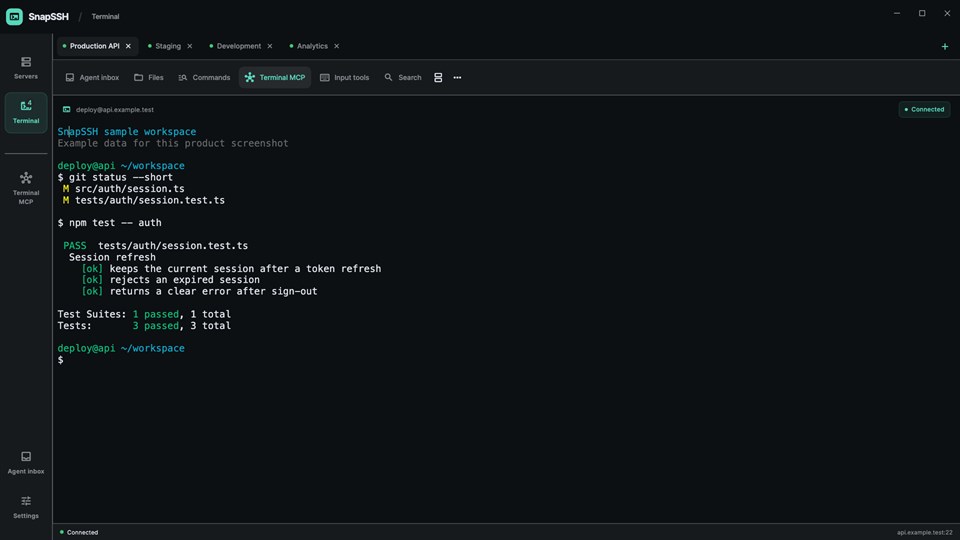
Search the terminal grid with case, whole-word and regular-expression options and highlighted matches. Review potentially unsafe multiline pastes before sending, and copy the last command output. Choose cursor shape and blinking, bell feedback and scrollback capacity, and see background-tab output indicators. Prompt marks use Enter input unless a compatible shell reports exact boundaries and exit status through OSC 133; marks alone do not prove success. Reconnect retains locally available display history, not a guarantee that remote processes survived. Use tmux for persistent remote work.
WINDOWS TERMINAL CONTROLS
Use a Windows-friendly keymap, cursor and selection behavior. Optional local IME composition displays composing text locally and sends committed text only. Drop files into the terminal for SFTP upload or local path insertion.
See agent status and resume existing tmux sessions safely.
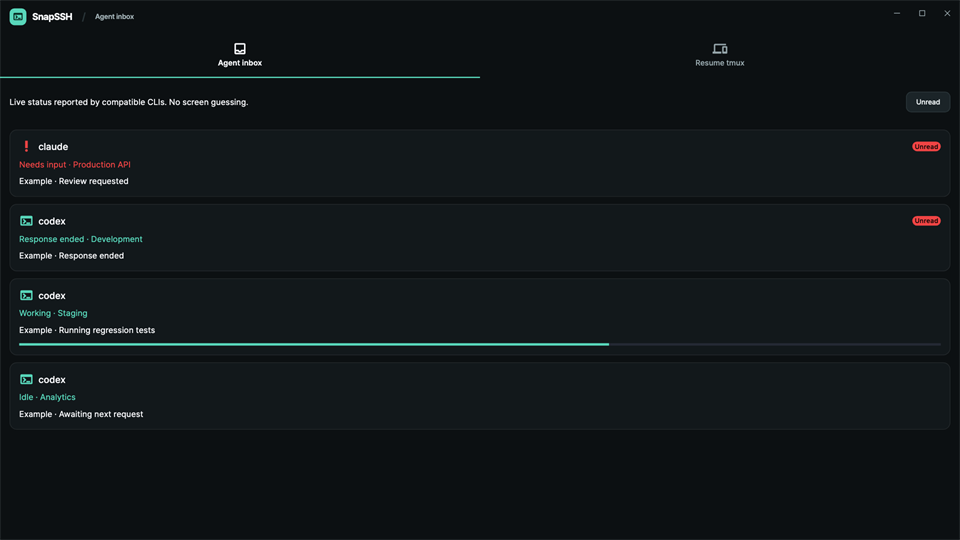
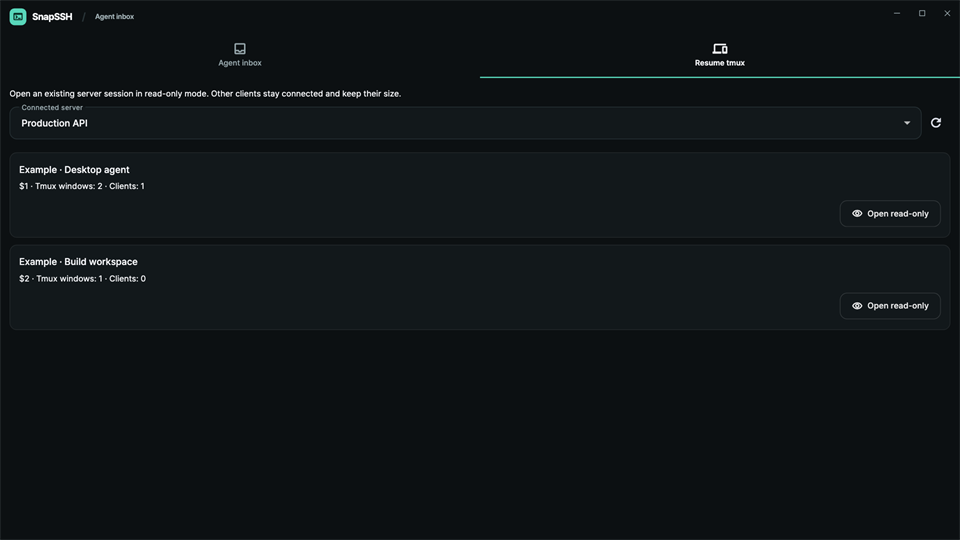
AGENT INBOX AND TMUX HANDOFF
See needs-input, working, response-ended and progress updates reported directly by compatible CLIs through OSC 7501. Filter unread updates and open the exact terminal. SnapSSH does not guess completion from screen text or silence.
Discover existing tmux sessions on a connected SSH server and open read-only by default. A separate control tab requires confirmation; other clients stay connected and keep their size. Missing targets never start a replacement task. Status requires compatible programs and PTYs that forward these events. Device-to-device status and unread synchronization are not included.
YOUR TERMINAL, WITH OPTIONAL EXTERNAL AI CONTROL
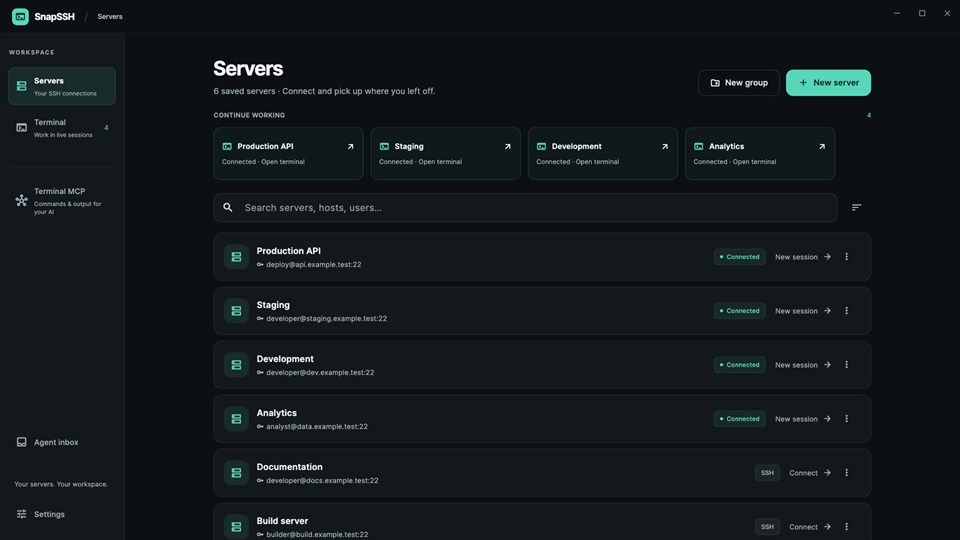
SnapSSH.ai is a Windows workspace for SSH terminals, SFTP file tools and Terminal MCP connections. Save servers, open independent terminals to the same host, use tabs and split panes, search output and keep favorite commands close at hand. Run tools already installed on your SSH server. Your current directory and running programs stay in that terminal session.
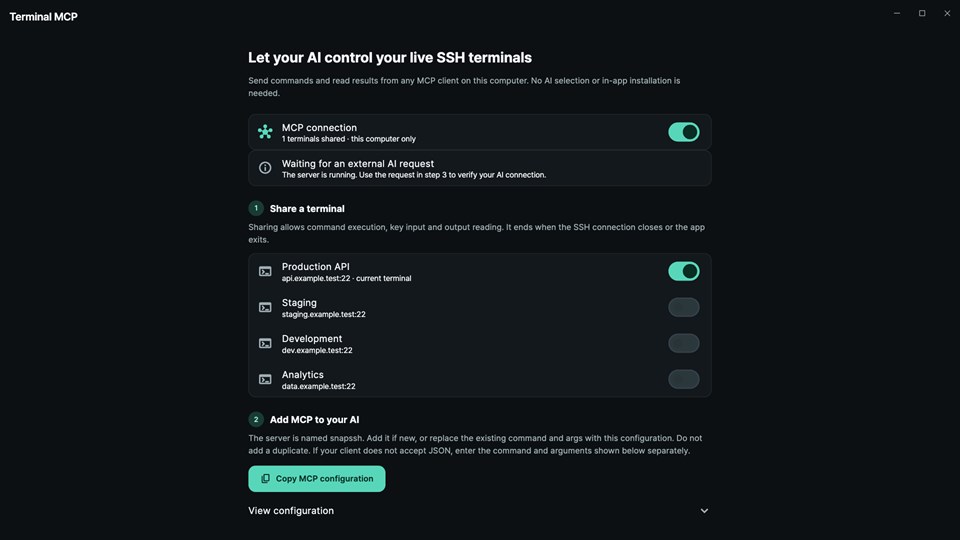
Connect to SSH, explicitly share a terminal in Terminal MCP, and copy the MCP configuration into a trusted external client on this PC. The client can list shared terminals, send commands and keys, read output and wait for new output. Read-only terminals reject input and MCP control. Stop sharing or disconnect SSH to revoke access.
The bridge uses an authenticated loopback connection on this PC, not a public Internet server. A connected client can act with the shared terminal's privileges and read its output, so connect only clients you trust. The bundled stable MCP launcher does not require a separate Dart SDK.
REMOTE FILES AND A WORKSPACE THAT FITS
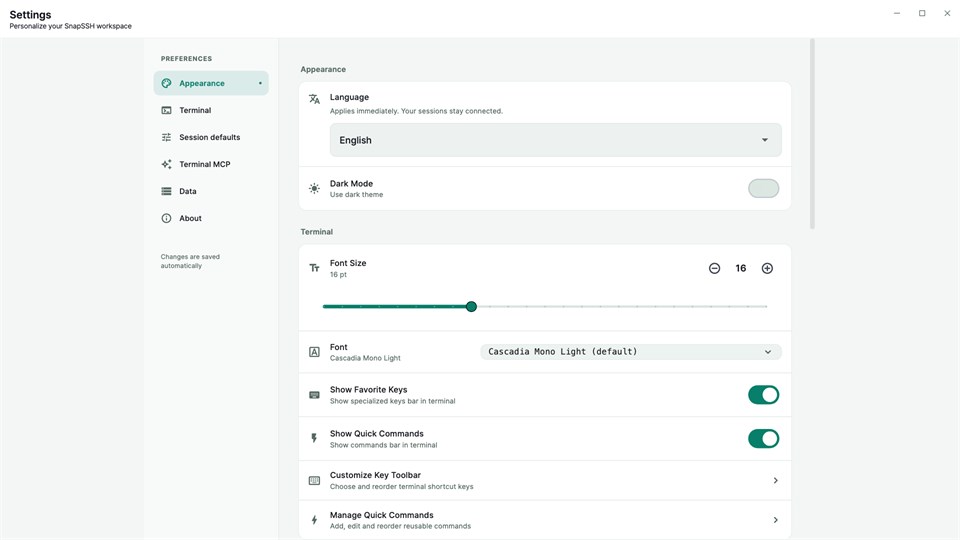
Browse and transfer files over SFTP and edit supported remote text files. Transfer progress and unsaved changes remain visible. Choose light or dark mode, terminal color themes and fonts, quick commands and snippets. Use English, Korean, Japanese, Simplified or Traditional Chinese, Spanish, French, German, Portuguese or Arabic.
REQUIREMENTS
An SSH server and your own access credentials are required for remote connections. SnapSSH does not require a SnapSSH account and does not include an AI model or AI subscription. External clients and server-side AI tools may require their own installation, accounts and usage fees. Output shared with an external AI is subject to that service's data policies. A command dispatch receipt or output wait ending is not proof of success. Automatic synchronization of device-local history is not included.
개발자 소식
개발자이신가요?
페이지 맨 위에 소식을 올리면 팔로워에게 이메일로 전달됩니다. YouTube 동영상을 추가하면 “동영상” 블록 맨 앞에 표시됩니다.
목록 0
-
 SnapSSH.ai
포인트 0
-

- +1 포인트

순위 0
-
- 내 평점
개발자 22
새로운 기능
- 버전: PC
- 마지막 업데이트:
- 2.2.4 maintenance update
• Fixed split view sometimes opening a new terminal without creating the split.
• Authentication prompts remain available after the connection picker closes.
• Refreshed Windows x64 and ARM64 packages from the latest release source.
버전 기록2
- New in 2.2.2
• Agent inbox with explicitly reported status, progress and unread filtering.
• Discover existing server tmux sessions and open read-only.
• Confirm a separate control tab while preserving other clients and their size.
• Block input and MCP control for read-only terminals.
• Preserve the exact target and monitor mode across clone/reconnect.
• Ten-language and narrow/large-text layout improvements. - Version 2.2.1
Open multiple independent terminals to the same SSH host in tabs or split panes. Numbered session names make matching hosts easier to distinguish. Existing terminals can still be resumed from Continue Working. Persistent-session reconnects keep their original workspace, and MCP sharing stays separate for each terminal.
추가 정보
 https://ja0.com/snapssh
AppAgg 점수
970
AppAgg 예상 점수:
SnapSSH.ai
개발자: Mocoplex
970 실버
점수가 높을수록 대체로 AppAgg의 여러 지표에서 좋은 결과를 보인다는 뜻입니다.
기준: 인기 · 사용자 평점 · 최신성 · 할인 · 스토어 데이터 · 커뮤니티 활동
최신 AppAgg 데이터를 바탕으로 매일 다시 계산됩니다.
웹사이트용 배지:  복사됨!
댓글 0 ¡
가장 먼저 댓글을 남겨주세요
공유하기
SnapSSH.ai 단축 URL: 복사됨!- Windows Store


