
บุ๊กมาร์ก
| ผู้พัฒนา: | Mocoplex (22) | ||
| ราคา: | * ฟรี | ||
| คะแนน: | 970 เงิน | ||
| การจัดอันดับ: | 0 | ||
| ความคิดเห็น: | 0 โพสต์ความคิดเห็น | ||
| รายการ: | 0 0 | ||
| แต้ม: | 0 | ||
| +1 แต้ม | |||
สรุป
SnapSSH.ai เป็นแอปในหมวด “เครื่องมือสำหรับนักพัฒนา” จาก Mocoplex
ออกเมื่อ ยังสดใหม่อยู่เลย
มีบน Google Play และApp Store ด้วย เลือกที่ที่สะดวกได้เลย
เข้าฟรี แต่ร้านค้าข้างในเปิดอยู่นะ
Microsoft Store มีมาในตัว Windows อยู่แล้ว ติดตั้งได้ในไม่กี่คลิก
คะแนน AppAgg คือ 970 ระดับ “เงิน” ถือว่าไม่เลวเลย
จัดเรต “EVERYONE” เหมาะกับเด็ก ๆ ด้วย
รองรับ 9 ภาษา แต่ยังไม่มีภาษาไทย
เคยใช้แล้วเหรอ? รีวิวของคุณจะเป็นรีวิวแรกที่นี่
ผู้พัฒนารายนี้มีเกมอื่นอีก 1 เกม และแอปอีก 20 แอปบน AppAgg ลองไปดูกัน
อยากรู้เรื่องอัปเดตและแอปใหม่ก่อนใครไหม? ติดตาม ผู้พัฒนา หรือกดติดตาม ฟีด RSS ได้เลย การแจ้งเตือนแบบพุชส่งผ่านแอป AppAgg Alerts สำหรับ Android และ iOS
แพลตฟอร์มอื่น 2
 | SnapSSH.aiWindows Store970 เงินWindowsการซื้อภายในแอป | ฟรี |
 | SnapSSH.aiGoogle Play610 บรอนซ์Android | ฟรี |
 | SnapSSH.aiApp Store810 บรอนซ์iPhoneiPadmacOS | ฟรี |
ประวัติราคา 0
- ราคาปัจจุบัน: ฟรี
- ต่ำสุด: ฟรี
- สูงสุด: ฟรี
ฟีดของคุณเองบนหน้าแรก
ภาพหน้าจอ 6
คำอธิบาย
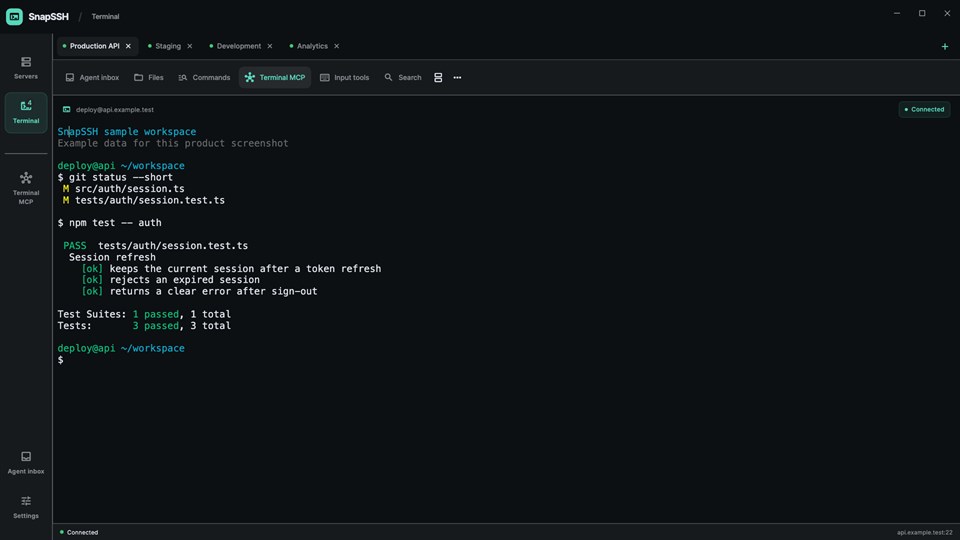
Search the terminal grid with case, whole-word and regular-expression options and highlighted matches. Review potentially unsafe multiline pastes before sending, and copy the last command output. Choose cursor shape and blinking, bell feedback and scrollback capacity, and see background-tab output indicators. Prompt marks use Enter input unless a compatible shell reports exact boundaries and exit status through OSC 133; marks alone do not prove success. Reconnect retains locally available display history, not a guarantee that remote processes survived. Use tmux for persistent remote work.
WINDOWS TERMINAL CONTROLS
Use a Windows-friendly keymap, cursor and selection behavior. Optional local IME composition displays composing text locally and sends committed text only. Drop files into the terminal for SFTP upload or local path insertion.
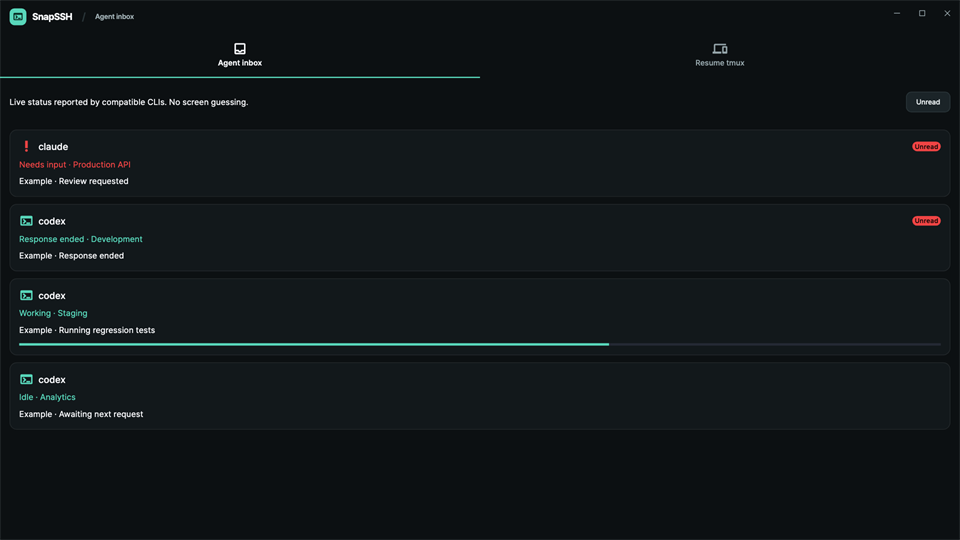
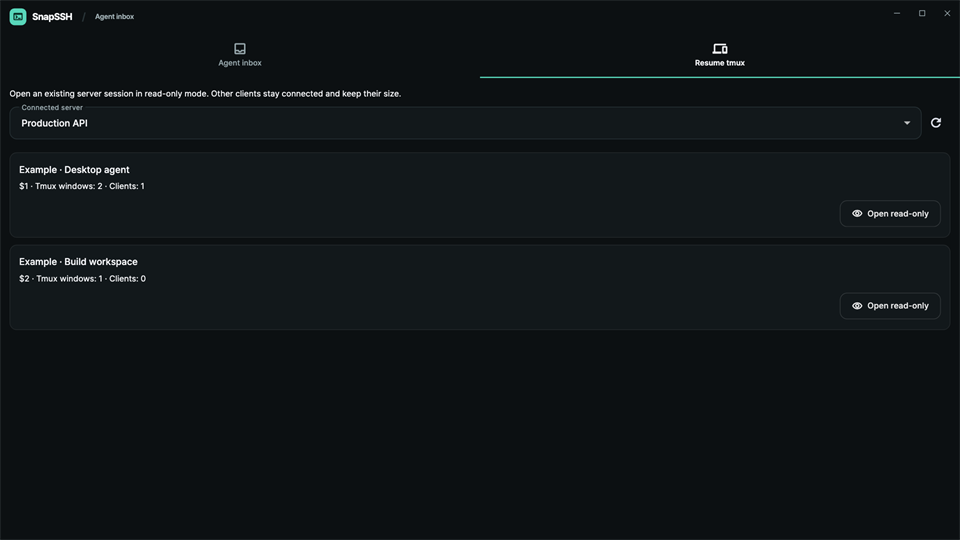
See agent status and resume existing tmux sessions safely.
AGENT INBOX AND TMUX HANDOFF
See needs-input, working, response-ended and progress updates reported directly by compatible CLIs through OSC 7501. Filter unread updates and open the exact terminal. SnapSSH does not guess completion from screen text or silence.
Discover existing tmux sessions on a connected SSH server and open read-only by default. A separate control tab requires confirmation; other clients stay connected and keep their size. Missing targets never start a replacement task. Status requires compatible programs and PTYs that forward these events. Device-to-device status and unread synchronization are not included.
YOUR TERMINAL, WITH OPTIONAL EXTERNAL AI CONTROL
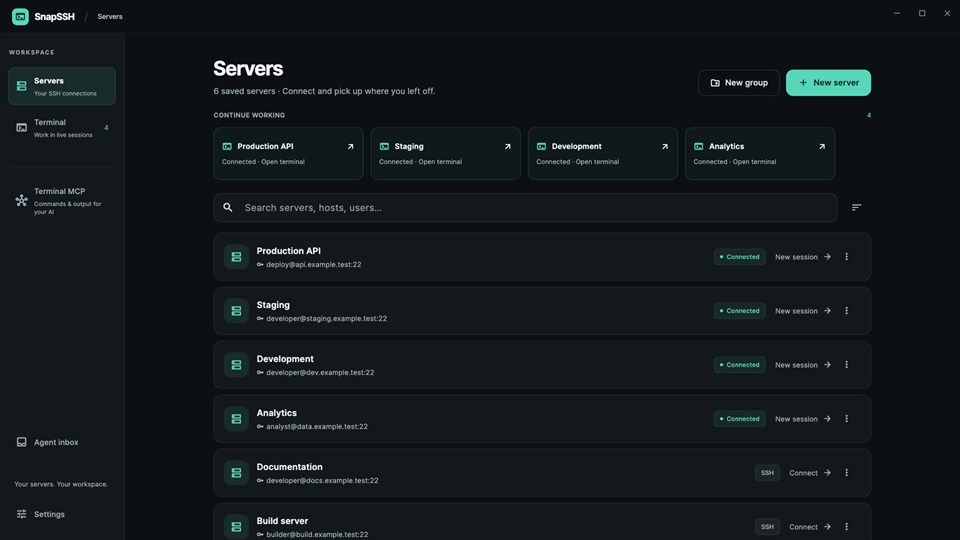
SnapSSH.ai is a Windows workspace for SSH terminals, SFTP file tools and Terminal MCP connections. Save servers, open independent terminals to the same host, use tabs and split panes, search output and keep favorite commands close at hand. Run tools already installed on your SSH server. Your current directory and running programs stay in that terminal session.
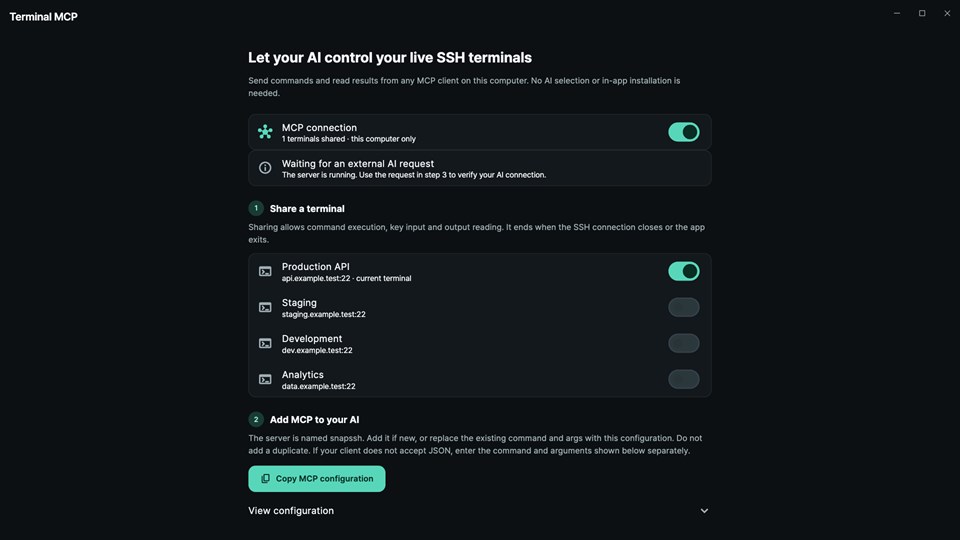
Connect to SSH, explicitly share a terminal in Terminal MCP, and copy the MCP configuration into a trusted external client on this PC. The client can list shared terminals, send commands and keys, read output and wait for new output. Read-only terminals reject input and MCP control. Stop sharing or disconnect SSH to revoke access.
The bridge uses an authenticated loopback connection on this PC, not a public Internet server. A connected client can act with the shared terminal's privileges and read its output, so connect only clients you trust. The bundled stable MCP launcher does not require a separate Dart SDK.
REMOTE FILES AND A WORKSPACE THAT FITS
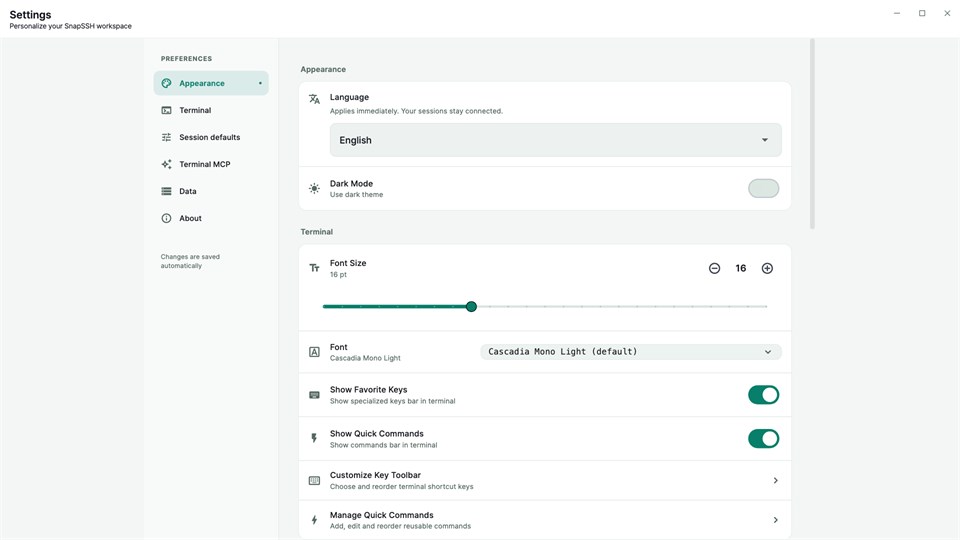
Browse and transfer files over SFTP and edit supported remote text files. Transfer progress and unsaved changes remain visible. Choose light or dark mode, terminal color themes and fonts, quick commands and snippets. Use English, Korean, Japanese, Simplified or Traditional Chinese, Spanish, French, German, Portuguese or Arabic.
REQUIREMENTS
An SSH server and your own access credentials are required for remote connections. SnapSSH does not require a SnapSSH account and does not include an AI model or AI subscription. External clients and server-side AI tools may require their own installation, accounts and usage fees. Output shared with an external AI is subject to that service's data policies. A command dispatch receipt or output wait ending is not proof of success. Automatic synchronization of device-local history is not included.
จากนักพัฒนา
รายการ 0
-
 SnapSSH.ai
แต้ม 0
-

- +1 แต้ม

การจัดอันดับ 0
-
- คะแนนของคุณ
ผู้พัฒนา 22
- Mocoplex
- ผู้ติดตาม: 0
- แพลตฟอร์ม: Android แอป (15) Android เกม (1) Windows แอป (6)
- ลดราคา: 0
- รายการ: 0 0
- แต้ม: 1
- การจัดอันดับ: 0
- ความคิดเห็น: 0
- วิดีโอ: 0
- RSS: ติดตาม
มีอะไรใหม่
- เวอร์ชัน: PC
- อัปเดตล่าสุด:
- 2.2.4 maintenance update
• Fixed split view sometimes opening a new terminal without creating the split.
• Authentication prompts remain available after the connection picker closes.
• Refreshed Windows x64 and ARM64 packages from the latest release source.
- New in 2.2.2
• Agent inbox with explicitly reported status, progress and unread filtering.
• Discover existing server tmux sessions and open read-only.
• Confirm a separate control tab while preserving other clients and their size.
• Block input and MCP control for read-only terminals.
• Preserve the exact target and monitor mode across clone/reconnect.
• Ten-language and narrow/large-text layout improvements. - Version 2.2.1
Open multiple independent terminals to the same SSH host in tabs or split panes. Numbered session names make matching hosts easier to distinguish. Existing terminals can still be resumed from Continue Working. Persistent-session reconnects keep their original workspace, and MCP sharing stays separate for each terminal.
ข้อมูลเพิ่มเติม
 https://ja0.com/snapssh
คะแนน AppAgg
คะแนน AppAgg โดยประมาณของ
SnapSSH.ai
ผู้พัฒนา: Mocoplex
คะแนนที่สูงขึ้นมักสะท้อนตัวชี้วัดที่ดีกว่าบน AppAgg
อิงจาก: ความนิยม · คะแนนจากผู้ใช้ · ความสดใหม่ · ดีล · ข้อมูลร้านค้า · กิจกรรมชุมชน
คำนวณใหม่ทุกวันจากข้อมูล AppAgg ล่าสุด
ความคิดเห็น 0 ¡
แชร์
SnapSSH.ai URL แบบสั้น: คัดลอกแล้ว!- Windows Store

