
บุ๊กมาร์ก
| ผู้พัฒนา: | lucas9801 (1) | ||
| ราคา: | ฟรี ใหม่ | ||
| คะแนน: | 580 บรอนซ์ | ||
| การจัดอันดับ: | 0 | ||
| ความคิดเห็น: | 0 โพสต์ความคิดเห็น | ||
| รายการ: | 0 0 | ||
| แต้ม: | 0 | ||
| +1 แต้ม | |||
สรุป
มาทำความรู้จัก Solo Code แอปในหมวด “เครื่องมือสำหรับนักพัฒนา” จาก lucas9801
มาใหม่ ออกเมื่อ คุณได้เป็นหนึ่งในคนกลุ่มแรก
ฟรี ไม่มีโฆษณา ไม่มีการซื้อภายในแอป มีแค่คุณกับแอป
Microsoft Store มีมาในตัว Windows อยู่แล้ว ติดตั้งได้ในไม่กี่คลิก
คะแนน AppAgg คือ 580 ตอนนี้อยู่ระดับ “บรอนซ์” ยังไปได้อีกไกล
จัดเรต “EVERYONE” เหมาะกับเด็ก ๆ ด้วย
รองรับ 2 ภาษา แต่ยังไม่มีภาษาไทย
ยังไม่มีใครบน AppAgg ให้คะแนนเลย โอกาสเป็นคนแรกอยู่ตรงนี้แล้ว
เป็นแอปเดียวของผู้พัฒนารายนี้บน AppAgg อย่างน้อยก็ตอนนี้
อยากรู้เรื่องอัปเดตและแอปใหม่ก่อนใครไหม? ติดตาม ผู้พัฒนา หรือกดติดตาม ฟีด RSS ได้เลย การแจ้งเตือนแบบพุชส่งผ่านแอป AppAgg Alerts สำหรับ Android และ iOS
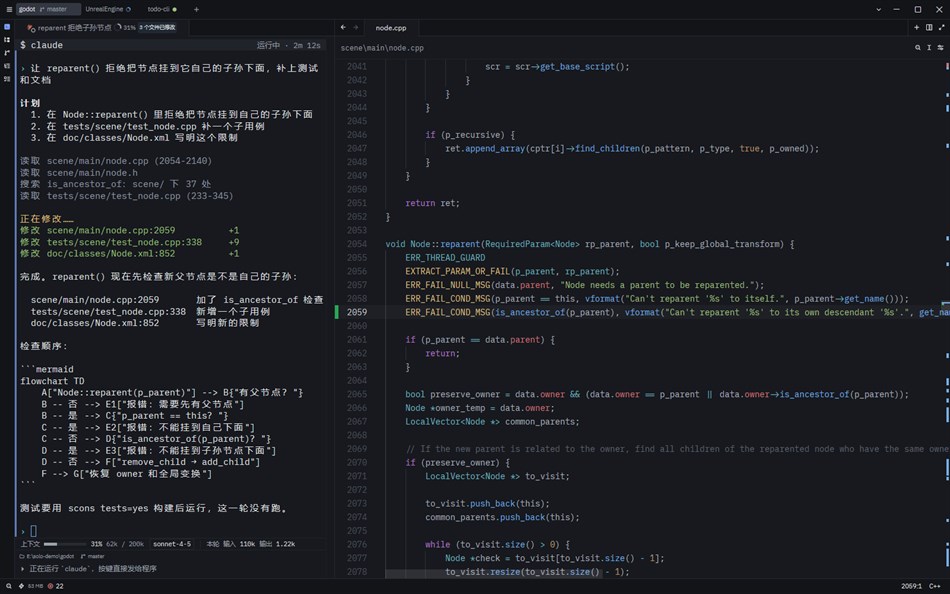
ภาพหน้าจอ 1
แพลตฟอร์มอื่น 0
ประวัติราคา 0
- ราคาปัจจุบัน: ฟรี
- ต่ำสุด: ฟรี
- สูงสุด: ฟรี
ฟีดของคุณเองบนหน้าแรก
คำอธิบาย

Solo Code is an editor for AI coding agents, built on the open-source Zed editor. The terminal fills the window, and command-line agents such as Claude Code, Codex and Copilot CLI run in a real terminal. When you need to read code, a full code editor opens on the right, so you can see what the agent changed at any time.
• Workspace tabs: one tab per project, each with its own terminals, agents, editor and file tree.
• Agent status: tabs show whether an agent is working, waiting for you, done with a turn or failed, and how much of its context it has used.
• Review and roll back by turn: see what each turn changed and how many new errors it introduced; keep or undo each change.
• A full code editor: language servers, go to definition, find references, project-wide search and Git.
• File paths in the terminal open with a click. Markdown and Mermaid diagrams render in a preview, and you can comment on a document and send the comments back to the agent.
• A better terminal: command blocks, an input editor and completions as you type.
• Parallel tasks: one git worktree per task, so several agents work without getting in each other's way.
You install and sign in to the agents yourself. Solo Code doesn't provide AI models and doesn't need an account.
จากนักพัฒนา
ผู้พัฒนา
- lucas9801
- ผู้ติดตาม: 0
- แพลตฟอร์ม: Windows แอป (1)
- ลดราคา: 0
- รายการ: 0 0
- แต้ม: 0
- การจัดอันดับ: 0
- ความคิดเห็น: 0
- วิดีโอ: 0
- RSS: ติดตาม
รายการ 0
-
 Solo Code
แต้ม 0
-

- +1 แต้ม

การจัดอันดับ 0
-
- คะแนนของคุณ
มีอะไรใหม่
- เวอร์ชัน: PC
- อัปเดตล่าสุด:
ข้อมูลเพิ่มเติม
- วันที่วางจำหน่าย:
- หมวดหมู่:
แอปสำหรับ Windows›เครื่องมือสำหรับนักพัฒนา - ระบบปฏิบัติการ:
PC - ขนาด:
129 Mb - ภาษาที่รองรับ:
จีน,อังกฤษ - การจัดประเภทเนื้อหา:
EVERYONE - Windows Store คะแนน: ¡
0 - เว็บไซต์:
 https://github.com/lucas9801/solo
ความคิดเห็น 0 ¡
คะแนน AppAgg
คะแนน AppAgg โดยประมาณของ
Solo Code
ผู้พัฒนา: lucas9801
คะแนนที่สูงขึ้นมักสะท้อนตัวชี้วัดที่ดีกว่าบน AppAgg
อิงจาก: ความนิยม · คะแนนจากผู้ใช้ · ความสดใหม่ · ดีล · ข้อมูลร้านค้า · กิจกรรมชุมชน
คำนวณใหม่ทุกวันจากข้อมูล AppAgg ล่าสุด
Solo Code URL แบบสั้น: คัดลอกแล้ว!- Windows Store

