
Bladwijzers
| Ontwikkelaar: | f1resh (1) | ||
| Prijs: | Gratis | ||
| Score: | 760 Zilver | ||
| Ranglijsten: | 0 | ||
| Reacties: | 0 Plaats reactie | ||
| Lijsten: | 0 0 | ||
| Punten: | 0 | ||
| +1 Punt | |||
Samenvatting
Maak kennis met SSHTermaq, een app van f1resh in de categorie “Ontwikkelhulpprogramma's”.
Pas uitgekomen, dus nog lekker vers.
Gratis, geen advertenties, geen in-app-aankopen. Alleen jij en de app.
De Microsoft Store zit ingebouwd in Windows, dus installeren doe je in een paar klikken.
De AppAgg-score is 760. Zilver, en dat is helemaal niet slecht.
Maar 5 megabyte, past zelfs nog op een volle schijf.
Leeftijdsclassificatie “EVERYONE”, dus ook prima voor kinderen.
Spreekt maar één taal, en dat is geen Nederlands.
Gebruikt? Jouw recensie zou hier de eerste zijn.
Dit is de enige app van de ontwikkelaar op AppAgg. Voorlopig.
Wil je als eerste horen over updates en nieuwe apps? Volg de ontwikkelaar of abonneer je op de RSS-feed. Pushmeldingen komen binnen via de app AppAgg Alerts voor Android en iOS.
Andere platforms 0
Prijsgeschiedenis 0
- Huidige prijs: Gratis
- Minimum: Gratis
- Maximum: Gratis
Je eigen feed op de startpagina
Screenshots 6
Beschrijving

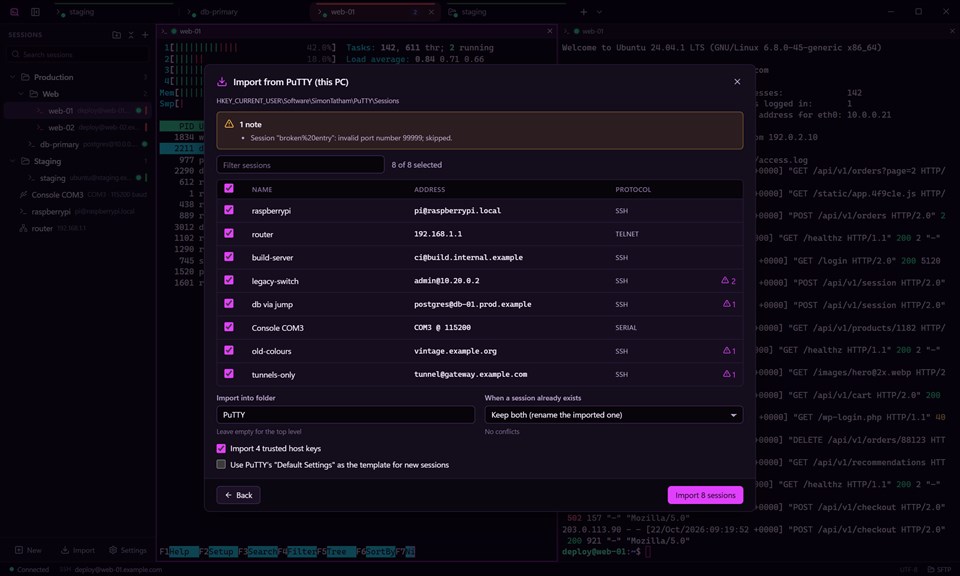
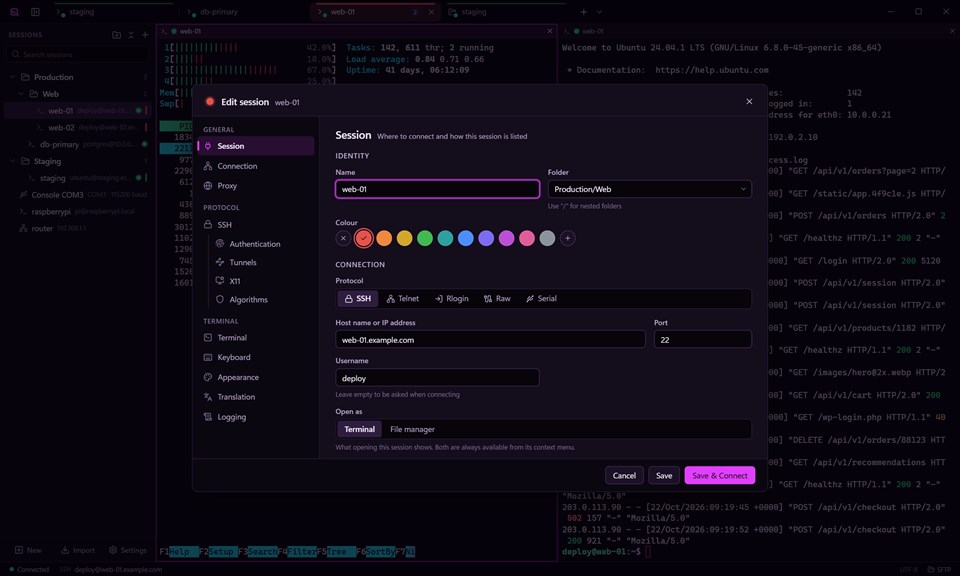
EVERYTHING PUTTY DOES • PuTTY-style settings for every session, PuTTY keyboard modes and PuTTY's command-line options • PuTTY .ppk keys (v2 and v3), OpenSSH and PEM keys, Pageant and the Windows OpenSSH agent • One-click import of your PuTTY sessions, default settings and trusted host keys, from the registry or a .reg file, and of the hosts in ~/.ssh/config
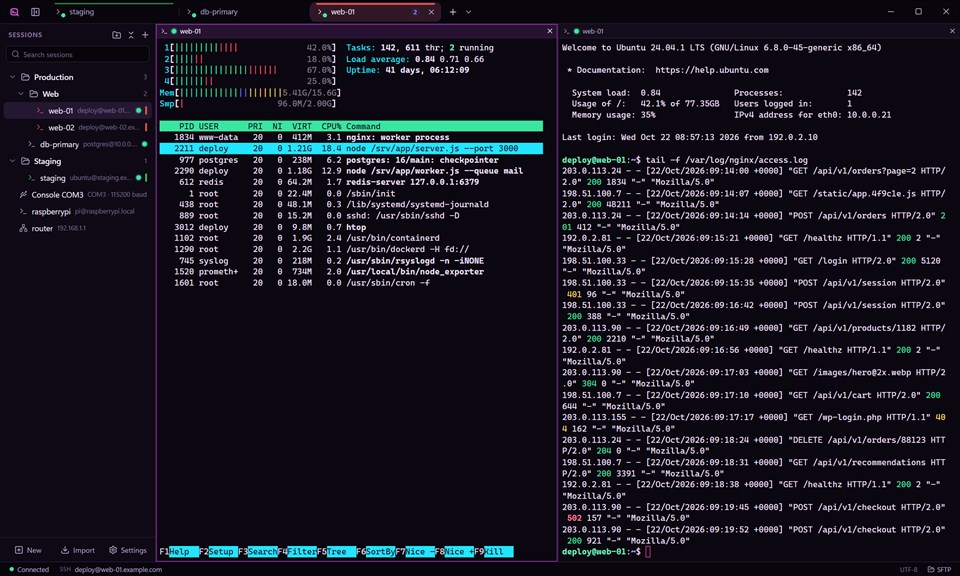
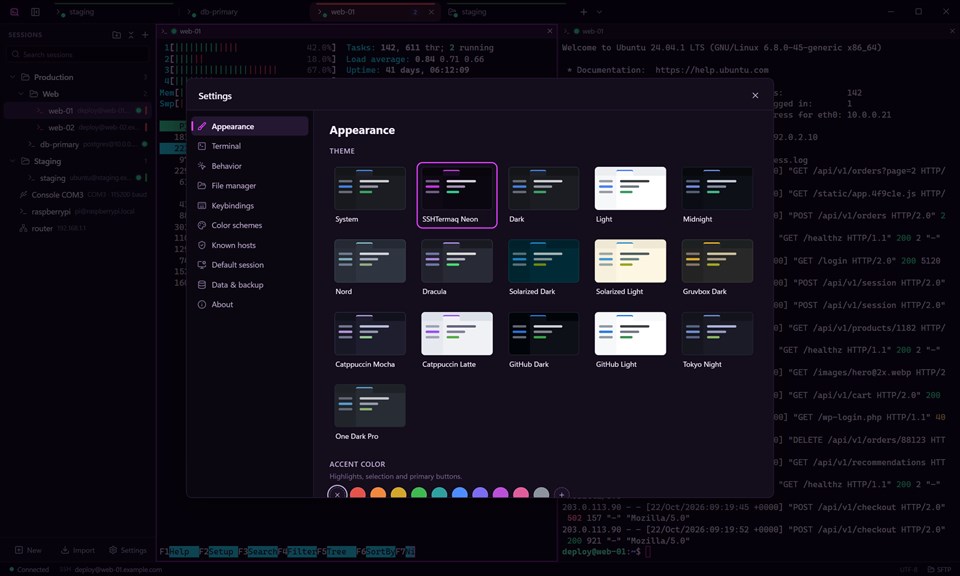
A MODERN WORKSPACE • Tabs and split panes, with input broadcast to all panes • Sessions in folders with colours, notes and search • Command palette, quick connect and configurable shortcuts • Your tabs and splits come back at the next start • 15 app themes, 30 terminal colour schemes and a scheme editor
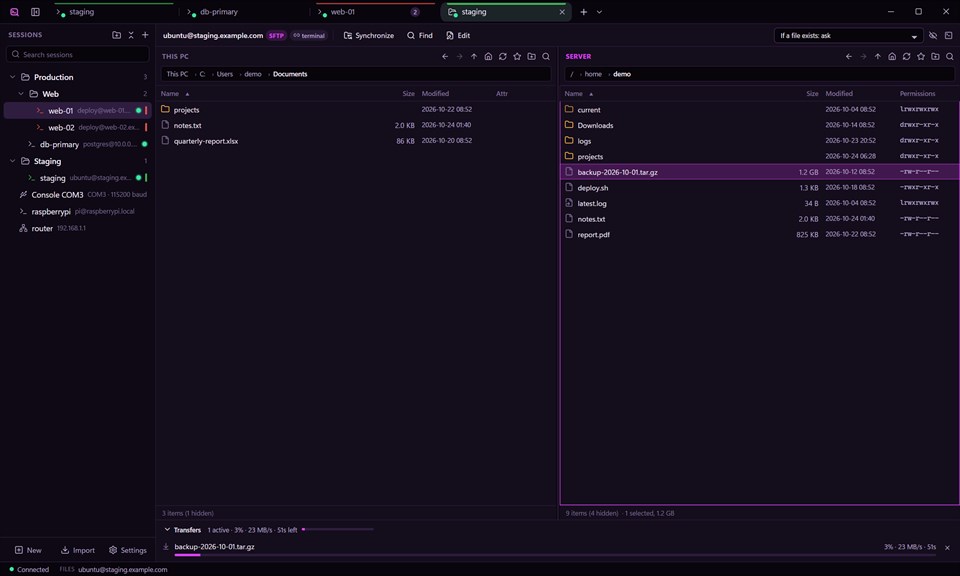
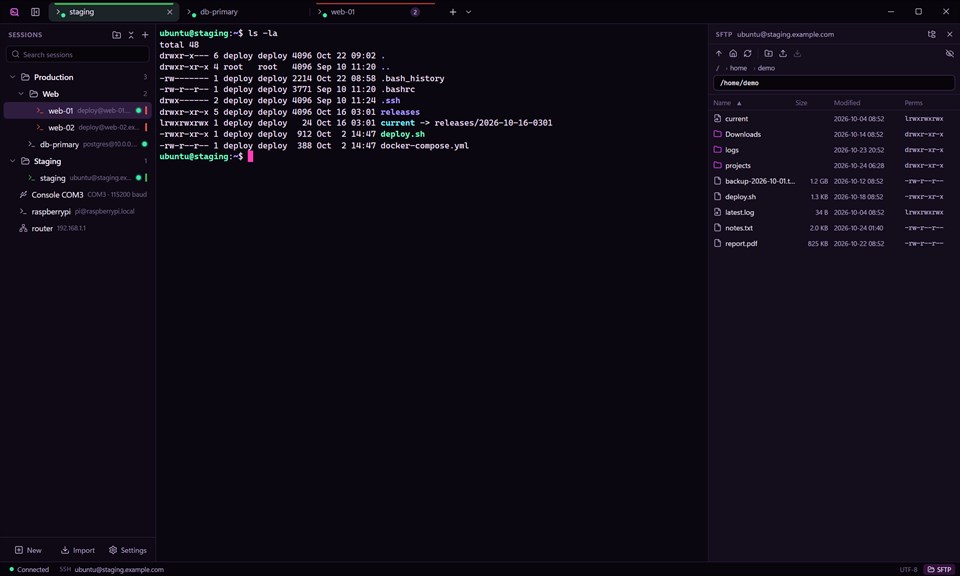
A FILE MANAGER BUILT IN • Local terminals: PowerShell, Command Prompt, Git Bash and WSL in the same tabs and split panes as your servers • An SFTP panel beside any SSH terminal, on the terminal's own connection: no second login • A two-pane file manager: this PC on the left, the server on the right, the transfer queue below • Drag and drop from Explorer, resume of interrupted transfers, overwrite and rename questions • Edit a server file in your own editor; it is uploaded on every save • Folder sync with a preview, file search on the server, bookmarks and permissions • Falls back to SCP on routers and other servers without SFTP
TUNNELS, PROXIES AND MORE • Local, remote and dynamic (SOCKS) port forwarding, agent forwarding and X11 forwarding • Jump hosts, and SOCKS, HTTP and Telnet proxies • Telnet, Rlogin, Raw TCP and serial ports (COM ports with all line settings) • Session logging, PuTTY-compatible character sets, 2FA (keyboard-interactive) logins • Saved passwords are encrypted for your Windows account (DPAPI) • ssh://, sftp://, scp:// and telnet:// links open in SSHTermaq
Requires the Microsoft Edge WebView2 Runtime, which Windows 11 includes. On Windows 10 without it, SSHTermaq offers its download page.
SSHTermaq is free and open source (MIT licence). It is not affiliated with the PuTTY project.
Van de ontwikkelaar
Lijsten 0
-
 SSHTermaq
Punten 0
-

- +1 Punt

Ranglijsten 0
-
- Jouw beoordeling
Ontwikkelaar 1
- f1resh
- Volgers: 0
- Platforms: Windows Apps (1)
- Aanbiedingen: 0
- Lijsten: 0 0
- Punten: 0
- Ranglijsten: 0
- Reacties: 0
- Video’s: 0
- RSS: Abonneren
Wat is er nieuw?
- Versie: PC
- Laatst bijgewerkt:
- New in 1.1.0
• Local terminals: Command Prompt, Windows PowerShell, PowerShell 7, Git Bash, Cygwin, MSYS2 and WSL in the same tabs and split panes as your servers. Open one with Ctrl+Shift+` or the + menu, from quick connect (local:bash) or with SSHTermaq.exe -local. Pick the default shell in Settings, or save a shell as a session with its own start folder.
• Upload or download a file or folder under a new name, as a copy or as a move.
• Rename a tab with Ctrl+Shift+R, and give the panes of a split tab their own names by double-clicking a pane's title. Names come back after a restart (you can turn that off in Settings).
• Clearer error reports: a problem in the window shows an error page instead of an empty window, and the app log records connections and errors for bug reports.
• "Leave out .DS_Store and ._ files" is now off by default on new Windows installations.
• Tabs keep their width instead of shrinking to the length of their title.
• The Mica and Acrylic window backgrounds are switched off for now: with them, the window buttons appeared twice. They will return in a later version.
Known issue: downloading a folder with thousands of small files from a distant server is slow, because the files are copied one at a time. A later version will copy several at once.
Aanvullende informatie
- Releasedatum:
- Categorie:
Windows-apps›Ontwikkelhulpprogramma's - Besturingssysteem:
PC - Grootte:
5 Mb - Ondersteunde talen:
Engels - Inhoudsclassificatie:
EVERYONE - Windows Store Beoordeling: ¡
0 - Website:
 https://f1resh.github.io/sshtermaq/
AppAgg-score
Geschatte AppAgg-score voor
SSHTermaq
Ontwikkelaar: f1resh
Een hogere score betekent meestal betere resultaten voor de factoren die AppAgg beoordeelt.
Gebaseerd op: populariteit · gebruikersbeoordelingen · actualiteit · aanbiedingen · winkelgegevens · community-activiteit
Wordt dagelijks opnieuw berekend met actuele AppAgg-gegevens.
Reacties 0 ¡
Delen
SSHTermaq Korte URL: Gekopieerd!- Windows Store

