
บุ๊กมาร์ก
| ผู้พัฒนา: | Gain Publications (25) | ||
| ราคา: | $39.99 ใหม่ | ||
| คะแนน: | 1,490 ทอง | ||
| การจัดอันดับ: | 0 | ||
| ความคิดเห็น: | 0 โพสต์ความคิดเห็น | ||
| รายการ: | 0 0 | ||
| แต้ม: | 0 | ||
| +1 แต้ม | |||
สรุป
มาทำความรู้จัก Synapse Desktop แอปในหมวด “เครื่องมือสำหรับนักพัฒนา” จาก Gain Publications
มาใหม่ ออกเมื่อ คุณได้เป็นหนึ่งในคนกลุ่มแรก
$39.99 และยังไม่เคยลดราคาเลยสักครั้งบน AppAgg ของแข็งจริง ๆ
Microsoft Store มีมาในตัว Windows อยู่แล้ว ติดตั้งได้ในไม่กี่คลิก
คะแนน AppAgg คือ 1,490 อยู่ระดับ “ทอง”
จัดเรต “EVERYONE” เหมาะกับเด็ก ๆ ด้วย
รองรับแค่ภาษาเดียว และไม่ใช่ภาษาไทย
ยังไม่มีใครบน AppAgg ให้คะแนนเลย โอกาสเป็นคนแรกอยู่ตรงนี้แล้ว
ผู้พัฒนารายนี้มีเกมอื่นอีก 3 เกม และแอปอีก 21 แอปบน AppAgg ลองไปดูกัน
อีกอย่าง ตอนนี้ผู้พัฒนารายนี้มี ดีลลดราคา 2 รายการ ด้วยนะ
อยากรู้เรื่องลดราคา อัปเดต และแอปใหม่ก่อนใครไหม? ตั้งการแจ้งเตือนราคา ติดตาม ผู้พัฒนา หรือกดติดตาม ฟีด RSS ได้เลย การแจ้งเตือนแบบพุชส่งผ่านแอป AppAgg Alerts สำหรับ Android และ iOS
แพลตฟอร์มอื่น 0
ประวัติราคา 1
- ราคาปัจจุบัน: $39.99
- ต่ำสุด: $39.99
- สูงสุด: $49.99
ฟีดของคุณเองบนหน้าแรก
ภาพหน้าจอ 9
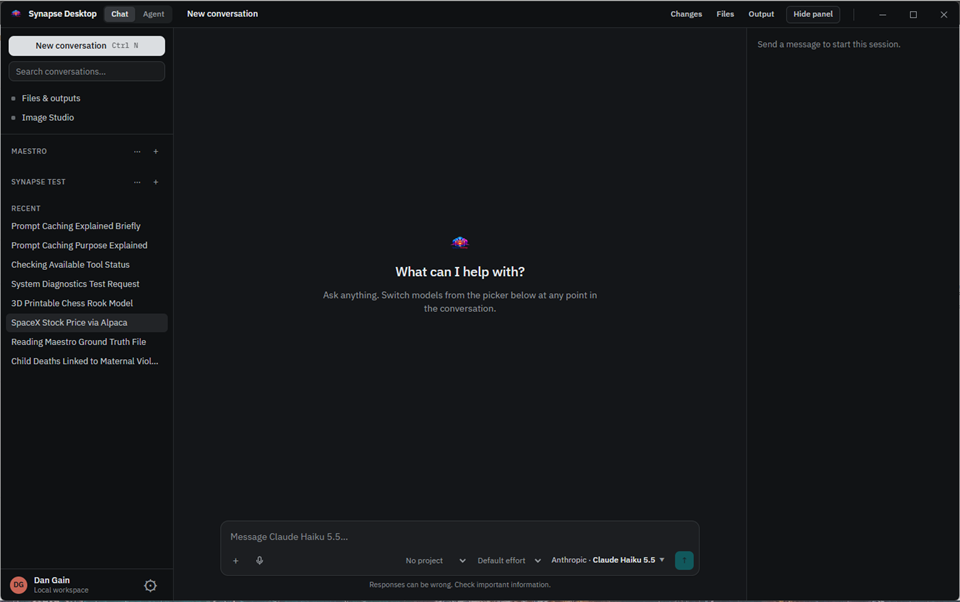
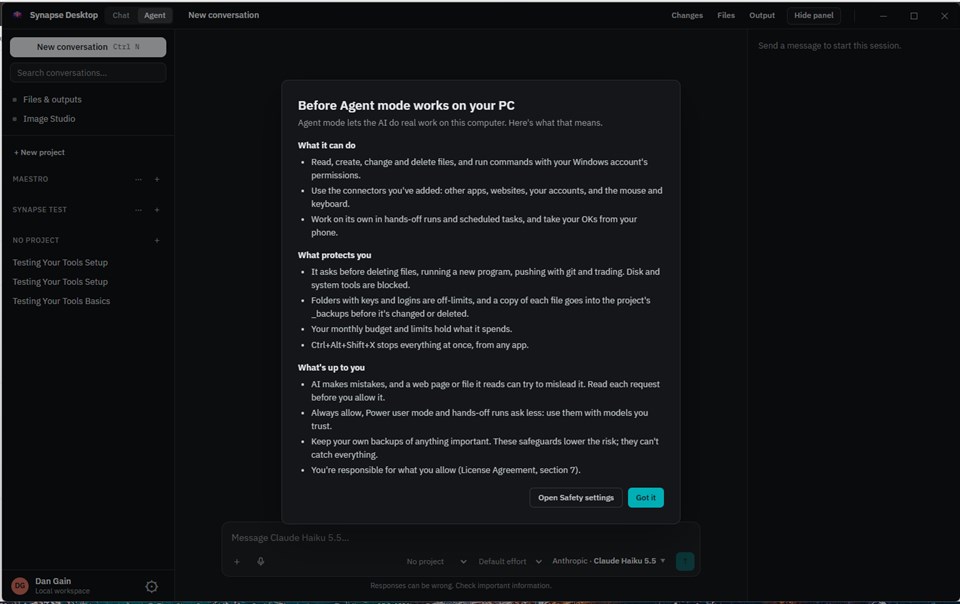
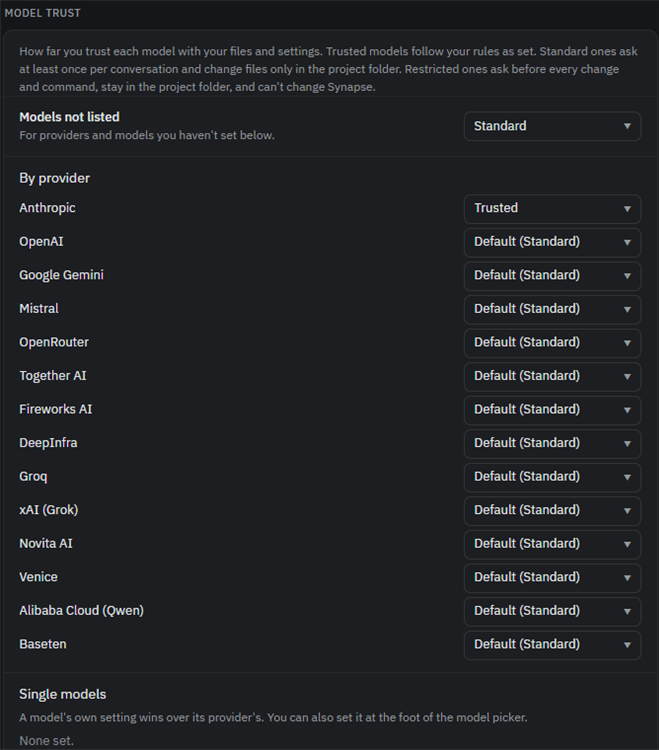
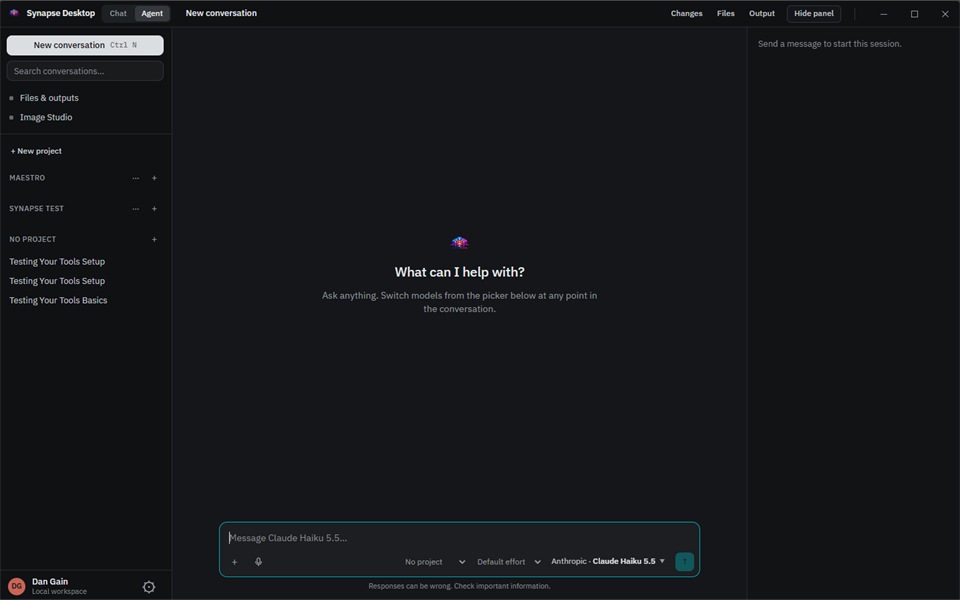
คำอธิบาย

Your keys, your providers, your data. Synapse Desktop is the app, not an AI service: your messages go straight from your PC to the provider you pick, using your own API key, and you pay that provider at their own rates. Gain Publications never sees your conversations, files or keys. No telemetry, no analytics, no account with us.
IT BUILDS SOFTWARE
Give Synapse a project folder and a goal, and it plans the work, writes the code and checks it. A planner model breaks the job into steps and writes each one up; a builder carries it out in your project; a reviewer checks the result and sends it back if it isn't right. Lessons from mistakes carry into later steps, several builders can work at once in their own git branches, and a hands-off run keeps going on its own until the job is done or it needs your answer, which can reach you on your phone. Every change is backed up and can be undone, and each finished step is committed to git.
PICTURES, VIDEO AND 3D MODELS IN ONE APP
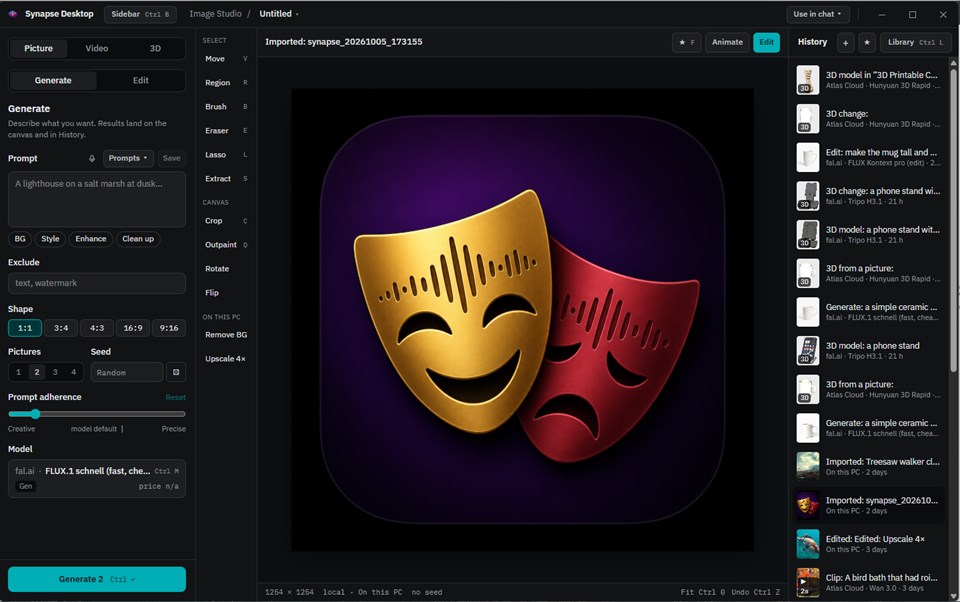
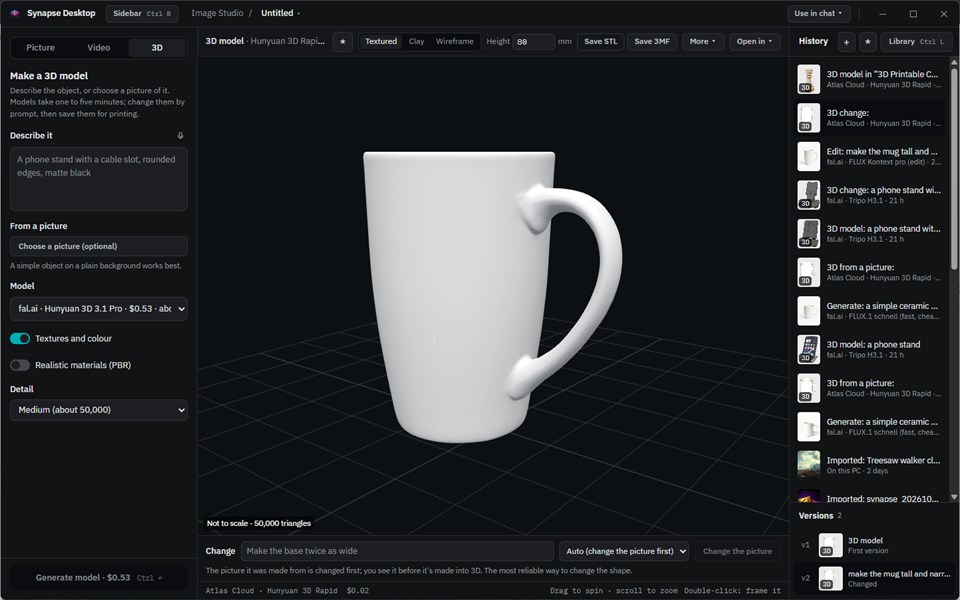
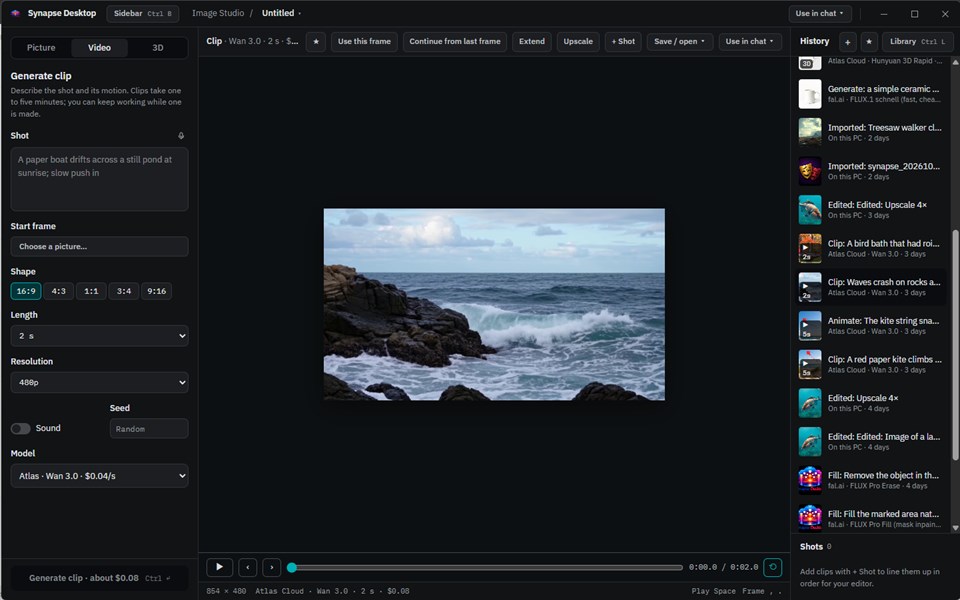
Image Studio makes and edits pictures with fal.ai, Atlas Cloud, Together AI, Fireworks, DeepInfra, xAI, OpenRouter and Venice, with a prompt library and a picture library. The Image Editor adds inpainting and outpainting, layers, and tools that run on your PC with no upload: background removal, 4x upscaling and object selection. Turn text or pictures into short video clips. Make printable 3D models (STL, 3MF, OBJ, GLB) from a description or a picture, see them in the built-in 3D viewer with their real size, and change them by asking. Ask for any of it in chat, too.
SAFETY YOU CONTROL
AI that can act on your computer needs limits you set. Approval cards for file changes, commands and anything that spends money or changes settings. Trust levels for each model (Trusted, Standard, Restricted), a command block list, protected folders that hold your keys and logins, a backup of every file before it changes, Revert, and an emergency stop. Deletions, disk changes and purchases always ask. Every safety feature has its own switch, so you decide how much freedom each model gets.
AGENTS THAT WORK ON YOUR PC
Agent mode reads and writes files in the folders you allow, runs commands, searches and reads the web, controls apps and the browser, and reports back. Everything Claude Desktop does with connectors and projects, Synapse does with any AI.
PROJECTS, KNOWLEDGE AND MEMORY
Group conversations into projects with their own folder, instructions and knowledge files (PDF, Word, Markdown, code, CSV and more). Synapse remembers what matters about you and each project, and you can see and edit every memory.
CONNECTORS (MCP)
Add tools through the Model Context Protocol. Desktop Commander, Windows control, a Playwright web browser and Alpaca come in the package, so installing them downloads nothing. Add GitHub, Context7, Exa, Notion, Linear, Atlassian, Sentry, Cloudflare, Supabase, Vercel or any MCP server of your own.
MANY MODELS AT ONCE
Compare answers side by side, race models for the fastest reply, chain them, or have them reach a consensus. Specialist models take on coding, vision or quick tasks for the main model.
SAVES MONEY AUTOMATICALLY
Prompt caching is used on every model and service that supports it, so a long conversation costs a fraction of the price after the first message. Models that cache are marked in the model picker, and Synapse can test any model's caching for you. A monthly budget, usage and cost by provider, and a warning at 80% keep spending in view.
AND MORE
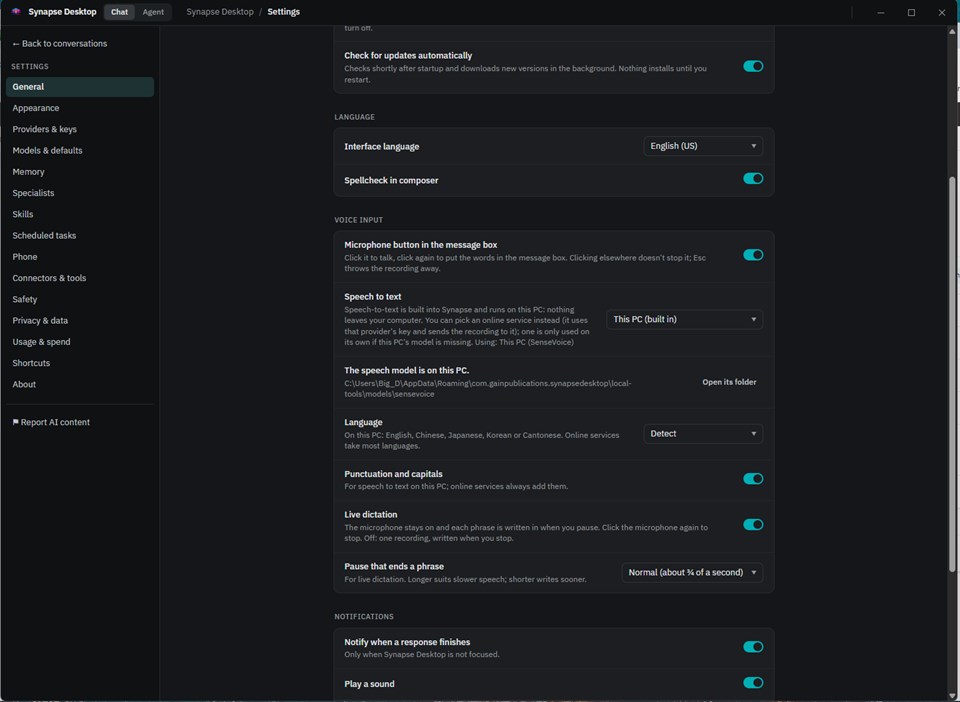
• Voice input, with speech recognition that can run entirely on your PC
• Scheduled tasks: run a prompt daily, weekly or every few hours
• Approve actions and chat with Synapse from your phone through your own Telegram bot
• Web search with no key needed, plus page reading
• WordPress and cPanel site tools
• Market data (Finnhub) and Alpaca trading, paper account by default, every order asks first
• "Test your tools": one command checks every tool and connector and reports what works
• Backup and restore of everything, including your saved keys (optionally password-locked)
• A local control API so other AI apps on your PC can drive Synapse
YOUR DATA STAYS ON YOUR PC
Conversations, projects, memories, pictures and settings are stored on your computer. API keys are kept in Windows Credential Manager, never in files. Nothing is sent to Gain Publications.
GENERATIVE AI
Synapse Desktop uses live generative AI: replies, code, pictures, video and 3D models are created by the third-party AI models you connect, in response to what you ask. Synapse doesn't make or control that content; each AI service's own policies and safety systems apply. AI can be wrong, so check important results. To report inappropriate AI content, use Report on any reply, or Report AI content in Settings.
SYSTEM REQUIREMENTS
Windows 10 (version 2004 or later) or Windows 11, 64-bit. Internet connection for cloud AI providers. An API key from at least one provider (many offer free tiers), or Ollama for local models. No GPU required.
LICENSING
Synapse Desktop includes open-source components (Rust and JavaScript libraries, ONNX Runtime, three.js, Node.js, Python, uv and the bundled connectors) under the MIT, Apache 2.0 and similar licenses. Full license texts are in Settings -> About -> Licenses & Legal.
Built by Daniel E. Gain at Gain Publications.
จากนักพัฒนา
รายการ 0
-
 Synapse Desktop
แต้ม 0
-

- +1 แต้ม

การจัดอันดับ 0
-
- คะแนนของคุณ
ผู้พัฒนา 25
- Gain Publications
- ผู้ติดตาม: 0
- แพลตฟอร์ม: Windows แอป (22) Windows เกม (3)
- ลดราคา: 2
- รายการ: 0 0
- แต้ม: 0
- การจัดอันดับ: 0
- ความคิดเห็น: 0
- วิดีโอ: 0
- RSS: ติดตาม
มีอะไรใหม่
- เวอร์ชัน: PC
- อัปเดตล่าสุด:
- Synapse Desktop — Initial Release
• Builds software: a planner, a builder and a reviewer work through your project step by step, hands-off if you like, with every change backed up and committed
• Pictures, video clips and printable 3D models in one app, with an image editor whose background removal, upscaling and selection run on your PC
• Works with Claude, Gemini, Grok, Mistral, Qwen, DeepSeek, Llama and hundreds more through your own keys, or local models with Ollama
• Agent mode with approval cards, trust levels, Revert and an emergency stop
• Projects with instructions, knowledge files and memory
• MCP connectors, with Desktop Commander, Windows control, Playwright and Alpaca included
• Compare, race, chain and consensus across several models
• Prompt caching on every model that supports it, with a cache test
• Scheduled tasks, phone approvals through Telegram, voice input
• Backup and restore, including saved keys
Built by Daniel E. Gain at Gain Publications.
ข้อมูลเพิ่มเติม
- วันที่วางจำหน่าย:
- หมวดหมู่:
แอปสำหรับ Windows›เครื่องมือสำหรับนักพัฒนา - ระบบปฏิบัติการ:
PC - ขนาด:
553 Mb - ภาษาที่รองรับ:
อังกฤษ - การจัดประเภทเนื้อหา:
EVERYONE - Windows Store คะแนน: ¡
0 - เว็บไซต์:
 https://gainpublications.com
คะแนน AppAgg
คะแนน AppAgg โดยประมาณของ
Synapse Desktop
ผู้พัฒนา: Gain Publications
คะแนนที่สูงขึ้นมักสะท้อนตัวชี้วัดที่ดีกว่าบน AppAgg
อิงจาก: ความนิยม · คะแนนจากผู้ใช้ · ความสดใหม่ · ดีล · ข้อมูลร้านค้า · กิจกรรมชุมชน
คำนวณใหม่ทุกวันจากข้อมูล AppAgg ล่าสุด
ความคิดเห็น 0 ¡
แชร์
Synapse Desktop URL แบบสั้น: คัดลอกแล้ว!- Windows Store

