
ブックマーク
このブックマークのタイトルを入力してください。
ブックマークを保存しました
| 開発者: | FUNMAKERZ (3) | ||
| 価格: | 無料 | ||
| スコア: | 1,080 シルバー | ||
| ランキング: | 0 | ||
| コメント: | 0 コメントを投稿する | ||
| リスト: | 0 0 | ||
| ポイント: | 0 | ||
| +1 ポイント | |||
概要
SysMain Proは、FUNMAKERZが手がける「開発者ツール」カテゴリのアプリです。
にリリース。まだまだフレッシュです。
無料。広告なし、アプリ内課金なし。あなたとアプリだけです。
Microsoft StoreはWindowsに組み込まれているので、数クリックでインストールできます。
AppAggスコアは1,080。「シルバー」なら、なかなかのものです。
たった24メガバイト。空きの少ないドライブにも収まります。
年齢区分は「EVERYONE」なので、子どもでも安心です。
対応言語はひとつだけ、しかも日本語ではありません。
使ってみましたか?あなたのレビューがここで最初の一件になります。
この開発者のアプリは、AppAggにほかに2個あります。のぞいてみては?
アップデートや新しいアプリを誰よりも早く知りたい?開発者をフォローするか、RSS フィードを購読しましょう。プッシュ通知は Android と iOS 向けの AppAgg Alerts アプリで届きます。
広告
他のプラットフォーム 0
価格履歴 0
- 現在の価格: 無料
- 最小値: 無料
- 最大値: 無料
ホームに自分だけのフィード
「新着・アップデート」のプラットフォームを選ぶと、ホームには必要なアプリとゲームだけが表示されます。
スクリーンショット 10
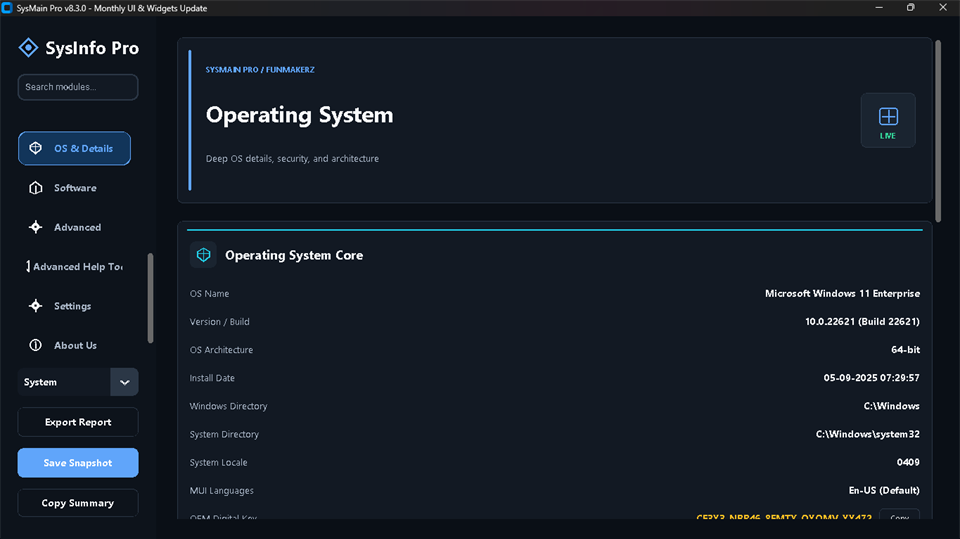
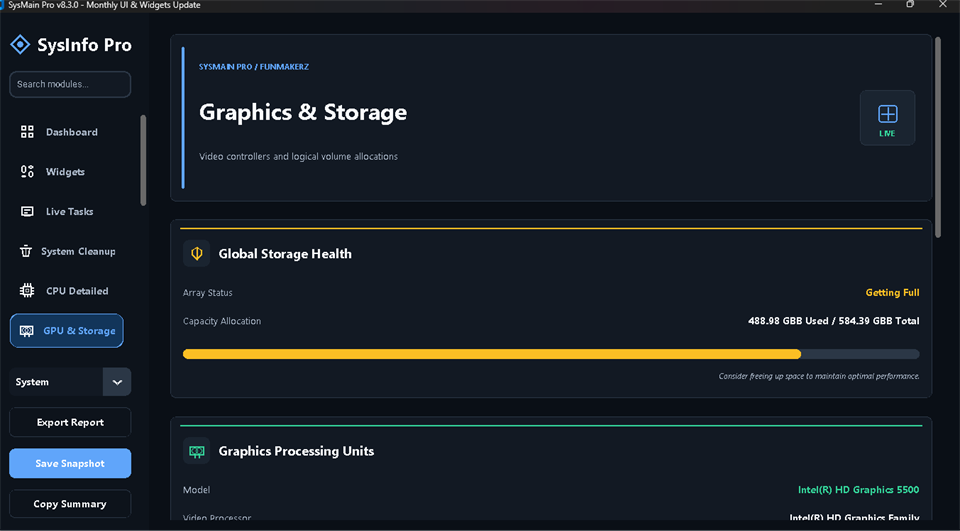
説明

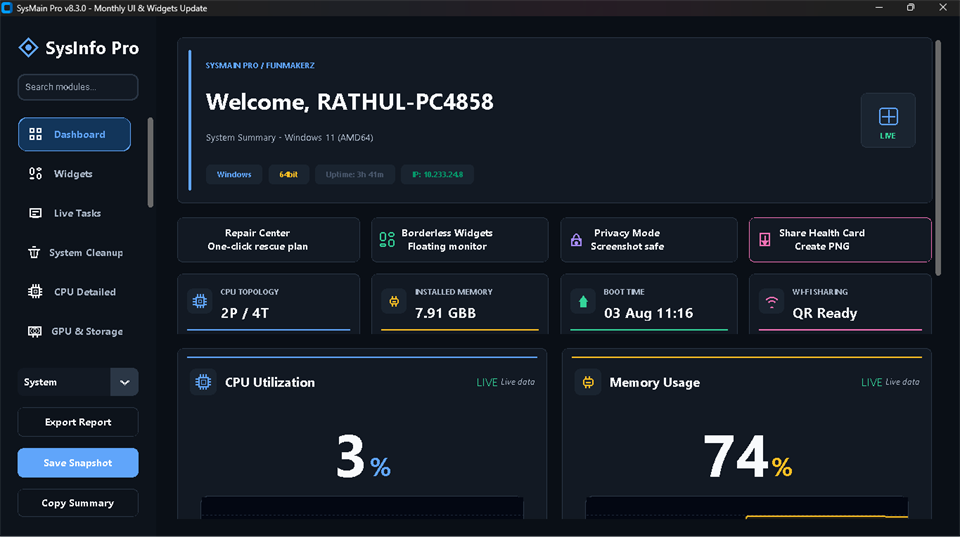
SysMain Pro V8.3 is a powerful, modern, lightweight Windows system information, monitoring, diagnostics, repair, and configuration platform developed by Funmakerz.
Built with performance, simplicity, privacy, and reliability in mind, SysMain Pro gives detailed insights into your hardware, operating system, performance, network activity, storage, battery, software, and overall system health through a clean and user-friendly interface.
━━━━━━━━━━━━━━━━━━━━
🔍 SYSTEM INFORMATION
━━━━━━━━━━━━━━━━━━━━
• Detailed CPU Information
• RAM and Memory Analysis
• GPU Information
• Motherboard Details
• Storage & Disk Information
• Operating System Information
• Battery Information
• Installed Software Information
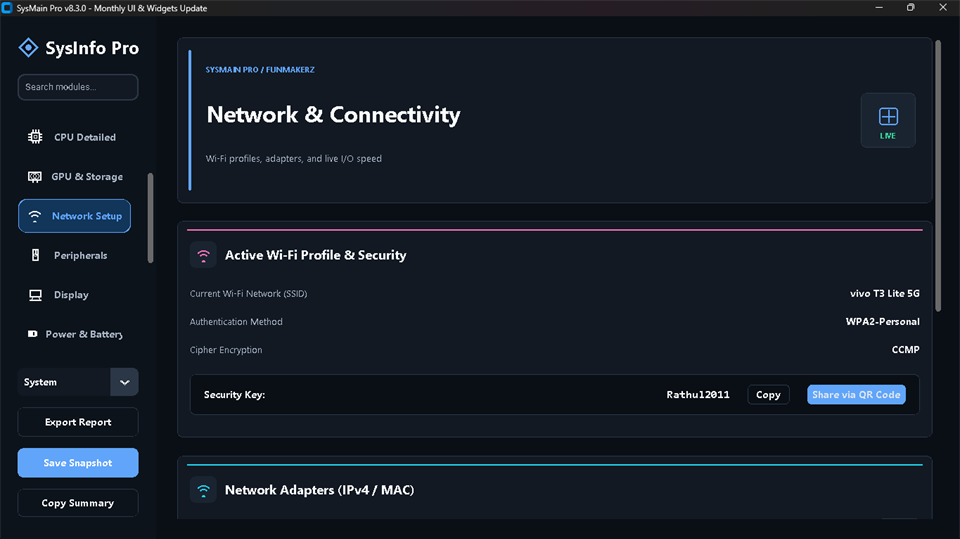
• Network Configuration Details
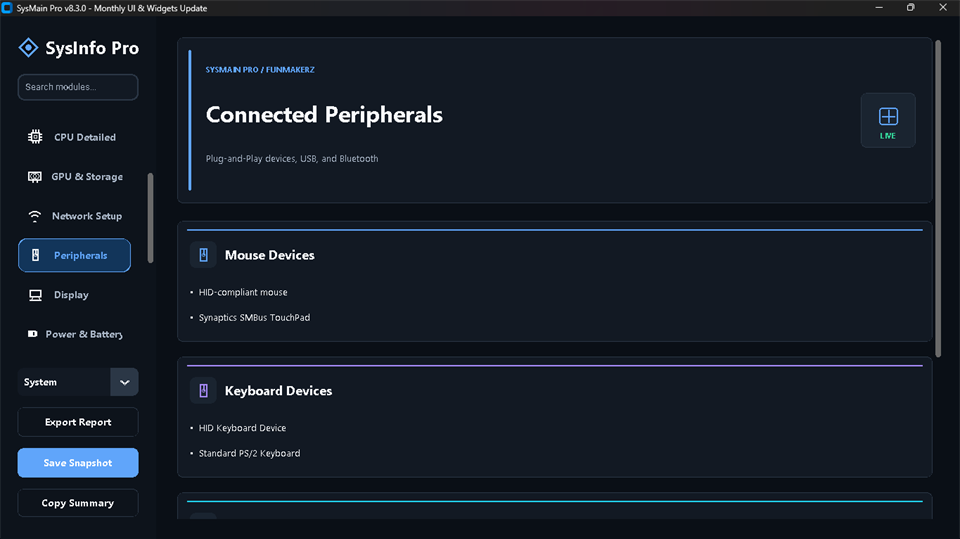
• Display and Peripheral Details
━━━━━━━━━━━━━━━━━━━━
⚡ REAL-TIME MONITORING
━━━━━━━━━━━━━━━━━━━━
Monitor your computer in real time with live system statistics including:
• CPU Usage
• Memory Usage
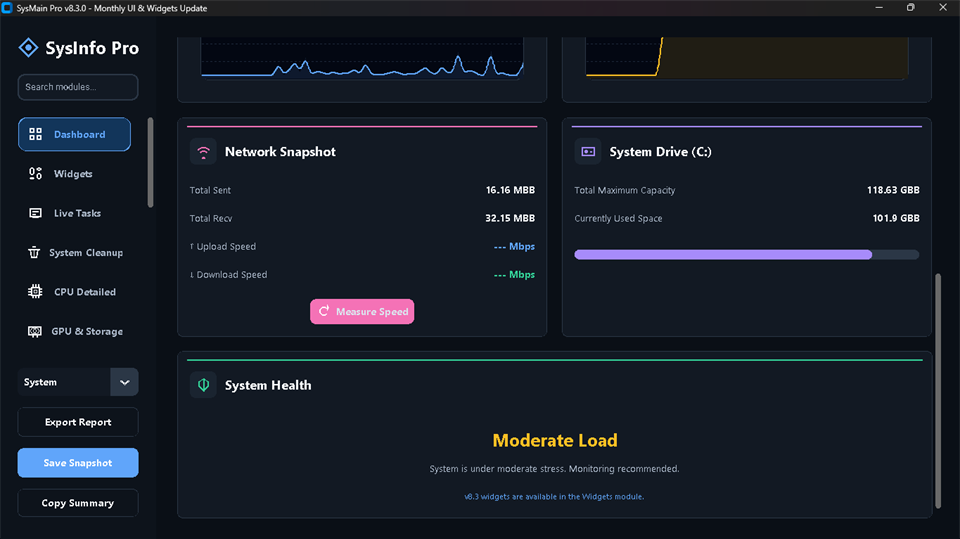
• Disk Usage
• Network Speed
• Total Data Sent
• Total Data Received
• System Performance Metrics
• Live Health Status
━━━━━━━━━━━━━━━━━━━━
🧩 WIDGETS
━━━━━━━━━━━━━━━━━━━━
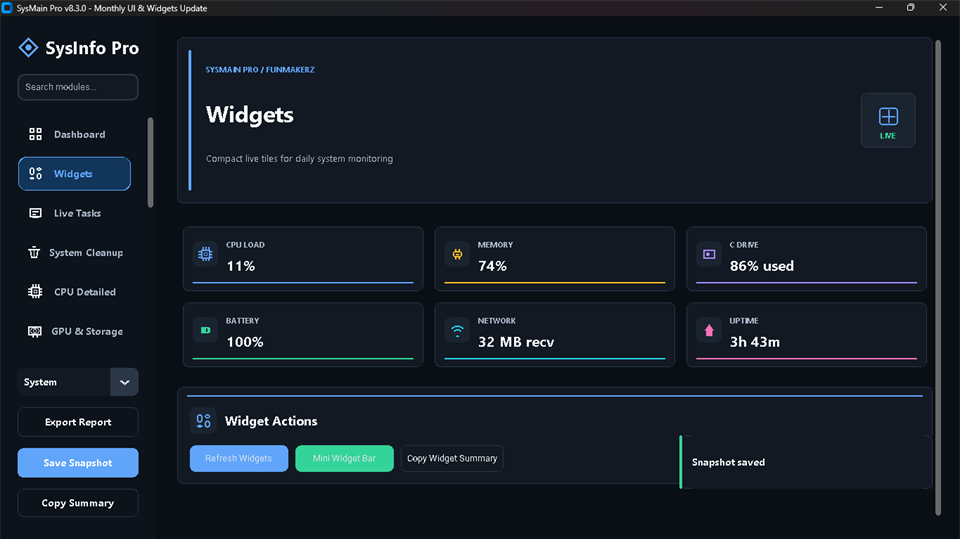
SysMain Pro V8.3 adds live widgets for quick monitoring:
• CPU Widget
• RAM Widget
• C Drive Usage Widget
• Battery Widget
• Network Widget
• Uptime Widget
• Borderless Floating Widgets
The borderless widget panel can run separately from the main app, allowing users to monitor system stats while working.
━━━━━━━━━━━━━━━━━━━━
🛠️ SYSTEM HEALTH & DIAGNOSTICS
━━━━━━━━━━━━━━━━━━━━
SysMain Pro V8.3 helps users better understand and improve their system with:
• Hardware Health Information
• Performance Analysis
• Configuration Insights
• Diagnostic Tools
• Advanced System Data
• Hidden Windows Information
• SMART Disk Health Tools
• Driver Information
• Startup App Tools
━━━━━━━━━━━━━━━━━━━━
🧠 SMART REPAIR CENTER
━━━━━━━━━━━━━━━━━━━━
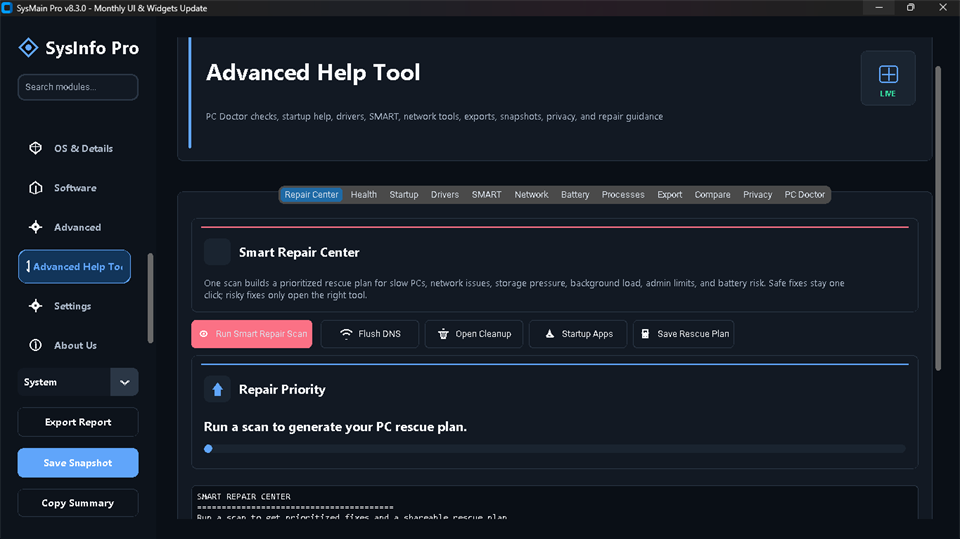
The new Smart Repair Center scans common PC issues and creates a simple rescue plan.
It checks:
• CPU Pressure
• RAM Pressure
• Disk Space
• Startup Load
• DNS / Network Status
• Battery Risk
• System Uptime
• Admin Mode
It generates:
• Repair Score
• Priority Fix Plan
• Safe Repair Suggestions
• Saveable Rescue Plan
━━━━━━━━━━━━━━━━━━━━
🤖 PC DOCTOR
━━━━━━━━━━━━━━━━━━━━
PC Doctor provides live system suggestions based on real metrics.
• Detects high CPU usage
• Detects high RAM pressure
• Detects low disk space
• Checks battery and uptime
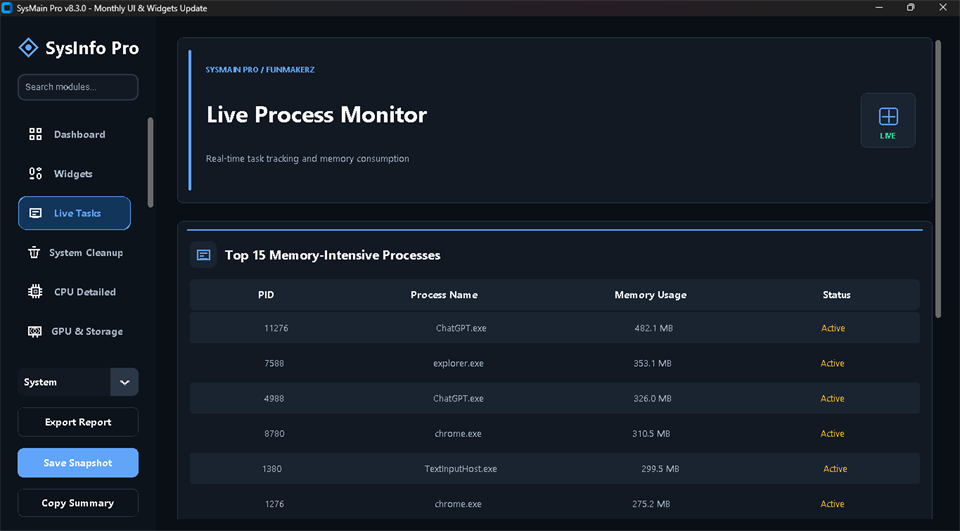
• Shows top memory processes
• Recommends useful next actions
━━━━━━━━━━━━━━━━━━━━
🌐 NETWORK TOOLS
━━━━━━━━━━━━━━━━━━━━
Built-in network utilities include:
• Ping Test
• DNS Lookup
• Traceroute
• Local IP Scan
• Adapter Information
• Network Speed Measurement
━━━━━━━━━━━━━━━━━━━━
📤 EXPORT & REPORTS
━━━━━━━━━━━━━━━━━━━━
SysMain Pro V8.3 supports multiple export and report options:
• HTML Report
• JSON Snapshot
• TXT Export
• CSV Export
• PDF-ready HTML Export
• Snapshot Comparison
━━━━━━━━━━━━━━━━━━━━
🌍 MULTILANGUAGE SUPPORT
━━━━━━━━━━━━━━━━━━━━
SysMain Pro V8.3 adds community language support:
• English
• Hindi
• Kannada
• Malayalam
• Tamil
The About page also changes based on the selected language.
━━━━━━━━━━━━━━━━━━━━
🎨 MODERN EXPERIENCE
━━━━━━━━━━━━━━━━━━━━
• Redesigned User Interface
• Fast and Responsive Startup
• Lazy-loaded Heavy Tools
• Loading Spinners for Slow Features
• Improved Icons
• Smooth Navigation
• Clean Dashboard Actions
• Modern Windows Design
• Easy for Beginners and Professionals
━━━━━━━━━━━━━━━━━━━━
🔒 PRIVACY & SECURITY
━━━━━━━━━━━━━━━━━━━━
Privacy is a core principle of Funmakerz.
• No Personal Data Collection
• No Tracking
• No Advertising
• No Telemetry
• No Selling of User Information
• Privacy Mode for Screenshots and Exports
System information is processed locally on your device.
━━━━━━━━━━━━━━━━━━━━
👨💻 WHO IS SYSMAIN FOR?
━━━━━━━━━━━━━━━━━━━━
• PC Enthusiasts
• Students
• Developers
• IT Professionals
• Technicians
• Everyday Windows Users
• Laptop Users
• Windows Troubleshooting Users
━━━━━━━━━━━━━━━━━━━━
🏢 ABOUT FUNMAKERZ
━━━━━━━━━━━━━━━━━━━━
SysMain Pro V8.3 is proudly developed by Funmakerz, an independent software studio focused on creating innovative applications, utilities, and digital solutions.
🇮🇳 Designed and Developed in Mangalore, Karnataka, India
Website:
https://sysmainpro.funmakerz.online/
━━━━━━━━━━━━━━━━━━━━
🚀 SYSMAIN PRO V8.3
━━━━━━━━━━━━━━━━━━━━
Understand your computer.
Monitor your system.
Repair common issues.
Stay informed.
Stay in control.
デベロッパーから
デベロッパーの方ですか?
ページの一番上にニュースを投稿すると、フォロワーにメールで届きます。YouTube 動画を追加すると、「動画」の一番上に表示されます。
リスト 0
-
 SysMain Pro
ポイント 0
-

- +1 ポイント

ランキング 0
-
- あなたの評価
開発者 3
- FUNMAKERZ
- フォロワー: 0
- プラットフォーム: Windows アプリ (3)
- セール: 0
- リスト: 0 0
- ポイント: 0
- ランキング: 0
- コメント: 0
- 動画: 0
- RSS: 購読する
新機能
- バージョン: PC
- 最終更新:
- What’s New in SysMain Pro v8.3
Added a redesigned UI with cleaner dashboard cards, smoother navigation, improved icons, better spacing, and loading spinners for tools that take time.
Added Widgets with live CPU, RAM, C Drive, battery, network, and uptime monitoring.
Added Borderless Widgets, a floating widget panel that can run separately from the main app.
Added Advanced Help Tool with Repair Center, PC Doctor, startup tools, driver tools, SMART disk health, network tools, exports, snapshot compare, and privacy controls.
Added Smart Repair Center to scan CPU, RAM, disk space, startup load, DNS/network, battery, uptime, and admin mode. It creates a repair score and a step-by-step rescue plan.
Added PC Doctor for live system suggestions and top memory process checks.
Added multilingual support for Hindi, Kannada, Malayalam, and Tamil, including a translated About page.
Added better cleanup tools for User Temp, Recycle Bin, Downloads, Prefetch, and junk scan.
Added export options: HTML, JSON snapshot, TXT, CSV, PDF-ready HTML, and snapshot comparison.
Added Privacy Mode to hide sensitive details like usernames, serial numbers, MAC addresses, and keys.
Added network tools: ping, DNS lookup, traceroute, local IP scan, adapter info, and speed measurement.
Updated About page with Funmakerz story, mission, highlights, version notes, contact, and official website:
https://sysmainpro.funmakerz.online/
情報
 https://sysmainpro.funmakerz.online
AppAggスコア
1,080
AppAgg推定スコア:
SysMain Pro
開発者: FUNMAKERZ
1,080 シルバー
スコアが高いほど、AppAgg上の各指標が良好な傾向にあります。
基準: 人気 · ユーザー評価 · 新しさ · セール · ストアデータ · コミュニティ活動
最新のAppAggデータに基づいて毎日再計算されます。
ウェブサイト用バッジ:  コピーしました!
コメント 0 ¡
最初のコメントを書きましょう
シェア
SysMain Pro 短縮 URL: コピーしました!- Windows Store

