
บุ๊กมาร์ก
| ผู้พัฒนา: | i10Studios (7) | ||
| ราคา: | ฟรี | ||
| คะแนน: | 570 บรอนซ์ | ||
| การจัดอันดับ: | 0 | ||
| ความคิดเห็น: | 0 โพสต์ความคิดเห็น | ||
| รายการ: | 0 0 | ||
| แต้ม: | 0 | ||
| +1 แต้ม | |||
สรุป
มาทำความรู้จัก SystemPulse - Client แอปในหมวด “เครื่องมือสำหรับนักพัฒนา” จาก i10Studios
ออกเมื่อ ยังสดใหม่อยู่เลย
ฟรี ไม่มีโฆษณา ไม่มีการซื้อภายในแอป มีแค่คุณกับแอป
Microsoft Store มีมาในตัว Windows อยู่แล้ว ติดตั้งได้ในไม่กี่คลิก
คะแนน AppAgg คือ 570 ตอนนี้อยู่ระดับ “บรอนซ์” ยังไปได้อีกไกล
แค่ 6 เมกะไบต์ ต่อให้ไดรฟ์เต็มก็ยังลงได้
จัดเรต “EVERYONE” เหมาะกับเด็ก ๆ ด้วย
รองรับแค่ภาษาเดียว และไม่ใช่ภาษาไทย
ยังไม่มีใครบน AppAgg ให้คะแนนเลย โอกาสเป็นคนแรกอยู่ตรงนี้แล้ว
ผู้พัฒนารายนี้มีเกมอื่นอีก 2 เกม และแอปอีก 4 แอปบน AppAgg ลองไปดูกัน
อยากรู้เรื่องอัปเดตและแอปใหม่ก่อนใครไหม? ติดตาม ผู้พัฒนา หรือกดติดตาม ฟีด RSS ได้เลย การแจ้งเตือนแบบพุชส่งผ่านแอป AppAgg Alerts สำหรับ Android และ iOS
ภาพหน้าจอ 1
แพลตฟอร์มอื่น 0
ประวัติราคา 0
- ราคาปัจจุบัน: ฟรี
- ต่ำสุด: ฟรี
- สูงสุด: ฟรี
ฟีดของคุณเองบนหน้าแรก
คำอธิบาย

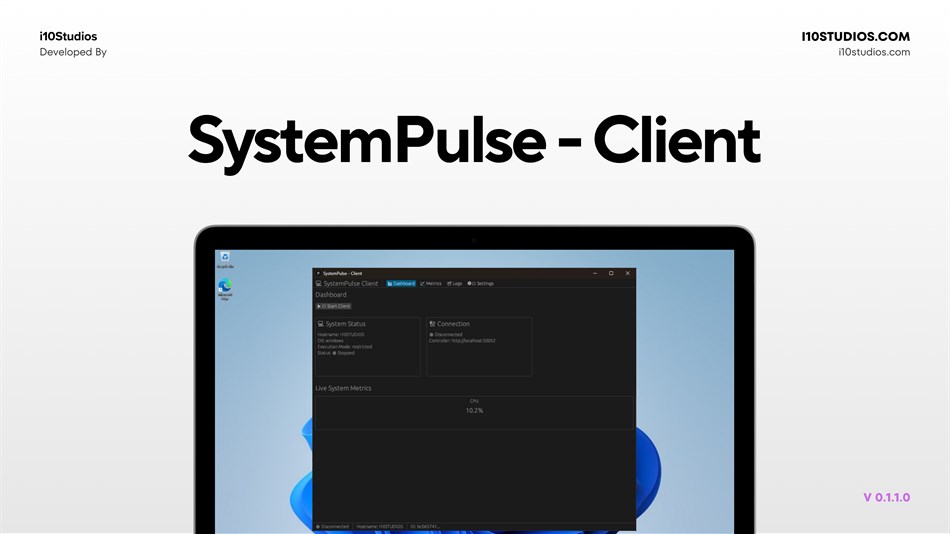
Running quietly in the background, SystemPulse Client continuously collects system metrics and sends them securely to your controller, enabling real-time monitoring, historical analytics, and optional remote command execution—all while maintaining minimal system resource usage.
Perfect for:
• Workstations that need remote monitoring
• Remote team computers requiring oversight
• Server systems needing health tracking
• Lab computers requiring management
• Any Windows device you want to monitor remotely
Key Benefits: SystemPulse Client provides effortless setup via join links, runs with minimal system impact, and offers configurable security levels to match your needs. Whether you need view-only monitoring or full command execution capabilities, the client adapts to your requirements.
Security & Privacy: Your system's security is paramount. SystemPulse Client uses encrypted communication, requires explicit registration via secure tokens, and gives you full control over execution permissions. The client only connects to your specified controller—no third-party access, ever.
Lightweight & Reliable: Built in Rust for exceptional performance and reliability, SystemPulse Client uses minimal CPU and memory while providing accurate, real-time metrics. Automatic reconnection ensures continuous monitoring even during network interruptions.
Works seamlessly with SystemPulse - Controller to provide complete system monitoring capabilities.
จากนักพัฒนา
ผู้พัฒนา
- i10Studios
- ผู้ติดตาม: 0
- แพลตฟอร์ม: Android แอป (1) Android เกม (1) iOS แอป (2) iOS เกม (1) Windows แอป (2)
- ลดราคา: 0
- รายการ: 0 0
- แต้ม: 0
- การจัดอันดับ: 0
- ความคิดเห็น: 0
- วิดีโอ: 0
- RSS: ติดตาม
รายการ 0
-
 SystemPulse - Client
แต้ม 0
-

- +1 แต้ม

การจัดอันดับ 0
-
- คะแนนของคุณ
มีอะไรใหม่
- เวอร์ชัน: PC
- อัปเดตล่าสุด:
- WHAT'S NEW IN VERSION 0.1.1.0
Initial Release - January 2026
Welcome to SystemPulse Client! This is the first public release.
EASY REGISTRATION
• Simple join link registration - just paste and click
• Automatic client ID persistence across restarts
• Visual registration status feedback
• One-time setup process
REAL-TIME MONITORING
• CPU usage monitoring with per-core tracking
• Memory usage with total and available bytes
• Disk usage for all drives
• Configurable collection intervals (1-60 seconds)
• Automatic metric streaming to controller
TWO SECURITY MODES
• Restricted Mode (default) - monitoring only, no command execution
• Unrestricted Mode - full remote command execution capabilities
• Easy mode switching in settings
• Clear visual indicators of current mode
SMART CONNECTION MANAGEMENT
• Automatic connection to controller on startup
• Intelligent reconnection with exponential backoff
• Real-time connection status indicators
• Graceful disconnect when stopped
• Handles network interruptions automatically
PROFESSIONAL INTERFACE
• Clean dashboard showing system status
• Real-time metrics display with visual gauges
• Comprehensive activity logs
• Easy settings management
• Intuitive tabbed navigation
FLEXIBLE CONFIGURATION
• Configure controller endpoint
• Choose execution mode (Restricted/Unrestricted)
• Adjust metrics collection interval
• Validate client registration
• Settings saved automatically
ข้อมูลเพิ่มเติม
- วันที่วางจำหน่าย:
- หมวดหมู่:
แอปสำหรับ Windows›เครื่องมือสำหรับนักพัฒนา - ระบบปฏิบัติการ:
PC - ขนาด:
6 Mb - ภาษาที่รองรับ:
อังกฤษ - การจัดประเภทเนื้อหา:
EVERYONE - Windows Store คะแนน: ¡
0 - เว็บไซต์:
 https://i10studios.com
ความคิดเห็น 0 ¡
คะแนน AppAgg
คะแนน AppAgg โดยประมาณของ
SystemPulse - Client
ผู้พัฒนา: i10Studios
คะแนนที่สูงขึ้นมักสะท้อนตัวชี้วัดที่ดีกว่าบน AppAgg
อิงจาก: ความนิยม · คะแนนจากผู้ใช้ · ความสดใหม่ · ดีล · ข้อมูลร้านค้า · กิจกรรมชุมชน
คำนวณใหม่ทุกวันจากข้อมูล AppAgg ล่าสุด
SystemPulse - Client URL แบบสั้น: คัดลอกแล้ว!- Windows Store

