
ブックマーク
このブックマークのタイトルを入力してください。
ブックマークを保存しました
| 開発者: | Alireza Noori Software (4) | ||
| 価格: | * 無料 | ||
| スコア: | 1,650 ゴールド | ||
| ランキング: | 0 | ||
| コメント: | 0 コメントを投稿する | ||
| リスト: | 0 0 | ||
| ポイント: | 0 | ||
| +1 ポイント | |||
概要
Textwrightは、Alireza Noori Softwareが手がける「開発者ツール」カテゴリのアプリです。
にリリース。まだまだフレッシュです。
入るのは無料。でも中のショップはしっかり営業中です。
Microsoft StoreはWindowsに組み込まれているので、数クリックでインストールできます。
AppAggスコアは1,650。「ゴールド」です。
たった46メガバイト。空きの少ないドライブにも収まります。
年齢区分は「EVERYONE」なので、子どもでも安心です。
対応言語はひとつだけ、しかも日本語ではありません。
ここはまだ静まり返っています。評価もコメントもなし。沈黙を破ってみませんか?
この開発者のアプリは、AppAggにほかに3個あります。のぞいてみては?
アップデートや新しいアプリを誰よりも早く知りたい?開発者をフォローするか、RSS フィードを購読しましょう。プッシュ通知は Android と iOS 向けの AppAgg Alerts アプリで届きます。
広告
他のプラットフォーム 0
価格履歴 0
- 現在の価格: 無料
- 最小値: 無料
- 最大値: 無料
ホームに自分だけのフィード
「新着・アップデート」のプラットフォームを選ぶと、ホームには必要なアプリとゲームだけが表示されます。
スクリーンショット 10

動画 1
説明

It's a native Windows app, compiled ahead of time, with acrylic glass behind it and the standard Windows title bar.
WHAT IT DOES
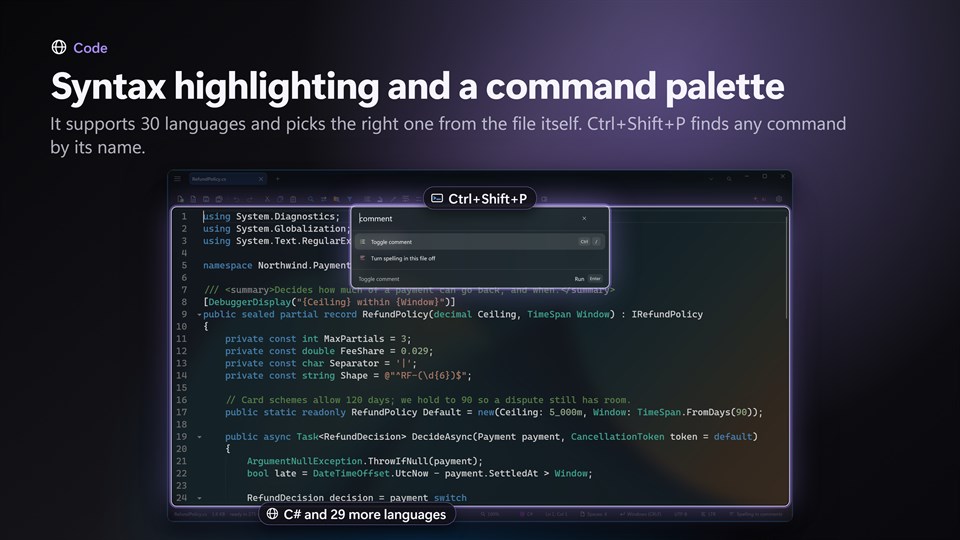
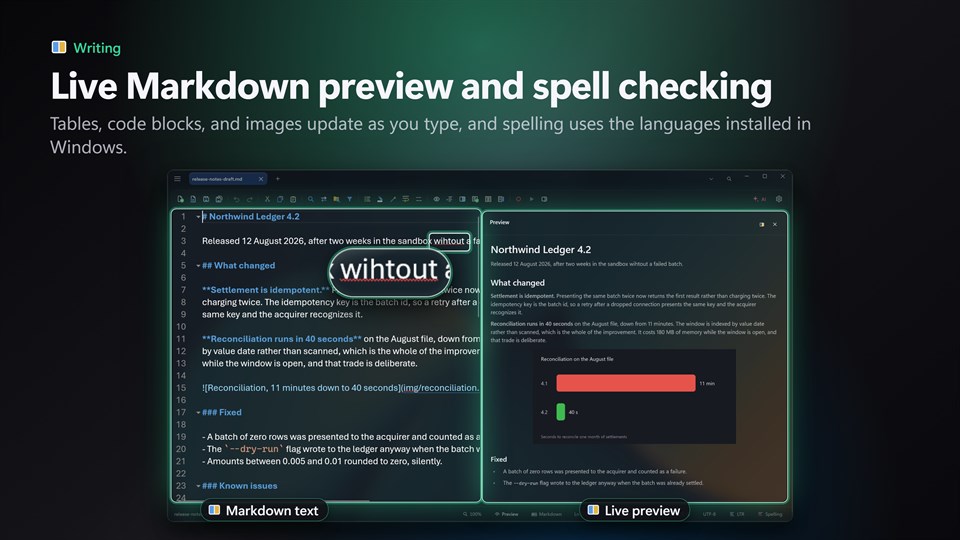
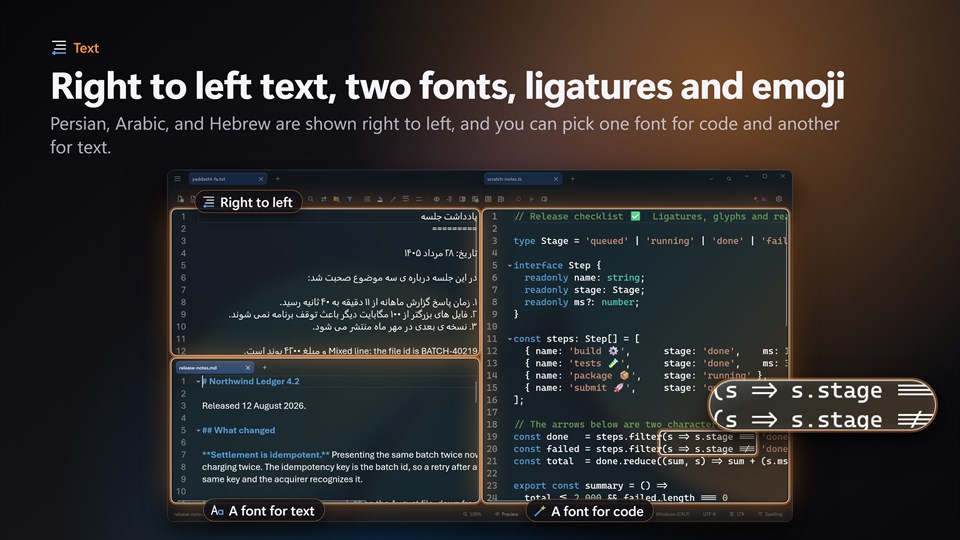
30 languages are syntax highlighted the moment a file opens, and the language is picked from the file itself. Markdown has a live preview beside the text, with tables, code blocks, and even images. Persian, Arabic, and Hebrew are laid out right to left in their real reading order, and the caret goes where you expect it to, even in a line that mixes them with English.
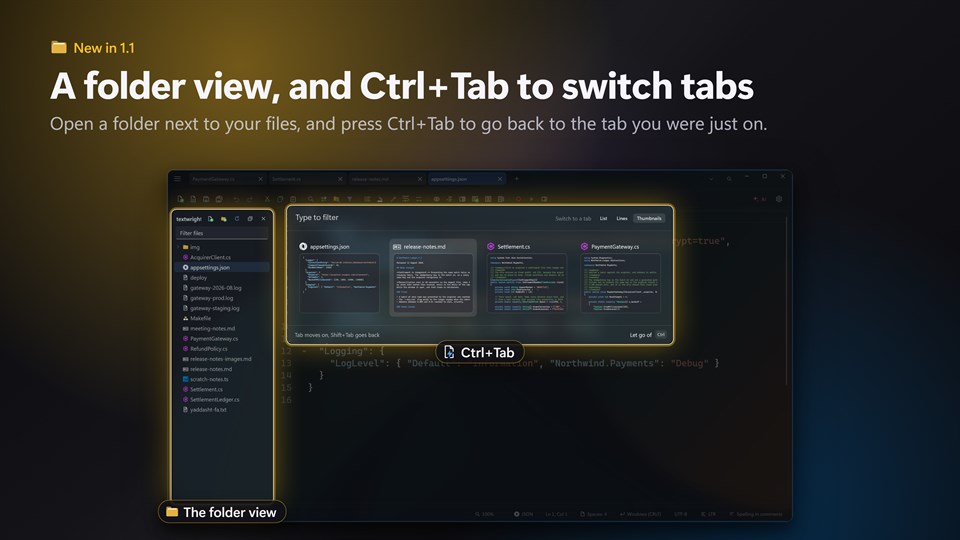
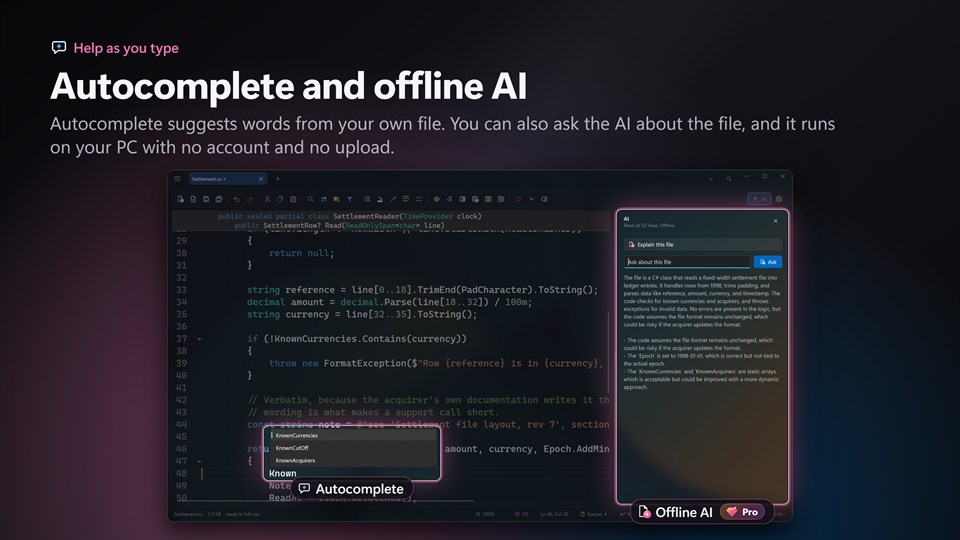
It also has a command palette (Ctrl+Shift+P), a folder view beside your files (Ctrl+B), Ctrl+Tab with a picture of each open tab, a color picker for the colors written in your file, a minimap, split view and docking, bookmarks, multiple carets, line filtering, spell checking, autocomplete for text and code, and UTF-8, UTF-16 and the common Windows code pages. Code and normal text can each have their own font. The macro recorder writes each step out in words, so you can read a macro before you run it. You can also hide a word on screen before you take a screenshot, without changing the file.
ASK ABOUT A FILE
Textwright can explain the file you have open, or answer a question about it, using an AI model that runs on your PC. There is no account, your files are never uploaded, and once the model is downloaded, it works even with the network off. With Pro and an NVIDIA graphics card, a graphics add-on makes the answers about seven times faster, and a second model adds text prediction as you type.
REVIEW YOUR CODING AGENT'S CHANGES
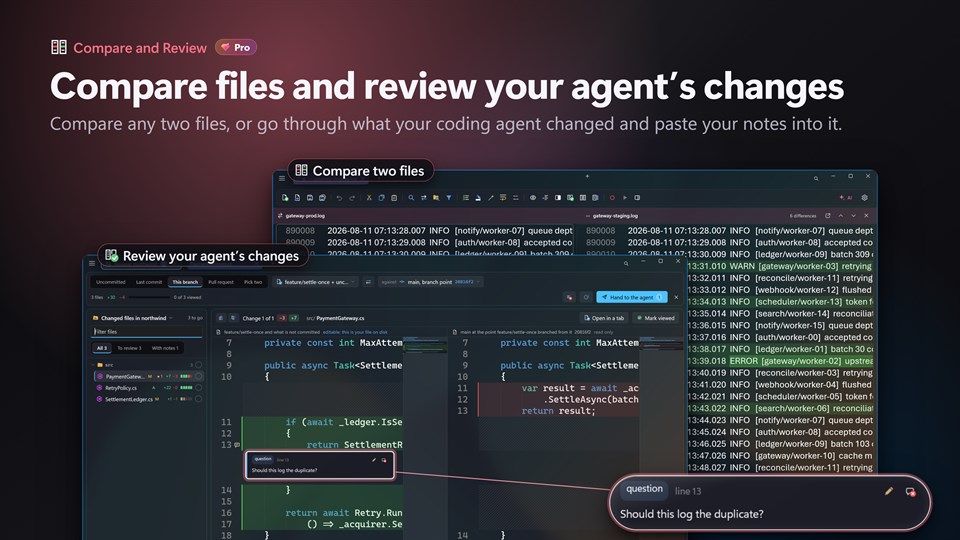
When Claude Code, Codex, or Copilot changes your code, Textwright shows you every change side by side. You can leave a note on any line, then copy every note as one message to paste into the agent, or save them as REVIEW.md. Review is part of Pro.
WHAT IS FREE
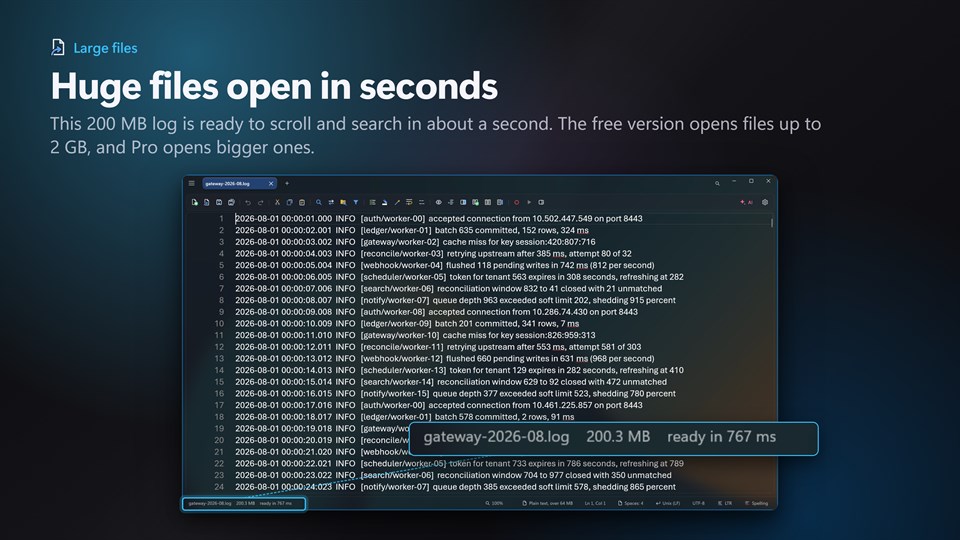
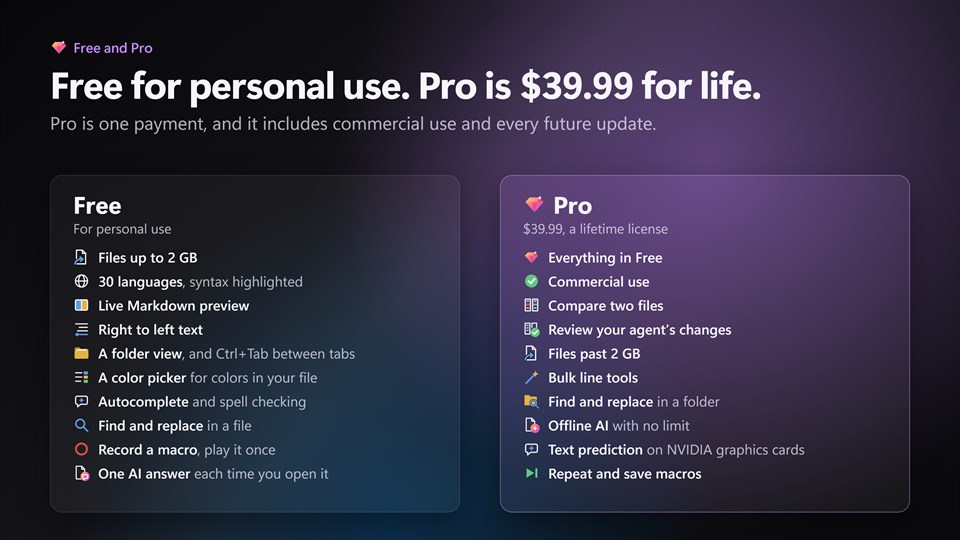
The editor is free for personal use: every language, files up to 2 GB, both splits, the minimap, the folder view, Ctrl+Tab, the color picker, Markdown, right to left text, find and replace in the file you have open, autocomplete, spell checking, printing, and recording a macro and playing it back once.
WHAT PRO ADDS
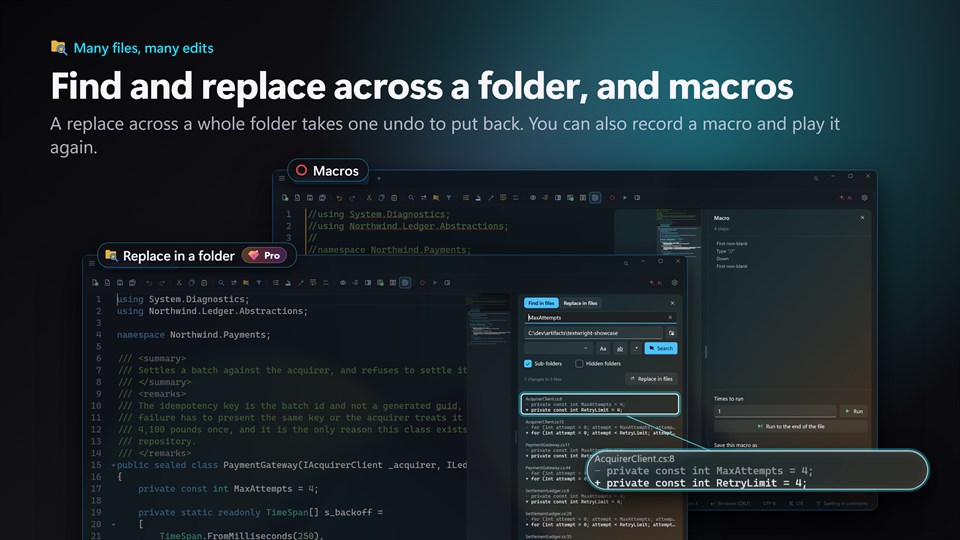
Pro is $39.99, paid only once. It's a lifetime license, so there is no subscription, no Textwright account, and every future update is included. It adds commercial use, comparing two files, reviewing your Git changes and handing the notes to your coding agent, files larger than 2 GB, the line tools that change a file in bulk, find and replace across a whole folder, the offline AI without a limit, text prediction and the graphics card speed-up, and repeating a macro and keeping the ones you name.
WHAT THE FREE VERSION LIMITS
The free version is for personal use. Using Textwright at work, or for paid work, needs Pro.
Free opens files up to 2 GB, and everything you need to read them is free too: every language, every split, the minimap, the line filter, following a file as it grows, find and replace inside the file you have open, the common encodings, printing, and recording a macro and playing it back once. The encode, decode, hash, and timestamp tools are free as well.
Pro is for changing things in bulk and for comparing two files: sorting, removing duplicate lines, trimming, joining, and changing the case of lines; find and replace across a folder, with an undo; repeating a macro and keeping the ones you name; files past 2 GB; and comparing two files side by side, even two 500 MB logs in about nine seconds, with F7 to go from one difference to the next.
The AI gives one free answer each time you open the app, with a short wait if you reopen it again and again, so you can see what it does before deciding whether it's worth paying for.
デベロッパーから
デベロッパーの方ですか?
ページの一番上にニュースを投稿すると、フォロワーにメールで届きます。YouTube 動画を追加すると、「動画」の一番上に表示されます。
リスト 0
-
 Textwright
ポイント 0
-

- +1 ポイント

ランキング 0
-
- あなたの評価
開発者 4
- Alireza Noori Software
- フォロワー: 0
- プラットフォーム: Windows アプリ (4)
- セール: 0
- リスト: 0 0
- ポイント: 0
- ランキング: 0
- コメント: 0
- 動画: 3
- RSS: 購読する
新機能
- バージョン: PC
- 最終更新:
- New in 1.2.2:
- The suggested word no longer sits a few pixels above your text when Aptos, the default text font, isn't installed.
New in 1.2.1:
- Review: pick a note's kind with Alt+F, Alt+Q, or Alt+N, or step through them with Ctrl+Up and Ctrl+Down. Each kind has its own color, and you can also write a note about a whole file or the whole review.
- Review: the notes you hand your agent name the commit you reviewed and say if the branch has moved since. A folder you haven't looked at is listed once instead of file by file.
- textwright:// links also take the form VS Code uses (textwright://file/C:/path/file.cs:12), and can open a review of a repository or compare two files.
- The suggested word sits on the same line as your text at every display scale.
New in 1.2:
- Terminal (Pro): press Ctrl+Shift+` or the New terminal button to open a terminal below your files, in the folder of the file you're working on. Right click the button to pick PowerShell, Command Prompt, WSL, or any other shell you have.
- Go to definition: hold Ctrl over a name in code and click it, or press F12, to open where it's declared in your folder, or in the review you're doing. Alt+Left takes you back and Alt+Right forward again, and so do the mouse's side buttons.
- Press Ctrl+, to open any file in your open folder by typing part of its name.
- The suggested word stays while you type its letters, so Tab still takes it. It also no longer disappears partway along a line or near its end.
バージョン履歴2
- New in 1.1.2:
- Comparing two big files no longer freezes the window while the second file is read.
- Pressing Enter in a big file with word wrap on no longer wraps the whole file again.
- Ctrl+= and Ctrl+- zoom from the main keyboard, not only from the number pad.
- The window title shows the tab you're working in, so the right window is easy to find in the taskbar and Alt+Tab.
- Review: the To review list empties once every file is viewed, and Ctrl+Shift+B brings back the last file you marked as viewed, like Ctrl+Shift+T does for tabs.
- Settings are saved more safely, so a power cut in the middle of a save can't lose them.
- Lots of smaller fixes from a full review of the code, including a few rare ways unsaved work could be lost.
New in 1.1:
- Folder view: press Ctrl+B to open a folder beside your files. You can make, rename, and delete files there without leaving the editor.
- Tab switcher: hold Ctrl and press Tab to see a picture of each open tab, the most recent first.
- Command palette: Ctrl+Shift+P has a new look, and every command shows its shortcut right beside it.
- Color picker: Ctrl+click a color written in your file, like #3A7BD5, to change it with a picker.
- Review has an inline view as well as side by side.
- Find and replace in files is faster, and long jobs can be stopped from the corner of the window. - Textwright now asks once whether you would like to rate it in the Microsoft Store. It waits until you have used it on at least three different days, asks only right after you save and stop typing, and never asks again, whatever you choose.
Pro can now be bought from inside the app. In 1.0.1 the Get Pro button could not find it in the Store, so if you tried and it failed, please try again after this update.
New in 1.1:
- Folder view: press Ctrl+B to open a folder beside your files. You can make, rename, and delete files there without leaving the editor.
- Tab switcher: hold Ctrl and press Tab to see a picture of each open tab, the most recent first.
- Command palette: Ctrl+Shift+P has a new look, and every command shows its shortcut right beside it.
- Color picker: Ctrl+click a color written in your file, like #3A7BD5, to change it with a picker.
- Review has an inline view as well as side by side.
- Find and replace in files is faster, and long jobs (Find in files, Replace in files, downloads, opening a big file) can be stopped from the corner of the window.
- A short "What's new" sheet opens once after an update, so you can see what changed.
情報
 https://alirezanoori.ca/textwright
AppAggスコア
1,650
AppAgg推定スコア:
Textwright
開発者: Alireza Noori Software
1,650 ゴールド
スコアが高いほど、AppAgg上の各指標が良好な傾向にあります。
基準: 人気 · ユーザー評価 · 新しさ · セール · ストアデータ · コミュニティ活動
最新のAppAggデータに基づいて毎日再計算されます。
ウェブサイト用バッジ:  コピーしました!
コメント 0 ¡
最初のコメントを書きましょう
シェア
Textwright 短縮 URL: コピーしました!- Windows Store

