
Bookmark
Pilih judul untuk bookmark ini.
Bookmark disimpan
| Pengembang: | Stuart Millington (4) | ||
| Harga: | Gratis Baru | ||
| Skor: | 590 Perunggu | ||
| Peringkat: | 0 | ||
| Komentar: | 0 Kirimkan komentar | ||
| Daftar: | 0 + 0 | ||
| Poin: | 0 + 0 ¡ | ||
| +1 Poin | |||
Jepretan layar
Iklan
Deskripsi

HISTORY AND COMMITS
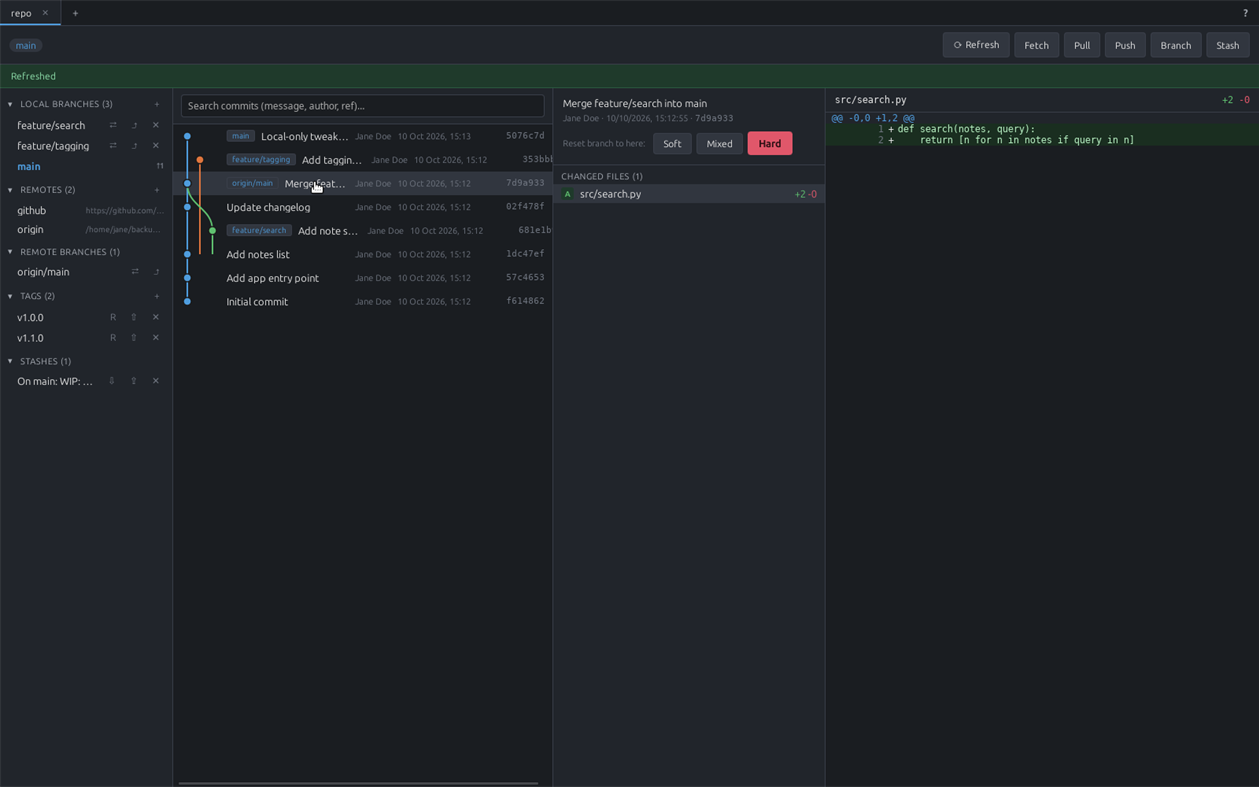
A colored, lane-based commit graph across all branches, in the style of git log --graph. Click any commit to see its changed files and diffs. Search by message, author, or branch/tag ref, with a live match count and Next/Prev navigation.
BRANCHING, MERGING AND REBASING
Create, check out and delete local and remote branches, with ahead/behind indicators against upstream. Real merge and rebase support with conflict detection, plus a genuine in-app 3-way merge tool: Local and Remote reference panes on top, an editable Result pane below. Resolved conflicts stay clearly marked and editable, and long unchanged stretches of a file collapse out of the way automatically. Soft/mixed/hard reset the current branch to any earlier commit.
STAGING, STASHING AND TAGS
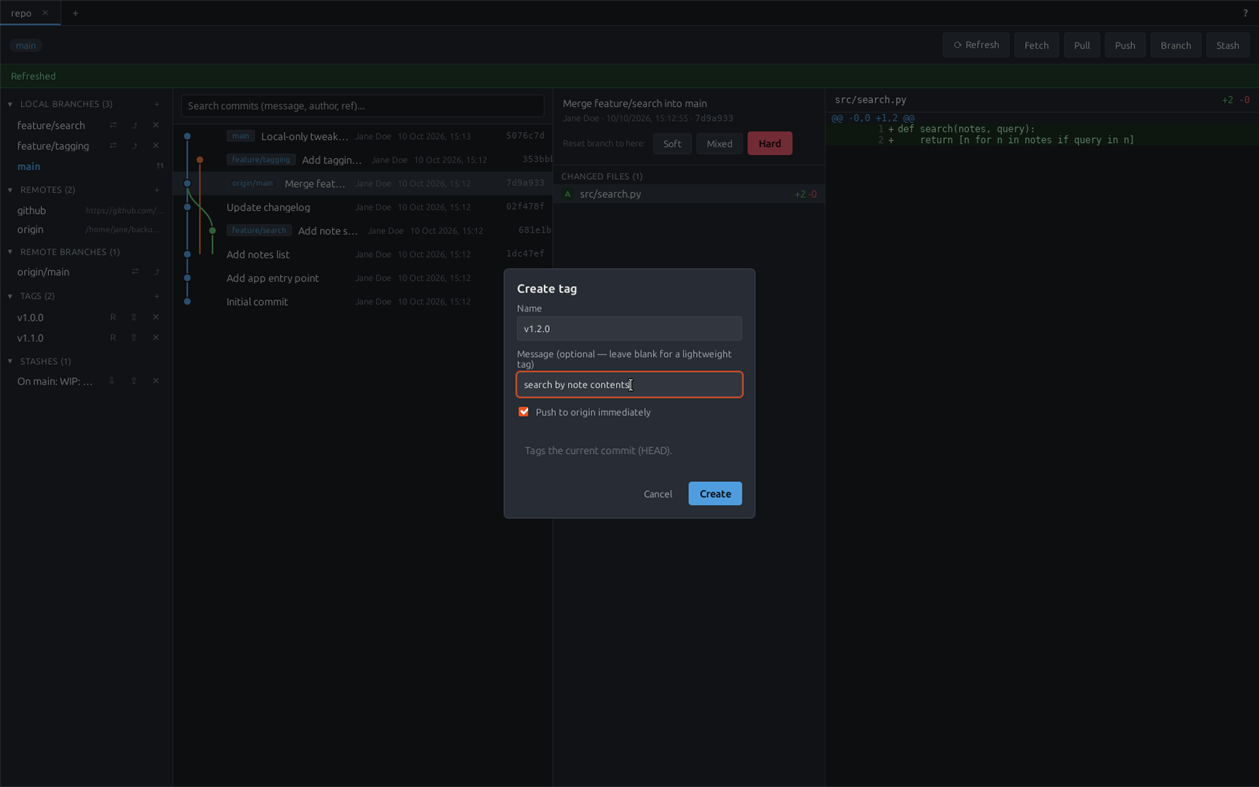
Stage or unstage individual files or everything at once, discard working changes, and view line-by-line diffs. Save, apply, pop and drop stashes. Create annotated or lightweight tags, push them to a remote immediately or later with one click, and delete them locally — everything a release needs, without dropping to a shell.
GITHUB INTEGRATION
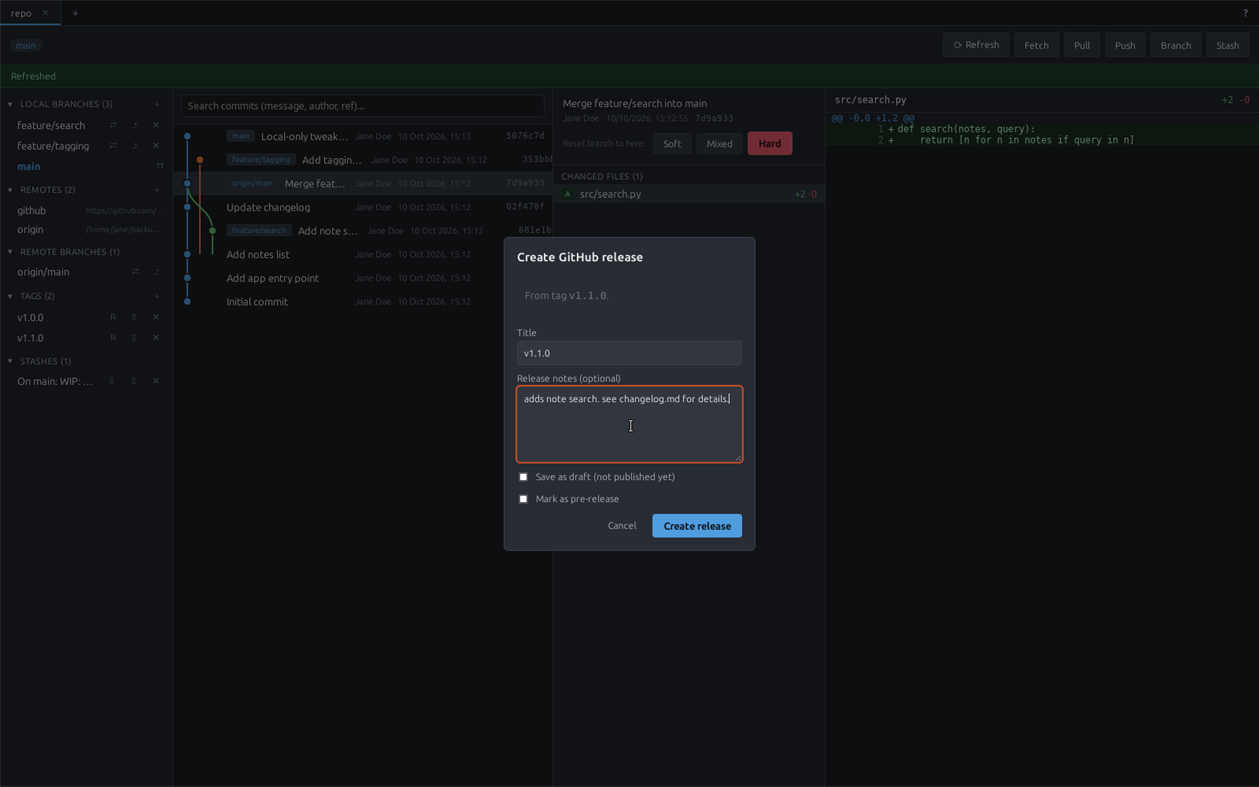
Sign in via GitHub's own Device Flow — no password ever touches uGit, and the token is stored in the OS credential store. Create a new GitHub repo and push to it in one step, and browse/clone your GitHub repos from the Open Repository screen. Turn an existing tag into a GitHub Release (title, notes, draft/pre-release) in one step — a tag that already has a release shows a link to view it instead of a duplicate "create" button.
REMOTES AND AUTHENTICATION
Add remotes, and fetch/pull/push with SSH-agent, ~/.ssh key, and git credential-helper authentication, tried in that order. If an SSH remote fails, uGit automatically retries over HTTPS using a signed-in GitHub account. Generate a new Ed25519 SSH keypair or point uGit at an existing key, right from the Help panel — only the public key ever leaves the app. A Test Connection button checks SSH auth independently of anything OAuth-related.
BUILT FOR REAL WORKFLOWS
Multiple repositories at once as tabs, each keeping its own in-progress work; a background tab silently refreshes itself if it's been more than 15 minutes. Reopens the same tabs, folder history and window position you had last time. A built-in Help panel covers SSH setup and linking repos to remotes with real buttons, not just instructions.
uGit's source is available on GitHub, licensed under AGPLv3 with the Commons Clause (free to use, modify and self-host; not for resale as a hosted product).
Riwayat harga
- Harga saat ini: Gratis
- Minimum: Gratis
- Maksimum: Gratis
Pantau harga Tambahkan ke daftar untuk menerima pemberitahuan diskon melalui email atau push
Platform lain (0)
| uGitWindows StoreAnda di sini | Gratis |
Saat ini hanya ada di toko ini.
Daftar (0)
0
- uGit
Poin (0)
0
Peringkat (0)
0
Komentar (0) ¡
Jadilah yang pertama berkomentar
Pengembang
- Stuart Millington
- Pengikut: 0
- Platform: Windows Aplikasi (4)
- Diskon: 0
- Daftar: 0 + 0
- Poin: 0 + 0 ¡
- Peringkat: 0
- Komentar: 0
- Video: 0
- RSS: Berlangganan
Yang Baru
- Versi: PC
- Terakhir diperbarui:
Info tambahan
- Tanggal rilis:
- Kategori:
Aplikasi Windows›Alat pengembang - OS:
PC - Ukuran:
3 Mb - Bahasa yang didukung:
English - Rating Konten:
EVERYONE - Windows Store Rating: ¡
0 - Situs Web:
 https://github.com/StuMP90/ugit
Skor AppAgg
590
Perkiraan Skor AppAgg untuk
uGit
Pengembang: Stuart Millington
590 Perunggu
Skor yang lebih tinggi biasanya menunjukkan indikator yang lebih kuat di AppAgg.
Berdasarkan: popularitas · rating pengguna · kebaruan · promo · data toko · aktivitas komunitas
Dihitung ulang setiap hari dari data AppAgg terbaru.
Lencana untuk situs web:  Disalin!
Ringkasan
uGit URL singkat: Disalin!- Windows Store
Di AppAgg, Anda dapat mengikuti “uGit”, aplikasi dari Stuart Millington untuk Windows dalam kategori Alat pengembang. Skor AppAgg: 590 (Perunggu). Poin AppAgg untuk aplikasi — terkonfirmasi: 0; tidak langsung: 0. Daftar publik yang memuat aplikasi ini: 0. Pengguna yang menyimpannya dalam daftar pribadi: 0. Pengguna AppAgg belum memberi rating untuk aplikasi ini. Poin terkonfirmasi mencatat kunjungan ke toko oleh pengguna yang sudah masuk ke AppAgg. Poin tidak langsung berasal dari data toko. Kedua penghitung menunjukkan jumlah daftar publik dan pengguna yang menyimpan aplikasi atau game dalam daftar pribadi. Aplikasi ini pertama kali dirilis pada . Pembaruan terakhir aplikasi ini: . Aplikasi ini saat ini tersedia gratis. Aplikasi ini mendukung bahasa berikut: English. Lihat riwayat harga, tambahkan aplikasi ke daftar, atau ikuti pengembangnya. Pantau penawaran dan pembaruan berikutnya untuk aplikasi ini melalui Umpan RSS. AppAgg tidak menyimpan aplikasi ini di servernya maupun mendistribusikannya. Semua merek dagang, logo, dan tangkapan layar yang terkait dengan aplikasi ini adalah milik pemiliknya masing-masing.
Anda mungkin juga suka
Diskusi terbaru
 AplikasiNauticPlayer This app is absolute cinema. Honestly, it’s one of the best media players I’ve ever tried, and I’m s...
  Manuel16
  AplikasiScreen Beings - Desktop Pet & Study Companion This is my app so I’m a little bias but as someone from the ADHD community that teaches ADHD and neu...
  Tarelle Irwin6
  AplikasiAadi vault good it ia a encrypter and good you my work on office
  Aditya Rai5
  AplikasiTyping 365 | Daily Typing Trainer The best typing app ever. With Typing 365 you don’t have to force yourself for couple minutes traini...
  Ahmad Mozaffar5
  AplikasiZefir Calendar — Calendar in the Taskbar excelente app! Superando todas as espectativas!
  Diógenes Magnus5
  AplikasiLockinRa LockinRa 리뷰 LockinRa는 작업 관리, 집중력 도구, AI 코칭을 하나의 데스크톱 앱으로 통합한 무료 Windows 생산성 프로그램입니다. 클라우드 동기화 없이 로컬 ...
  abhilok reddy6
  AplikasiCN Vault I Love this app CN Vault is a user-friendly app that helps keep your passwords safe and secure. If y...
  Marjuk Amin5
