
ブックマーク
このブックマークのタイトルを入力してください。
ブックマークを保存しました
| 開発者: | Stuart Millington (3) | ||
| 価格: | 無料 新着 | ||
| スコア: | 590 ブロンズ | ||
| ランキング: | 0 | ||
| コメント: | 0 コメントを投稿する | ||
| リスト: | 0 + 0 | ||
| ポイント: | 0 + 0 ¡ | ||
| +1 ポイント | |||
スクリーンショット
広告
説明

HISTORY AND COMMITS
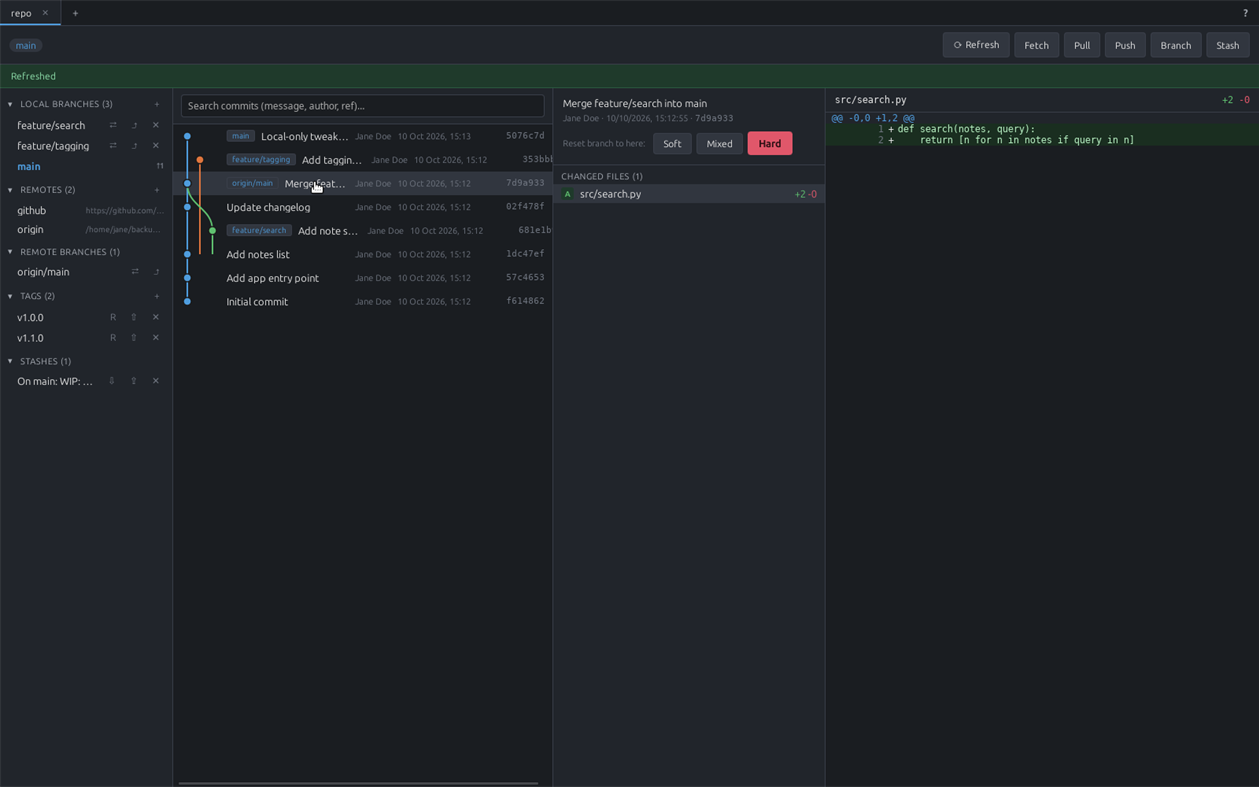
A colored, lane-based commit graph across all branches, in the style of git log --graph. Click any commit to see its changed files and diffs. Search by message, author, or branch/tag ref, with a live match count and Next/Prev navigation.
BRANCHING, MERGING AND REBASING
Create, check out and delete local and remote branches, with ahead/behind indicators against upstream. Real merge and rebase support with conflict detection, plus a genuine in-app 3-way merge tool: Local and Remote reference panes on top, an editable Result pane below. Resolved conflicts stay clearly marked and editable, and long unchanged stretches of a file collapse out of the way automatically. Soft/mixed/hard reset the current branch to any earlier commit.
STAGING, STASHING AND TAGS
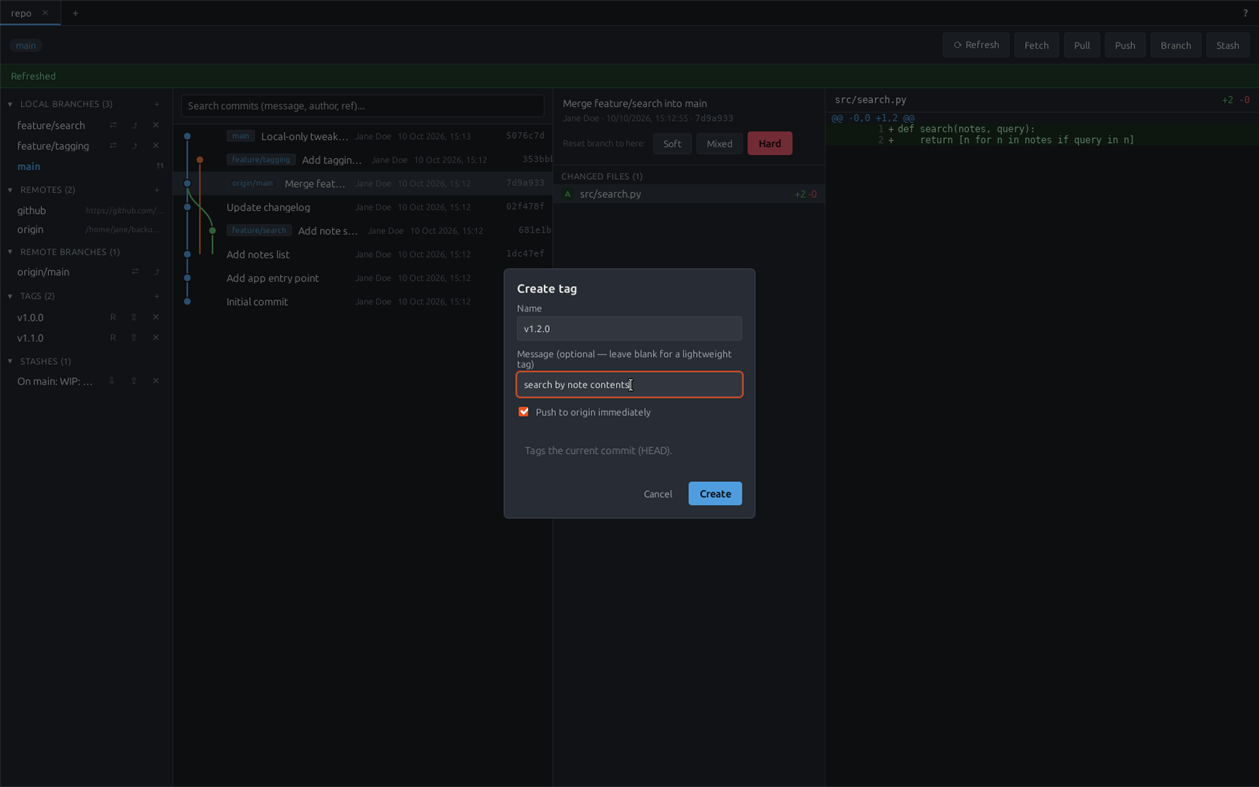
Stage or unstage individual files or everything at once, discard working changes, and view line-by-line diffs. Save, apply, pop and drop stashes. Create annotated or lightweight tags, push them to a remote immediately or later with one click, and delete them locally — everything a release needs, without dropping to a shell.
GITHUB INTEGRATION
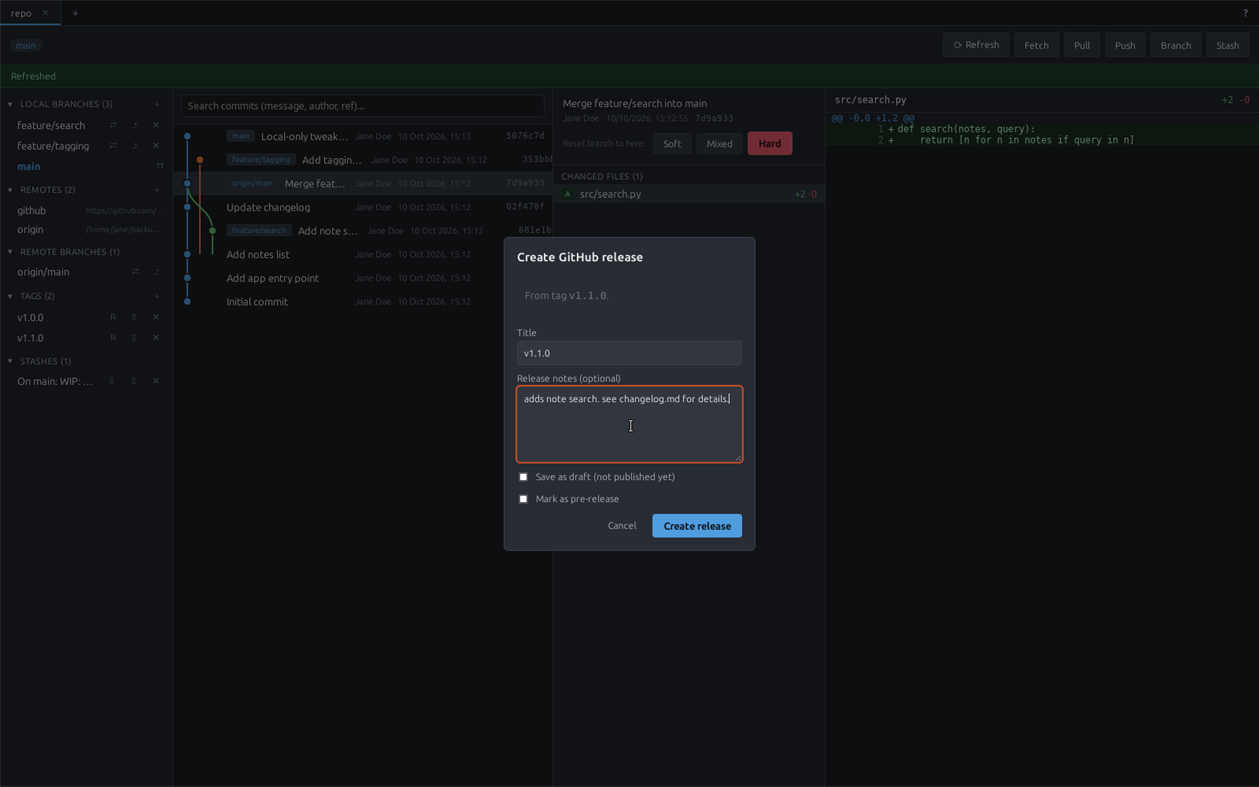
Sign in via GitHub's own Device Flow — no password ever touches uGit, and the token is stored in the OS credential store. Create a new GitHub repo and push to it in one step, and browse/clone your GitHub repos from the Open Repository screen. Turn an existing tag into a GitHub Release (title, notes, draft/pre-release) in one step — a tag that already has a release shows a link to view it instead of a duplicate "create" button.
REMOTES AND AUTHENTICATION
Add remotes, and fetch/pull/push with SSH-agent, ~/.ssh key, and git credential-helper authentication, tried in that order. If an SSH remote fails, uGit automatically retries over HTTPS using a signed-in GitHub account. Generate a new Ed25519 SSH keypair or point uGit at an existing key, right from the Help panel — only the public key ever leaves the app. A Test Connection button checks SSH auth independently of anything OAuth-related.
BUILT FOR REAL WORKFLOWS
Multiple repositories at once as tabs, each keeping its own in-progress work; a background tab silently refreshes itself if it's been more than 15 minutes. Reopens the same tabs, folder history and window position you had last time. A built-in Help panel covers SSH setup and linking repos to remotes with real buttons, not just instructions.
uGit's source is available on GitHub, licensed under AGPLv3 with the Commons Clause (free to use, modify and self-host; not for resale as a hosted product).
価格履歴
- 現在の価格: 無料
- 最小値: 無料
- 最大値: 無料
他のプラットフォーム (0)
| uGitWindows Store現在のページ | 無料 |
現在はこのストアでのみ配信中です。
リスト (0)
0
- uGit
ポイント (0)
0
ランキング (0)
0
コメント (0) ¡
最初にコメントしてください
開発者
- Stuart Millington
- フォロワー: 0
- プラットフォーム: Windows アプリ (3)
- セール: 0
- リスト: 0 + 0
- ポイント: 0 + 0 ¡
- ランキング: 0
- コメント: 0
- 動画: 0
- RSS: 購読する
新機能
- バージョン: PC
- 最終更新:
情報
- リリース日:
- カテゴリ:
Windows向けアプリ›開発者ツール - オペレーティング システム:
PC - サイズ:
3 Mb - サポートされる言語:
English - コンテンツのレーティング:
EVERYONE - Windows Store 評価: ¡
0 - ウェブサイト:
 https://github.com/StuMP90/ugit
AppAggスコア
590
AppAgg推定スコア:
uGit
開発者: Stuart Millington
590 ブロンズ
スコアが高いほど、AppAgg上の各指標が良好な傾向にあります。
基準: 人気 · ユーザー評価 · 新しさ · セール · ストアデータ · コミュニティ活動
最新のAppAggデータに基づいて毎日再計算されます。
Webサイト用バッジ:  コピーしました!
概要
uGit 短縮 URL: コピーしました!- Windows Store
AppAggでは、Stuart Millingtonが開発したアプリ「uGit」の情報を確認できます。対応プラットフォーム:Windows。カテゴリ:開発者ツール。 AppAggスコア:590(ブロンズ)。 このアプリのAppAggポイント:確認済み 0、間接 0。 このアプリを含む公開リスト:0件。非公開リストに保存しているユーザー:0人。 このアプリには、AppAggユーザーからの評価はまだありません。 確認済みポイントは、ログインしたAppAggユーザーのストアへのアクセスを記録します。間接ポイントはストアのデータに基づきます。 2つの数字は、公開リストの数と、非公開リストに保存したユーザー数を表します。 このアプリの初回リリースはです。 このアプリの最終更新はです。 このアプリは現在無料です。 このアプリは次の言語に対応しています:English。 価格履歴を確認したり、アプリをリストに追加したり、開発者をフォローしたりできます。 このアプリの今後のセールや更新はRSS フィードで確認できます。 AppAggはこのアプリをホストまたは配布していません。 このアプリに関連する商標、ロゴ、スクリーンショットはすべて各権利者に帰属します。
こちらもおすすめ
最近の話題
 アプリNauticPlayer This app is absolute cinema. Honestly, it’s one of the best media players I’ve ever tried, and I’m s...
  Manuel16
  アプリScreen Beings - Desktop Pet & Study Companion This is my app so I’m a little bias but as someone from the ADHD community that teaches ADHD and neu...
  Tarelle Irwin6
  アプリAadi vault good it ia a encrypter and good you my work on office
  Aditya Rai5
  アプリTyping 365 | Daily Typing Trainer The best typing app ever. With Typing 365 you don’t have to force yourself for couple minutes traini...
  Ahmad Mozaffar5
  アプリZefir Calendar — Calendar in the Taskbar excelente app! Superando todas as espectativas!
  Diógenes Magnus5
  アプリLockinRa LockinRa 리뷰 LockinRa는 작업 관리, 집중력 도구, AI 코칭을 하나의 데스크톱 앱으로 통합한 무료 Windows 생산성 프로그램입니다. 클라우드 동기화 없이 로컬 ...
  abhilok reddy6
  アプリCN Vault I Love this app CN Vault is a user-friendly app that helps keep your passwords safe and secure. If y...
  Marjuk Amin5
