
북마크
이 북마크의 제목을 입력하세요.
북마크가 저장되었습니다
| 개발자: | Mojosoft Co., Ltd. (9) | ||
| 가격: | $25.49 | ||
| 종합 점수: | 890 실버 | ||
| 순위: | 0 | ||
| 댓글: | 0 댓글 게시 | ||
| 목록: | 0 0 | ||
| 포인트: | 0 | ||
| +1 포인트 | |||
요약
소개합니다. Mojosoft Co., Ltd.에서 만든 ‘개발자 도구’ 카테고리 앱, VibeFront - AI HTML Editor.
에 출시됐어요. 아직 꽤 따끈따끈해요.
$25.49, 그리고 AppAgg에서 지금까지 할인이 단 한 번도 없었어요. 만만치 않은 상대네요.
Microsoft Store는 Windows에 기본으로 들어 있어서 클릭 몇 번이면 설치돼요.
AppAgg 점수는 890. 실버 등급, 이 정도면 꽤 괜찮아요.
겨우 2메가바이트. 꽉 찬 드라이브에도 쏙 들어가요.
연령 등급은 ‘EVERYONE’, 아이들에게도 괜찮아요.
2개 언어를 지원하지만, 한국어는 아직 없어요.
사용해 보셨나요? 여기서 첫 리뷰의 주인공이 되어 주세요.
이 개발자의 앱이 AppAgg에 8개 더 있어요. 한번 둘러보세요.
할인, 업데이트, 새 앱 소식을 가장 먼저 받고 싶나요? 가격 알림을 설정하거나 개발자를 팔로우하거나 RSS 피드를 구독하세요. 푸시 알림은 Android와 iOS용 AppAgg Alerts 앱으로 받을 수 있어요.
광고
다른 플랫폼 0
가격 기록 0
- 현재 가격: $25.49
- 최소: $25.49
- 최대: $25.49
홈 화면의 나만의 피드
“신규 및 업데이트” 피드의 플랫폼을 선택하면 홈 화면에 필요한 앱과 게임만 표시됩니다.
스크린샷 5
동영상 1
설명

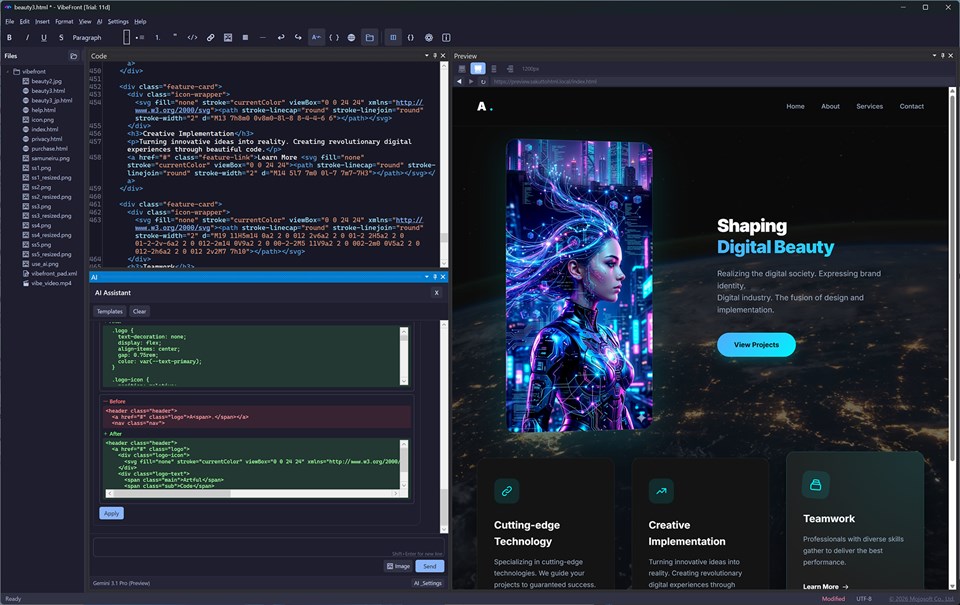
Build and Edit HTML by Chatting with AI
- Describe the page you want, and AI generates the HTML + CSS
- AI proposes only the changes to your current HTML; review them and click "Apply"
- Proofread, translate, or rewrite just the selected part
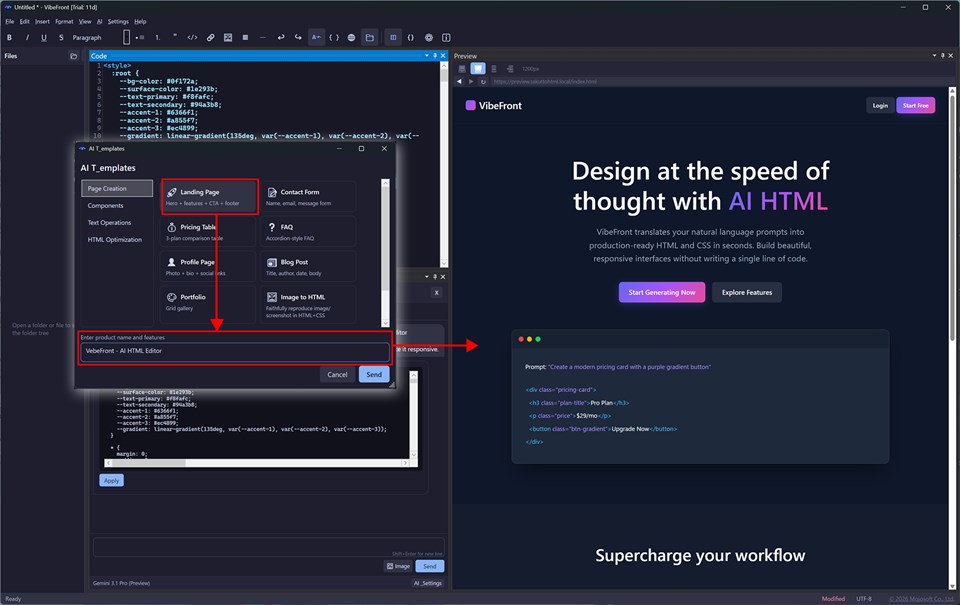
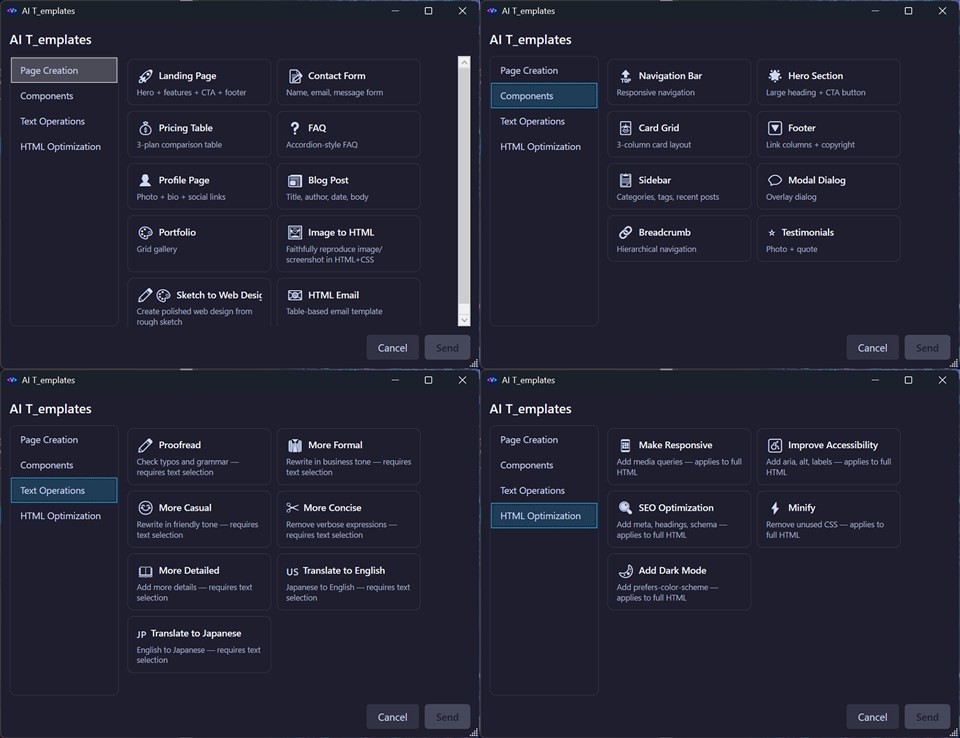
30 AI Templates
- Pages: landing page, contact form, pricing table, FAQ, profile, blog post, portfolio, email template, and more
- Components: navbar, hero, cards, footer, sidebar, modal, breadcrumbs, testimonials
- Text: proofread; rewrite as formal, casual, concise, or detailed; translate English Japanese
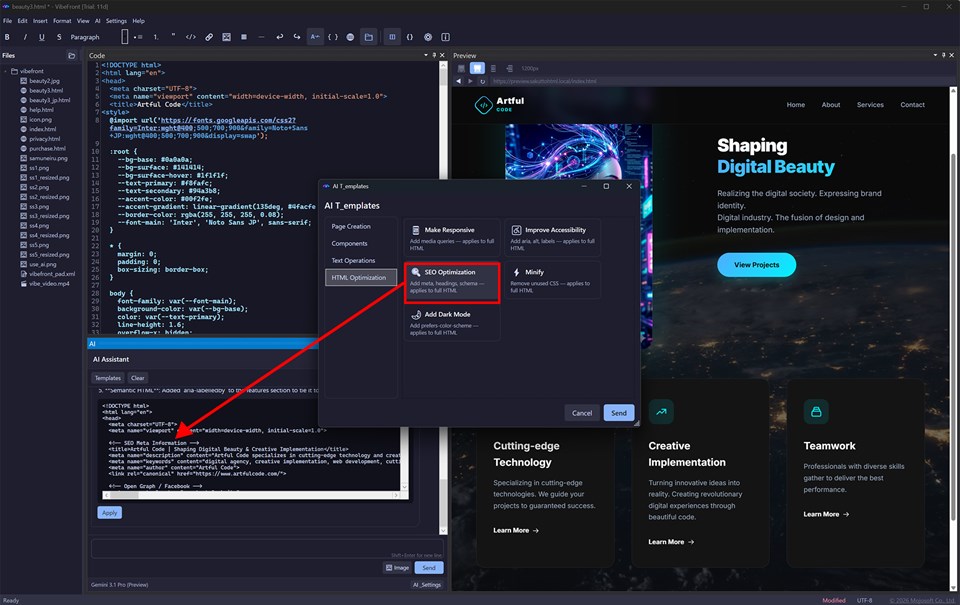
- HTML optimization: responsive, accessibility, SEO, minify, dark mode
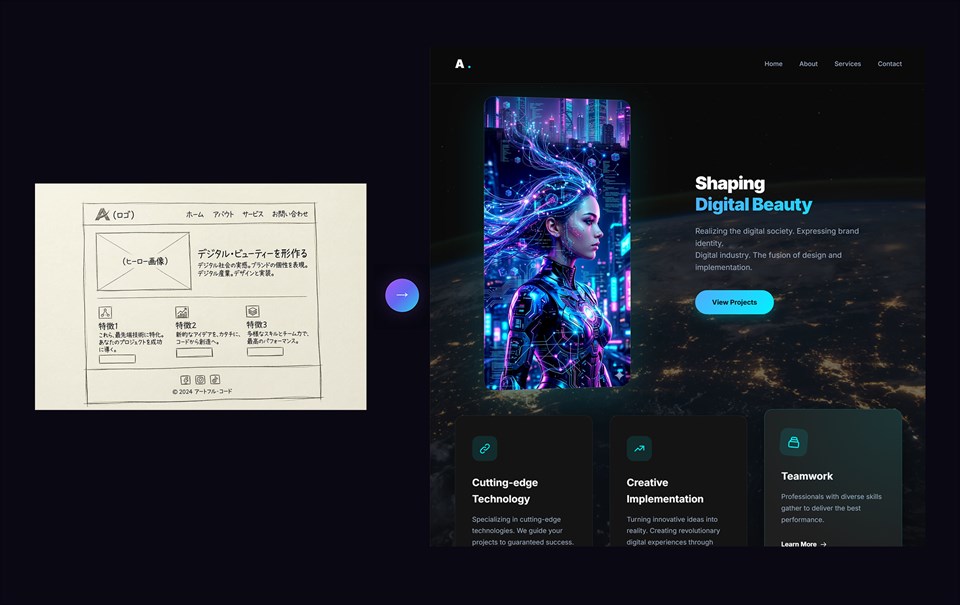
Image to HTML
- Paste a screenshot or design mockup, and AI recreates it in HTML + CSS
- Turn a hand-drawn rough sketch into a polished web page design
(Image input uses OpenAI, Claude, or Gemini)
Latest AI Models (v1.3.0)
- OpenAI: GPT-6.1 Sol / GPT-6 Astra / GPT-6 Luna
- Anthropic: Claude Opus 5.5 / Claude Sonnet 5.5 / Claude Haiku 4.5
- Google: Gemini 3.8 Flash (free tier) / Gemini 3.1 Pro / Gemini 3.5 Flash Lite
- Local LLMs: Ollama / LM Studio (fully offline, no API cost)
Your API key is stored only on your PC and is sent directly to the provider you choose when you use AI.
Professional Code Editor
- HTML syntax highlighting and code completion
- Emmet expansion (type div>ul>li*3, press Tab)
- Find & replace with regular expressions, HTML formatting
Live Preview
- Code changes appear in the preview right away
- Check layouts at Mobile (375px), Tablet (768px), Desktop (1200px), and full width
- Select text in the preview to jump to the matching source code
- Preview in a separate window or open the page in your browser
Comfortable Workspace
- Drag files from the file explorer to insert img, a, link, or script tags automatically
- Dark / light theme; dock and float panels freely
- Auto-detects UTF-8, UTF-8 BOM, Shift-JIS, EUC-JP, and UTF-16, and saves in the encoding you choose
Buy Once, No Subscription
Pay once and use it for as long as you like. No monthly fees. AI usage is billed by each AI provider (free with Gemini's free tier or local LLMs).
Software Dependencies
This app depends on the following software:
- Microsoft Edge WebView2 Runtime (required) — Used for the HTML preview. Pre-installed on Windows 11. For Windows 10, download free from https://developer.microsoft.com/microsoft-edge/webview2/
- .NET 9.0 Desktop Runtime (required) — Required to run the app. Automatically installed with the Microsoft Store version. Available free at https://dotnet.microsoft.com/download/dotnet/9.0
System Requirements
- Windows 10 version 2004 or later / Windows 11
- Memory: 4 GB minimum (8 GB recommended)
- Disk: 200 MB free space
AI Features (optional)
To use AI features, one of the following is required (the app's core features work without AI):
- OpenAI API Key (paid)
- Anthropic Claude API Key (paid)
- Google Gemini API Key (free tier available)
- Local LLM: Ollama (free) or LM Studio (free)
개발자 소식
개발자이신가요?
페이지 맨 위에 소식을 올리면 팔로워에게 이메일로 전달됩니다. YouTube 동영상을 추가하면 “동영상” 블록 맨 앞에 표시됩니다.
목록 0
-
 VibeFront - AI HTML Editor
포인트 0
-

- +1 포인트

순위 0
-
- 내 평점
개발자 9
- Mojosoft Co., Ltd.
- 팔로워: 0
- 플랫폼: iOS 앱 (1) Windows 앱 (8)
- 할인: 0
- 목록: 0 0
- 포인트: 0
- 순위: 0
- 댓글: 0
- 동영상: 2
- RSS: 구독
새로운 기능
- 버전: PC
- 마지막 업데이트:
- v1.3.0 — Support for the latest AI models.
- OpenAI: GPT-6.1 Sol / GPT-6 Astra / GPT-6 Luna
- Claude: Claude Opus 5.5 / Claude Sonnet 5.5 / Claude Haiku 4.5
- Gemini: Gemini 3.8 Flash (free tier) / Gemini 3.1 Pro / Gemini 3.5 Flash Lite
- If you had selected a retired or restricted model, VibeFront now switches to its successor in the same price range automatically
- You are now notified when a response is cut off at the output limit
- Claude prompt caching lowers the cost of follow-up messages
- The Gemini API key is now sent in a request header instead of the URL
- Fixed an issue where an empty AI response caused errors for the rest of the conversation, and other bugs
추가 정보
 https://mojosoftjp.github.io/vibefront/
AppAgg 점수
890
AppAgg 예상 점수:
VibeFront - AI HTML Editor
개발자: Mojosoft Co., Ltd.
890 실버
점수가 높을수록 대체로 AppAgg의 여러 지표에서 좋은 결과를 보인다는 뜻입니다.
기준: 인기 · 사용자 평점 · 최신성 · 할인 · 스토어 데이터 · 커뮤니티 활동
최신 AppAgg 데이터를 바탕으로 매일 다시 계산됩니다.
웹사이트용 배지:  복사됨!
댓글 0 ¡
가장 먼저 댓글을 남겨주세요
공유하기
VibeFront - AI HTML Editor 단축 URL: 복사됨!- Windows Store


