
Opgeslagen
Kies de naam die in je menu Opgeslagen moet worden weergegeven.
Klaar!
| Ontwikkelaar: | Microsoft Corporation (766) | ||
| Prijs: | Gratis | ||
| Beoordelingen: | 0 | ||
| Reacties: | 0 Plaats reactie | ||
| Lijsten: | 0 + 1 | ||
| Punten: | 1 + 4 (4.8) ¡ | ||
| +1 Punten | |||
Beschrijving

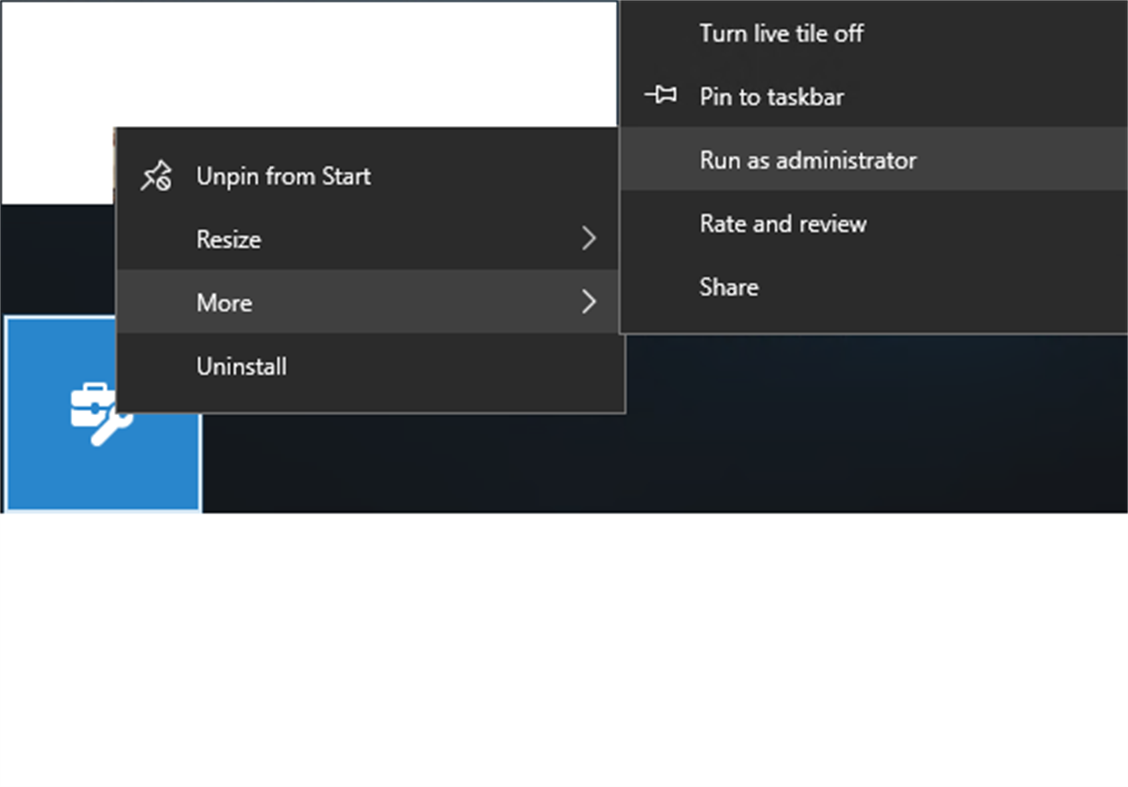
Please note: WIP setup developer assistant needs to be run as an administrator. It requires administrator access to your VM to apply WIP policy.
Instructions:
1. First, install the WIP setup developer assistant on a VM. We recommend that you use a VM because it’s probably not managed by other competing protection policies. After you’ve got a VM, we recommend that you create a checkpoint on it before you run the app apply a policy.
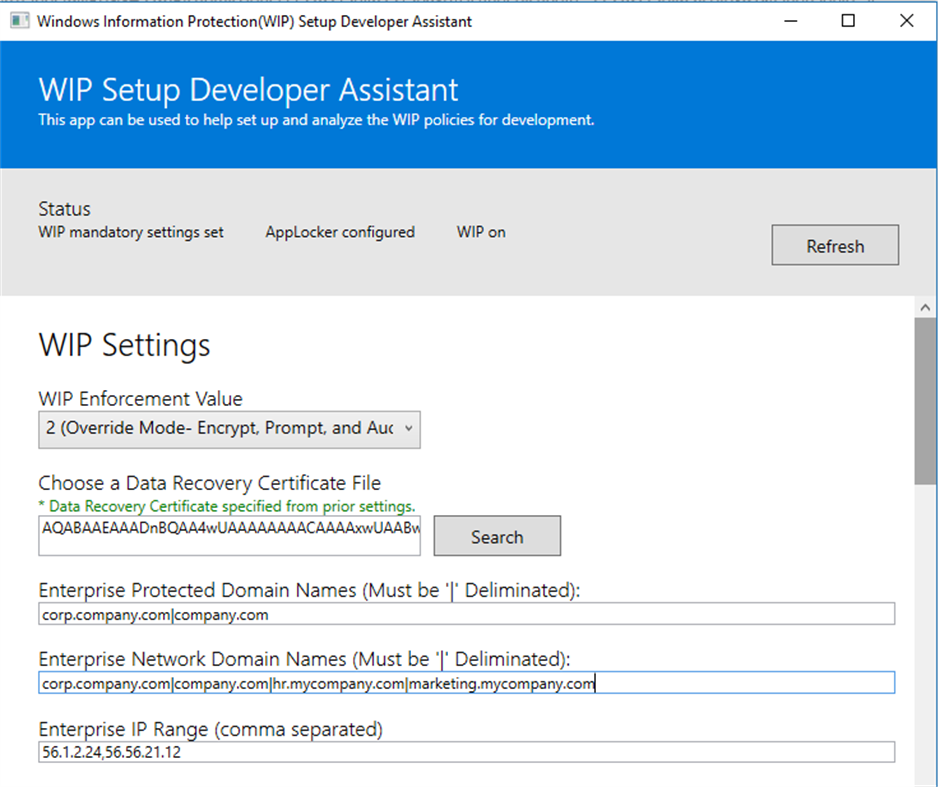
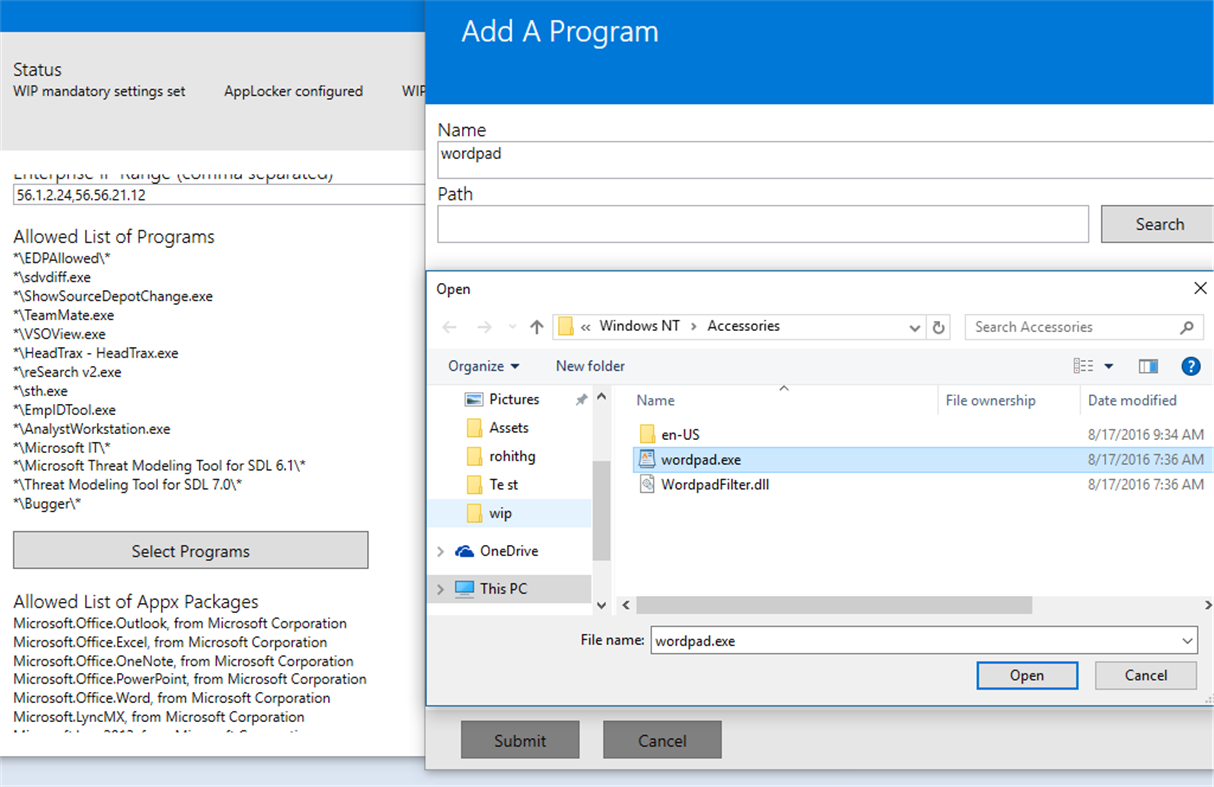
2. Define your policy by adding information to each section in the WIP setup developer assistant. All sections are required except Enterprise Cloud Resources and your allowed lists of programs however, you will need to allow some applications in order to see WIP behavior. Choose the help icon (i) next to any setting to learn more about how to use it.
a. To generate a DRA certificate, open a command prompt and type this command: cipher /r: certname. certname is any name that you want to give your certificate. Respond to each prompt to give your certificate a password. After you’ve generated the certificate, you can choose it in the “Choose a Data Recovery Certificate” File setting of the WIP setup developer assistant.
b. You’ll have to Install your desktop apps or Universal Windows Platform (UWP) apps on the VM before you can browse and add them to the policy.
c. To create an AppLocker policy for a desktop app, use the Select Programs button to point to the .exe file in the app folder structure.
d. To create an AppLocker policy for a UWP app, choose the Select Packages button to locate the package of your app. Your app appears in this list only if the UWP is already installed on the VM either from the store or side loaded.
3. When you’re done, choose the Apply Changes button. Confirm that you’ve successfully applied these settings in the status section of the tool.
a. Besides the status section of the tool, you can see if WIP policy is applied and working if you create a new text file on the desktop, right click on it and you will see a new item in the context menu labeled “File Ownership”. You can use this menu item to toggle ownership from work to personal and vis a versa.
Screenshots
Prijsgeschiedenis
- Huidige prijs: Gratis
- Minimum: Gratis
- Maximaal: Gratis
Prijzen volgen
Ad
Aanvullende informatie
- Releasedatum:
- Categorie:
Windows Apps›Ontwikkelhulpprogramma's - Besturingssystemen:
PC - Grootte:
1 Mb - Ondersteunde talen:
English - Beoordeling van content:
EVERYONE - Windows Store Beoordeling:
4.8(4)
Wat is er nieuw?
- Versie: PC
- Bijgewerkt:
Ontwikkelaar
- Microsoft Corporation
- Platforms: Android Apps (66) Android Games (5) iOS Apps (57) iOS Games (5) macOS Apps (15) Windows Apps (573) Windows Games (2) Steam Games (1) PlayStation Games (41) Xbox Games (1)
- Lijsten: 246 + 46
- Punten: 1,085 + 110,611,450 ¡
- Beoordelingen: 4.8 (26)
- Reacties: 0
- Kortingen: 7
- Videos: 46
- RSS: Abonneren
Lijsten (0)
0 ☹️
- WIP Setup Developer Assistant
Punten (1)
-

- 11,372 Simon Chan
- +1

Beoordelingen (0)
0 ☹️
Reacties (0)
Reageer als eerste 🌟
«WIP Setup Developer Assistant». Platform: Windows. Categorie: Ontwikkelhulpprogramma's. Ontwikkelaar: «Microsoft Corporation». Eerste uitgave: . Laatste update: . Huidige prijs: gratis. Deze titel heeft nog geen beoordelingen of recensies ontvangen op AppAgg. Bijgehouden punten: bevestigde 1, indirecte 4. Winkel: Windows Store. Winkelbeoordeling: 4.8. Stemmen: 4. Beschikbare talen: English. AppAgg houdt de prijsgeschiedenis, beoordelingen en gebruikersfeedback bij «WIP Setup Developer Assistant». Volg toekomstige kortingen en updates via RSS. AppAgg host geen applicaties en distribueert geen software. Alle handelsmerken, logo's en screenshots zijn eigendom van hun respectievelijke eigenaren.
WIP Setup Developer Assistant Korte URL: Gekopieerd!- 🌟 Delen
- Windows Store
Vergelijkbare
-
- Developer Helper
- Windows Apps: Ontwikkelhulpprogramma's Door: Bruno Capuano
- Gratis
- Lijsten: 0 0 0
- Punten: 0 + 1 (5.0) Versie: PC The app displays - The current connection status (connected or disconnected to internet) - The current IP Address - Battery information - Device information - Latest time of ... ⥯
-
- SD App developer
- Windows Apps: Ontwikkelhulpprogramma's Door: Dynamic Applications
- $4.79
- Lijsten: 0 + 2 0 0
- Punten: 2 Versie: PC Ever wanted to look forward, see your company, and decide 1 year ahead of competition? - we ll give you four years. SD App Developer, based on .NET 6.0 Desktop Environment, allows you ... ⥯
-
- Microsoft Store Developer CLI
- Windows Apps: Ontwikkelhulpprogramma's Door: Microsoft Corporation
- Gratis
- Lijsten: 0 + 1 0 0
- Punten: 5 + 6 (3.8) Versie: PC The Microsoft Store Developer Command Line Tool is a CLI that helps developers configure their API access to the Microsoft Store, for both managed, as well as unmanaged applications. ... ⥯
-
- Pulsar Assistant
- Windows Apps: Ontwikkelhulpprogramma's Door: Redisant
- $29.99
- Lijsten: 0 0 0
- Punten: 1 Versie: PC - SSL/TLS: Pulsar Assistant supports various authentication methods, including HTTP basic and JWT (Java Web Token), etc.; it also supports SSL/TLS transmission encryption to ensure ... ⥯
-
- exabox —Developer survival kit
- Windows Apps: Ontwikkelhulpprogramma's Door: Alberto Malagoli
- $9.99
- Lijsten: 0 + 1 0 0
- Punten: 0 Versie: PC exabox is a set of 30+ essential tools for developers. With it you can: convert JSON to YAML, encode and decode Base64 values, generate fake data, parse JWTs, transform a text using ... ⥯
-
- PrismKit: Advanced Developer Toolbox
- Windows Apps: Ontwikkelhulpprogramma's Door: Automata Labs
- * Gratis
- Lijsten: 1 0 0
- Punten: 0 Versie: PC Stop breaking your flow state to open browser tabs for basic developer utilities. PrismKit is a keyboard-first, local-only utility belt designed to sit quietly in the background until ... ⥯
-
- HTML Developer Kit
- Windows Apps: Ontwikkelhulpprogramma's Door: Carlos Rafael Ramirez
- Gratis
- Lijsten: 0 0 0
- Punten: 1 + 3 (5.0) Versie: PC HTML Developer Kit allows you to author, edit, preview and save HTML documents. ⥯
-
- Serial Debug Assistant
- Windows Apps: Ontwikkelhulpprogramma's Door: lingguang
- * Gratis
- Lijsten: 4 0 0
- Punten: 15 + 79 (4.6) Versie: PC A communication debugging tool tailored for embedded systems, supporting serial port debugging, TCP and UDP debugging. Powerful yet easy to use, it helps you easily send and receive ... ⥯
-
- System Informer (EXE Setup)
- Windows Apps: Ontwikkelhulpprogramma's Door: Process Hacker
- Gratis
- Lijsten: 0 + 1 0 0
- Punten: 0 Versie: PC A free, powerful, multi-purpose tool that helps you monitor system resources, debug software and detect malware. ⥯
-
- App Developer Utilities
- Windows Apps: Ontwikkelhulpprogramma's Door: MKA Solutions
- $4.99
- Lijsten: 0 0 0
- Punten: 0 + 2 (1.0) Versie: PC Utility for developers: conversion of resource files in different formats, code generation associated with the android user interface and embedding of xml and json. Try the new ... ⥯
-
- MQTT Debug Assistant
- Windows Apps: Ontwikkelhulpprogramma's Door: YH Software
- $4.99
- Lijsten: 0 0 0
- Punten: 0 + 1 (4.0) Versie: PC This is a lightweight and powerful UWP app that helps you debug MQTT protocol in a pretty easy way! MQTT Over TCP, TCP With SSL, WebSocket and WebSocket With SSL are supported. You can ⥯
-
- SVG Icon Builder
- Windows Apps: Ontwikkelhulpprogramma's Door: DEVELOPER EXPRESS INC.
- Gratis
- Lijsten: 0 0 0
- Punten: 1 + 12 (3.5) Versie: PC A productivity tool designed to simplify the creation of custom SVG icons. You can create thousands of unique icons for your application based on a wide set of predefined icons. ⥯
-
- Micromite Console
- Windows Apps: Ontwikkelhulpprogramma's Door: SAGT3K App Developer
- Gratis
- Lijsten: 0 0 0
- Punten: 0 Versie: PC Is a simple console editor that allows you to connect to any COMx port that is connected with MMBasic Micromite board on Microchip PIC32 or STM32-Nucleo tech. This the features: - ... ⥯
-
- Verdure DevTools
- Windows Apps: Ontwikkelhulpprogramma's Door: 绿荫阿广
- * Gratis
- Lijsten: 0 0 0
- Punten: 0 Versie: PC Developer Tools is a Windows desktop toolbox designed for developers, QA engineers, IT professionals, embedded engineers, and anyone who frequently works with technical text and data. ... ⥯