
บุ๊กมาร์ก
| ผู้พัฒนา: | The YACM Authors (1) | ||
| ราคา: | ฟรี ใหม่ | ||
| คะแนน: | 690 เงิน | ||
| การจัดอันดับ: | 0 | ||
| ความคิดเห็น: | 0 โพสต์ความคิดเห็น | ||
| รายการ: | 0 0 | ||
| แต้ม: | 0 | ||
| +1 แต้ม | |||
สรุป
YACM เป็นแอปในหมวด “เครื่องมือสำหรับนักพัฒนา” จาก The YACM Authors
ใหม่เอี่ยม เพิ่งออกเมื่อ ยังหอมกลิ่นโค้ดใหม่อยู่เลย
ฟรี ไม่มีโฆษณา ไม่มีการซื้อภายในแอป มีแค่คุณกับแอป
Microsoft Store มีมาในตัว Windows อยู่แล้ว ติดตั้งได้ในไม่กี่คลิก
คะแนน AppAgg คือ 690 ระดับ “เงิน” ถือว่าไม่เลวเลย
แค่ 15 เมกะไบต์ ต่อให้ไดรฟ์เต็มก็ยังลงได้
จัดเรต “EVERYONE” เหมาะกับเด็ก ๆ ด้วย
รองรับแค่ภาษาเดียว และไม่ใช่ภาษาไทย
ยังไม่มีใครบน AppAgg ให้คะแนนเลย โอกาสเป็นคนแรกอยู่ตรงนี้แล้ว
เป็นแอปเดียวของผู้พัฒนารายนี้บน AppAgg อย่างน้อยก็ตอนนี้
อยากรู้เรื่องอัปเดตและแอปใหม่ก่อนใครไหม? ติดตาม ผู้พัฒนา หรือกดติดตาม ฟีด RSS ได้เลย การแจ้งเตือนแบบพุชส่งผ่านแอป AppAgg Alerts สำหรับ Android และ iOS
ภาพหน้าจอ 5
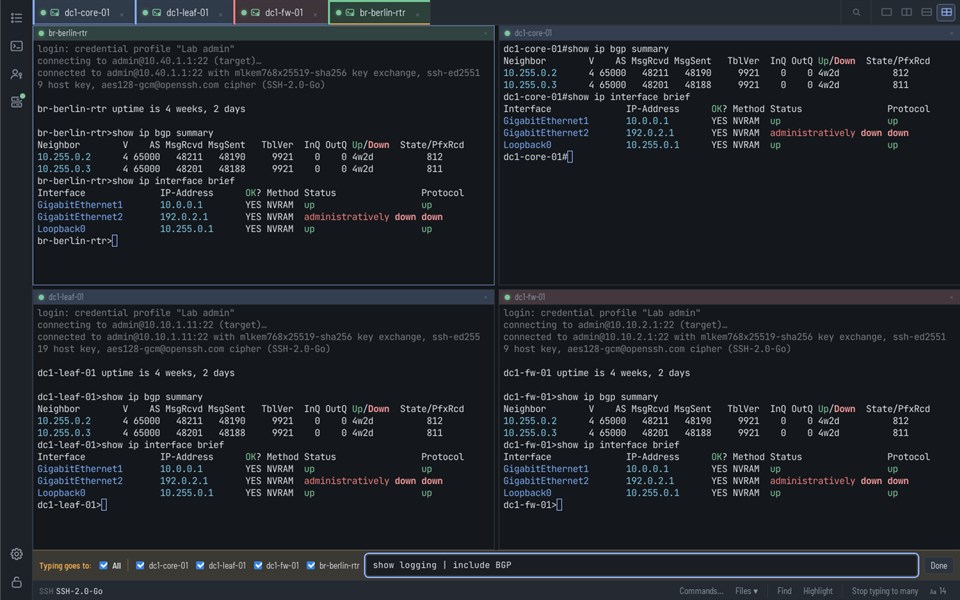
แพลตฟอร์มอื่น 0
ประวัติราคา 0
- ราคาปัจจุบัน: ฟรี
- ต่ำสุด: ฟรี
- สูงสุด: ฟรี
ฟีดของคุณเองบนหน้าแรก
คำอธิบาย

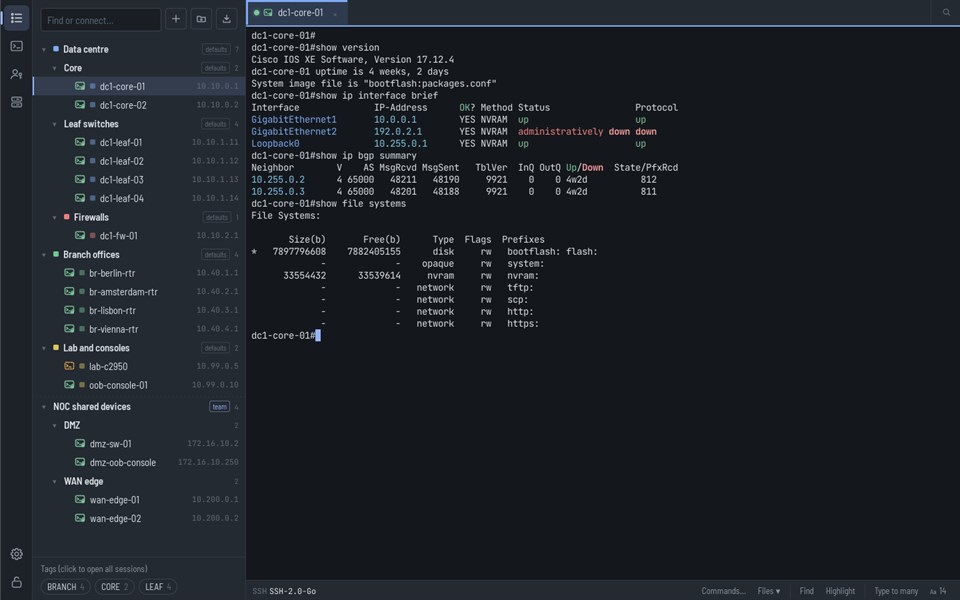
Built for teams and large networks
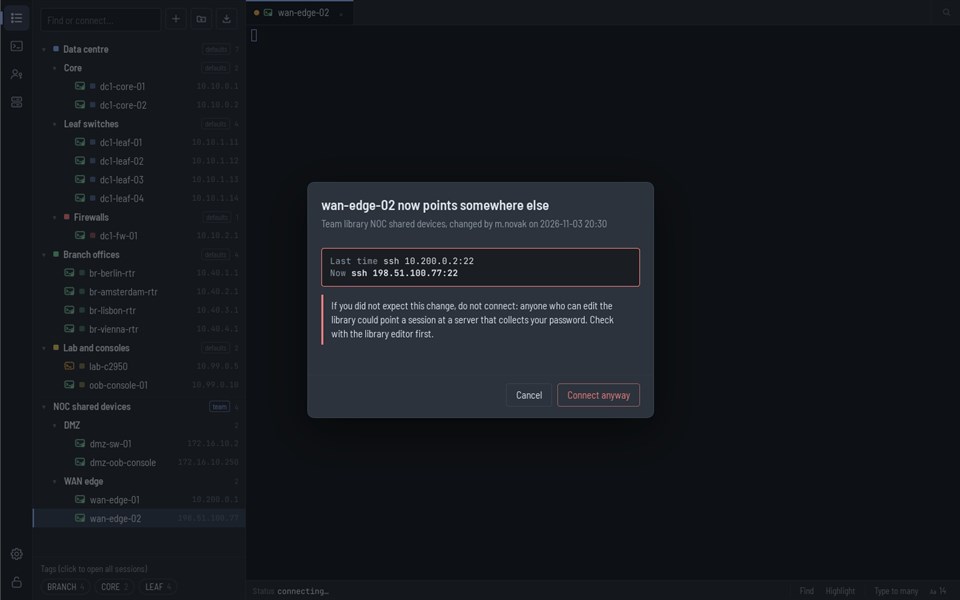
• Team libraries: shared, read-only session lists on a share, a synced folder or git, each colleague logging in with a personal account.
• Credential profiles and group defaults: logins, jump hosts, algorithms and colours inherited through groups.
• Edit many sessions at once, cut, copy and paste them with their passwords, and find any of thousands with one field.
• Import from SecureCRT, Xshell, MobaXterm, mRemoteNG, Royal TS, PuTTY, Ásbrú, ssh config, CSV and Excel lists and NetBox, with saved passwords moved into the encrypted vault.
Every device, every path
• SSH with post-quantum key exchange by default, and Compatible and Legacy algorithm sets for old gear.
• Telnet and serial consoles (USB adapters by name, break for ROMMON).
• Chains of jump hosts with MFA and a host key check on every hop; port forwards and SOCKS or HTTP proxies.
• Login automation, anti-idle at the prompt and reconnect after a reload.
Files, the way network devices need them
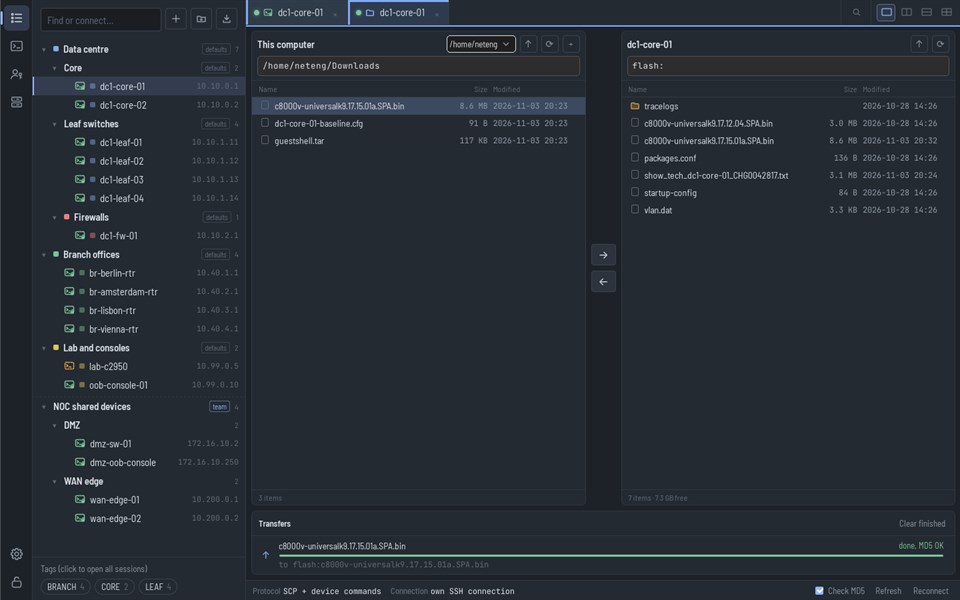
• Files tab: this computer and the device side by side, on the session's own connection, with MD5 checks on Cisco, Arista, Juniper and Linux.
• Whole folders, Resume for a stopped SFTP transfer, and show tech-support straight into a file.
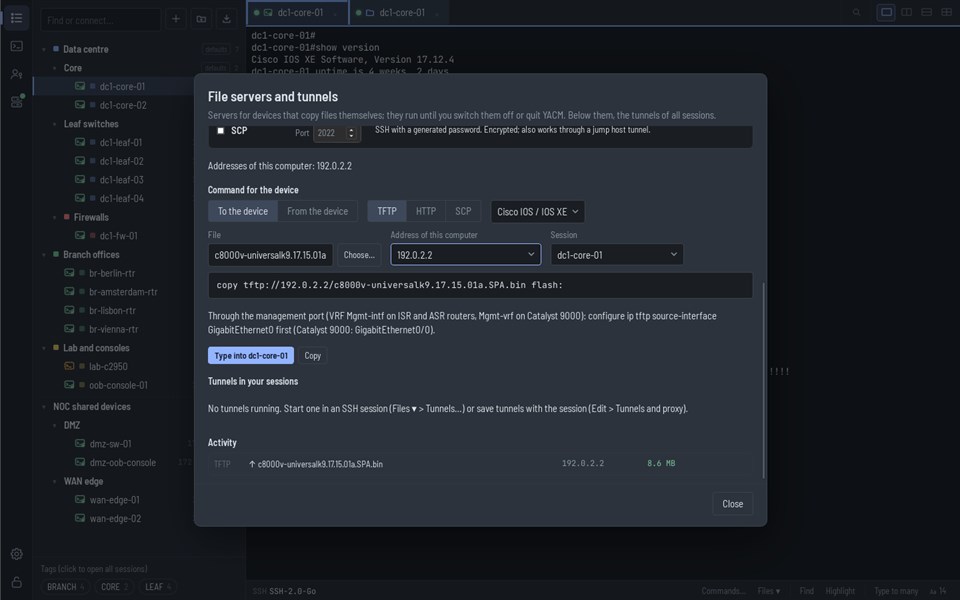
• TFTP, HTTP and SCP/SFTP servers on your computer that write the copy command for the device.
In the terminal
• Type to many, split view with up to four sessions, saved commands with placeholders.
• Highlighting of errors, interfaces and addresses, and alerts from sessions in the background.
Security
• Encrypted vault (Argon2id and AES-256-GCM) that locks itself and can lock the open sessions with it.
• Secrets masked in session logs, log names with the change or ticket number, no telemetry.
• Helps you meet NIS2, ISO 27001 and PCI DSS requirements.
The Store version keeps its data in %AppData%\YACM, shared with the zip version, so sessions and the vault stay where they are. Requires Windows 11.
Free software under the GNU GPL version 3 or later. Source code, the user guide and versions for macOS and Linux: https://github.com/yacm-app/yacm
จากนักพัฒนา
ผู้พัฒนา
- The YACM Authors
- ผู้ติดตาม: 0
- แพลตฟอร์ม: Windows แอป (1)
- ลดราคา: 0
- รายการ: 0 0
- แต้ม: 0
- การจัดอันดับ: 0
- ความคิดเห็น: 0
- วิดีโอ: 0
- RSS: ติดตาม
รายการ 0
-
 YACM
แต้ม 0
-

- +1 แต้ม

การจัดอันดับ 0
-
- คะแนนของคุณ
มีอะไรใหม่
- เวอร์ชัน: PC
- อัปเดตล่าสุด:
- YACM 1.1
• Royal TS import: sessions, folders, credentials and saved passwords from .rtsz documents.
• Choose what to import from another program; on a fresh install, a button for each program whose sessions are found.
• Cut, copy and paste of sessions and groups; edit several sessions together switches them between telnet and SSH.
• The lock screen can guard open sessions: they need the master password again, or are closed.
• Files tab: whole folders, Resume for a stopped SFTP transfer, Send with sudo where a Linux server refuses to write.
• File servers: SFTP on the SCP server; they reach only their shared folder.
• The Legacy algorithm set accepts the short RSA keys of very old devices.
• Exports without user names and logins; your own export brings all settings to a new computer.
• Tabs keep a readable width, long names are shortened in the middle, and the tab menu can close all tabs.
ข้อมูลเพิ่มเติม
- วันที่วางจำหน่าย:
- หมวดหมู่:
แอปสำหรับ Windows›เครื่องมือสำหรับนักพัฒนา - ระบบปฏิบัติการ:
PC - ขนาด:
15 Mb - ภาษาที่รองรับ:
อังกฤษ - การจัดประเภทเนื้อหา:
EVERYONE - Windows Store คะแนน: ¡
0 - เว็บไซต์:
 https://yacm.app
ความคิดเห็น 0 ¡
คะแนน AppAgg
คะแนน AppAgg โดยประมาณของ
YACM
ผู้พัฒนา: The YACM Authors
คะแนนที่สูงขึ้นมักสะท้อนตัวชี้วัดที่ดีกว่าบน AppAgg
อิงจาก: ความนิยม · คะแนนจากผู้ใช้ · ความสดใหม่ · ดีล · ข้อมูลร้านค้า · กิจกรรมชุมชน
คำนวณใหม่ทุกวันจากข้อมูล AppAgg ล่าสุด
YACM URL แบบสั้น: คัดลอกแล้ว!- Windows Store

