
ブックマーク
このブックマークのタイトルを入力してください。
ブックマークを保存しました
| 開発者: | Kim YoungMin (2) | ||
| 価格: | 無料 新着 | ||
| スコア: | 570 ブロンズ | ||
| ランキング: | 0 | ||
| コメント: | 0 コメントを投稿する | ||
| リスト: | 0 + 0 | ||
| ポイント: | 0 + 0 ¡ | ||
| +1 ポイント | |||
スクリーンショット
広告
説明

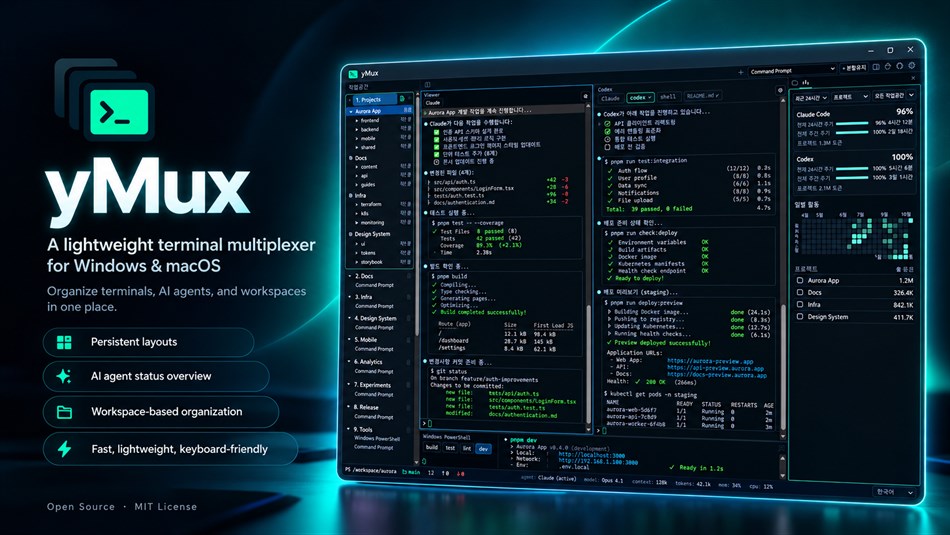
LAYOUTS THAT PERSIST Split any pane horizontally or vertically, as deep as you like. Every pane remembers its shell, working directory and an optional startup command, and every workspace keeps its own layout across restarts. Terminal scrollback is saved too, so your output is still there after you reopen the app.
ALL YOUR SHELLS yMux detects Command Prompt, Windows PowerShell, PowerShell 7, Git Bash and your WSL distributions automatically. When you split a pane, the new one opens in the directory your shell is in right now, not the one it started in.
NUMBERED WORKSPACES Switch workspaces with Ctrl+Alt+1 to 9 and add as many as you need. Panes keep running while you switch away, so REPLs, servers and log tails never die.
BUILT FOR AI CODING AGENTS
See at a glance which pane's agent is running, finished or waiting for you.
The agent tree lists every pane and agent in each workspace.
Resume Claude Code and Codex sessions after restarting yMux.
Open a pane in a new git worktree to give each agent an isolated checkout.
The side panel shows your Claude Code and Codex token usage and remaining quota.
MORE THAN A TERMINAL
Side panel with a file browser and AI usage view
Built-in text editor and git log / branch / worktree view
Browser panes next to your terminals
Command palette (Ctrl+Shift+P), pane tabs, pane zoom and scrollback search
Clickable links and file paths in terminal output
Paste text and images straight into the terminal
Per-workspace notes and a live CPU / RAM status bar
Close to tray and keep everything running
Customizable theme, syntax colors and keyboard shortcuts
Available in 13 languages
PRIVATE BY DESIGN yMux has no accounts, no analytics and no telemetry. Your layouts, scrollback and settings stay on your PC.
yMux is free and open source: https://github.com/YoungMins/ymux
価格履歴
- 現在の価格: 無料
- 最小値: 無料
- 最大値: 無料
他のプラットフォーム (0)
| yMuxWindows Store現在のページ | 無料 |
現在はこのストアでのみ配信中です。
リスト (0)
0
- yMux
ポイント (0)
0
ランキング (0)
0
コメント (0) ¡
最初にコメントしてください
開発者
- Kim YoungMin
- フォロワー: 0
- プラットフォーム: Windows アプリ (2)
- セール: 0
- リスト: 0 + 0
- ポイント: 0 + 0 ¡
- ランキング: 0
- コメント: 0
- 動画: 0
- RSS: 購読する
新機能
- バージョン: PC
- 最終更新:
情報
- リリース日:
- カテゴリ:
Windows向けアプリ›開発者ツール - オペレーティング システム:
PC - サイズ:
7 Mb - サポートされる言語:
Arabic,Chinese,English,French,German,Hindi,Japanese,Korean,Portuguese,Russian,Spanish,Turkish,Vietnamese - コンテンツのレーティング:
EVERYONE - Windows Store 評価: ¡
0 - ウェブサイト:
 https://www.cloudmins.kr/
AppAggスコア
570
AppAgg推定スコア:
yMux
開発者: Kim YoungMin
570 ブロンズ
スコアが高いほど、AppAgg上の各指標が良好な傾向にあります。
基準: 人気 · ユーザー評価 · 新しさ · セール · ストアデータ · コミュニティ活動
最新のAppAggデータに基づいて毎日再計算されます。
Webサイト用バッジ:  コピーしました!
概要
yMux 短縮 URL: コピーしました!- Windows Store
AppAggでは、Kim YoungMinが開発したアプリ「yMux」の情報を確認できます。対応プラットフォーム:Windows。カテゴリ:開発者ツール。 AppAggスコア:570(ブロンズ)。 このアプリのAppAggポイント:確認済み 0、間接 0。 このアプリを含む公開リスト:0件。非公開リストに保存しているユーザー:0人。 このアプリには、AppAggユーザーからの評価はまだありません。 確認済みポイントは、ログインしたAppAggユーザーのストアへのアクセスを記録します。間接ポイントはストアのデータに基づきます。 2つの数字は、公開リストの数と、非公開リストに保存したユーザー数を表します。 このアプリの初回リリースはです。 このアプリの最終更新はです。 このアプリは現在無料です。 このアプリは次の言語に対応しています:Arabic, Chinese, English, French, German, Hindi, Japanese, Korean, Portuguese, Russian, Spanish, Turkish, Vietnamese。 価格履歴を確認したり、アプリをリストに追加したり、開発者をフォローしたりできます。 このアプリの今後のセールや更新はRSS フィードで確認できます。 AppAggはこのアプリをホストまたは配布していません。 このアプリに関連する商標、ロゴ、スクリーンショットはすべて各権利者に帰属します。
こちらもおすすめ
最近の話題
 アプリNauticPlayer This app is absolute cinema. Honestly, it’s one of the best media players I’ve ever tried, and I’m s...
  Manuel16
  アプリScreen Beings - Desktop Pet & Study Companion This is my app so I’m a little bias but as someone from the ADHD community that teaches ADHD and neu...
  Tarelle Irwin6
  アプリAadi vault good it ia a encrypter and good you my work on office
  Aditya Rai5
  アプリTyping 365 | Daily Typing Trainer The best typing app ever. With Typing 365 you don’t have to force yourself for couple minutes traini...
  Ahmad Mozaffar5
  アプリZefir Calendar — Calendar in the Taskbar excelente app! Superando todas as espectativas!
  Diógenes Magnus5
  アプリLockinRa LockinRa 리뷰 LockinRa는 작업 관리, 집중력 도구, AI 코칭을 하나의 데스크톱 앱으로 통합한 무료 Windows 생산성 프로그램입니다. 클라우드 동기화 없이 로컬 ...
  abhilok reddy6
  アプリCN Vault I Love this app CN Vault is a user-friendly app that helps keep your passwords safe and secure. If y...
  Marjuk Amin5
