
Favoritos
Escolha um título para este favorito.
Favorito salvo
| Desenvolvedor: | Yozoneko (1) | ||
| Preço: | * Grátis Novo | ||
| Pontuação: | 600 Prata | ||
| Classificações: | 0 | ||
| Comentários: | 0 Postar comentário | ||
| Listas: | 0 + 0 | ||
| Pontos: | 0 + 0 ¡ | ||
| +1 Pontos | |||
Capturas de tela
Anúncio
Descrição

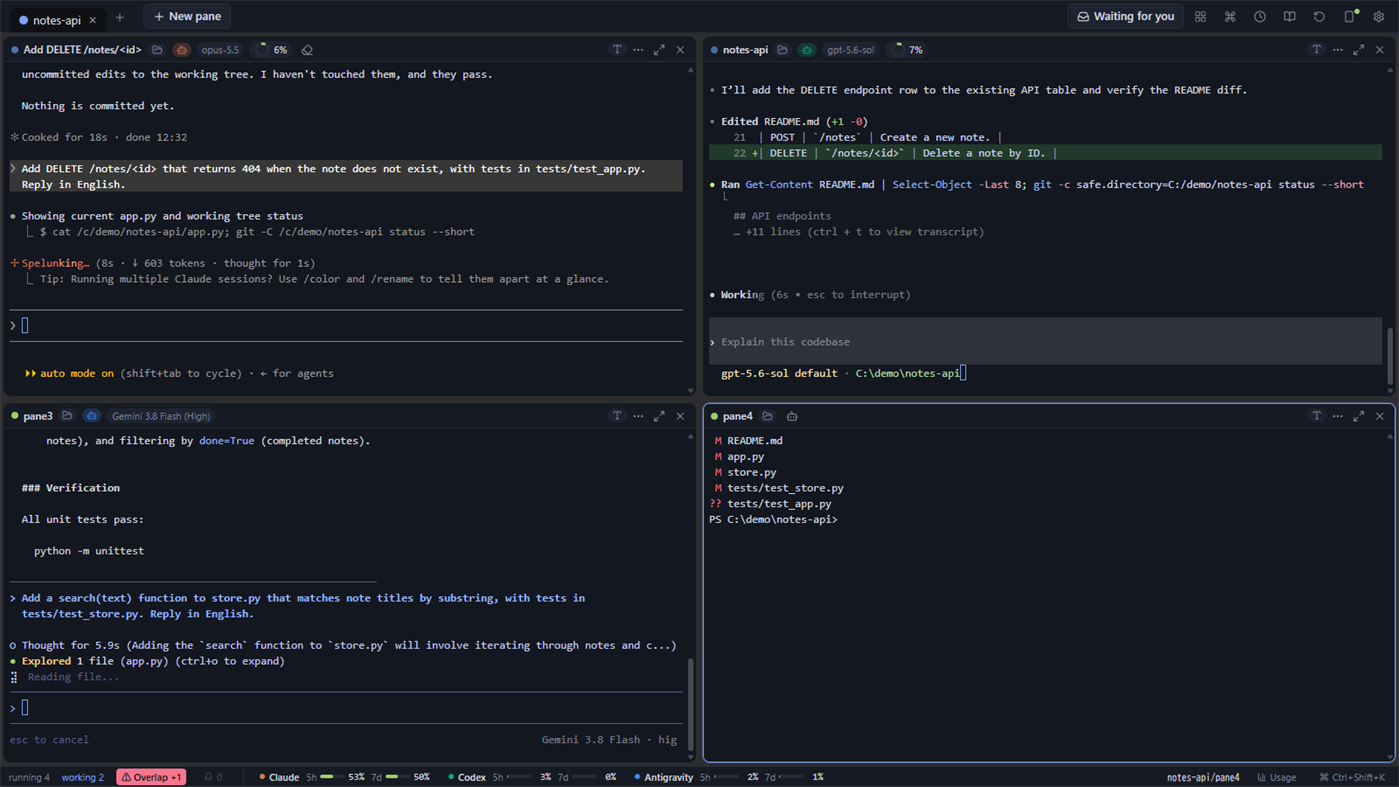
■ Split the window and arrange panes freely
Split one window up, down, left or right, and run a separate shell in each pane. Every pane is an ordinary terminal (PowerShell, cmd or WSL), and agents are started inside it.
- Drag a pane by its header to move it elsewhere or swap it with another pane
- Drag the dividers to resize, or even out every pane with one click
- Zoom one pane to fill the window for a while
- Besides terminals, a pane can also be a file explorer that shows the contents of a folder
■ Keep work apart with groups
Each group holds its own arrangement of panes, and you switch groups with the tabs at the top. Give each project its own group: agents in the groups you are not looking at keep running.
- Name a group and give it a color. Each group can also have its own folder that new panes open in
- Drag tabs to reorder them, and drag a pane onto a tab to move it to that group
- Groups and panes come back the next time you open the app. Claude Code and Codex CLI sessions that were running when you closed it resume their conversation
■ See what every agent is doing
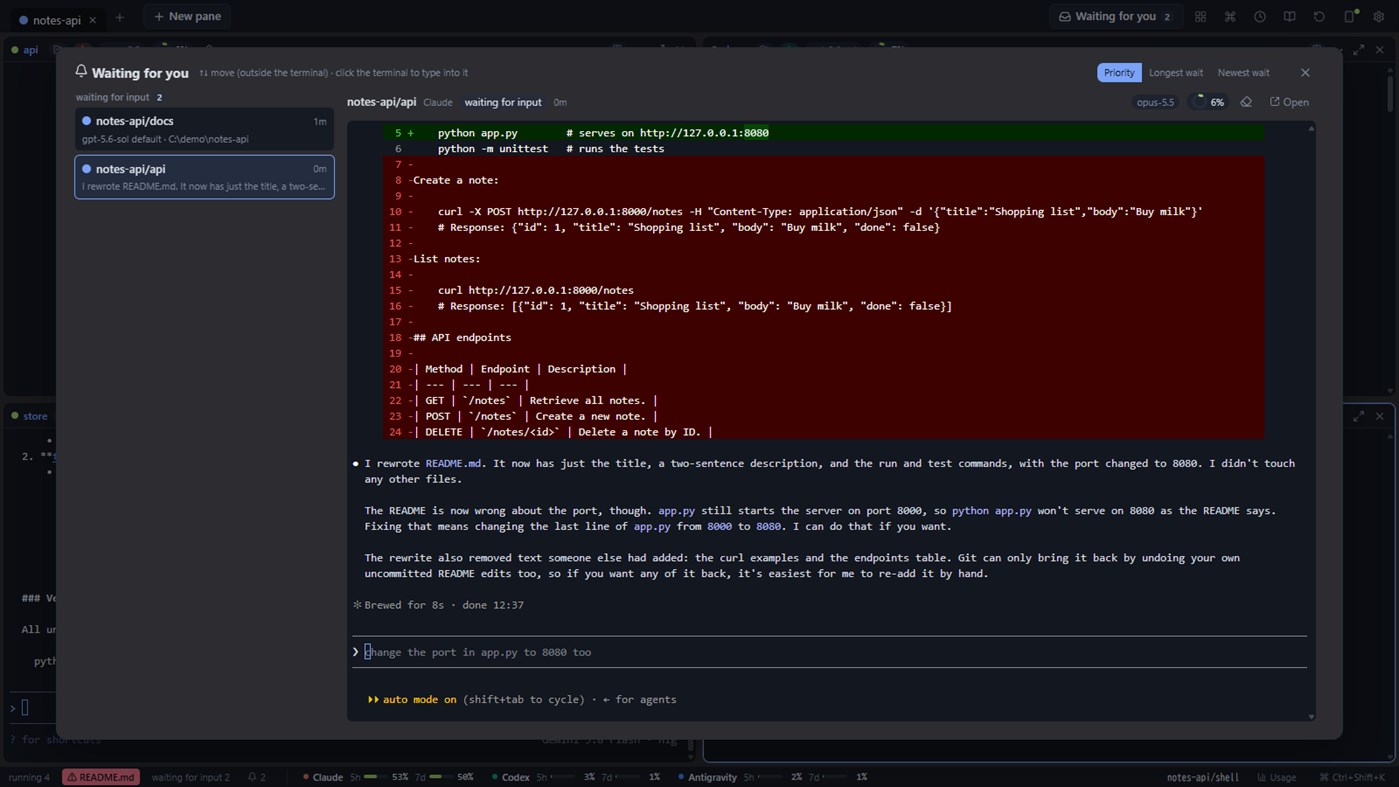
Each pane header shows the agent running there, its model, context usage, and whether it is working, waiting for input, or waiting for your approval. Claude Code, Codex CLI and Antigravity CLI are supported. Remaining usage limits are shown at the bottom of the window.
Panes that are waiting for you are gathered in one list, where you can answer them.
The state is read from the log files each CLI already writes. For Claude Code you can also connect its hooks (Claude Code's way of reporting what it is doing), so states such as a permission request show up immediately. This is optional, and the exact text it adds to Claude Code's settings file is shown before anything is written.
■ A safety net for running several agents in one repository
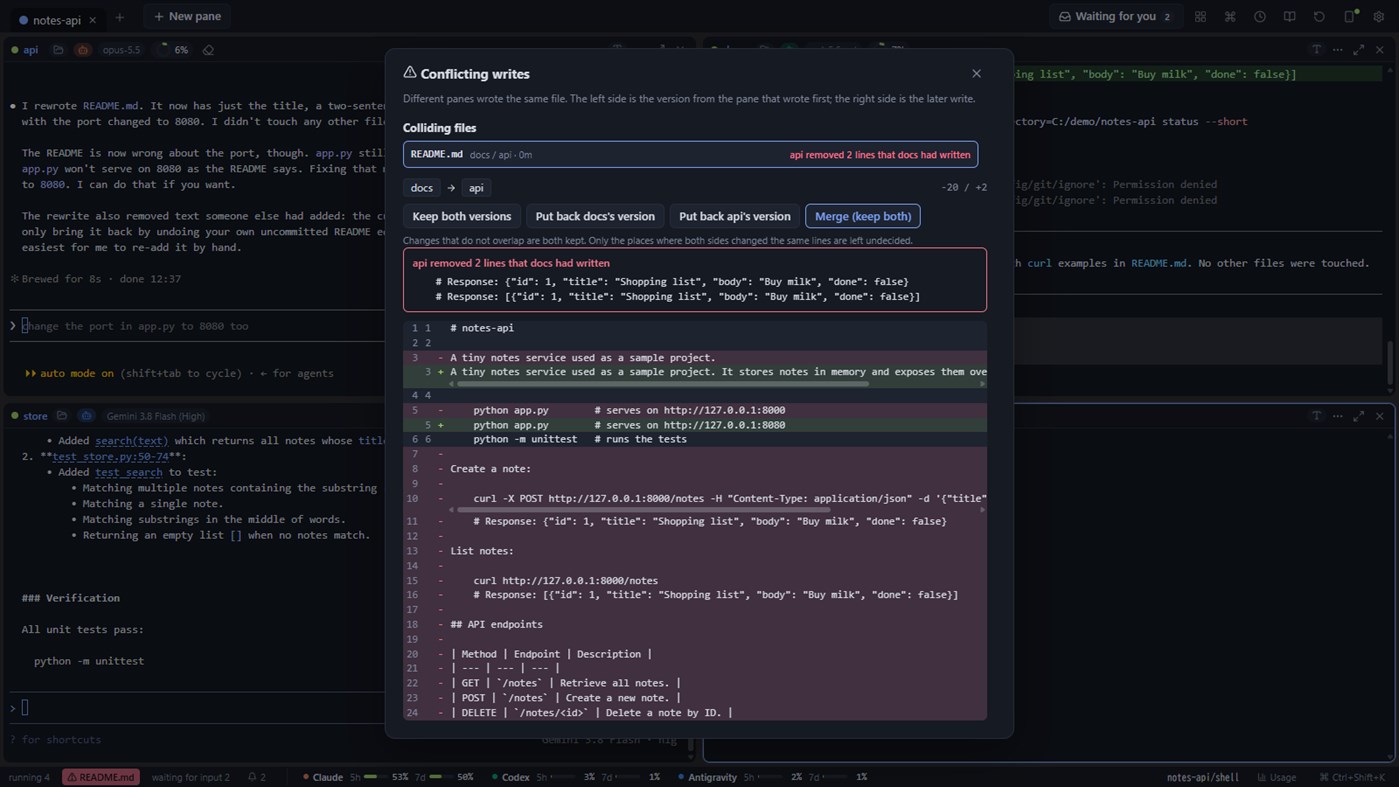
- When two agents write to the same file, YozoDeck tells you. With Pro you can view the difference, restore one side, or merge
- With Pro you can rewind the working folder to just before a Claude Code or Codex CLI turn started, whether the agent changed files with its edit tools or with shell commands
■ Let an agent drive the pane next to it (yzd command)
The bundled yzd command lets an agent in one pane read and operate the screen of the pane beside it, such as an SSH session or a dev server. It is limited to its own group by default, and every action is recorded.
■ Check in from your phone
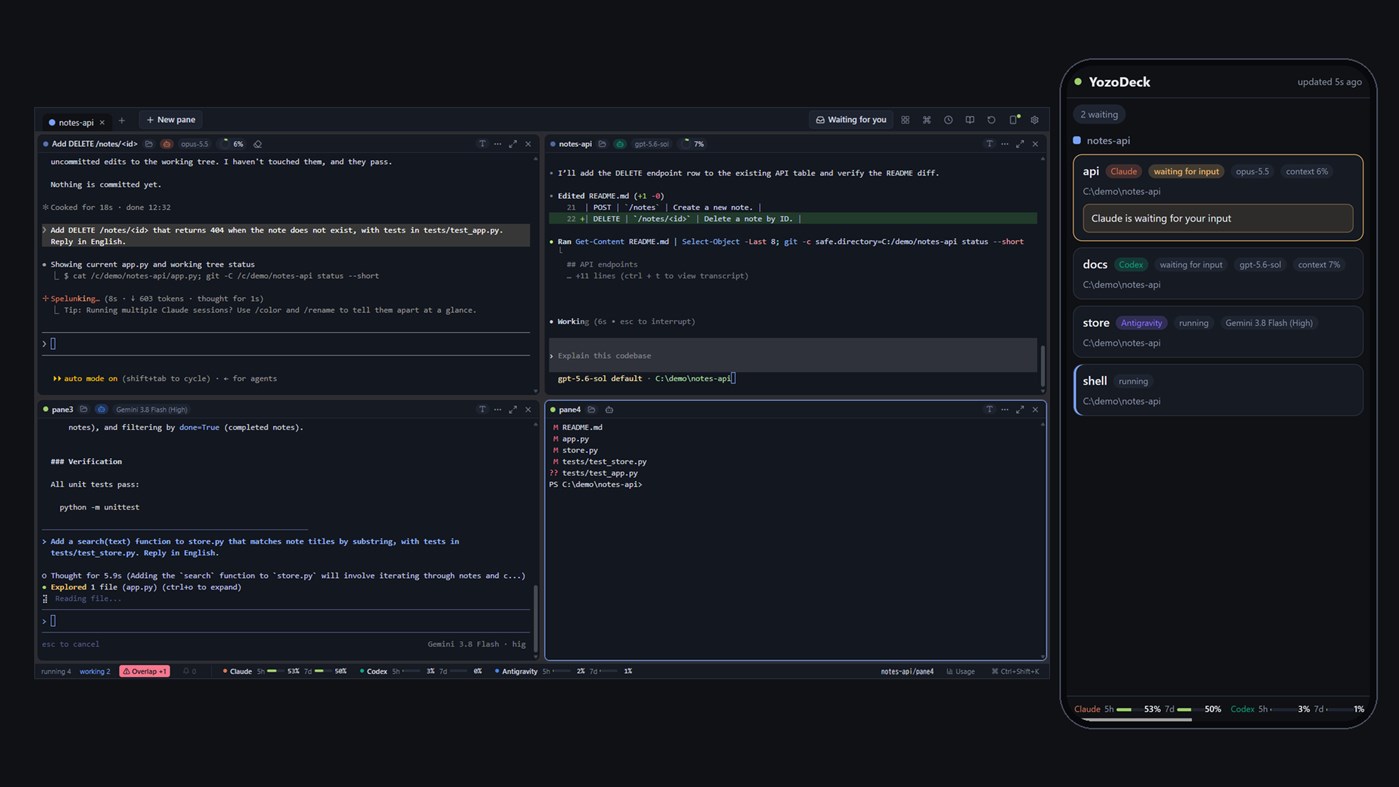
From the same network, or from your own Tailscale, open a phone view to see the state and screen of each pane. With Pro you can also answer permission requests and send instructions. No outside server is involved.
Traffic inside the same network is not encrypted (plain HTTP): turn the feature on only on a network you trust, such as your home, and use Tailscale anywhere else. It is off by default.
■ Local AI (optional, off by default)
When turned on, a generative AI model running on your own PC (Ollama) writes one-line titles for history entries, summarises a pane, and explains permission requests and diffs. You can also search history by meaning and open a pane to chat with it.
- Everything runs on your PC; nothing is sent to an outside service
- Turning it on downloads the Ollama runtime (about 40 MB) and the model you choose (about 0.6 to 3.2 GB each). The size and the location are shown before anything is downloaded
- AI output can be wrong. YozoDeck uses it only for explanations and search, never to decide an approval or to instruct an agent
■ Free and Pro
The free version is a complete terminal. Pro (a one-time in-app add-on) differs in these five points only:
- Groups: up to 3 in Free / as many as you like in Pro
- Remote from your phone: view only in Free / send instructions, allow or deny, interrupt and more in Pro
- History: the newest 10 entries from the last 3 days in Free / everything that is stored, searchable, in Pro
- Rewind: Pro only
- Write collisions: detection and the list in Free / the diff, restoring one side and merging in Pro
Stored history has a time and size limit, and entries beyond it are deleted in Pro too. The limit is 180 days and 1 GB by default and can be changed in Settings.
■ Also
- Dark (default) and light themes, Japanese and English
- Desktop notifications
- Start with Windows (optional, in Settings)
- Usage totals, a list of skills and memory files, saved prompts
Claude and Claude Code are products or services of Anthropic PBC, Codex of OpenAI OpCo, LLC, and Antigravity and Gemini of Google LLC. YozoDeck is a third-party app not affiliated with these providers, and it does not bundle or redistribute their CLIs.
Outras plataformas
| YozoDeckWindows Store600 PrataVocê está aquiCompras no aplicativo | Grátis |
Por enquanto, só nesta loja.
Histórico de preços
- Preço atual: Grátis
- Mínimo: Grátis
- Máximo: Grátis
Acompanhe os preços Adicione a uma lista para receber alertas de descontos por e-mail ou push
Listas 0
0
- YozoDeck
Pontos 0
0
Classificações 0
-

- Sua nota

Comentários 0 ¡
Seja o primeiro a comentar
Desenvolvedor
- Yozoneko
- Seguidores: 0
- Plataformas: Windows Apps (1)
- Promoções: 0
- Listas: 0 + 0
- Pontos: 0 + 0 ¡
- Classificações: 0
- Comentários: 0
- Vídeos: 0
- RSS: Assinar
Novidades
- Versão: PC
- Última atualização:
Informações adicionais
- Data de lançamento:
- Categoria:
Aplicativos para Windows›Ferramentas de desenvolvedor - Sistemas operacionais:
PC - Tamanho:
6 Mb - Idiomas disponíveis:
English,Japanese - Classificação do conteúdo:
EVERYONE - Windows Store Nota: ¡
0 - Site:
 https://yozoneko.com/
Pontuação AppAgg
600
Pontuação AppAgg estimada de
YozoDeck
Desenvolvedor: Yozoneko
600 Prata
Uma pontuação mais alta geralmente reflete resultados melhores nos indicadores do AppAgg.
Com base em: popularidade · avaliações dos usuários · atualidade · ofertas · dados das lojas · atividade da comunidade
Recalculado diariamente com dados AppAgg atualizados.
Selo para site:  Copiado!
Resumo
YozoDeck URL abreviado: Copiado!- Windows Store
No AppAgg, você pode acompanhar “YozoDeck”, um aplicativo de Yozoneko para Windows na categoria Ferramentas de desenvolvedor. Pontuação AppAgg: 600 (Prata). Pontos AppAgg do aplicativo — confirmados: 0; indiretos: 0. Listas públicas que incluem o aplicativo: 0. Usuários que o salvaram em listas privadas: 0. Os usuários do AppAgg ainda não avaliaram este aplicativo. Os pontos confirmados registram os acessos à loja por usuários conectados ao AppAgg. Os indiretos se baseiam em dados das lojas. O AppAgg conta as listas públicas que incluem um aplicativo ou jogo e os usuários que o salvaram em listas privadas. O aplicativo foi lançado pela primeira vez em . Última atualização do aplicativo: . O aplicativo está disponível gratuitamente no momento. O aplicativo está disponível nos seguintes idiomas: English, Japanese. Confira o histórico de preços, adicione o aplicativo a uma lista ou siga o desenvolvedor. Acompanhe as próximas promoções e atualizações do aplicativo pelo Feed RSS. O AppAgg não hospeda nem distribui este aplicativo. Todas as marcas, logotipos e capturas de tela relacionados ao aplicativo pertencem aos respectivos proprietários.
Você também pode gostar de
Discussões recentes
 AplicativoLocalDub – Real-Time Game Dubbing Hello Kırtay Interactive, I am using LocalDub - Real-Time Game Dubbing. I would like to know if Hind...
  rashid game5
  AplicativoNauticPlayer This app is absolute cinema. Honestly, it’s one of the best media players I’ve ever tried, and I’m s...
  Manuel16
  AplicativoScreen Beings - Desktop Pet & Study Companion This is my app so I’m a little bias but as someone from the ADHD community that teaches ADHD and neu...
  Tarelle Irwin6
  AplicativoAadi vault good it ia a encrypter and good you my work on office
  Aditya Rai5
  AplicativoTyping 365 | Daily Typing Trainer The best typing app ever. With Typing 365 you don’t have to force yourself for couple minutes traini...
  Ahmad Mozaffar5
  AplicativoZefir Calendar — Calendar in the Taskbar excelente app! Superando todas as espectativas!
  Diógenes Magnus5
  AplicativoLockinRa LockinRa 리뷰 LockinRa는 작업 관리, 집중력 도구, AI 코칭을 하나의 데스크톱 앱으로 통합한 무료 Windows 생산성 프로그램입니다. 클라우드 동기화 없이 로컬 ...
  abhilok reddy6
  AplicativoCN Vault I Love this app CN Vault is a user-friendly app that helps keep your passwords safe and secure. If y...
  Marjuk Amin5
