
북마크
이 북마크의 제목을 입력하세요.
북마크가 저장되었습니다
| 개발자: | Yutaka Hirata (4) | ||
| 가격: | $8.39 | ||
| 종합 점수: | 1,070 실버 | ||
| 순위: | 0 | ||
| 댓글: | 0 댓글 게시 | ||
| 목록: | 0 0 | ||
| 포인트: | 0 | ||
| +1 포인트 | |||
요약
소개합니다. Yutaka Hirata에서 만든 ‘개발자 도구’ 카테고리 앱, YuHex.
지금 가격은 $8.39, 하지만 에는 $2.49까지 내려갔어요. 기다림은 배신하지 않아요.
에 출시됐어요. 아직 꽤 따끈따끈해요.
Microsoft Store는 Windows에 기본으로 들어 있어서 클릭 몇 번이면 설치돼요.
AppAgg 점수는 1,070. 실버 등급, 이 정도면 꽤 괜찮아요.
겨우 4메가바이트. 꽉 찬 드라이브에도 쏙 들어가요.
연령 등급은 ‘EVERYONE’, 아이들에게도 괜찮아요.
지원 언어는 딱 하나, 그런데 한국어는 아니에요.
AppAgg에서는 아직 아무도 평가하지 않았어요. 첫 번째가 될 기회는 바로 지금이에요.
이 개발자의 앱이 AppAgg에 3개 더 있어요. 한번 둘러보세요.
할인, 업데이트, 새 앱 소식을 가장 먼저 받고 싶나요? 가격 알림을 설정하거나 개발자를 팔로우하거나 RSS 피드를 구독하세요. 푸시 알림은 Android와 iOS용 AppAgg Alerts 앱으로 받을 수 있어요.
광고
다른 플랫폼 0
가격 기록 4
- 현재 가격: $8.39
- 최소: $2.49
- 최대: $8.39
홈 화면의 나만의 피드
“신규 및 업데이트” 피드의 플랫폼을 선택하면 홈 화면에 필요한 앱과 게임만 표시됩니다.
스크린샷 8
설명

Inspect huge files or search across folders with YuHex, a Windows 11 hex editor that presents bytes as text, numbers and C structures. Work with 100 language variants, 107 regional choices, 22 encodings and right-to-left layouts.
FIND BYTES WITHOUT OPENING EVERY FILE
Search binary files across multiple folders and subfolders. Choose include/exclude patterns and generate a reusable CMD with embedded search conditions. View results in the console or save TXT, HTML and JSONL output. Open a match directly in YuHex from an HTML report, connecting discovery with inspection.
KEEP DISTANT OFFSETS IN VIEW
Open up to three read-only mirror views to inspect headers and data side by side. Search and navigate independently, synchronize offsets in one step, and arrange or restore your windows.
Use the byte map to visualize each byte as a pixel. Inspect distributions and repeating patterns in the displayed range, then click a pixel to locate its byte in the editor.
COMPARE HUGE FILES AND APPLY THE DIFFERENCES YOU NEED
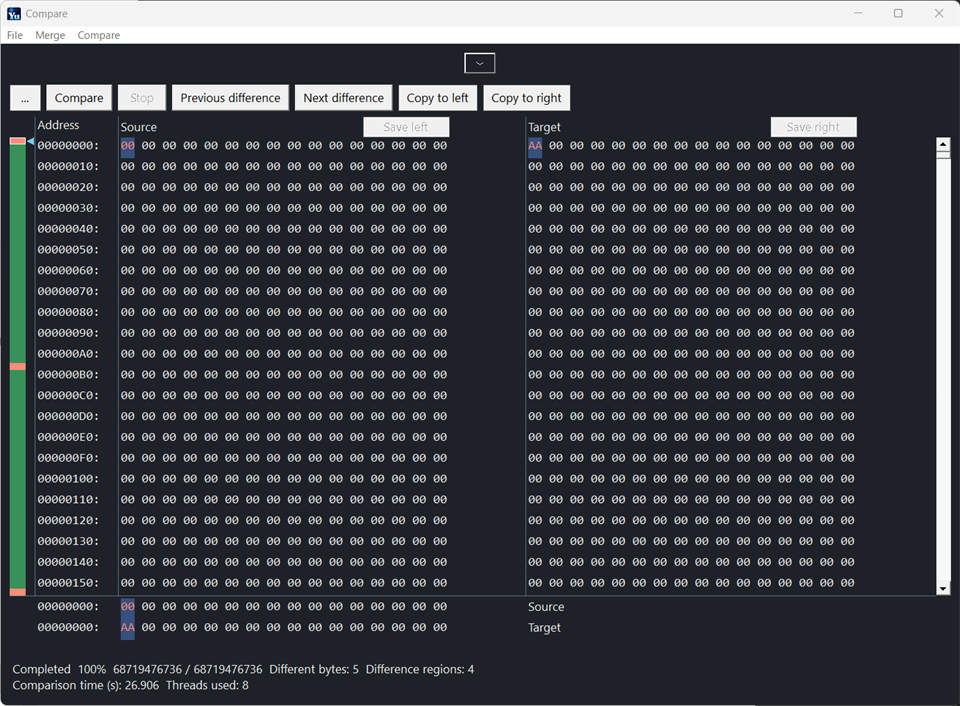
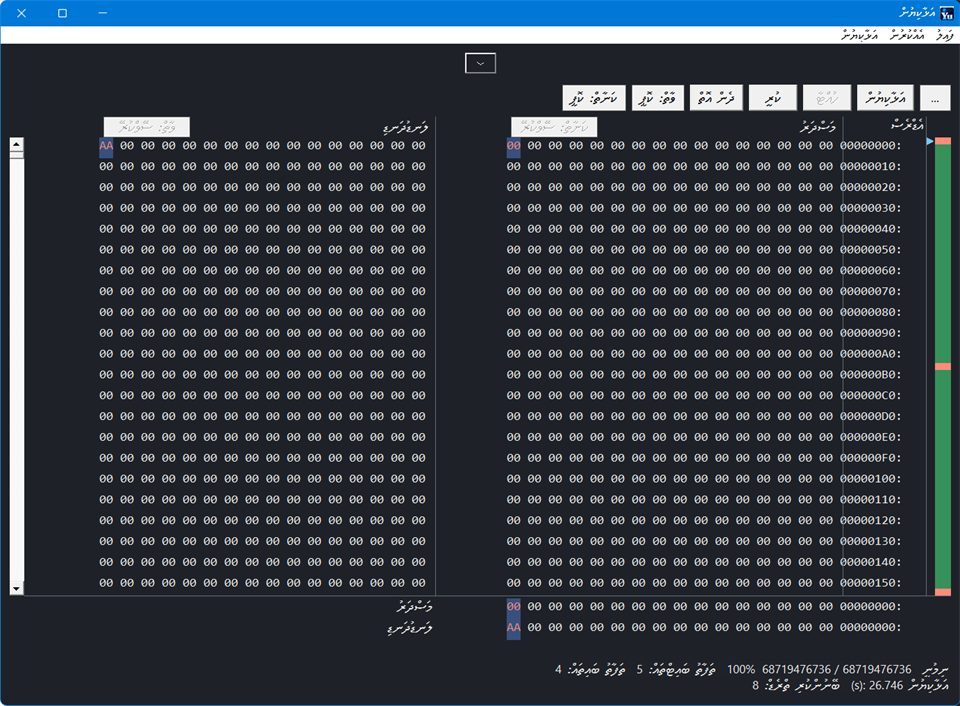
View, edit and compare large files without loading them entirely into memory. Accelerate hexadecimal searches and comparisons with up to 32 workers. Follow highlighted differences and the location pane, then copy difference regions in either direction and save after comparison completes. Browse the full range during comparison, monitor progress and cancel when needed.
REVIEW CHANGES AS YOU REPLACE OR FILL
Replace equal-length hex sequences individually or in bulk, with a change list and highlights showing what changed. Fill a selection with a repeating hex pattern without expanding the entire fill into memory, and undo or redo the whole fill as one operation.
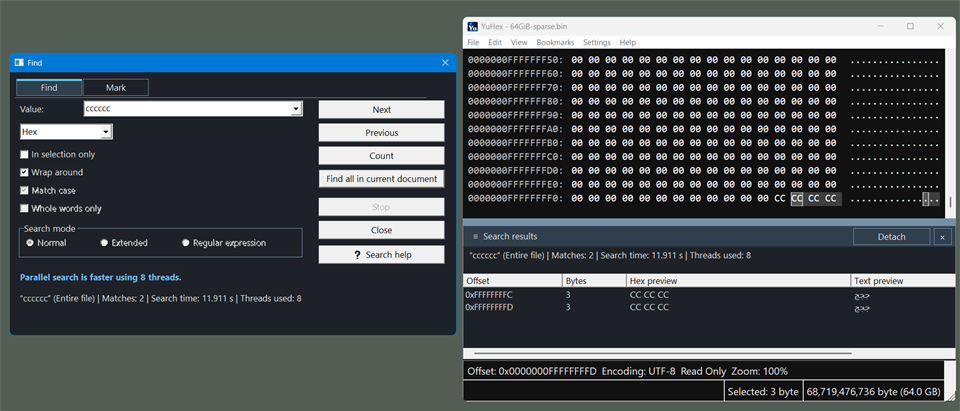
Hex (mismatch) search finds contiguous ranges that differ from a repeating pattern, useful for checking zero-filled regions and other expected data.
READ BYTES AS TEXT, VALUES AND STRUCTURES
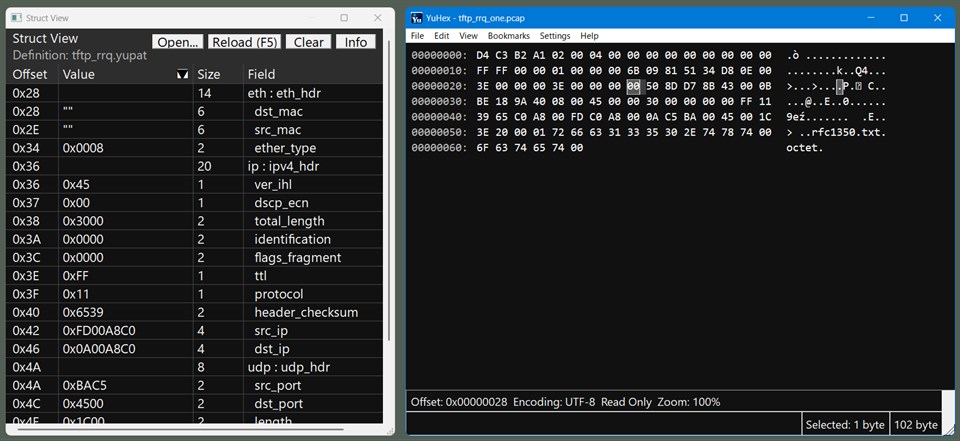
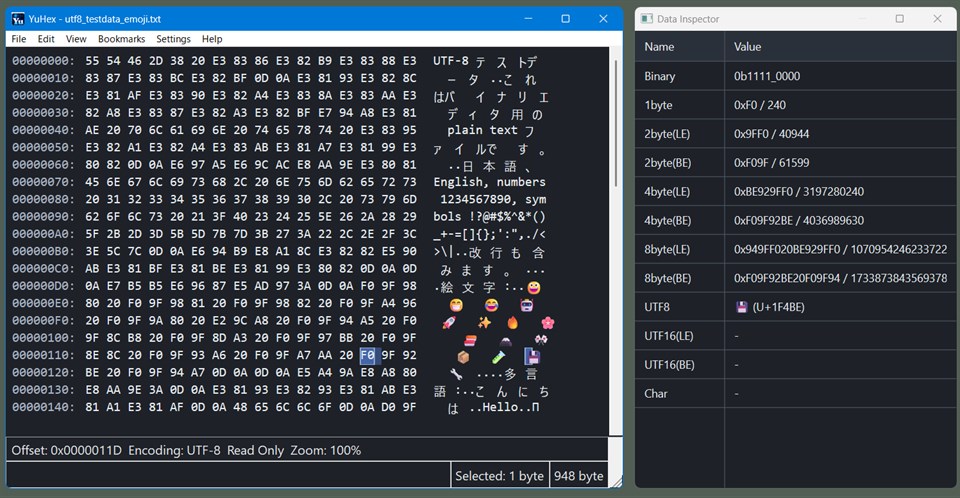
Switch between 22 encodings, including ASCII, UTF-8, UTF-16 and Shift_JIS, with full-color Unicode emoji. Inspect integers, floating-point values and characters in Data Inspector. Load .yupat definitions containing C struct declarations to explore field names, types, values and offsets in Struct View.
FROM SEARCH AND EDITING TO OUTPUT
Search hex, text and regular expressions, count matches and browse up to 100,000 results. Jump using arithmetic expressions and add named, colored bookmarks without a count limit. Overwrite, insert or delete data with Undo/Redo and Edit History.
Export whole files or selections as text dumps or C arrays. Print addresses, hex bytes and ASCII with print preview. The printed character column always uses ASCII.
YOUR LANGUAGE, YOUR COLORS
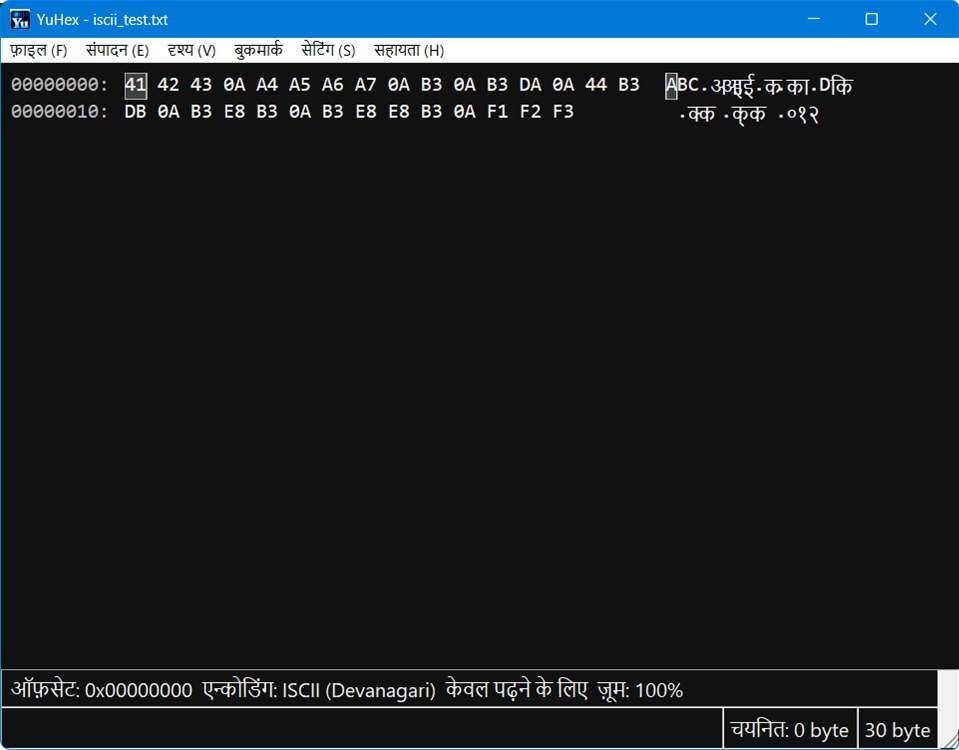
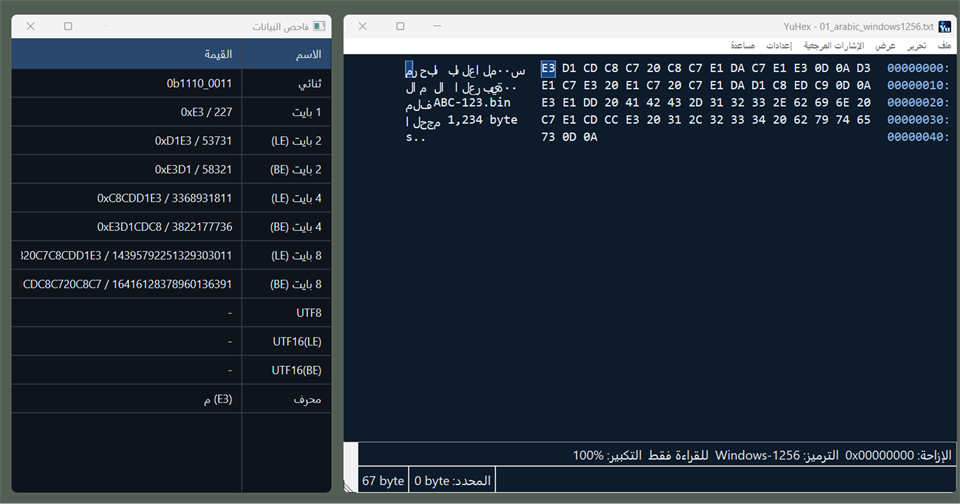
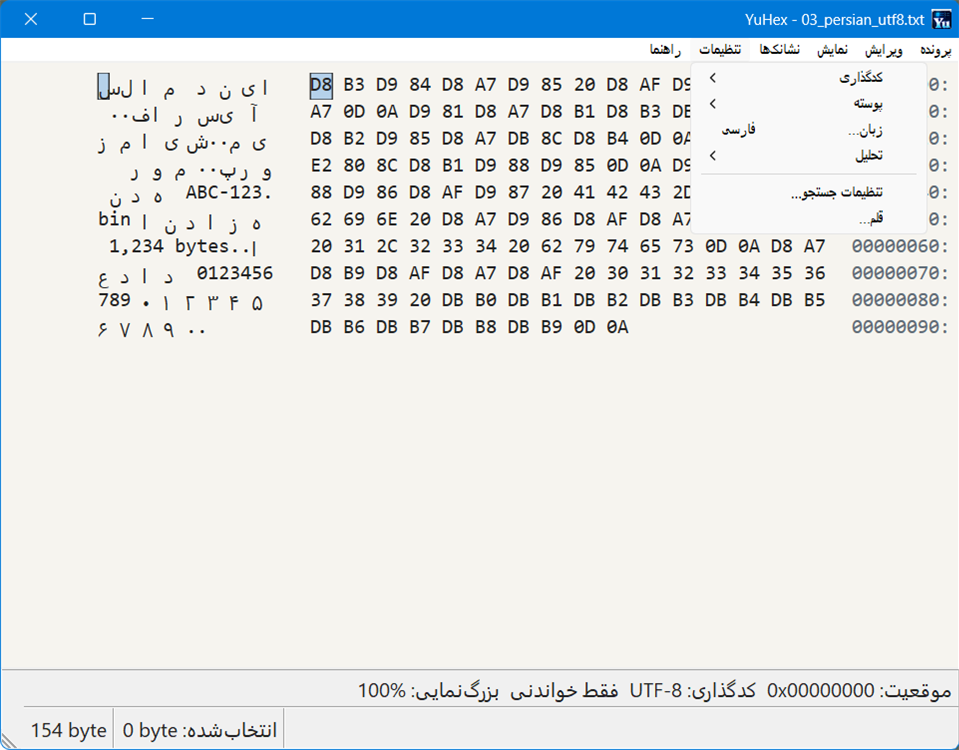
Use Japanese, English and many other languages, including Arabic and Persian with RTL layouts. Follow the system light/dark setting or choose from five dark palettes, including Mystical Forest and Juicy Plum. Adjust zoom and fonts with high-DPI and long-path support.
USAGE NOTES
• Windows 11 on Intel/AMD 64-bit systems.
• File viewing, searching and editing run on your PC. No account is required. Automatic update checks can be disabled.
• Dedicated links in HTML results require the installed Store edition.
• Comparison merging overwrites the same offsets; merge Undo/Redo and Save As are not supported.
• Normal-edit history retains up to 16 MiB. Pattern fill supports whole-operation Undo/Redo.
Features, supported languages and guides:
https://yutakasan.11ya.net/winapps/YuHex/store/index.html
개발자 소식
개발자이신가요?
페이지 맨 위에 소식을 올리면 팔로워에게 이메일로 전달됩니다. YouTube 동영상을 추가하면 “동영상” 블록 맨 앞에 표시됩니다.
목록 0
-
 YuHex
포인트 0
-

- +1 포인트

순위 0
-
- 내 평점
개발자 4
- Yutaka Hirata
- 팔로워: 0
- 플랫폼: Windows 앱 (4)
- 할인: 0
- 목록: 0 0
- 포인트: 0
- 순위: 0
- 댓글: 0
- 동영상: 0
- RSS: 구독
새로운 기능
- 버전: PC
- 마지막 업데이트:
- Please see the release history at the following URL:
https://yutakasan.11ya.net/winapps/YuHex/store/history.html
버전 기록3
- Version 3.11
NEW FEATURES
• Added Help → Feedback… to open a draft in your default email app, with a subject identifying your edition and version and an English template for bug reports and feature requests. Review the message before sending; no email is sent automatically.
• Added automatic update checks in Settings → Update settings…. Enabled by default, checks run once a day and notify you when an update is available. You can disable automatic checking, check manually, and open the download page from the notification.
BUG FIXES
[Memory management]
• Fixed an application crash when memory allocation failed during data inspector analysis.
• Fixed an application crash when memory allocation failed while caching character boundaries for Shift_JIS and other double-byte encodings.
• Fixed a duplicated thread handle leak when memory allocation failed while registering file comparison I/O. - Version 3.09
NEW FEATURES
• Compare and merge huge files with no app-imposed size cap and up to 32 workers. Full scans tested at 64 GiB; interaction with 1 TiB sparse files. Browse and select anywhere during comparison, monitor progress or stop.
• After comparison, copy the current contiguous difference region in either direction and save each side separately. Resolved differences disappear from highlights, counts and the location pane. Copies overwrite ranges present in both files; resizing and merge Undo/Redo are not supported. Saving supports progress, cancellation and unsaved-change checks. Comparison alone leaves originals unchanged; merged changes apply when saved.
• File location: view or copy the open file's full path, or show it in Explorer. Title bars retain file names only.
IMPROVEMENTS
• Red "*Modified" indicators identify unsaved changes in the editor and on each modified comparison side, with RTL and theme support.
BUG FIXES
File saving
• Restored keyboard focus after Save, Save As, failure or cancellation without interrupting other active windows.
• Fixed long-path saving, misleading external-change errors and Save As to a hard-link alias.
Export
• Corrected RTL progress direction and keyboard focus handling.
• Prevented mixed-content output if another program changes or replaces the source; existing output is preserved.
Localization
• Fixed untranslated Filipino language names, RTL descriptions and restart/settings-save messages. - Version 3.08
NEW FEATURES
• Export text dumps (optional addresses) and C arrays, with selection support, unsaved edits, background processing, progress and cancellation.
• Added ISO 8859-6, OEM 720, Windows-1255, ISO 8859-8 and OEM 862: 22 encodings in total.
• Go To: arithmetic and parentheses, decimal/0x input, start/current/end origins, destination preview and shared history.
• Per-file encoding recall and a recent files list with full-path copying.
IMPROVEMENTS
• Shared file/search histories, compact lists and screen-fitting path tooltips, including RTL layouts.
BUG FIXES
File I/O
• Fixed opening long local/WSL paths via Open, Explorer drop, startup and history; improved folder/quoted-path input, reloading and change detection.
Display
• Fixed RTL address order and punctuation, language-dialog title bars, translated structure-view buttons and dialog icons.
추가 정보
 https://yutakasan.11ya.net/
AppAgg 점수
1,070
AppAgg 예상 점수:
YuHex
개발자: Yutaka Hirata
1,070 실버
점수가 높을수록 대체로 AppAgg의 여러 지표에서 좋은 결과를 보인다는 뜻입니다.
기준: 인기 · 사용자 평점 · 최신성 · 할인 · 스토어 데이터 · 커뮤니티 활동
최신 AppAgg 데이터를 바탕으로 매일 다시 계산됩니다.
웹사이트용 배지:  복사됨!
댓글 0 ¡
가장 먼저 댓글을 남겨주세요
공유하기
YuHex 단축 URL: 복사됨!- Windows Store


