
북마크
이 북마크의 제목을 입력하세요.
북마크가 저장되었습니다
| 개발자: | Antony Corbett (2) | ||
| 가격: | 무료 | ||
| 종합 점수: | 590 브론즈 | ||
| 순위: | 0 | ||
| 댓글: | 0 댓글 게시 | ||
| 목록: | 0 0 | ||
| 포인트: | 0 | ||
| +1 포인트 | |||
요약
Zoomara: Antony Corbett에서 만든 ‘개발자 도구’ 카테고리의 앱이에요.
HoloLens에서도 쓸 수 있어요. 혼합 현실 속 Windows예요.
Windows Mobile 버전까지 있어요. 과거에서 안부 전해요.
무료. 광고도 인앱 구매도 없어요. 앱에만 집중하면 돼요.
에 출시됐어요. 아직 꽤 따끈따끈해요.
Surface Hub도 지원해요. 큰 회의실에 딱이에요.
AppAgg 점수는 590. 지금은 브론즈 등급이지만, 성장할 여지가 충분해요.
연령 등급은 ‘EVERYONE’, 아이들에게도 괜찮아요.
지원 언어는 딱 하나, 그런데 한국어는 아니에요.
AppAgg에서는 아직 아무도 평가하지 않았어요. 첫 번째가 될 기회는 바로 지금이에요.
이 개발자의 앱이 AppAgg에 1개 더 있어요. 한번 둘러보세요.
업데이트와 새 앱 소식을 가장 먼저 받고 싶나요? 개발자를 팔로우하거나 RSS 피드를 구독하세요. 푸시 알림은 Android와 iOS용 AppAgg Alerts 앱으로 받을 수 있어요.
광고
스크린샷 2
다른 플랫폼 0
가격 기록 0
- 현재 가격: 무료
- 최소: 무료
- 최대: 무료
홈 화면의 나만의 피드
“신규 및 업데이트” 피드의 플랫폼을 선택하면 홈 화면에 필요한 앱과 게임만 표시됩니다.
설명

Zoomara is a modern, high-performance Windows application designed to make Deep Zoom image creation fast, intuitive, and accessible to everyone. Whether you’re a photographer, artist, archivist, educator, or web developer, Zoomara empowers you to convert ultra-high-resolution images into interactive, zoomable experiences suitable for online viewing and sharing.
What is Deep Zoom?
Deep Zoom technology allows users to explore massive images smoothly, without long load times or excessive memory usage. Instead of loading the entire image at once, Deep Zoom splits your image into a pyramid of tiles at multiple resolutions. As viewers pan and zoom, only the necessary tiles are loaded, ensuring a seamless and responsive experience—even on devices with limited resources or slower connections. This approach is ideal for detailed maps, artwork, blueprints, historical documents, and any scenario where clarity at every zoom level is essential.
Why Choose Zoomara?
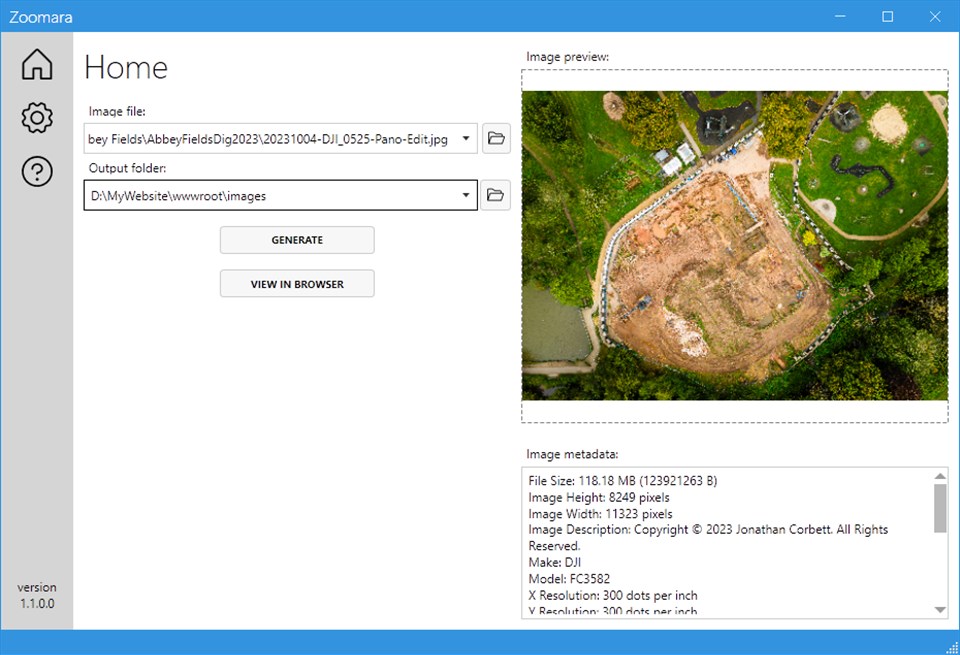
• User-Friendly Interface: Zoomara’s clean, modern interface makes it easy to load your high-resolution images, preview them, and generate Deep Zoom tiles in just a few clicks.
• Fast Processing: Leveraging multi-threaded processing and efficient algorithms, Zoomara can process even very large images quickly. You can adjust processing power to suit your workflow, from background-friendly single-threaded mode to full-speed multithreaded operation.
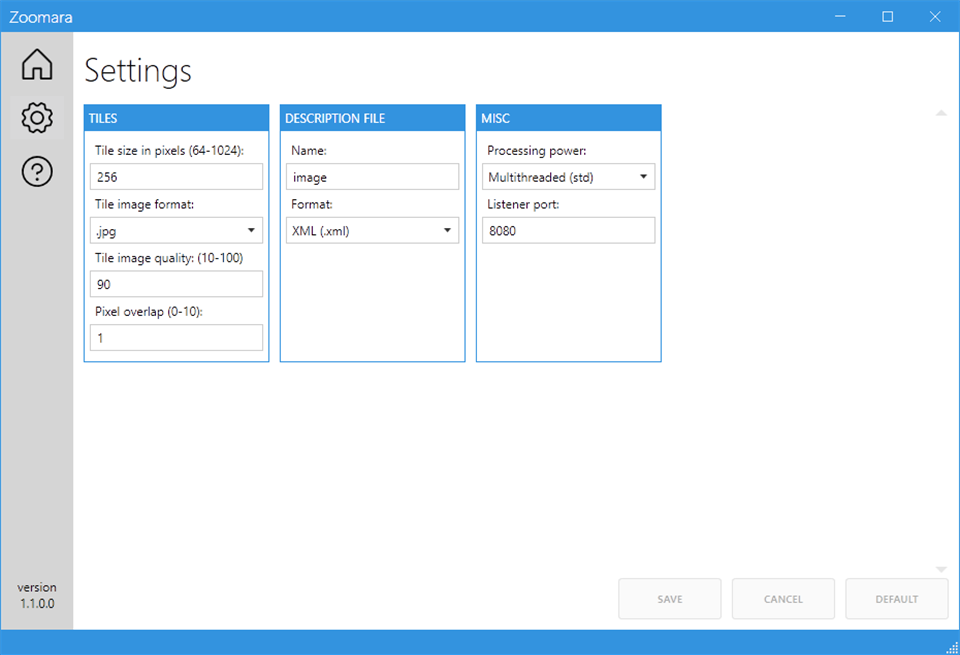
• Flexible Output: Choose your preferred tile size, image format (JPG, PNG, WebP, BMP), and quality settings. Zoomara supports the industry-standard DZI (Deep Zoom Image) format, as well as XML, JSON, and JSONP description files for maximum compatibility.
• Instant Preview: Use the built-in “View in Browser” feature to instantly preview your Deep Zoom image in your default web browser, powered by an integrated local web server. No need to upload files to a website just to check your results.
• Comprehensive Settings: Fine-tune tile overlap, output folder structure, and listener port for browser previews. All settings are clearly explained, making it easy to optimize for your specific needs.
• Seamless Deployment: Once your image is processed, simply upload the generated tiles and description file to your website. Zoomara provides clear instructions and sample HTML for integrating with popular viewers like OpenSeadragon.
How It Works:
1. Install Zoomara on your Windows PC from the Microsoft Store.
2. Load your high-resolution image.
3. Select an output folder and click “Generate” to create Deep Zoom tiles.
4. Preview your results in your browser, or upload the output to your website for public viewing.
Ideal For:
• Museums and galleries digitizing artwork or artifacts
• Educators sharing detailed diagrams or maps
• Photographers and artists showcasing high-res portfolios
• Archivists preserving historical documents
• Anyone needing to present large images online with clarity and speed
Support and Documentation:
Zoomara includes built-in help and links to online resources about Deep Zoom technology. For additional support, contact the developer directly via the support email provided in the app.
Trademarks:
Microsoft, Deep Zoom, and Seadragon are trademarks of the Microsoft group of companies.
개발자 소식
개발자이신가요?
페이지 맨 위에 소식을 올리면 팔로워에게 이메일로 전달됩니다. YouTube 동영상을 추가하면 “동영상” 블록 맨 앞에 표시됩니다.
개발자
- Antony Corbett
- 팔로워: 0
- 플랫폼: Windows 앱 (2)
- 할인: 0
- 목록: 0 0
- 포인트: 0
- 순위: 0
- 댓글: 0
- 동영상: 0
- RSS: 구독
목록 0
-
 Zoomara
포인트 0
-

- +1 포인트

순위 0
-
- 내 평점
새로운 기능
- 버전: PC
- 마지막 업데이트:
추가 정보
 https://cv8.org.uk/zoomara
댓글 0 ¡
가장 먼저 댓글을 남겨주세요
AppAgg 점수
590
AppAgg 예상 점수:
Zoomara
개발자: Antony Corbett
590 브론즈
점수가 높을수록 대체로 AppAgg의 여러 지표에서 좋은 결과를 보인다는 뜻입니다.
기준: 인기 · 사용자 평점 · 최신성 · 할인 · 스토어 데이터 · 커뮤니티 활동
최신 AppAgg 데이터를 바탕으로 매일 다시 계산됩니다.
웹사이트용 배지:  복사됨!
Zoomara 단축 URL: 복사됨!- Windows Store


