
บุ๊กมาร์ก
| ผู้พัฒนา: | Antony Corbett (2) | ||
| ราคา: | ฟรี | ||
| คะแนน: | 590 บรอนซ์ | ||
| การจัดอันดับ: | 0 | ||
| ความคิดเห็น: | 0 โพสต์ความคิดเห็น | ||
| รายการ: | 0 0 | ||
| แต้ม: | 0 | ||
| +1 แต้ม | |||
สรุป
Zoomara เป็นแอปในหมวด “เครื่องมือสำหรับนักพัฒนา” จาก Antony Corbett
ใช้ได้แม้แต่บน HoloLens (Windows ในโลกความเป็นจริงผสม)
มีเวอร์ชัน Windows Mobile ด้วยนะ สวัสดีจากอดีต
ฟรี ไม่มีโฆษณา ไม่มีการซื้อภายในแอป มีแค่คุณกับแอป
ออกเมื่อ ยังสดใหม่อยู่เลย
รองรับแม้แต่ Surface Hub เหมาะกับห้องประชุมใหญ่ ๆ
คะแนน AppAgg คือ 590 ตอนนี้อยู่ระดับ “บรอนซ์” ยังไปได้อีกไกล
จัดเรต “EVERYONE” เหมาะกับเด็ก ๆ ด้วย
รองรับแค่ภาษาเดียว และไม่ใช่ภาษาไทย
ยังไม่มีใครบน AppAgg ให้คะแนนเลย โอกาสเป็นคนแรกอยู่ตรงนี้แล้ว
ผู้พัฒนารายนี้มีแอปอื่นบน AppAgg อีก 1 แอป ลองไปดูกัน
อยากรู้เรื่องอัปเดตและแอปใหม่ก่อนใครไหม? ติดตาม ผู้พัฒนา หรือกดติดตาม ฟีด RSS ได้เลย การแจ้งเตือนแบบพุชส่งผ่านแอป AppAgg Alerts สำหรับ Android และ iOS
ภาพหน้าจอ 2
แพลตฟอร์มอื่น 0
ประวัติราคา 0
- ราคาปัจจุบัน: ฟรี
- ต่ำสุด: ฟรี
- สูงสุด: ฟรี
ฟีดของคุณเองบนหน้าแรก
คำอธิบาย

Zoomara is a modern, high-performance Windows application designed to make Deep Zoom image creation fast, intuitive, and accessible to everyone. Whether you’re a photographer, artist, archivist, educator, or web developer, Zoomara empowers you to convert ultra-high-resolution images into interactive, zoomable experiences suitable for online viewing and sharing.
What is Deep Zoom?
Deep Zoom technology allows users to explore massive images smoothly, without long load times or excessive memory usage. Instead of loading the entire image at once, Deep Zoom splits your image into a pyramid of tiles at multiple resolutions. As viewers pan and zoom, only the necessary tiles are loaded, ensuring a seamless and responsive experience—even on devices with limited resources or slower connections. This approach is ideal for detailed maps, artwork, blueprints, historical documents, and any scenario where clarity at every zoom level is essential.
Why Choose Zoomara?
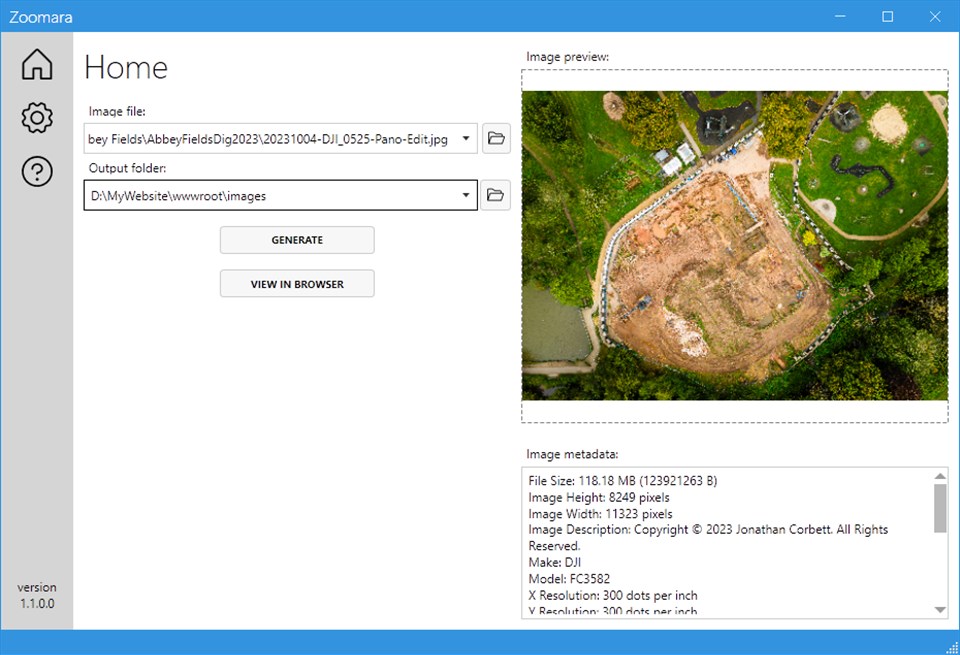
• User-Friendly Interface: Zoomara’s clean, modern interface makes it easy to load your high-resolution images, preview them, and generate Deep Zoom tiles in just a few clicks.
• Fast Processing: Leveraging multi-threaded processing and efficient algorithms, Zoomara can process even very large images quickly. You can adjust processing power to suit your workflow, from background-friendly single-threaded mode to full-speed multithreaded operation.
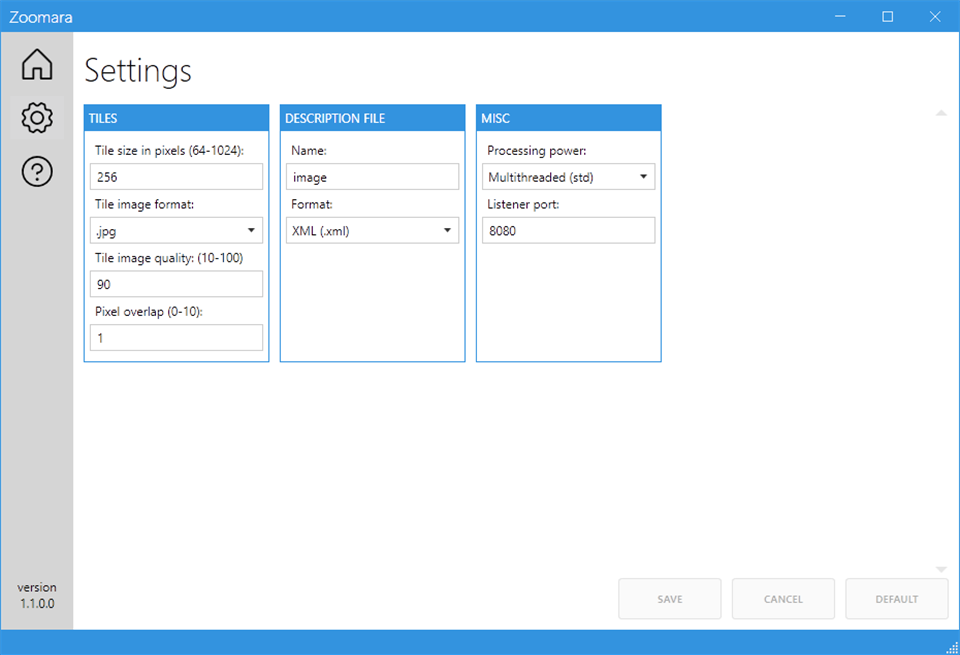
• Flexible Output: Choose your preferred tile size, image format (JPG, PNG, WebP, BMP), and quality settings. Zoomara supports the industry-standard DZI (Deep Zoom Image) format, as well as XML, JSON, and JSONP description files for maximum compatibility.
• Instant Preview: Use the built-in “View in Browser” feature to instantly preview your Deep Zoom image in your default web browser, powered by an integrated local web server. No need to upload files to a website just to check your results.
• Comprehensive Settings: Fine-tune tile overlap, output folder structure, and listener port for browser previews. All settings are clearly explained, making it easy to optimize for your specific needs.
• Seamless Deployment: Once your image is processed, simply upload the generated tiles and description file to your website. Zoomara provides clear instructions and sample HTML for integrating with popular viewers like OpenSeadragon.
How It Works:
1. Install Zoomara on your Windows PC from the Microsoft Store.
2. Load your high-resolution image.
3. Select an output folder and click “Generate” to create Deep Zoom tiles.
4. Preview your results in your browser, or upload the output to your website for public viewing.
Ideal For:
• Museums and galleries digitizing artwork or artifacts
• Educators sharing detailed diagrams or maps
• Photographers and artists showcasing high-res portfolios
• Archivists preserving historical documents
• Anyone needing to present large images online with clarity and speed
Support and Documentation:
Zoomara includes built-in help and links to online resources about Deep Zoom technology. For additional support, contact the developer directly via the support email provided in the app.
Trademarks:
Microsoft, Deep Zoom, and Seadragon are trademarks of the Microsoft group of companies.
จากนักพัฒนา
ผู้พัฒนา
- Antony Corbett
- ผู้ติดตาม: 0
- แพลตฟอร์ม: Windows แอป (2)
- ลดราคา: 0
- รายการ: 0 0
- แต้ม: 0
- การจัดอันดับ: 0
- ความคิดเห็น: 0
- วิดีโอ: 0
- RSS: ติดตาม
รายการ 0
-
 Zoomara
แต้ม 0
-

- +1 แต้ม

การจัดอันดับ 0
-
- คะแนนของคุณ
มีอะไรใหม่
- เวอร์ชัน: PC
- อัปเดตล่าสุด:
ข้อมูลเพิ่มเติม
- วันที่วางจำหน่าย:
- หมวดหมู่:
แอปสำหรับ Windows›เครื่องมือสำหรับนักพัฒนา - ระบบปฏิบัติการ:
HoloLensMobilePCSurface Hub - ขนาด:
243 Mb - ภาษาที่รองรับ:
อังกฤษ - การจัดประเภทเนื้อหา:
EVERYONE - Windows Store คะแนน: ¡
0 - เว็บไซต์:
 https://cv8.org.uk/zoomara
ความคิดเห็น 0 ¡
คะแนน AppAgg
คะแนน AppAgg โดยประมาณของ
Zoomara
ผู้พัฒนา: Antony Corbett
คะแนนที่สูงขึ้นมักสะท้อนตัวชี้วัดที่ดีกว่าบน AppAgg
อิงจาก: ความนิยม · คะแนนจากผู้ใช้ · ความสดใหม่ · ดีล · ข้อมูลร้านค้า · กิจกรรมชุมชน
คำนวณใหม่ทุกวันจากข้อมูล AppAgg ล่าสุด
Zoomara URL แบบสั้น: คัดลอกแล้ว!- Windows Store

