
Yer imleri
| Geliştirici: | Antony Corbett (2) | ||
| Fiyat: | Ücretsiz | ||
| Skor: | 590 Bronz | ||
| Sıralamalar: | 0 | ||
| Yorumlar: | 0 Yorum gönder | ||
| Listeler: | 0 0 | ||
| Puanlar: | 0 | ||
| +1 Puan | |||
Özet
Zoomara, Antony Corbett imzalı, Geliştirici araçları kategorisinde bir uygulama.
HoloLens’te bile çalışıyor (karma gerçeklikte Windows).
Windows Mobile sürümü bile var. Geçmişten selamlar.
Ücretsiz, reklam yok, uygulama içi satın alma yok. Sadece sen ve uygulama.
çıktı, hâlâ epey taze.
Surface Hub için bile hazır, büyük toplantı odaları için.
AppAgg skoru 590. Şimdilik Bronz, ama yükselmek için bolca yer var.
Yaş sınırı “EVERYONE”, yani çocuklar için de uygun.
Tek bir dil konuşuyor, o da Türkçe değil.
AppAgg’de henüz kimse puan vermedi. İlk olma şansın tam şu an.
Geliştiricinin AppAgg’de 1 uygulaması daha var. Bir göz at.
Güncellemeleri ve yeni uygulamaları ilk sen mi duymak istiyorsun? Hemen geliştiriciyi takip et ya da RSS akışı ile haberdar ol. Push bildirimleri Android ve iOS için AppAgg Alerts uygulamasıyla gelir.
Ekran görüntüleri 2
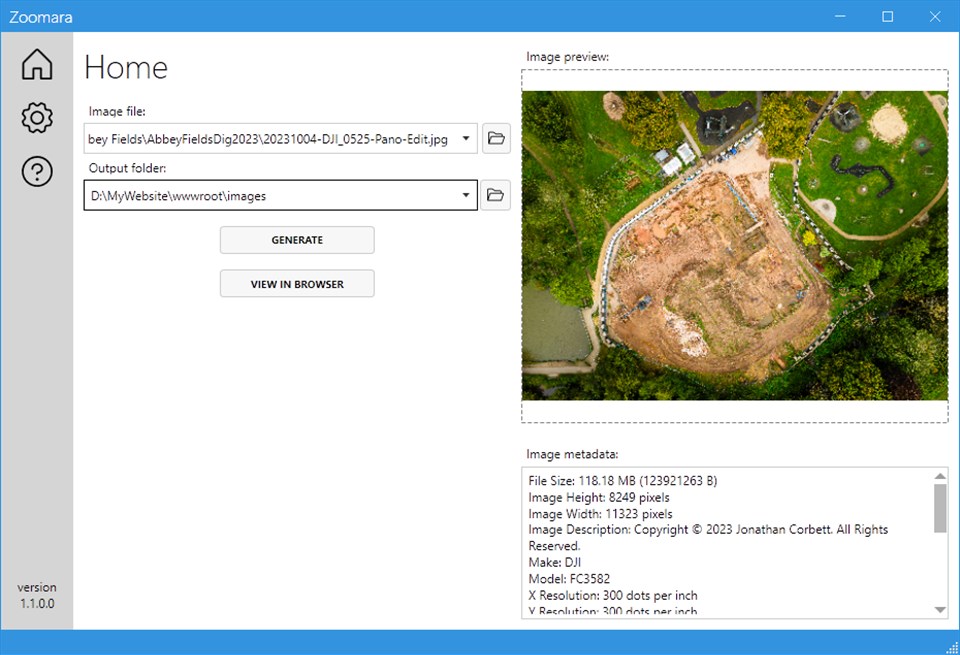
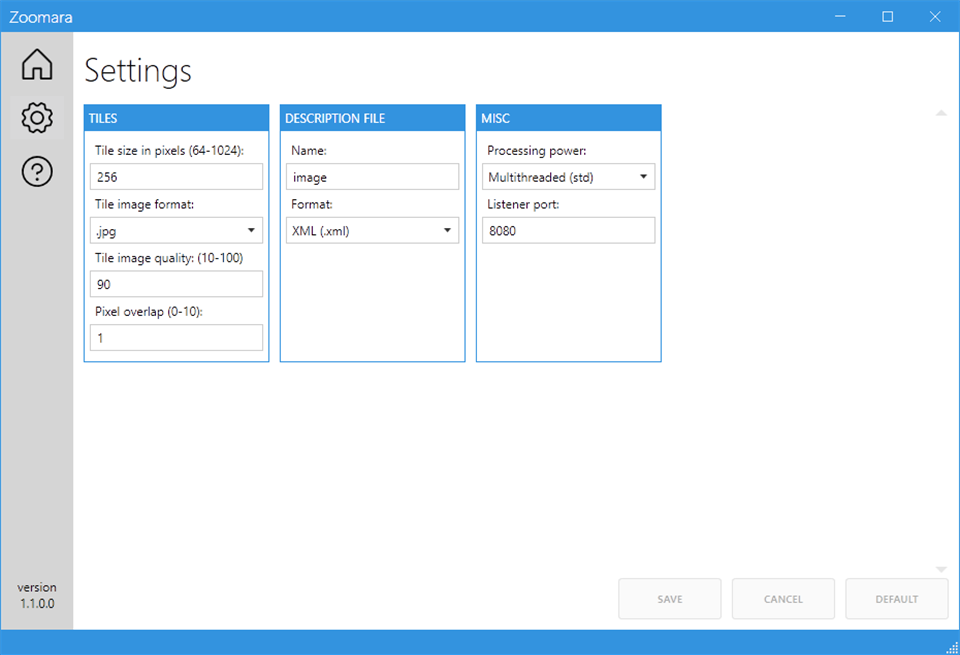
Diğer platformlar 0
Fiyat Geçmişi 0
- Güncel fiyat: Ücretsiz
- En az: Ücretsiz
- En fazla: Ücretsiz
Ana sayfada kendi akışınız
Açıklama

Zoomara is a modern, high-performance Windows application designed to make Deep Zoom image creation fast, intuitive, and accessible to everyone. Whether you’re a photographer, artist, archivist, educator, or web developer, Zoomara empowers you to convert ultra-high-resolution images into interactive, zoomable experiences suitable for online viewing and sharing.
What is Deep Zoom?
Deep Zoom technology allows users to explore massive images smoothly, without long load times or excessive memory usage. Instead of loading the entire image at once, Deep Zoom splits your image into a pyramid of tiles at multiple resolutions. As viewers pan and zoom, only the necessary tiles are loaded, ensuring a seamless and responsive experience—even on devices with limited resources or slower connections. This approach is ideal for detailed maps, artwork, blueprints, historical documents, and any scenario where clarity at every zoom level is essential.
Why Choose Zoomara?
• User-Friendly Interface: Zoomara’s clean, modern interface makes it easy to load your high-resolution images, preview them, and generate Deep Zoom tiles in just a few clicks.
• Fast Processing: Leveraging multi-threaded processing and efficient algorithms, Zoomara can process even very large images quickly. You can adjust processing power to suit your workflow, from background-friendly single-threaded mode to full-speed multithreaded operation.
• Flexible Output: Choose your preferred tile size, image format (JPG, PNG, WebP, BMP), and quality settings. Zoomara supports the industry-standard DZI (Deep Zoom Image) format, as well as XML, JSON, and JSONP description files for maximum compatibility.
• Instant Preview: Use the built-in “View in Browser” feature to instantly preview your Deep Zoom image in your default web browser, powered by an integrated local web server. No need to upload files to a website just to check your results.
• Comprehensive Settings: Fine-tune tile overlap, output folder structure, and listener port for browser previews. All settings are clearly explained, making it easy to optimize for your specific needs.
• Seamless Deployment: Once your image is processed, simply upload the generated tiles and description file to your website. Zoomara provides clear instructions and sample HTML for integrating with popular viewers like OpenSeadragon.
How It Works:
1. Install Zoomara on your Windows PC from the Microsoft Store.
2. Load your high-resolution image.
3. Select an output folder and click “Generate” to create Deep Zoom tiles.
4. Preview your results in your browser, or upload the output to your website for public viewing.
Ideal For:
• Museums and galleries digitizing artwork or artifacts
• Educators sharing detailed diagrams or maps
• Photographers and artists showcasing high-res portfolios
• Archivists preserving historical documents
• Anyone needing to present large images online with clarity and speed
Support and Documentation:
Zoomara includes built-in help and links to online resources about Deep Zoom technology. For additional support, contact the developer directly via the support email provided in the app.
Trademarks:
Microsoft, Deep Zoom, and Seadragon are trademarks of the Microsoft group of companies.
Geliştiriciden
Geliştirici
- Antony Corbett
- Takipçiler: 0
- Platformlar: Windows Uygulamalar (2)
- İndirimler: 0
- Listeler: 0 0
- Puanlar: 0
- Sıralamalar: 0
- Yorumlar: 0
- Video: 0
- RSS: Abone ol
Listeler 0
-
 Zoomara
Puanlar 0
-

- +1 Puan

Sıralamalar 0
-
- Puanınız
Yenilikler
- Sürüm: PC
- Son güncelleme:
Ek Bilgi
- Çıkış tarihi:
- Kategori:
Windows uygulamaları›Geliştirici araçları - İşletim Sistemleri:
HoloLensMobilePCSurface Hub - Boyut:
243 Mb - Desteklenen diller:
İngilizce - İçerik Derecelendirmesi:
EVERYONE - Windows Store Puan: ¡
0 - Web sitesi:
 https://cv8.org.uk/zoomara
Yorumlar 0 ¡
AppAgg Skoru
Tahmini AppAgg skoru:
Zoomara
Geliştirici: Antony Corbett
Daha yüksek skorlar genellikle AppAgg’deki göstergelerin daha güçlü olduğunu belirtir.
Şunlara göre: popülerlik · kullanıcı puanları · güncellik · fırsatlar · mağaza verileri · topluluk etkinliği
Güncel AppAgg verileriyle her gün yeniden hesaplanır.
Zoomara Kısa URL: Kopyalandı!- Windows Store

