
Könyvjelzők
| Fejlesztő: | Boyin Chen (1) | ||
| Ár: | Ingyenes | ||
| Pontszám: | 580 Bronz | ||
| Rangsorok: | 0 | ||
| Hozzászólások: | 0 Hozzászólás közzététele | ||
| Listák: | 0 0 | ||
| Pontok: | 0 | ||
| +1 Pont | |||
Röviden
ZShell egy „Fejlesztői eszközök” kategóriájú alkalmazás, fejlesztője: Boyin Chen.
Csak jelent meg, még egészen friss.
Ingyenes, se reklám, se alkalmazáson belüli vásárlás. Csak te és az alkalmazás.
A Microsoft Store a Windows beépített része, így pár kattintással felteheted.
Az AppAgg-pontszáma 580. Egyelőre „Bronz”, de van még hová fejlődni.
Csak 13 megabájt, még egy teletömött meghajtóra is felfér.
„EVERYONE” besorolású, vagyis gyerekeknek is megfelel.
5 nyelvet ismer, de magyarul még nem tanult meg.
Egyelőre teljes a csend: se értékelés, se hozzászólás. Törd meg a csendet.
Ez a fejlesztő egyetlen alkalmazása az AppAggon. Egyelőre.
Szeretnél elsőként értesülni a frissítésekről és az új alkalmazásokról? Kövesd a fejlesztőt vagy az RSS-hírcsatornát. A push-értesítések az AppAgg Alerts alkalmazásban érkeznek Android és iOS rendszerre.
Képernyőképek 2
Más platformok 0
Ártörténet 0
- Jelenlegi ár: Ingyenes
- Minimális: Ingyenes
- Maximális: Ingyenes
Saját hírfolyam a kezdőlapon
Ismertető

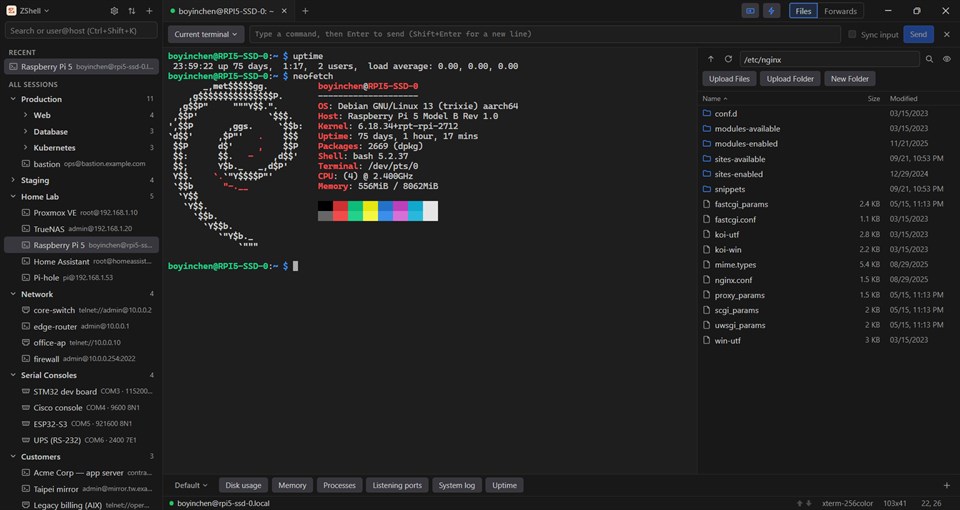
One connection per tab: the terminal, the SFTP file panel and port forwarding share a single SSH connection, and duplicated tabs and split panes reuse it, so you authenticate once.
SSH
• Password, private key, SSH agent (the Windows OpenSSH agent and Pageant) and keyboard-interactive authentication, or all of them in OpenSSH's order.
• Host keys checked against ~/.ssh/known_hosts, shared with OpenSSH, and asked in the terminal as ssh does, including host certificates from a trusted certificate authority (@cert-authority).
• Jump hosts, SOCKS5 and HTTP proxies or proxy commands, keepalives and automatic reconnection.
• Hosts imported from ~/.ssh/config.
Telnet and serial consoles
• For network devices and older systems, with saved logins typed at the prompts.
• Serial sessions reconnect when a USB adapter is plugged back in.
Files
• An SFTP panel that opens in the terminal's folder and can follow it, with drag and drop in and out, transfers with progress, and remote files edited in your own editor and uploaded on save.
• rz and sz (ZMODEM) for hosts without SFTP.
Port forwarding
• Local, remote and dynamic SOCKS rules (-L, -R, -D) saved with the session, with live status.
Sessions, tabs and terminals
• Nested folders, search and quick connect, export and import.
• Per-session character encodings (GBK, Big5, Shift_JIS…), colors, fonts, commands run after login, environment variables and notes.
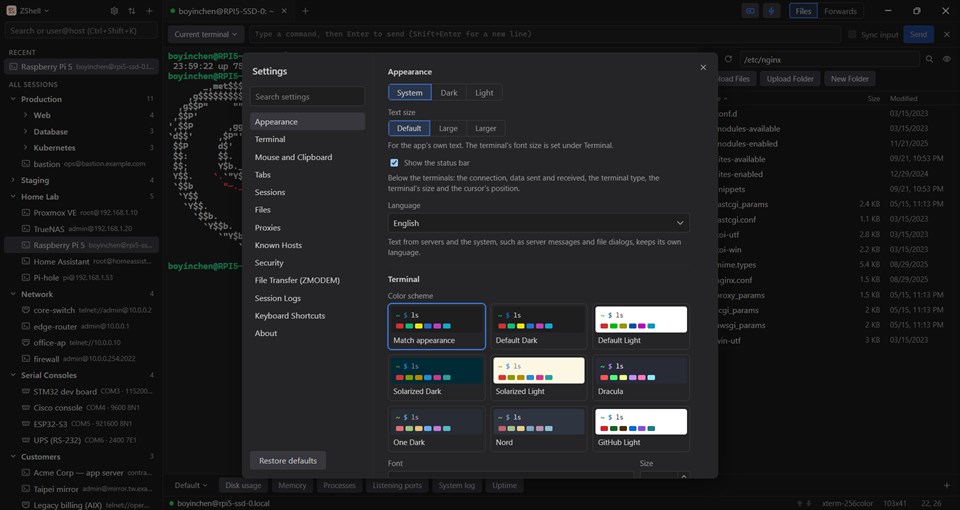
• Local terminals (PowerShell), split panes, tabs in the title bar, several windows that tabs move between with their sessions, a full screen showing only the terminals, search, color schemes, the programming ligatures of fonts such as Fira Code and Cascadia Code, copy on select, right-click paste and session logs.
• Quick command buttons and a command palette, and a compose bar that sends to several terminals or syncs what you type.
Security
• Sessions and saved passwords encrypted with a master password or a key in the Windows Credential Manager.
• Exports protected with a passphrase.
• An app lock that covers the window with Windows Hello after a period of inactivity, when the computer locks, or on demand.
Accessibility
• Screen readers (Narrator, NVDA, JAWS) can read the terminals, turned on automatically while one is running.
• Everything works from the keyboard, and the system's contrast and reduced motion settings are followed.
ZShell runs entirely on your computer: no account, no telemetry, nothing collected. It is free, with no ads or in-app purchases.
A fejlesztőtől
Fejlesztő
- Boyin Chen
- Követők: 0
- Platformok: Windows Alkalmazások (1)
- Akciók: 0
- Listák: 0 0
- Pontok: 0
- Rangsorok: 0
- Hozzászólások: 0
- Videók: 0
- RSS: Feliratkozás
Listák 0
-
 ZShell
Pontok 0
-

- +1 Pont

Rangsorok 0
-
- Az értékelésed
Újdonságok
- Verzió: PC
- Utolsó frissítés:
- New
- File transfers cut short by a lost connection resume by themselves once the tab reconnects, skipping files already copied and continuing large files where they stopped. Transfers that failed for other reasons have a Retry button.
- Local terminals can run PowerShell 7, Windows PowerShell, Command Prompt, Git Bash or an installed WSL distribution, from the arrow beside "+". Choose which one "+" opens in Settings > Terminal, and save local terminals as sessions with their own program, start folder and environment variables.
- A new setting in Keyboard Shortcuts leaves Alt+1-9, Ctrl+V and Alt+Shift+= / - to programs in the terminal.
- About ZShell shows the WebView2 version in use; click a version to copy it.
Fixes
- Pasted text no longer carries control characters that could run part of a paste without confirmation.
- A file opened in the editor from the file panel is never run.
- Encrypted PKCS#8 and PuTTY keys now ask for their passphrase.
- Safer imports: an ssh_config no longer follows Includes on network shares, and a file changed after its preview is refused.
- Uploads no longer risk truncating a file when the server is slow to answer, and quitting during a transfer leaves no partial files.
- More reliable port forwarding and Telnet pastes to devices that echo them.
- Terminals no longer flicker while resizing, and the status bar no longer jumps when switching tabs.
- New in 3.17.0:
- Debug log: Help > Debug Log opens a window with the records the app keeps in memory while it runs, to see what happened with a connection that fails or behaves oddly. It covers SSH connections and jump hosts, host keys, authentication attempts, forwarding, SFTP, proxies, Telnet, serial ports and local shells, as well as the app's own errors. Filter by level or text, clear, or copy the records. They are never written to disk and never include what is typed in a terminal, passwords, passphrases or keys.
- About ZShell is now a dialog of its own, opened from the app menu: the version and links to the license, the privacy policy and the third-party licenses. Settings no longer has an About section; the data folder moved to Settings > Security.
Fixes:
- The third-party licenses dialog opens with Close focused rather than the search field.
- A help tip after a checkbox sits at the right distance from its text. - Urgent fixes in 3.16.1:
- A tab in the background with new output is marked again by a ring around its status dot, rather than a block of color over its title.
- The menus side by side in the settings (the cursor style, the log format and how long logs are kept) are drawn like the other menus, rather than as gray buttons. - - Hide the session list to give the terminal more room, while keeping your tabs and panels open: click the button next to the menu button, choose View › Hide Session List, or press Ctrl+Shift+B. Searching or creating a session shows the list again, and ZShell remembers whether you hid it.
- The terminal now uses its full width for text. The scroll bar is thinner, sits over the last column and fades out when you're not scrolling.
- Ctrl+, now closes Settings as well as opening it.
- Security: updated a cryptography component used by SSH connections to fix a timing weakness. - Features
- The interface does less work while terminals are busy. A program that keeps changing its title, such as one showing a spinner, no longer makes the session list, the other tabs or the quick command bar redraw, and a running transfer no longer redraws the whole file list several times a second. This saves CPU and memory, most of all with many tabs or large folders.
Bug fixes
- Terminals in background tabs no longer redraw their screen as their programs write output, which kept using CPU and memory while something ran in another tab (a build, a log being followed, a program with a spinner). They catch up when their tab is shown.
- Switching to a tab no longer shows its terminal blank for a moment before the text appears.
- In Settings › Known Hosts, the help icon next to the number of host keys lines up with the text.
Others
- The code was restructured; sessions and settings are saved and read as before.
További információk
- Megjelenési dátum:
- Kategória:
Windows-alkalmazások›Fejlesztői eszközök - Operációs rendszer:
PC - Méret:
13 Mb - Támogatott nyelvek:
Angol,Francia,Japán,Kínai,Német - Tartalom besorolása:
EVERYONE - Windows Store Értékelés: ¡
0 - Weboldal:
 https://zshell.boyin.org
Hozzászólások 0 ¡
AppAgg-pontszám
Becsült AppAgg-pontszám:
ZShell
Fejlesztő: Boyin Chen
A magasabb pontszám általában jobb eredményeket tükröz az AppAgg által figyelt mutatókban.
Alapja: népszerűség · felhasználói értékelések · frissesség · akciók · áruházi adatok · közösségi aktivitás
Naponta újraszámítjuk a friss AppAgg-adatok alapján.
ZShell Rövid URL: Másolva!- Windows Store

