
북마크
이 북마크의 제목을 입력하세요.
북마크가 저장되었습니다
| 개발자: | GlobalCore Labs (15) | ||
| 가격: | * 무료 신규 | ||
| 종합 점수: | 580 브론즈 | ||
| 순위: | 0 | ||
| 댓글: | 0 댓글 게시 | ||
| 목록: | 0 0 | ||
| 포인트: | 0 | ||
| +1 포인트 | |||
요약
DraftDiff Pro: GlobalCore Labs에서 만든 ‘생산성’ 카테고리의 앱이에요.
새로 나온 앱이에요. 에 나왔으니 지금 써 보면 얼리어답터예요.
입장은 무료지만, 안에 상점이 열려 있어요.
Microsoft Store는 Windows에 기본으로 들어 있어서 클릭 몇 번이면 설치돼요.
AppAgg 점수는 580. 지금은 브론즈 등급이지만, 성장할 여지가 충분해요.
연령 등급은 ‘EVERYONE’, 아이들에게도 괜찮아요.
지원 언어는 딱 하나, 그런데 한국어는 아니에요.
사용해 보셨나요? 여기서 첫 리뷰의 주인공이 되어 주세요.
이 개발자의 게임 2개와 앱 12개가 AppAgg에 더 있어요. 한번 둘러보세요.
업데이트와 새 앱 소식을 가장 먼저 받고 싶나요? 개발자를 팔로우하거나 RSS 피드를 구독하세요. 푸시 알림은 Android와 iOS용 AppAgg Alerts 앱으로 받을 수 있어요.
광고
스크린샷 1
홈 화면의 나만의 피드
“신규 및 업데이트” 피드의 플랫폼을 선택하면 홈 화면에 필요한 앱과 게임만 표시됩니다.
설명

FIND VISUAL AND TEXT CHANGES
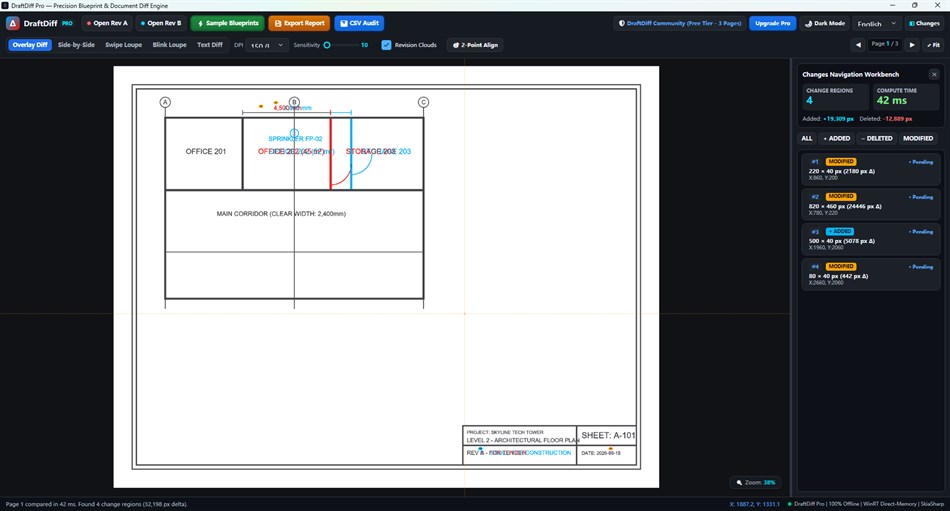
Overlay PDF pages to inspect changed lines and shapes, or view both revisions side by side with synchronized pan and zoom. Swipe and blink modes help you inspect the same area in both versions. Review extracted text differences and navigate detected change regions.
REVIEW PDF DRAWINGS AND DOCUMENTS
Use DraftDiff Pro to compare drawing revisions, technical documents, contracts and artwork exported to PDF. Two-point alignment helps align shifted or rotated pages. Revision clouds mark detected changes, and report tools export a PDF comparison report or a CSV audit log.
LOCAL DOCUMENT PROCESSING
Compare PDFs offline on your Windows device. The app processes your PDF documents locally rather than uploading them for comparison. Microsoft Store purchase and license verification may require an internet connection.
FREE TIER AND OPTIONAL PRO UNLOCK
The free tier is limited to the first 3 pages. The optional DraftDiff Pro Unlock is a one-time, non-subscription purchase that removes the app's page limit and enables two-point alignment, PDF report export and CSV audit log export. The price shown by Microsoft Store applies to your region.
SUPPORTED FILES AND LIMITS
Input: two PDF files. Word documents, CAD drawings and other source formats must first be exported to PDF in their original application. Text comparison requires extractable PDF text; OCR is not included. Scanned PDFs can be inspected visually. Results should be reviewed before relying on them for a design or document decision.
REQUIREMENTS
Windows 10 version 2004 (build 19041) or later, or Windows 11; x64 processor; keyboard and mouse.
개발자 소식
개발자이신가요?
페이지 맨 위에 소식을 올리면 팔로워에게 이메일로 전달됩니다. YouTube 동영상을 추가하면 “동영상” 블록 맨 앞에 표시됩니다.
다른 플랫폼 0
| DraftDiff ProWindows Store580 브론즈Windows인앱 구매 | 무료 |
현재 이 스토어에서만 이용할 수 있습니다.
가격 기록 0
- 현재 가격: 무료
- 최소: 무료
- 최대: 무료
목록 0
-
 DraftDiff Pro
포인트 0
-

- +1 포인트

순위 0
-
- 내 평점
댓글 0 ¡
가장 먼저 댓글을 남겨주세요
개발자 15
- GlobalCore Labs
- 팔로워: 0
- 플랫폼: Windows 앱 (13) Windows 게임 (2)
- 할인: 0
- 목록: 0 0
- 포인트: 0
- 순위: 0
- 댓글: 0
- 동영상: 0
- RSS: 구독
새로운 기능
- 버전: PC
- 마지막 업데이트:
추가 정보
AppAgg 점수
580
AppAgg 예상 점수:
DraftDiff Pro
개발자: GlobalCore Labs
580 브론즈
점수가 높을수록 대체로 AppAgg의 여러 지표에서 좋은 결과를 보인다는 뜻입니다.
기준: 인기 · 사용자 평점 · 최신성 · 할인 · 스토어 데이터 · 커뮤니티 활동
최신 AppAgg 데이터를 바탕으로 매일 다시 계산됩니다.
웹사이트용 배지:  복사됨!
공유하기
DraftDiff Pro 단축 URL: 복사됨!- Windows Store


