
บุ๊กมาร์ก
| ผู้พัฒนา: | GlobalCore Labs (15) | ||
| ราคา: | * ฟรี ใหม่ | ||
| คะแนน: | 580 บรอนซ์ | ||
| การจัดอันดับ: | 0 | ||
| ความคิดเห็น: | 0 โพสต์ความคิดเห็น | ||
| รายการ: | 0 0 | ||
| แต้ม: | 0 | ||
| +1 แต้ม | |||
สรุป
DraftDiff Pro เป็นแอปในหมวด “เพิ่มประสิทธิภาพการทำงาน” จาก GlobalCore Labs
มาใหม่ ออกเมื่อ คุณได้เป็นหนึ่งในคนกลุ่มแรก
เข้าฟรี แต่ร้านค้าข้างในเปิดอยู่นะ
Microsoft Store มีมาในตัว Windows อยู่แล้ว ติดตั้งได้ในไม่กี่คลิก
คะแนน AppAgg คือ 580 ตอนนี้อยู่ระดับ “บรอนซ์” ยังไปได้อีกไกล
จัดเรต “EVERYONE” เหมาะกับเด็ก ๆ ด้วย
รองรับแค่ภาษาเดียว และไม่ใช่ภาษาไทย
เคยใช้แล้วเหรอ? รีวิวของคุณจะเป็นรีวิวแรกที่นี่
ผู้พัฒนารายนี้มีเกมอื่นอีก 2 เกม และแอปอีก 12 แอปบน AppAgg ลองไปดูกัน
อยากรู้เรื่องอัปเดตและแอปใหม่ก่อนใครไหม? ติดตาม ผู้พัฒนา หรือกดติดตาม ฟีด RSS ได้เลย การแจ้งเตือนแบบพุชส่งผ่านแอป AppAgg Alerts สำหรับ Android และ iOS
ภาพหน้าจอ 1
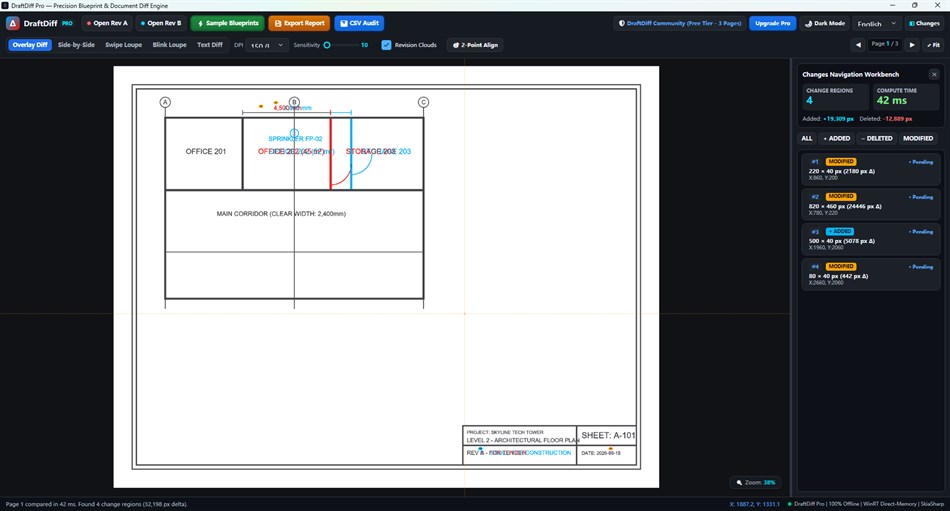
ฟีดของคุณเองบนหน้าแรก
คำอธิบาย

FIND VISUAL AND TEXT CHANGES
Overlay PDF pages to inspect changed lines and shapes, or view both revisions side by side with synchronized pan and zoom. Swipe and blink modes help you inspect the same area in both versions. Review extracted text differences and navigate detected change regions.
REVIEW PDF DRAWINGS AND DOCUMENTS
Use DraftDiff Pro to compare drawing revisions, technical documents, contracts and artwork exported to PDF. Two-point alignment helps align shifted or rotated pages. Revision clouds mark detected changes, and report tools export a PDF comparison report or a CSV audit log.
LOCAL DOCUMENT PROCESSING
Compare PDFs offline on your Windows device. The app processes your PDF documents locally rather than uploading them for comparison. Microsoft Store purchase and license verification may require an internet connection.
FREE TIER AND OPTIONAL PRO UNLOCK
The free tier is limited to the first 3 pages. The optional DraftDiff Pro Unlock is a one-time, non-subscription purchase that removes the app's page limit and enables two-point alignment, PDF report export and CSV audit log export. The price shown by Microsoft Store applies to your region.
SUPPORTED FILES AND LIMITS
Input: two PDF files. Word documents, CAD drawings and other source formats must first be exported to PDF in their original application. Text comparison requires extractable PDF text; OCR is not included. Scanned PDFs can be inspected visually. Results should be reviewed before relying on them for a design or document decision.
REQUIREMENTS
Windows 10 version 2004 (build 19041) or later, or Windows 11; x64 processor; keyboard and mouse.
จากนักพัฒนา
แพลตฟอร์มอื่น 0
| DraftDiff ProWindows Store580 บรอนซ์Windowsการซื้อภายในแอป | ฟรี |
ตอนนี้มีเฉพาะในร้านนี้
ประวัติราคา 0
- ราคาปัจจุบัน: ฟรี
- ต่ำสุด: ฟรี
- สูงสุด: ฟรี
รายการ 0
-
 DraftDiff Pro
แต้ม 0
-

- +1 แต้ม

การจัดอันดับ 0
-
- คะแนนของคุณ
ความคิดเห็น 0 ¡
ผู้พัฒนา 15
- GlobalCore Labs
- ผู้ติดตาม: 0
- แพลตฟอร์ม: Windows แอป (13) Windows เกม (2)
- ลดราคา: 0
- รายการ: 0 0
- แต้ม: 0
- การจัดอันดับ: 0
- ความคิดเห็น: 0
- วิดีโอ: 0
- RSS: ติดตาม
มีอะไรใหม่
- เวอร์ชัน: PC
- อัปเดตล่าสุด:
ข้อมูลเพิ่มเติม
- วันที่วางจำหน่าย:
- หมวดหมู่:
แอปสำหรับ Windows›เพิ่มประสิทธิภาพการทำงาน - ระบบปฏิบัติการ:
PC - ขนาด:
103 Mb - ภาษาที่รองรับ:
อังกฤษ - การจัดประเภทเนื้อหา:
EVERYONE - Windows Store คะแนน: ¡
0
คะแนน AppAgg
คะแนน AppAgg โดยประมาณของ
DraftDiff Pro
ผู้พัฒนา: GlobalCore Labs
คะแนนที่สูงขึ้นมักสะท้อนตัวชี้วัดที่ดีกว่าบน AppAgg
อิงจาก: ความนิยม · คะแนนจากผู้ใช้ · ความสดใหม่ · ดีล · ข้อมูลร้านค้า · กิจกรรมชุมชน
คำนวณใหม่ทุกวันจากข้อมูล AppAgg ล่าสุด
แชร์
DraftDiff Pro URL แบบสั้น: คัดลอกแล้ว!- Windows Store

