
| ผู้พัฒนา: | better app (2) | ||
| ราคา: | * ฟรี | ||
| การจัดอันดับ: | 0 | ||
| ความเห็น: | 0 เขียนความเห็น | ||
| รายการ: | 0 + 0 | ||
| แต้มแล: | 0 + 5,870 (4.7) ¡ | ||
| Windows Store | |||
คำอธิบาย

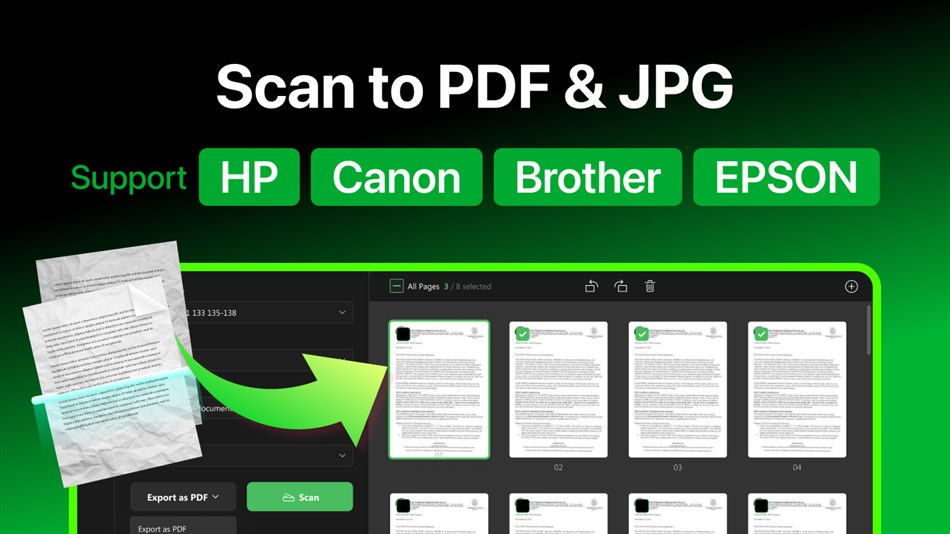
Support most scanner & printer brands, including but not limited to:
HP, Canon, Brother, EPSON, Deli, Lenovo, Panasonic, Ricoh, Samsung, Xerox, etc.
[Key Features]
- Scan documents to PDF, JPEG, PNG, BMP, TIFF, etc.
- Recognize the texts in scanned documents with OCR
- Conduct changes to the scanned images, including crop, rotate, reorder, contrast, saturation, color, and acutance
- Share scanned files through E-mail directly
[In-app Purchases Features]
• Unlimited Scans
• OCR Supported
• Edit Scans
• Scan at Higher Resolution
Subscription plan: billed annually at $7.99/year
Lifetime license: one-time purchase for $15.99
ภาพหน้าจอ
มีอะไรใหม่
- เวอร์ชัน: PC
- อัปเดต:
ราคา
-
* การซื้อภายในแอพ - วันนี้: ฟรี
- ต่ำสุด: ฟรี
- มากที่สุด: ฟรี
ติดตามราคา
ผู้พัฒนา
- better app
- แพลตฟอร์ม: Windows แอป (2)
- รายการ: 0 + 0
- แต้มแล: 0 + 5,946 ¡
- การจัดอันดับ: 0
- ความเห็น: 0
- ลดราคา: 0
- วิดีโอ: 0
- RSS: ติดตาม
แต้มแล
0 ☹️
การจัดอันดับ
0 ☹️
รายการ
0 ☹️
ความเห็น
แสดงรีวิวเป็นคนแรกเลย 🌟
ข้อมูลเพิ่มเติม
- เวอร์ชัน: PC
- หมวดหมู่:
Windows แอป›เครื่องมือและอรรถประโยชน์ - ระบบปฏิบัติการ:
PC - ขนาด:
12 Mb - ภาษาที่สนับสนุน:
English - การจัดประเภทเนื้อหา:
EVERYONE - Windows Store คะแนนโดย:
4.7(5,870) - อัปเดต:
- วันที่วางจำหน่าย:
Doc Scan PDF Scanner URL แบบสั้น: คัดลอกแล้ว!- 🌟 แชร์
- Windows Store
คุณอาจชอบ
-
- PDF scanner : Scanning and OCR
- Windows แอป: เครื่องมือและอรรถประโยชน์ โดย: WindyWarmStudio
- $3.99
- รายการ: 0 + 1 การจัดอันดับ: 0 ความเห็น: 0
- แต้มแล: 1 + 167 (4.6) เวอร์ชัน: PC This application can turn your device into a powerful scanner that recognizes text automatically (OCR) and allows you to create, save, and organize your paper documents as a digital ... ⥯
-
- Doc Scanner: Scan PDF OCR
- Windows แอป: เครื่องมือและอรรถประโยชน์ โดย: Screen Recorder
- $7.99
- รายการ: 0 + 0 การจัดอันดับ: 0 ความเห็น: 0
- แต้มแล: 0 + 3 (3.7) เวอร์ชัน: PC CScanner provides scanned image from camera scanners (camscanner). The app enables easy scanning and saving of documents and images in your preferred format with just a single click. ... ⥯
-
- PDF Conversion Suite
- Windows แอป: เครื่องมือและอรรถประโยชน์ โดย: Tiny Smart Apps
- * ฟรี
- รายการ: 1 + 0 การจัดอันดับ: 0 ความเห็น: 0
- แต้มแล: 0 + 5,425 (4.7) เวอร์ชัน: PC PDF Conversion Suite creates PDF or multipage TIFF from various document formats. Also it could convert your PDF file to Microsoft Word Document(docx). You just need to select action ... ⥯
-
- Scan Document to PDF
- Windows แอป: เครื่องมือและอรรถประโยชน์ โดย: Some Media Apps
- * ฟรี
- รายการ: 0 + 1 การจัดอันดับ: 0 ความเห็น: 0
- แต้มแล: 2 + 282 (4.5) เวอร์ชัน: PC Scan Document to PDF allows you to quickly and easily scan documents and convert them to professional PDFs. Moreover, you can add existing PDF pages to the newly scanned document and ... ⥯
-
- PDF Edit - Lite Version of PDFCool
- Windows แอป: เครื่องมือและอรรถประโยชน์ โดย: Newera Software Technology Inc.
- $19.99
- รายการ: 2 + 1 การจัดอันดับ: 0 ความเห็น: 0
- แต้มแล: 3 + 2 (2.5) เวอร์ชัน: PC "PDF Edit - Lite Version of PDFCool" is an easy-to-use but powerful PDF editing software. It can be used to edit and modify PDF documents, such as Split Document, Combine Document and ... ⥯
-
- PDF to JPG - A Batch Converter
- Windows แอป: เครื่องมือและอรรถประโยชน์ โดย: RootRise Technologies Private Limited
- $3.99
- รายการ: 0 + 0 การจัดอันดับ: 0 ความเห็น: 0
- แต้มแล: 0 + 14 (3.4) เวอร์ชัน: PC PDF to JPG is an easy, intuitive and fastest way to batch convert PDF documents into best quality images. PDF to JPG converts each PDF page into JPEG, JPEG XR, PNG, TIFF, GIF and BMP ... ⥯
-
- PDF Viewer Plus
- Windows แอป: เครื่องมือและอรรถประโยชน์ โดย: GSnathan
- ฟรี
- รายการ: 0 + 0 การจัดอันดับ: 0 ความเห็น: 0
- แต้มแล: 0 + 4,162 (4.7) เวอร์ชัน: PC PDF Viewer Plus PDF Viewer Plus is a simple UWP PDF reader. Easily open and view a PDF file from you local storage. With the recent update, you can easily print PDF files, open ... ⥯
-
- Scan Navigator
- Windows แอป: เครื่องมือและอรรถประโยชน์ โดย: Dmitrijs Volkovs
- * $3.99
- รายการ: 0 + 0 การจัดอันดับ: 0 ความเห็น: 0
- แต้มแล: 0 + 2 (3.0) เวอร์ชัน: PC Scan Navigator is an easy to use scanning program which enables you to scan, save and print images and documents. The scanned documents can be saved as various image formats, ... ⥯
-
- PDF Editor for Windows
- Windows แอป: เครื่องมือและอรรถประโยชน์ โดย: SoftPard Tech
- * ฟรี
- รายการ: 0 + 1 การจัดอันดับ: 0 ความเห็น: 0
- แต้มแล: 3 + 510 (4.4) เวอร์ชัน: PC PDF Editor kit, a complete PDF editor, merger and annotator. It is a very easy, lightweight, secure app to read, annotate, fill, merge, split and watermark your PDF Files. The app is ... ⥯
-
- Pdf Utilities
- Windows แอป: เครื่องมือและอรรถประโยชน์ โดย: MKA Solutions
- $9.99
- รายการ: 0 + 0 การจัดอันดับ: 0 ความเห็น: 0
- แต้มแล: 0 + 7 (4.4) เวอร์ชัน: PC PDF Utilities let you to make different operations on your PDF documents directly on your PC without online sharing. It can convert your PDF in Microsoft Word documents (.docx) making ... ⥯
-
- PDF Converter
- Windows แอป: เครื่องมือและอรรถประโยชน์ โดย: AnywaySoft, Inc.
- ฟรี
- รายการ: 0 + 1 การจัดอันดับ: 0 ความเห็น: 0
- แต้มแล: 1 + 284 (4.1) เวอร์ชัน: PC PDF Converter is an all-in-one tool to convert PDF documents to five other document formats. Having our PDF Converter means you have: A PDF to Word (docx) converter A PDF to ePub ebook ⥯
-
- PDF to DWG Converter
- Windows แอป: เครื่องมือและอรรถประโยชน์ โดย: AnyDWG Software
- ฟรี
- รายการ: 0 + 1 การจัดอันดับ: 0 ความเห็น: 0
- แต้มแล: 1 + 6 (3.7) เวอร์ชัน: PC PDF to DWG Converter is a full featured PDF to DWG/DXF converter that allows you to batch convert PDF to DWG and PDF to DXF without the need of AutoCAD and Adobe Acrobat. ⥯
-
- PDF To Images Maker
- Windows แอป: เครื่องมือและอรรถประโยชน์ โดย: GalaxyApps
- ฟรี
- รายการ: 0 + 1 การจัดอันดับ: 0 ความเห็น: 0
- แต้มแล: 0 + 74 (4.4) เวอร์ชัน: PC PDF to Image Maker- An application to convert PDF to images Free Convert PDF to Image - Free PDF to Image converter, nothing to upload and then download. Convert free infinite number ... ⥯
-
- PDF Merger And Splitter
- Windows แอป: เครื่องมือและอรรถประโยชน์ โดย: PDFClubs
- $1.99
- รายการ: 0 + 0 การจัดอันดับ: 0 ความเห็น: 0
- แต้มแล: 0 + 9 (4.9) เวอร์ชัน: PC PDF Merger And Splitter is an easy, fast and highly secure app to merge and split your PDF document offline. If you have several PDF documents and need to merge them into a single PDF ... ⥯