
Đã lưu
Chọn tên sẽ hiển thị trong menu Đã lưu của bạn.
Làm xong!
| Nhà phát triển: | Deliverance Software Ltd (4) | ||
| Giá bán: | $7.99 | ||
| Xếp hạng: | 0 | ||
| Bình luận: | 0 Đăng bình luận | ||
| Danh sách: | 5 + 2 | ||
| Điểm: | 1 + 899 (4.5) ¡ | ||
| App Store | |||
Mô tả

ZoomNotes is compatible with any capacitive stylus pen and also with the top electronic pens on the market including the fabulous Apple Pencil.
ZoomNotes Desktop for Mac now also available.
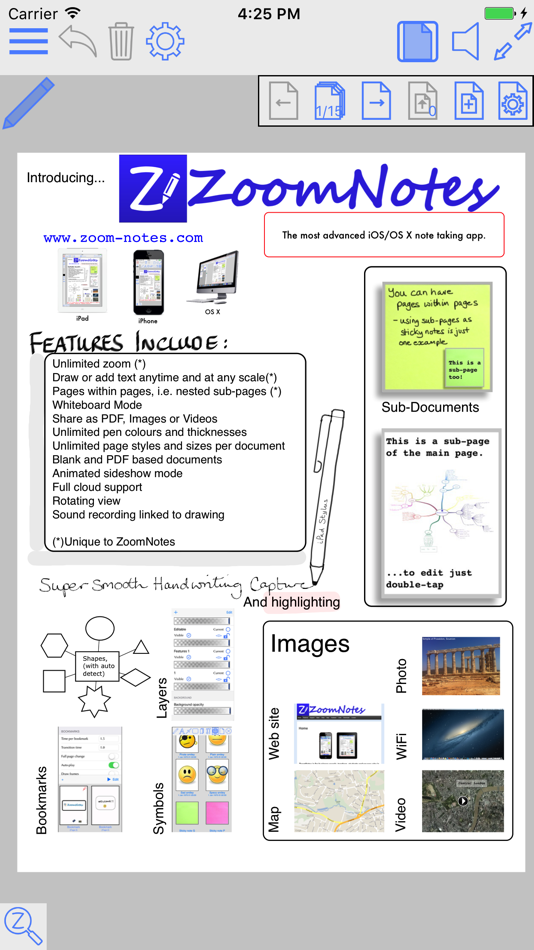
Features include:
MULTIPLE PEN TYPES
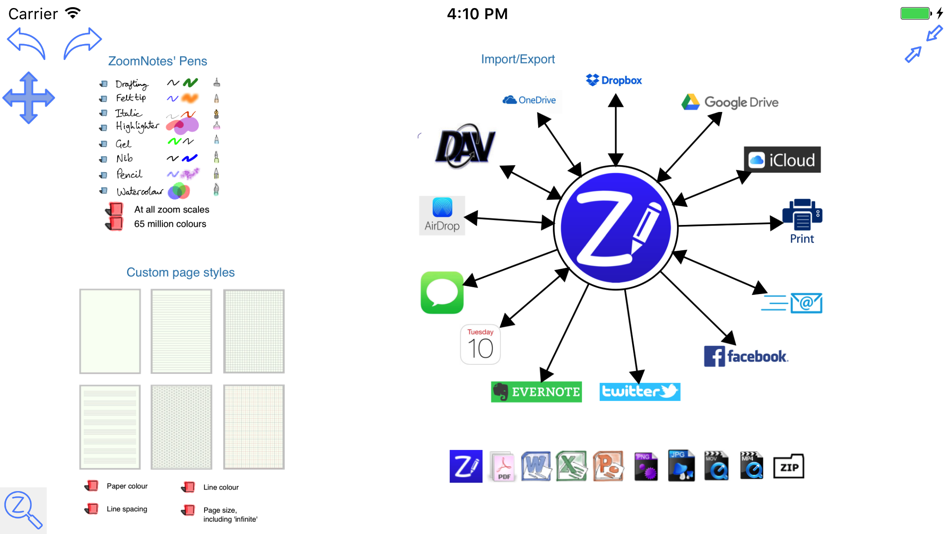
There are 8 pen types to choose from including gel, nib, pencil and watercolour each with unlimited line thicknesses.
HANDWRITING RECOGNITION
Search handwritten notes.
DIGITAL PLANNING
Either import a planner pdf or use the ‘Custom digital planner’ option to create your own. You can configure a planner to show events and reminders from the Calendar and Reminder apps.
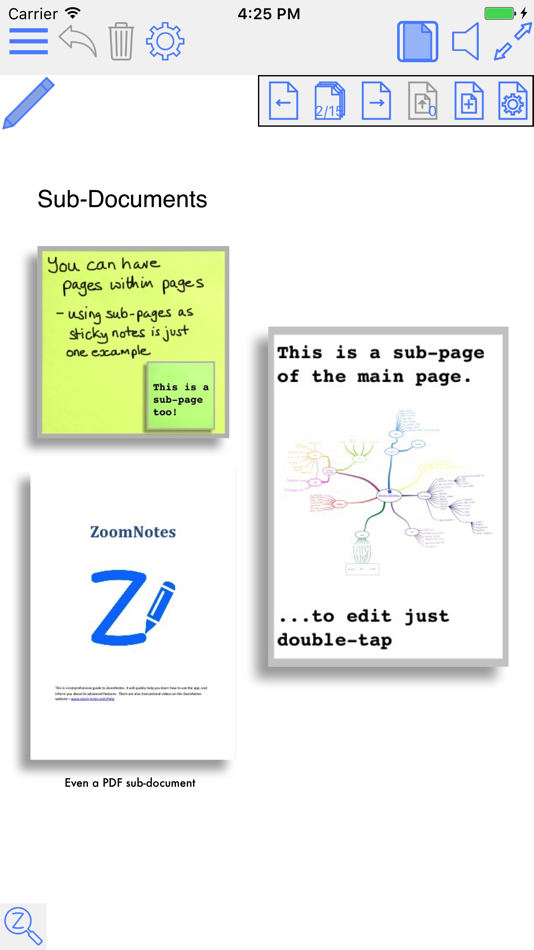
SUB-PAGES
This unique feature allows you to use ‘pages within pages’. This allows you to use sticky-notes and enables the creation of hierarchical visual files. You can also insert whole pdf files as sub-pages, or import pages from other ZoomNotes documents into a sub-page.
BOOKMARKS
Bookmarks allow you save views in your documents, and then return to them at a later date. There are animated playback facilities to allow you to present with or to create videos from your document.
LINKS
Add links between pages, and even between documents. This lets you create your own digital planners, enhance imported pdf planners or create indices.
SPLIT_SCREEN
Edit and view two documents side by side (or above and below). You can now also have 2 views of the same document.
CALENDAR EVENTS
Add events/reminders linked to your documents, possibly with alarms. The URL in the event links back to the document in ZoomNotes.
HUGE ZOOM RANGE, WHITEBOARD MODE
Zoom in and out without arbitrary limits including rotated views.
LAYERS
Layers let you control what is visible on a page, also options for 'master layers' which show on all pages.
WRITE OVER PDF FILES
Import and write over PDFs, Microsoft Office files Word, Excel and PowerPoint (via GoogleDrive).
UNLIMITED PAPER SIZES AND STYLES
Make your page as small or as large as you like. Choose any type of paper with our configurable paper types.
FULLY EDITABLE
In ZoomNotes, you can select, scale, rotate, shift and flip (mirror) objects. Cut, copy and paste are also available, including between documents, pages and other apps.
SHAPES AND ARROWS
Regular shapes and arrows (ideal for visual mapping); they can be drawn with the polygon tool or roughly drawn by hand and automatically converted into the exact geometric shape.
SYMBOL LIBRARY
Fully configurable library of reusable shapes and images.
IMAGES AND IMAGE EDITING
Insert images (photos) in your documents at any size and scale. Crop, mask, re-sample, edit transparency, scan-correct and deform images. Insert images and videos from camera or photo library.
TYPED TEXT
Enter typed text via keyboard; with a wide range of fonts and font sizes, font colours, fills and borders. Text can be entered at all zoom scales and can be selected and moved, scaled and rotated.
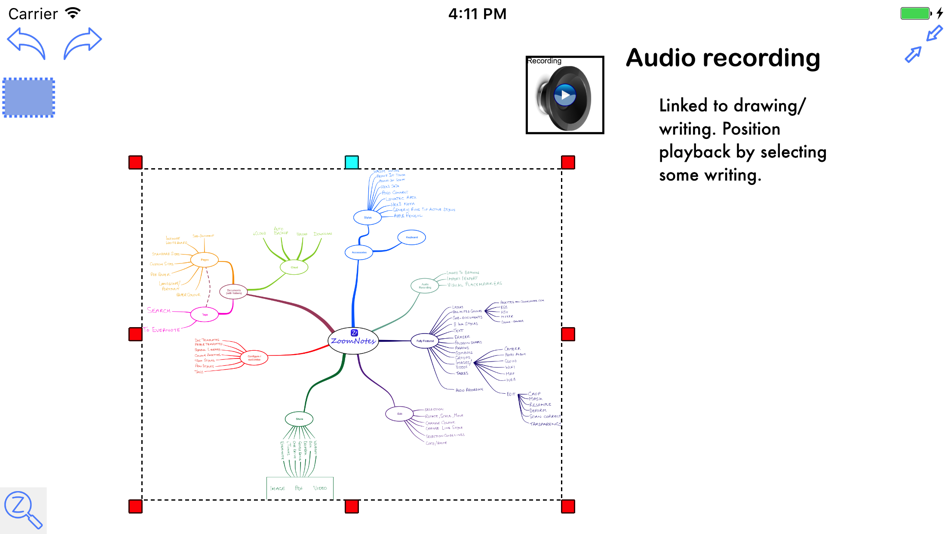
RECORD AND PLAYBACK SOUNDS
Including import and export of mp3 files. You can also insert a sound recording on the page to which it relates. Now linked to drawing.
SHARE DOCUMENTS
Share documents as PDF files, images, videos or ZoomNotes documents (via email, iTunes, clipboard, Dropbox, Twitter and Evernote, Airdrop, iCloud Drive and Open in.
USE FOR PRESENTATIONS
ZoomNotes is VGA compatible for use with projectors, monitors and AirPlay.
MAGNIFICATION WINDOW
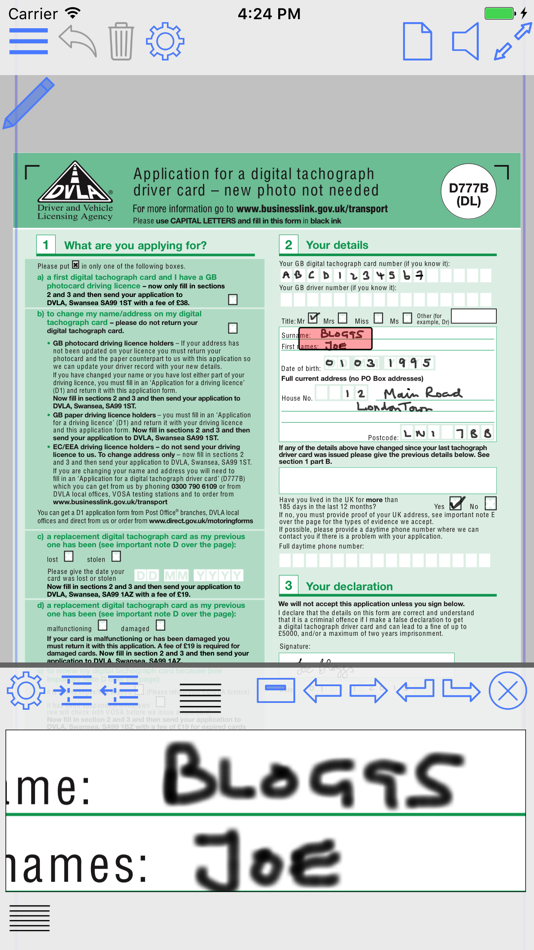
Write into a zoomed in view whilst still viewing the zoomed out view.
There are lots more details including videos or the app in action at www.zoom-notes.com.
We respond to every email sent to support@zoom-notes.com
Ad
Ảnh chụp màn hình
Lịch sử giá
- Giá hiện tại: $7.99
- Tối thiểu: $7.99
- Tối đa: $7.99
Theo dõi giá
Thông tin bổ sung
- Ngày phát hành:
- Danh mục:
iOS Ứng dụng›Năng suất - HĐH:
iPad,iPhone,iOS 15.0 trở lên - Kích thước:
148 Mb - Ngôn ngữ được hỗ trợ:
Chinese,English,French,German,Japanese,Portuguese,Spanish - Xếp hạng nội dung:
4+ - App Store Xêp hạng:
4.5(899)
Tính năng mới
- Phiên bản: 9.1.22
- Cập nhật:
- New: Trim edges (of images with transparent borders around them)
Improvements to 3d extrusion - now with ‘edges’
Fix for PDF Grids which have been copied between documents (via the cut/paste of pages mechanism)
If you are enjoying using ZoomNotes please leave a review - thanks.
Nhà phát triển
- Deliverance Software Ltd
- Nền tảng: iOS Ứng dụng (3) macOS Ứng dụng (1)
- Danh sách: 5 + 4
- Điểm: 8 + 1,149 ¡
- Xếp hạng: 0
- Bình luận: 0
- Giảm giá: 0
- Video: 0
- RSS: Đăng ký
Danh sách (5)
- ZoomNotes


Điểm (1)
-

- 647 holy_braveheart
- +1

Xếp hạng (0)
0 ☹️
Bình luận (0)
Hãy là người đầu tiên nhận xét 🌟
«ZoomNotes». Nền tảng: iOS. Thể loại: Năng suất. Nhà phát triển: «Deliverance Software Ltd». Bản phát hành đầu tiên: . Cập nhật lần cuối: . Giá hiện tại: $7.99. Giá thấp nhất được ghi nhận: $7.99. Giá cao nhất được ghi nhận: $7.99. Tiêu đề này chưa nhận được xếp hạng hoặc đánh giá trên AppAgg. Danh sách: công khai 5, riêng tư 2. Điểm được theo dõi: xác nhận 1, gián tiếp 899. Cửa hàng: App Store. Đánh giá cửa hàng: 4.5. Phiếu bầu: 899. Ngôn ngữ có sẵn: Chinese, English, French, German, Japanese, Portuguese, Spanish. AppAgg theo dõi lịch sử giá, xếp hạng và phản hồi của người dùng cho «ZoomNotes». Theo dõi ưu đãi và cập nhật trong tương lai qua RSS. AppAgg không lưu trữ ứng dụng hoặc phân phối phần mềm. Tất cả các nhãn hiệu, logo và ảnh chụp màn hình đều thuộc về chủ sở hữu tương ứng.
ZoomNotes URL ngắn: Đã sao chép!- 🌟 Chia sẻ
- App Store
Tương tự
-
- Notes Expert
- iOS Ứng dụng: Năng suất Bởi: Montana AI Solutions, LLC
- * Miễn phí
- Danh sách: 0 0 0
- Điểm: 1 + 2 (5.0) Phiên bản: 1.0.79 Notes Expert transforms how you capture and organize ideas. Record your thoughts, let AI enhance your notes, and keep everything synced securely across all your devices. VOICE ... ⥯
-
- Notes+ - Inkpad Notepad
- iOS Ứng dụng: Năng suất Bởi: Brijesh Kanani
- Miễn phí
- Danh sách: 0 0 0
- Điểm: 0 + 4 (3.8) Phiên bản: 2.0 Notes+ - Inkpad Notepad is your ultimate all-in-one tool for note-taking, planning, organizing, and capturing inspiration whenever and wherever it strikes. Whether you're a student, a ... ⥯
-
- Notes Buddy Kit
- iOS Ứng dụng: Năng suất Bởi: Ally Msuo
- Miễn phí
- Danh sách: 0 0 0
- Điểm: 1 Phiên bản: 1.1 Notes Buddy is a notes app that brings useful tools directly into your documents. Every element, text or widget is an independent block so you can build notes that do more than record ... ⥯
-
- Notes - AI Note Taker
- iOS Ứng dụng: Năng suất Bởi: Shanghai Zongchong Information Technology Co., Ltd
- * Miễn phí
- Danh sách: 0 0 0
- Điểm: 0 + 3 (5.0) Phiên bản: 1.0.8 Notes - AI Note Taker makes note-taking effortless whether you're in class, at a meeting, interviewing, or brainstorming. Capture voice, text, images or documents, then let powerful AI ⥯
-
- Notes - Site Supervision
- iOS Ứng dụng: Năng suất Bởi: Script&Go
- Miễn phí
- Danh sách: 0 0 0
- Điểm: 0 Phiên bản: 1.7.1 Notes offers you a solution to create your notes with photos during your site visits, organize them in your concerned sites, linked to Site Supervision. Thanks to tags, find them more ... ⥯
-
- Zoom for Safari
- iOS Ứng dụng: Năng suất Bởi: Stefan Van Damme
- Miễn phí
- Danh sách: 0 0 0
- Điểm: 0 + 6 (4.3) Phiên bản: 2.8.25 Are you tired of struggling to zoom in and out of web pages? Look no further! The Zoom browser extension is the ultimate solution, featuring an intuitive slider and zoom buttons for ... ⥯
-
- Notes Air - Simple Notes
- iOS Ứng dụng: Năng suất Bởi: Air Apps Systems
- Miễn phí
- Danh sách: 0 0 0
- Điểm: 3 + 8 (4.4) Phiên bản: 2025.8.1 Simple and easy-to-use notepad. Generate Text Based on Your Input, and stay organized. Download the app now! Notes AIR is a simple notepad where you can create, edit and capture your ... ⥯
- mới
- Notes: Color Notepad, Notebook
- iOS Ứng dụng: Năng suất Bởi: EXTRA MART LLC
- * Miễn phí
- Danh sách: 0 0 0
- Điểm: 0 Phiên bản: 1.1 Looking for a simple and fast notes app to write down ideas, manage daily notes, and stay organized anytime? Note pad app helps save ideas quickly and keep everything in one place. It ... ⥯
-
- Notes Notepad
- iOS Ứng dụng: Năng suất Bởi: Jksol Infotech LLP
- Miễn phí
- Danh sách: 0 0 0
- Điểm: 0 Phiên bản: 1.0 The Notes App is an all-in-one productivity tool designed to help users capture their thoughts, manage tasks, and stay organised with ease. With a variety of features aimed at ... ⥯
-
- Notes: Voice, Notepad, Todos
- iOS Ứng dụng: Năng suất Bởi: Tecinus
- Miễn phí
- Danh sách: 0 0 0
- Điểm: 1 Phiên bản: 1.0 Simplify your note-taking and task management with Notes: Voice, Notepad, Todos. Create text and voice notes, organize tasks, set reminders, and stay productive. Download now! List of ... ⥯
-
- Notes: Memos with Reminders
- iOS Ứng dụng: Năng suất Bởi: Planning Technologies LLC
- Miễn phí
- Danh sách: 0 0 0
- Điểm: 0 + 8 (4.9) Phiên bản: 2.0.8 MC Notes will help you make event plans, write down inspiring ideas for creativity, and keep track of important to-do lists. Take notes, and save them right on your phone. Whether at ... ⥯
-
- Notes Ai Pro
- iOS Ứng dụng: Năng suất Bởi: Sufi K Sulaiman
- Miễn phí
- Danh sách: 0 0 0
- Điểm: 2 Phiên bản: 1.0 Go far beyond traditional note taking with Notes Ai Pro, It acts as an intelligent creative layer that helps you capture ideas faster and develop them more deeply. Using agentic AI, it ⥯
-
- Notes by viyali
- iOS Ứng dụng: Năng suất Bởi: Letsdosimple
- * Miễn phí
- Danh sách: 0 0 0
- Điểm: 0 Phiên bản: 2026.04.08 Capture thoughts quickly and keep them private, and access them from any device by using sync feature. Notes by Viyali is a focused, minimal notes app built around privacy. Create ... ⥯