
| Concepteur: | Maksym Cherniaiev (5) | ||
| Prix: | $14.99 | ||
| Classements: | 0 | ||
| Avis: | 0 Rédiger un avis | ||
| Listes: | 1 + 0 | ||
| Points: | 1 + 0 ¡ | ||
| Mac App Store | |||
Description

PhotoMill helps you convert a bulk of images into the most popular image formats, give your files meaningful names, watermark with text and image, adjust photos (brightness/saturation/exposure/grayscale/etc.), fit geometry (scale/crop/trim/etc.), remove private metadata, add your own copyrights etc.
Also, PhotoMill is a great batch metadata editor, renamer and photo browser.
CONVERT
Conversion to: BMP, GIF, HEIC, JPEG, JPEG 2000, JPEG XL, PDF, PNG, TIFF, WEBP
Color models: RGB, Gray, CMYK
Color depth: 8/16/32 bits; with or without alpha channel; lossless option for HEIC, JPEG XL and WEBP.
METADATA EDITOR
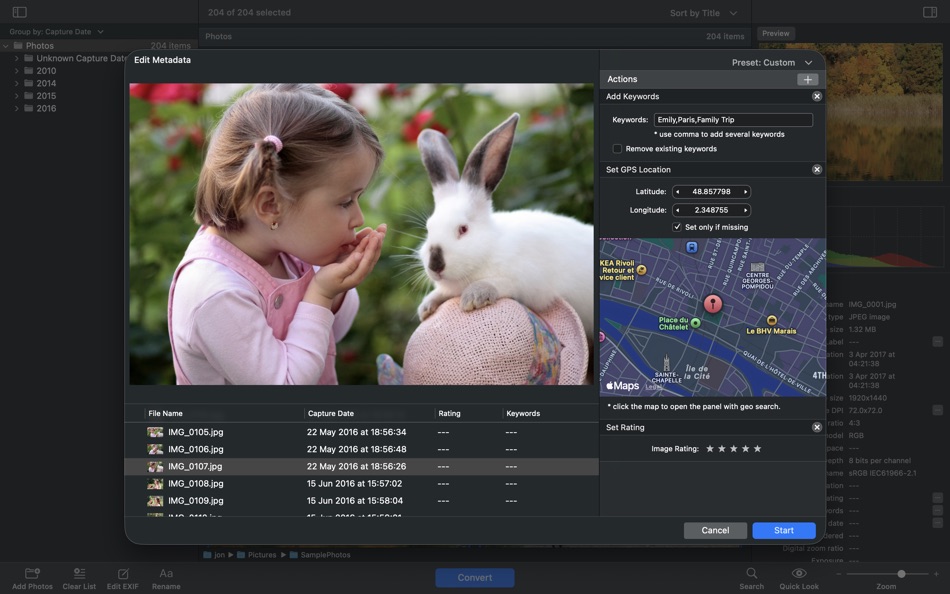
Correct EXIF/IPTC metadata tags in your photos: place GPS coordinates, remove private information from your photos, correct or set capture dates, add your own copyright, keywords or rating.
PHOTO BROWSER
The app has a bunch of features for comfortable browsing and multi-criteria search of photos in the Browser.
The Browser has 3 panels: Image Info - displays detailed information about a selected photo; Groups - splits photos into groups/subgroups based on a chosen criteria, for instance, by capture dates; Search - gives you an opportunity to search photos by different criteria.
RENAME
You can give meaningful names to converted photos constructing file names in the “pro” way - using text and tags: index, capture date, original name, image width, “find & replace” etc. Also, you can rename photos without any conversion.
RESIZE
Fit image size with a bunch of geometry actions: scale, crop, add border, trim, trim color, rotate & flip, change resolution.
WATERMARK
• Text - you can use photo metadata information - tags: capture date, keywords, camera maker etc., as well as entered text. Font size can be either fixed or relative to an image width, height, long or short edge. Multiline text, stroke, shadow, rotation, tiling and other features.
• Image - image size can be either fixed or relative to main image size. Image tiling is also available.
• Rectangle - background for text; square or rounded. Fill and stroke color can be half-transparent.
ADJUST COLORS
Available filters: auto contrast, auto white balance, gamma, contrast, exposure, sharpness, grayscale, sepia, colorize, temperature, HSL channels (Hue/Saturation/Lightness), HSV channels (Hue/Saturation/Value,Brightness), RGB channels, curves.
Working with transparency: alpha mask, color to alpha, alpha to color.
Color matching: assign profile, convert to profile, proof with profile.
A comprehensive user manual is available on our site: https://overmacs.com/
If you have questions about PhotoMill or issues about the app, drop us a line: support@overmacs.com
We are always happy to get your feedback and suggestions.
Captures d'écran



Nouveautés
- Version: 3.3.0
- Mis à jour:
- + Support for exporting images to JPEG XL format.
+ Bug fixes and performance improvements based on user feedback.
Prix
- Aujourd’hui: $14.99
- Minimum: $6.99
- Maximum: $14.99
Suivre l'évolution des prix
Concepteur
- Maksym Cherniaiev
- Plateformes: iOS Applications (1) macOS Applications (3) macOS Jeux (1)
- Listes: 3 + 2
- Points: 2 + 24 ¡
- Classements: 0
- Avis: 0
- Remises: 0
- Vidéos: 0
- RSS: S'abonner
Points
-

- 2 trenneman
- +1

Classements
0 ☹️
Listes
- PhotoMill: The Image Converter

Avis
Soyez le premier à donner votre avis 🌟
Informations supplémentaires
- Version: 3.3.0
- Catégorie:
macOS Applications›Photo et vidéo - Systèmes d'exploitation:
macOS,macOS 10.15 ou version ultérieure - Taille:
73 Mb - Langues prises en charge:
English,French,German,Italian,Russian,Spanish,Ukrainian - Classification du contenu:
4+ - Mac App Store Note:
0 - Mis à jour:
- Date de sortie:
Contacts
- Site Web:
 https://overmacs.com
PhotoMill: The Image Converter URL courte: Copié!- 🌟 Partager
- Mac App Store
Découvrez également
-
- Image converter to JPEG XL
- macOS Applications: Photo et vidéo De: Aliaksandr Melnikau
- $5.99
- Listes: 0 + 0 Classements: 0 Avis: 0
- Points: 2 + 0 Version: 1.1 Image converter to JPEG XL - allows export images to JPEG XL from JPEG, JPEG2000, PNG, HEIC (HEIF), BMP, TIFF and GIF files with customizable encoding options; - supports lossless ... ⥯
-
- Image Converter: JPG-PDF-HEIC
- macOS Applications: Photo et vidéo De: Muhammad Zikaria
- * Gratuit
- Listes: 0 + 0 Classements: 0 Avis: 0
- Points: 11 + 1 (5.0) Version: 1.0.3 Image Converter All-in-One Photo & File Converter Easily convert photos and files with the ultimate image converter. Whether you need a quick photo converter, a reliable file ... ⥯
-
- Photo Plus - Image Editor
- macOS Applications: Photo et vidéo De: Day 1 Solutions SRL
- $5.99
- Listes: 0 + 0 Classements: 0 Avis: 0
- Points: 0 + 0 Version: 1.2 Photo Plus is the complete solution for editing, enhancing and fine-tuning your photos. Designed to satisfy the needs of both amateur and professional photographers and featuring an ... ⥯
-
- Image Converter - Kompressor
- macOS Applications: Photo et vidéo De: Lucas Fischer
- * Gratuit
- Listes: 0 + 2 Classements: 0 Avis: 0
- Points: 9 + 0 Version: 1.3 Kompressor makes image conversion a breeze! For ease of use, you can drag n' drop to convert between over 50 supported image formats like JPEG, HEIC, AVIF, WebP, PNG, camera raw ... ⥯
-
- Photo To GIF Converter Lite
- macOS Applications: Photo et vidéo De: Paclake, LLC
- Gratuit
- Listes: 0 + 0 Classements: 0 Avis: 0
- Points: 0 + 0 Version: 1.0 Upload a series of images and make your own GIF file. This app accepts JPG, PNG and TIFF files. Use the arrows to reorder your images. See a preview of the GIF by clicking the build ... ⥯
-
- Photo Editor: Cut Out Shapes
- macOS Applications: Photo et vidéo De: Photo & Video Labs
- * Gratuit
- Listes: 0 + 0 Classements: 0 Avis: 0
- Points: 2 + 0 Version: 4.2.9 Enhance your favorite pictures and selfies with our fast & efficient photo eraser! Remove, change, blur background and unnecessary objects by using adjustable brushes. Use a wide range ⥯
-
- HEIC Image Converter
- macOS Applications: Photo et vidéo De: Harald Meyer
- $2.99
- Listes: 0 + 0 Classements: 0 Avis: 0
- Points: 0 + 0 Version: 1.0.1 The HEIC Image Converter application converts images from and to the HEIC/HEIF format. ## Features - Convert images from *.heic to jpg, png, bmp, and tiff. - Convert images from jpg, ... ⥯
-
- Pixillion Image Converter
- macOS Applications: Photo et vidéo De: NCH Software
- * Gratuit
- Listes: 0 + 0 Classements: 0 Avis: 0
- Points: 1 + 0 Version: 13.07 Pixillion Free Image Converter Pixillion Image Converter for Mac OS X is a quick and easy way to convert all your images quickly. Simply drag and drop your files into Pixillion, select ⥯
-
- Metoon: Cartoon Photo Editor
- macOS Applications: Photo et vidéo De: Image LLC
- Gratuit
- Listes: 0 + 0 Classements: 0 Avis: 0
- Points: 0 + 23 (4.8) Version: 1.6 Metoon: Anime Cartoon Photo Editor transforms your photos into magical anime, cartoon, and fantasy-style art! Powered by AI, this cartoon photo editor turns your images into hand-drawn ⥯
-
- Image Convert Factory
- macOS Applications: Photo et vidéo De: 华芳 刘
- $0.99
- Listes: 0 + 0 Classements: 0 Avis: 0
- Points: 1 + 0 Version: 1.1 Image Convert Factory = Image Information Viewer + Image Browser + Image Converter + Watermark Generator + Animation Generator + Image Effects * Support Too Many Input Image Formats: ... ⥯
-
- Photo Editor for Seedream
- macOS Applications: Photo et vidéo De: Yasir Islam
- * Gratuit
- Listes: 0 + 0 Classements: 0 Avis: 0
- Points: 0 + 0 Version: 1.3 Photo Editor for Seedream is an all-in-one AI photo editing app that turns your imagination into art. Create stunning visuals with Text to Image or transform existing photos using ... ⥯
-
- Photo Vault & Safe Gallery App
- macOS Applications: Photo et vidéo De: Revoo Teknoloji Limited Sirketi
- Gratuit
- Listes: 0 + 0 Classements: 0 Avis: 0
- Points: 0 + 32 (4.2) Version: 1.4.2 Photo Vault for Mac is a powerful and indispensable application designed for individuals who wish to keep their photos and videos secure and hidden from prying eyes. This cutting-edge ... ⥯
-
- Image Resizer : Resize Photos
- macOS Applications: Photo et vidéo De: APP CHUNKS
- * Gratuit
- Listes: 0 + 0 Classements: 0 Avis: 0
- Points: 1 + 1 (5.0) Version: 1.1.3 Image resizer app in KB to resize photo resolution, crop and convert images. The image converter feature can help the user to convert images in users desired image format. Are you ... ⥯
-
- Photo Police for Mac OS X
- macOS Applications: Photo et vidéo De: KroNick
- Gratuit
- Listes: 0 + 0 Classements: 0 Avis: 0
- Points: 0 + 0 Version: 1.0 Photo Police allows a deeper look at the photos and see usually invisible things. Photo Police shows low-bit pixel data. Usually low-bit pixel data is noisy, but it contains visual ... ⥯