
| Vývojář: | digitalMoksha LLC (1) | ||
| Cena: | $4.99 | ||
| Hodnocení: | 0 | ||
| Recenze: | 0 Napsat recenzi | ||
| Komentáře: | 0 Přidat komentář | ||
| Seznamy: | 1 + 1 | ||
| Body: | 0 + 0 ¡ | ||
| Mac App Store | |||
Popis

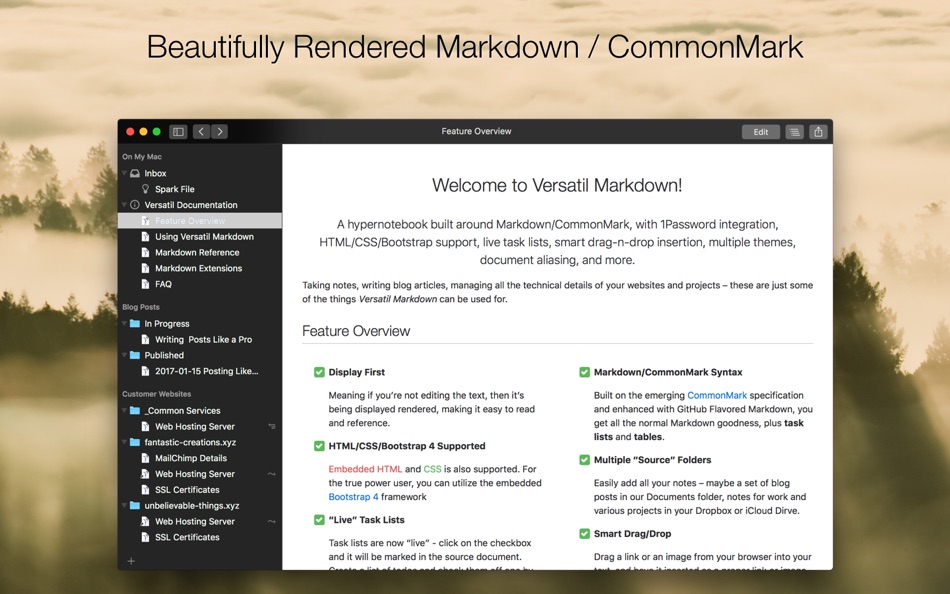
Taking notes, writing blog articles, managing all the technical details of your websites and projects -- these are just some of the things _Versatil Markdown_ can be used for.
## Feature Overview
### Display First
Meaning if you're not editing the text, then it's being displayed rendered, making it easy to read and reference.
### Markdown/CommonMark Syntax
Built on the emerging _CommonMark_ specification and enhanced with GitHub Flavored Markdown, you get all the normal Markdown goodness, plus **task lists** and **tables**.
### Multiple "Source" Folders
Easily add all your notes -- maybe a set of blog posts in our Documents folder, notes for work and various projects in your Dropbox or iCloud Drive.
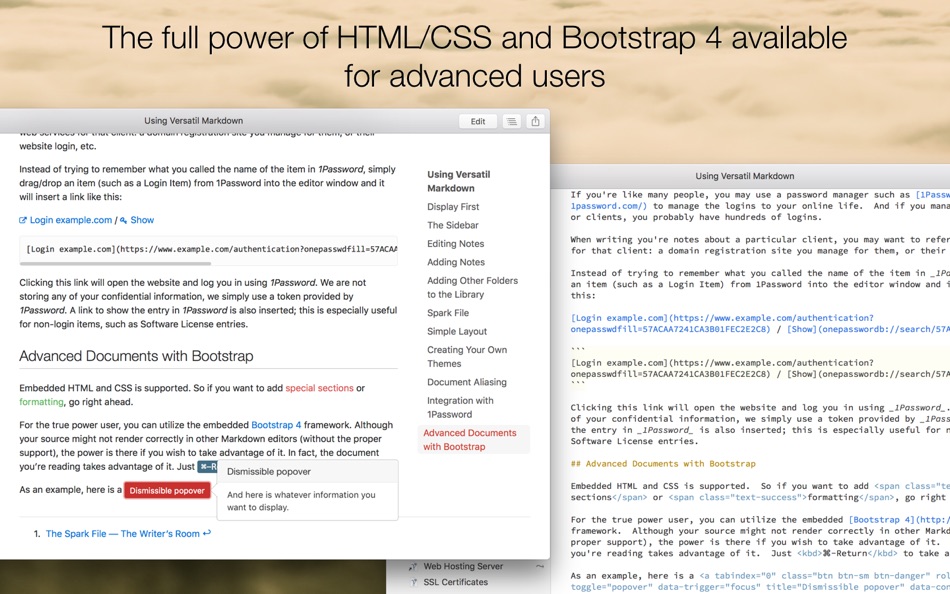
### HTML/CSS/Bootstrap 4 Supported
Embedded HTML and CSS is also supported. For the true power user, you can utilize the embedded Bootstrap 4 framework
### "Live" Task Lists
Task lists are "live" - click on the checkbox and it will be marked in the source document. Create a list of todos and check them off one by one as they get done, without having to directly edit the document.
### 1Password Integration
If you use _1Password_ to store your logins to various websites, you can easily create a link to one of these sites, by simply dragging an item from 1Password into the editor window.
### Integrated Spark File
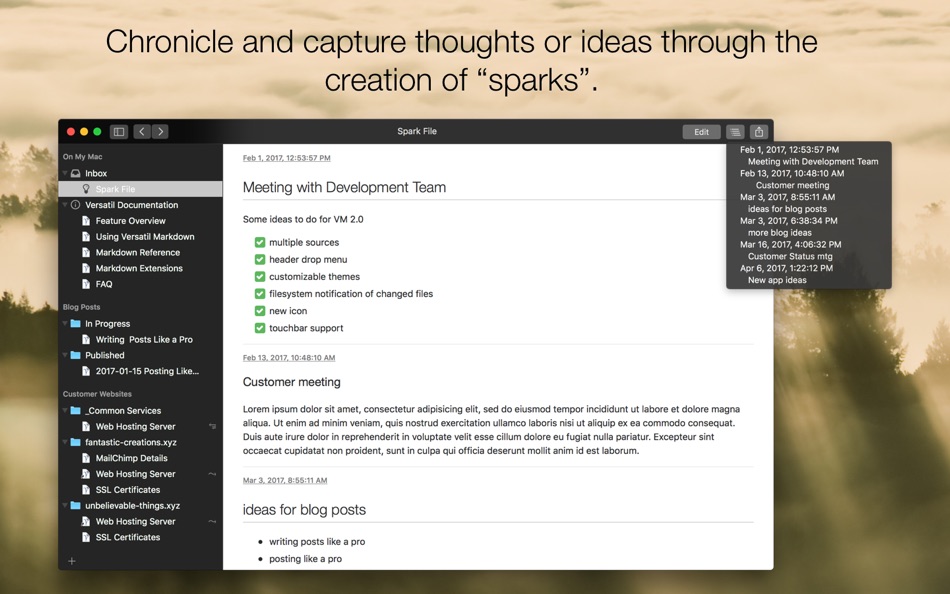
An easy way to chronicle and capture thoughts or ideas through the creation of _sparks_. Each spark is stamped with a date and time and kept in chronological order, so you can quickly browse through them.
### Syntax Highlighting
Embedded source code can be syntax highlighted for many languages, including HTML, CSS, JavaScript, Ruby, and many more.
### Smart Drag/Drop
Drag a link or an image from your browser into your text, and have it inserted as a proper link or image, including the title for the link.
### Document Aliasing
Sometimes information belongs in more than one place; create an alias to virtually place a note in any section/folder where it needs to be.
### Dark Mode and Multiple Themes
_Normal_, _Solarized Dark_, and _Solarized Light_ themes for display and editing are provided, or create your own customized themes, whether it's making a small tweak to an existing theme or creating something entirely new. A "Dark Mode" is also provided.
### Multiple Columns
Sometimes, it makes sense to have multiple columns for your notes/data. With a simple syntax, easily create new rows and columns. Simple and unobtrusive.
## Additional Features
- Markdown
- Fully CommonMark compliant
- Supports GitHub Flavored Markdown (GFM) extensions
- Tables
- Task lists
- Footnotes
- Supports GitLab Flavored Markdown (GFLM) extensions
- Multiline blockquotes
- Color chips
- Inline diagrams with Kroki
- Other Markdown extensions
- Description lists
- MathJax for TeX and LaTeX Support
- Abbreviations
- Syntax highlighting
- Defining multiple columns
- Data stored as text
- Frictionless keyboard flow
- Click to edit at specific location
- Sharing menu integration
- Export (HTML, PDF and Web Archives)
- Touchbar support
- Back/Forward history navigation
- QuickLook integration
Ad
Snímky obrazovky


Historie cen
- Dnes: $4.99
- Minimální: $4.99
- Maximální: $14.99
Sledovat ceny
Vývojář
- digitalMoksha LLC
- Platformy: macOS Aplikace (1)
- Seznamy: 1 + 1
- Body: 0 + 0 ¡
- Hodnocení: 0
- Recenze: 0
- Komentáře: 0
- Slevy: 0
- Videa: 0
- RSS: Odebírat
Body (0)
0 ☹️
Hodnocení (0)
0 ☹️
Seznamy (1)
- Versatil Markdown

Recenze (0)
Buďte první, kdo bude hodnotit 🌟
Další informace
- Verze: 2.5.13
- Kategorie:
macOS Aplikace›Produktivita - OS:
macOS,macOS 11.0 a vyšší - Velikost:
23 Mb - Podporovaný jazyk:
English - Hodnocení obsahu:
4+ - Mac App Store Hodnocení:
0 - Aktualizováno:
- Datum vydání:
Kontakty
 https://versatilapp.com
 «Versatil Markdown». Platforma: macOS. Kategorie: Produktivita. Vývojář: «digitalMoksha LLC». První vydání: . Poslední aktualizace: . Aktuální cena: $4.99. Nejnižší zaznamenaná cena: $4.99 (). Nejvyšší zaznamenaná cena: $14.99 (). Tento titul zatím na AppAgg nezískal hodnocení ani recenze. Seznamy: veřejné 1, soukromé 1. Dostupné jazyky: English. AppAgg sleduje historii cen, hodnocení a zpětnou vazbu od uživatelů «Versatil Markdown». Sledujte budoucí slevy a aktualizace prostřednictvím RSS. AppAgg nehostuje aplikace ani nedistribuuje software. Všechny ochranné známky, loga a snímky obrazovky patří jejich příslušným vlastníkům.
Komentáře (0)
Buďte první, kdo okomentuje 🌟
Versatil Markdown Krátká adresa URL: Zkopírováno!- 🌟 Sdílet
- Mac App Store
Ad
Podobné
-
- Markdown - Enjoy writing
- macOS Aplikace: Produktivita Podle: xiao luo
- $7.99
- Seznamy: 1 + 0 Hodnocení: 0 Recenze: 0
- Body: 0 + 0 0 Verze: 1.3.3 I'm Markdown, the Markdown editor for OS X. This is a powerful Markdown editor, very design, UI simple and user-friendly interactive experience, let us focus more on writing. Markdown ... ⥯
-
- Markdown Pro
- macOS Aplikace: Produktivita Podle: RADSense Software
- $5.99
- Seznamy: 1 + 0 Hodnocení: 0 Recenze: 0
- Body: 0 + 0 0 Verze: 1.0.9 Best Markdown Syntax Editor With Markdown PRO you can write beautiful documentation, notes, essays, term papers all by using plain text to tag your formatting such as bold, italic, ... ⥯
-
- Markdown Peek
- macOS Aplikace: Produktivita Podle: Michael Thingmand
- Zdarma
- Seznamy: 0 + 0 Hodnocení: 0 Recenze: 0
- Body: 1 + 0 0 Verze: 1.0 Description: Markdown Peek is a simple, elegant markdown viewer for macOS. Set it as your default app for .md files and enjoy instant, beautiful rendering. Features: Instant Preview ... ⥯
-
- Markdown+
- macOS Aplikace: Produktivita Podle: InSili.co
- $14.99
- Seznamy: 0 + 0 Hodnocení: 0 Recenze: 0
- Body: 0 + 0 0 Verze: 3.3 Edit, style, preview and export your Markdown in macOS. With style. Like a breeze. Easy-to-use Getting started is really easy. Just open the editor and start writing. Your text will be ⥯
- -100%
- Markdown Web Writer
- macOS Aplikace: Produktivita Podle: Eric Kampman
- ▼ Zdarma
$19.99-100% - Seznamy: 0 + 1 Hodnocení: 0 Recenze: 0
- Body: 9 + 0 0 Verze: 1.1.0 Markdown Web Writer is a macOS application for converting Markdown into clean HTML and PDF output. It s designed as a single-purpose tool, without plugins, build steps, or ... ⥯
-
- Markdown Inbox
- macOS Aplikace: Produktivita Podle: Solutions Cay LLC
- $14.99
- Seznamy: 0 + 0 Hodnocení: 0 Recenze: 0
- Body: 0 + 0 0 Verze: 1.2 Markdown Inbox is a clean, focused markdown reader designed for people who work with lots of markdown files. Whether you re managing AI-generated documentation, personal notes, or ... ⥯
-
- Markdown Book Compiler
- macOS Aplikace: Produktivita Podle: Lotus Core
- $34.99
- Seznamy: 0 + 0 Hodnocení: 0 Recenze: 0
- Body: 0 + 0 0 Verze: 1.1.2 Markdown Book Compiler makes it easy for self-publishers, authors, bloggers, and educators to turn plain-text .md files into fully formatted, beautifully styled eBooks without using ... ⥯
-
- Markdown Editor
- macOS Aplikace: Produktivita Podle: Satoshi Iwaki
- Zdarma
- Seznamy: 0 + 0 Hodnocení: 0 Recenze: 0
- Body: 1 + 0 0 Verze: 1.5.0 Markdown Editor is a lightweight markdown editor. MAIN FEATURES - Syntax highlighting - Display line numbers - Auto preview - Export to HTML ⥯
-
- Markdown Viewer Offline
- macOS Aplikace: Produktivita Podle: Hopebest Inc Limited
- Zdarma
- Seznamy: 0 + 0 Hodnocení: 0 Recenze: 0
- Body: 1 + 0 0 Verze: 1.0 In today s fast-paced digital landscape, clear and structured documentation is essential. Whether you are a developer writing technical guides, a student organizing lecture notes, or a ⥯
-
- Markdown Clip
- macOS Aplikace: Produktivita Podle: Tomoaki Yagishita
- * Zdarma
- Seznamy: 0 + 0 Hodnocení: 0 Recenze: 0
- Body: 2 + 0 0 Verze: 6.2.4 simple MarkdownEditor - new-style Markdown WYSIWYG editor Simple markdown editor without preview mode. apply markdown decoration on the spot. - TODO management (simple TODO and Dated ... ⥯
-
- Markdown Email
- macOS Aplikace: Produktivita Podle: Roger Oba
- $14.99
- Seznamy: 0 + 0 Hodnocení: 0 Recenze: 0
- Body: 0 + 0 0 Verze: 3.2.1 Write in Markdown and send beautiful emails with one click! Tired of messy email formatting? Markdown Email lets you write in Markdown and instantly transform your emails into clean, ... ⥯
-
- Open Markdown
- macOS Aplikace: Produktivita Podle: Aralu Single Member P.C.
- Zdarma
- Seznamy: 0 + 0 Hodnocení: 0 Recenze: 0
- Body: 0 + 0 0 Verze: 1.3.1 Working with LLMs and the markdown files they generate can be tedious. This app is will help you easily visual what your LLM is telling you. You can now effortlessly visualize the ... ⥯
-
- FlowMD — Markdown Editor
- macOS Aplikace: Produktivita Podle: Phanith Ny
- Zdarma
- Seznamy: 0 + 0 Hodnocení: 0 Recenze: 0
- Body: 0 + 0 0 Verze: 1.1.0 FlowMD Markdown Editor FlowMD is a fast, focused Markdown editor for macOS with live preview built for clarity and flow. Write Markdown on one side and instantly preview the result on ... ⥯
- Novinka
- Mircules Markdown Viewer
- macOS Aplikace: Produktivita Podle: Mircules
- Zdarma
- Seznamy: 0 + 0 Hodnocení: 0 Recenze: 0
- Body: 0 + 0 0 Verze: 1.0 Mircules Markdown Viewer opens .md files as clean, readable documents no editing, no clutter. Just your Markdown rendered the way it's meant to look. Built for developers, technical ... ⥯