
Tersimpan
Pilih nama yang akan ditampilkan di menu Tersimpan Anda.
Selesai!
| Pengembang: | The Iconfactory (29) | ||
| Harga: | $9.99 | ||
| Penilaian: | 870 Perak | ||
| Peringkat: | 0 | ||
| Komentar: | 0 Kirimkan komentar | ||
| Daftar: | 1 + 0 | ||
| Poin: | 0 + 0 ¡ | ||
| +1 Poin | |||
Deskripsi

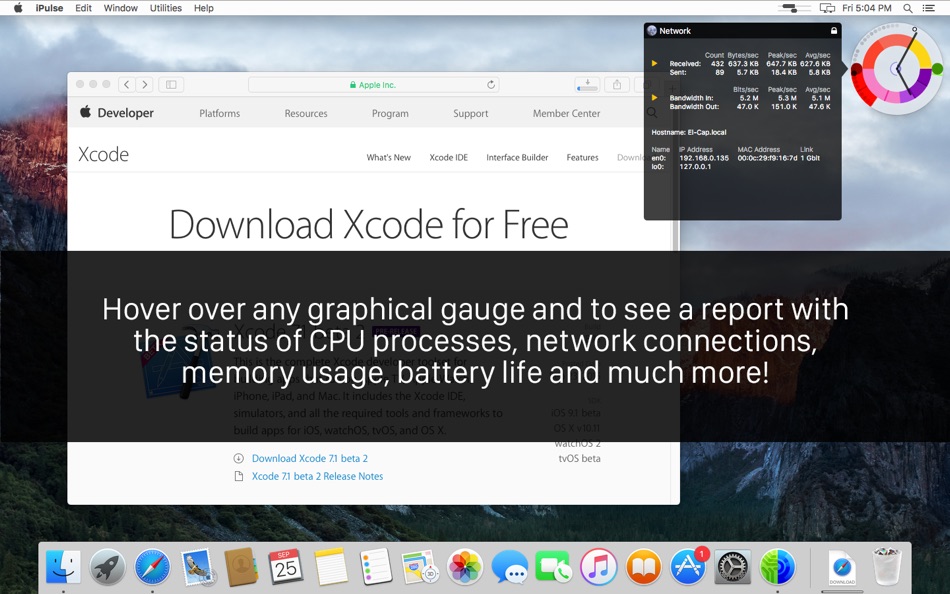
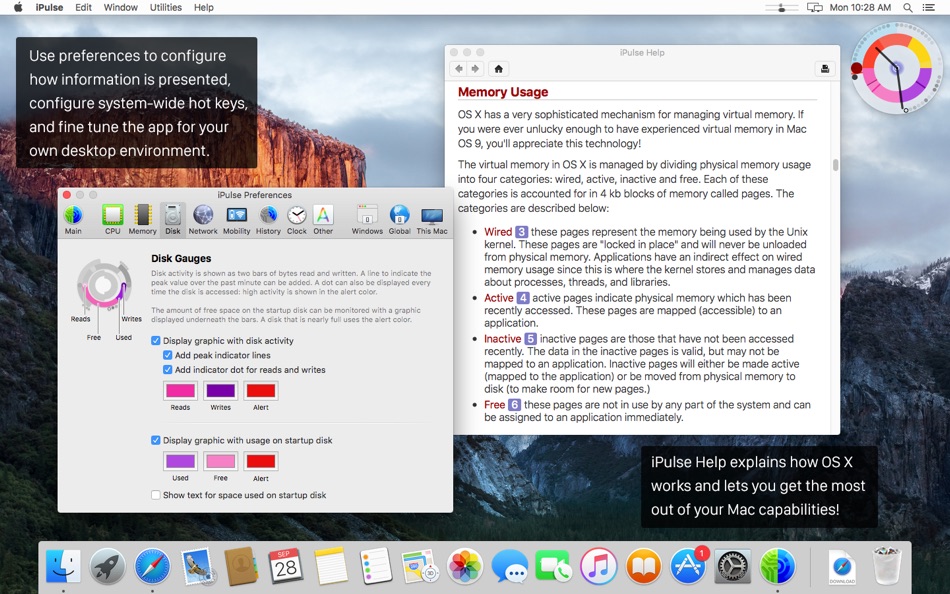
Using its concise and appealing user interface, iPulse graphically displays the inner workings of macOS on your desktop, menu bar or Dock. The presentation is totally configurable so you can set exactly what you need and view it just the way you want.
iPulse comes with ten built-in presets that let you quickly choose a setup that works best for your needs. You can also download new looks from the Iconfactory website. Check out the different configurations in the screenshots below!
The app is fully compatible with "rootless" System Integrity Protection: it's designed to use system resources efficiently and securely.
FEATURES
• Monitors numerous macOS statistics including:
‣ CPU activity
‣ System load over time
‣ Network bandwidth and activity
‣ Memory activity and usage
‣ Battery & wireless signal strength
‣ Disk usage
‣ Current time and date
• Compact, clever & fully customizable user interface
• Presents information both graphically and with text
• Beautiful on Retina display
• Fits in perfectly with the new system appearances
• Save & load custom appearances
• Minimizes impact on system performance
• View data on the desktop, in the menu bar or Dock
• Show & hide windows using system hotkeys
Jepretan layar

Ad
Sejarah Harga
- Harga saat ini: $9.99
- Minimal: $4.99
- Maksimum: $9.99
Pantau harga
Penilaian AppAgg
870
Penilaian AppAgg estimasi untuk
iPulse – Monitor your Desktop
870 Perak
Penilaian yang lebih tinggi biasanya berarti sinyal yang lebih kuat di AppAgg.
Berdasarkan: popularitas · rating pengguna · kebaruan · promo · data toko · aktivitas komunitas
Dihitung ulang setiap hari dari data AppAgg terbaru.
URL singkat: Disalin!
Yang Baru
- Versi: 3.14159
- Terakhir diperbarui:
- • Added a feature to display User Information:
- Use Other panel in Settings to set a user information file
- Contents of the file can be rich or plain text
- Displayed when you hover over the lower-right corner of round window
- Can be used for a TODO list, server monitoring, checking token usage, and more
- See the Help for more information and examples
• Breakin’ out of Squircle Jail with a new icon!
• Added support for super cores on M5 processors
• Fixed layout issues on latest macOS
• Fixed an issue reporting the swapping information when there were more than 2048 user processes
• Fixed an issue displaying Emoji in Wireless network name
Info tambahan
- Tanggal rilis:
- Kategori:
macOS Aplikasi›Utilitas - OS:
macOS,macOS 10.13 dan yang lebih tinggi - Ukuran:
3 Mb - Bahasa yang didukung:
English - Rating Konten:
4+ - Mac App Store Peringkat:
0 - Situs Web:
 https://ipulseapp.com
Pengembang
- The Iconfactory
- Platform: iOS Aplikasi (20) iOS Game (1) macOS Aplikasi (8)
- Daftar: 14 + 19
- Poin: 42 + 2,097 ¡
- Peringkat: 0
- Komentar: 0
- Diskon: 0
- Video: 0
- RSS: Berlangganan
Daftar (1)
- iPulse – Monitor your Desktop

Poin (0)
0
Peringkat (0)
0
Komentar (0)
Jadilah yang pertama berkomentar
Ringkasan
iPulse – Monitor your Desktop URL singkat: Disalin!- Bagikan
- Mac App Store
«iPulse – Monitor your Desktop». Platform: macOS. Kategori: Utilitas. Pengembang: «The Iconfactory». Rilis pertama: . Pembaruan terakhir: . Harga saat ini: $9.99. Harga terendah yang tercatat: $4.99 (). Harga tertinggi yang tercatat: $9.99 (). Judul ini belum mendapat rating atau ulasan di AppAgg. Daftar: publik 1, pribadi 0. Bahasa yang tersedia: English. AppAgg melacak riwayat harga, peringkat, dan umpan balik pengguna «iPulse – Monitor your Desktop». AppAgg tidak menghosting aplikasi atau mendistribusikan perangkat lunak. Semua merek dagang, logo, dan tangkapan layar adalah milik pemiliknya masing-masing. Ikuti diskon dan pembaruan di masa mendatang melalui RSS
Serupa
-
- Desktop Lens
- macOS Aplikasi: Utilitas Oleh: Pavel Kosykh
- $1.99
- Daftar: 0 + 1 0 0
- Poin: 19 + 0 8K Versi: 6.1.5 Desktop Lens is a lightweight desktop magnifier designed for simple and efficient zooming of on-screen content. The app provides a floating lens that magnifies any area of the screen ... ⥯
-
- Pulse System Monitor
- macOS Aplikasi: Utilitas Oleh: Thomas Erwin Stange
- $1.99
- Daftar: 0 0 0
- Poin: 0 + 0 580 Versi: 1.1 Pulse System Monitor is a focused live dashboard for your computer. It shows system load, CPU activity, memory, swap, disk, paging, network throughput, and macOS thermal pressure in ... ⥯
-
- Monitor Portals
- macOS Aplikasi: Utilitas Oleh: Marcus Gunn
- Gratis
- Daftar: 0 + 1 0 0
- Poin: 2 + 0 810 Versi: 1.0 Monitor Portals is a lightweight utility that creates visual indicators where your displays connect, making multi-monitor navigation intuitive and efficient. Key Features: Illuminated ... ⥯
-
- Pulse - System Health Monitor
- macOS Aplikasi: Utilitas Oleh: Nate Cheng
- Gratis
- Daftar: 0 0 0
- Poin: 0 + 0 890 Versi: 1.2.6 Pulse Lite is a beautiful menu bar app that monitors your Mac's health in real time. See CPU, memory, storage, battery, and network stats at a glance always one click away. DASHBOARD ... ⥯
-
- Desktop Cleaner Pro
- macOS Aplikasi: Utilitas Oleh: Cederic Schmid
- * Gratis
- Daftar: 0 0 0
- Poin: 0 + 0 580 Versi: 1.0 Desktop Cleaner Pro helps you keep your Mac organized with one click. It scans your desktop and sorts files into tidy folders by type or date, turning clutter into clarity instantly. ... ⥯
-
- Desktop Wrestler
- macOS Aplikasi: Utilitas Oleh: Cyrus M Keck
- $2.99
- Daftar: 0 0 0
- Poin: 0 + 0 600 Versi: 1.9.0 Desktop Wrestler keeps your Mac s desktop and downloads folder tidy without effort. It quietly watches for new files, sorting screenshots and downloads into organized folders. You can ... ⥯
-
- Desktop Space Renamer
- macOS Aplikasi: Utilitas Oleh: TGFMedia
- $4.99
- Daftar: 0 0 0
- Poin: 0 + 0 550 Versi: 10.0 Bring order to your Mission Control. Desktop Space Renamer is a lightweight macOS menu bar app that lets you assign custom names and emoji labels to your Desktop Spaces, so you can ... ⥯
-
- Pulse - System Monitor
- macOS Aplikasi: Utilitas Oleh: Eduard Bruch
- $2.99
- Daftar: 0 0 0
- Poin: 0 + 0 600 Versi: 1.0 Keep your Mac running at its best. Pulse is a beautiful, modern system monitor that lives in your menu bar showing CPU, memory, disk, network, battery, GPU, and temperature stats at a ... ⥯
-
- Desktop Ghost Pro
- macOS Aplikasi: Utilitas Oleh: App Tyrant Corp
- $3.99
- Daftar: 0 0 0
- Poin: 2 + 0 1K Versi: 2.3 Is your desktop overwhelmed with files and folders? Introducing Desktop Ghost Pro the ultimate solution to instantly declutter your workspace. With a single click or a customizable ... ⥯
-
- Desktop Revealer
- macOS Aplikasi: Utilitas Oleh: Ori Roniger
- $0.99
- Daftar: 0 0 0
- Poin: 3 + 0 760 Versi: 1.05 Introducing "Desktop Revealer," a user-friendly app that simplifies the process of revealing your desktop with just one click. With Desktop Revealer, you can easily access your desktop ⥯
-
- Monitor Banda Larga
- macOS Aplikasi: Utilitas Oleh: NIC.br
- Gratis
- Daftar: 0 0 0
- Poin: 0 + 0 500 Versi: 1.1.1 O Monitor Banda Larga verifica a qualidade e a velocidade de sua internet fixa, de maneira automatizada e com relatórios de fácil compreensão, oferecendo também uma ferramenta que ... ⥯
-
- Pulse: System Monitor
- macOS Aplikasi: Utilitas Oleh: Oleksandr Kozlovskyi
- * Gratis
- Daftar: 0 + 1 0 0
- Poin: 5 + 0 1K Versi: 1.4.1 Pulse puts your Mac's vital signs right in the menu bar. One click reveals everything you need to know - no windows to hunt for, no Activity Monitor to dig through. FIVE METRICS, ... ⥯
-
- Desktop Director
- macOS Aplikasi: Utilitas Oleh: Shugang Guo
- $1.69
- Daftar: 0 0 0
- Poin: 0 + 0 890 Versi: 2.0.0 Desktop Director is a utility application to help you manage your desktop. 1. Desktop Director can gather your files or folders in the desktop by using the build-in rules (i.e. the ... ⥯
-
- Pulse Guard - Home Security
- macOS Aplikasi: Utilitas Oleh: Bugra Gunay
- * Gratis
- Daftar: 0 0 0
- Poin: 0 + 0 1K Versi: 1.0 Pulse Guard turns your Mac into a smart home security sensor by analyzing WiFi signal patterns. When someone enters your room, the WiFi signals shift and Pulse Guard detects it ... ⥯