
Αποθηκευμένα
Επίλεξε το όνομα που θα εμφανίζεται στο μενού Αποθηκευμένα.
Εγινε!
| Προγραμματιστής: | 兰桂 吴 (72) | ||
| Τιμή: | $14.99 | ||
| Κατατάξεις: | 0 | ||
| Σχόλια: | 0 Δημοσίευση σχολίου | ||
| Λίστες: | 1 + 0 | ||
| Βαθμοί: | 0 + 0 ¡ | ||
| Mac App Store | |||
Περιγραφή

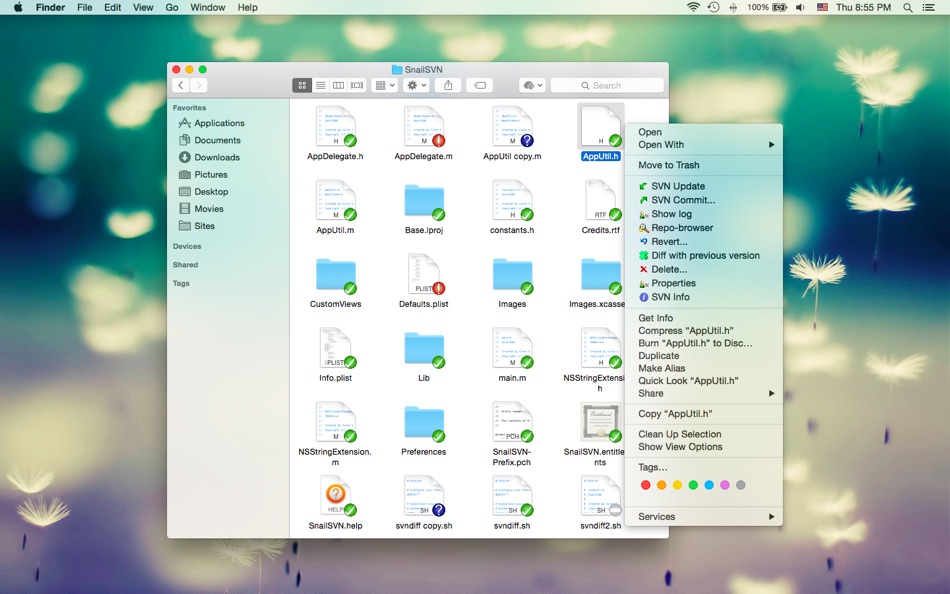
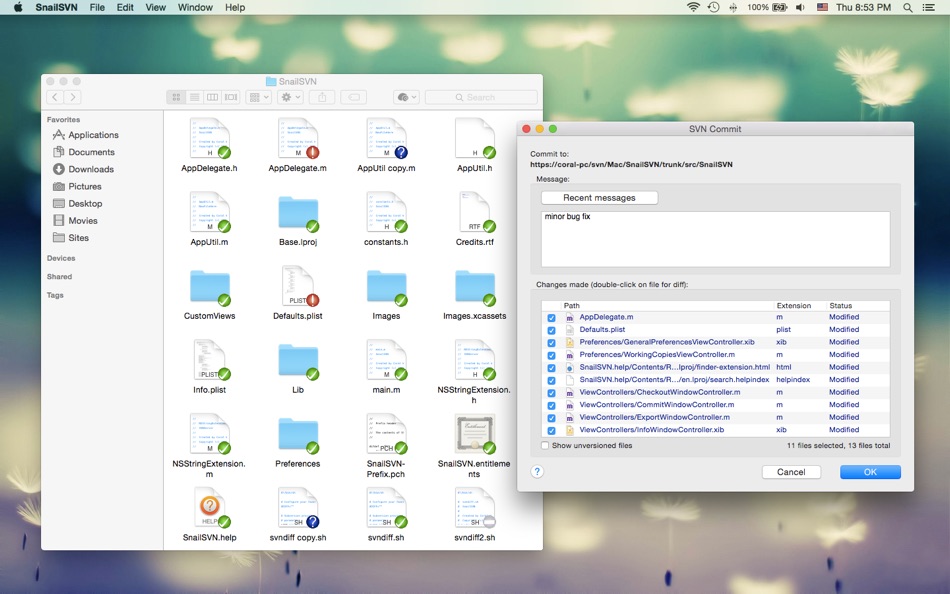
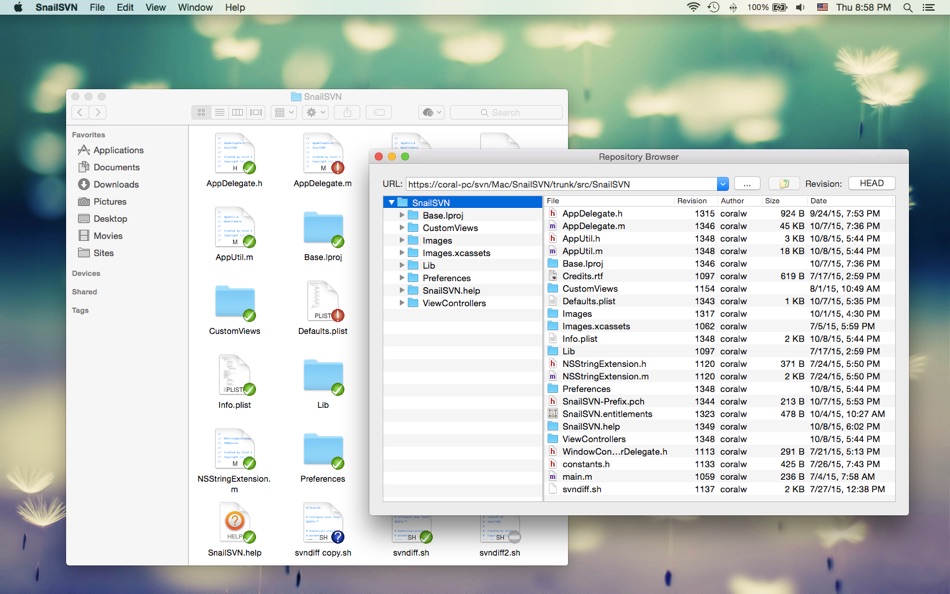
SnailSVN allows you to access the most frequently used SVN features, from the Finder context menu directly.
SnailSVN also adds icon overlays to your SVN working copies in Finder. It tracks your SVN working copies and updates the icon overlays automatically, giving you visual feedback of the current state of your working copies.
In a few steps, you can start using SnailSVN easily:
1. Enable "SnailSVN Extension" in "System Preferences » Extensions".
2. Checkout a SVN working copy with SnailSVN (File » SVN Checkout...) or add an existing SVN working copy to SnailSVN (SnailSVN Preferences » Working Copies).
3. Navigate to your working copy in Finder and right click to access the SnailSVN functionalities.
* FAQ
Q: There is no icon overlays / context menu for the files?
A: Please make sure that you've enabled "SnailSVN Extension" in "System Preferences » Extensions", and also make sure that you've added the working copy to SnailSVN Preferences.
If your SVN working copy is monitored by multiple Finder extensions, please make sure that SnailSVN Extension comes first in "System Preferences » Extensions » Finder", you can drag and drop the extensions to adjust the order.
If the problem persists, please disable "SnailSVN Extension" in "System Preferences » Extensions" and then enable it again. The last resort is to relaunch Finder or restart your computer.
Q: What kind of URL schemes does SnailSVN support?
A: SnailSVN supports the following URL schemes:
• http://
• https://
• svn://
• svn+ssh://
• file://
Q: Does SnailSVN support shelving (shelve & unshelve)?
A: Yes. Please switch to Subversion 1.14.x or later in order to support shelving. (SnailSVN Preferences -> SVN Settings -> Settings)
The shelve & unshelve menu items are available in "SnailSVN Preferences -> Working Copies", the commit window, the "Check for modifications" window and the Finder context menu.
Q: How to mark multiple files as checked in the SVN commit window?
A: Please select the files you would like to commit and press the space bar (or right click and select "Mark as selected" from the context menu).
Q: Does SnailSVN work well with other SVN clients?
A: SnailSVN should work with any kinds of SVN clients that is compatible with Subversion 1.7.x, 1.8.x or 1.9.x, from the command line client to the GUI apps.
Q: Does SnailSVN work for file managers other than Finder?
A: SnailSVN is primarily a Finder extension, so it is likely that it will not work for other file managers.
Q: Can I use SnailSVN as a standalone SVN client?
A: Yes. Most SnailSVN functionalities are available in "SnailSVN Preferences -> Working Copies", the commit window and the "Check for modifications" window.
Ad
Στιγμιότυπα οθόνης


Ιστορία τιμών
- Τρέχουσα τιμή: $14.99
- Ελάχιστο: $14.99
- Μέγιστο: $17.99
Παρακολούθηση τιμών
Πρόσθετες πληροφορίες
- Ημερομηνία έκδοσης:
- Κατηγορία:
macOS Εφαρμογές›Εργαλεία - Λειτουργικό σύστημα:
macOS,macOS 10.10 και νεότερες εκδόσεις - Μέγεθος:
22 Mb - Υποστηριζόμενη γλώσσα:
Chinese,English - Αξιολόγηση περιεχομένου:
4+ - Mac App Store Εκτίμηση:
0 - Ιστοσελίδα:
 https://langui.net
Τι νέο υπάρχει
- Εκδοχή: 1.15.13
- Ενημερώθηκε:
- • Shows unencoded URLs in the repo browser
• Supports editing author for a committed change
Προγραμματιστής
- 兰桂 吴
- Πλατφόρμες: iOS Εφαρμογές (6) macOS Εφαρμογές (66)
- Λίστες: 7 + 6
- Βαθμοί: 47 + 151 ¡
- Κατατάξεις: 0
- Σχόλια: 0
- Εκπτώσεις: 0
- Βίντεο: 0
- RSS: Εγγραφή
Λίστες (1)
- SnailSVN – SVN for Finder

Βαθμοί (0)
0 ☹️
Κατατάξεις (0)
0 ☹️
Σχόλια (0)
Γίνε ο πρώτος που θα σχολιάσει 🌟
«SnailSVN – SVN for Finder». Πλατφόρμα: macOS. Κατηγορία: Εργαλεία. Προγραμματιστής: «兰桂 吴». Πρώτη κυκλοφορία: . Τελευταία ενημέρωση: . Τρέχουσα τιμή: $14.99. Χαμηλότερη καταγεγραμμένη τιμή: $14.99 (). Υψηλότερη καταγεγραμμένη τιμή: $17.99 (). Αυτός ο τίτλος δεν έχει λάβει ακόμη αξιολογήσεις ή κριτικές στο AppAgg. Λίστες: δημόσιες 1, ιδιωτικές 0. Διαθέσιμες γλώσσες: Chinese, English. Το AppAgg παρακολουθεί το ιστορικό τιμών, τις αξιολογήσεις και τα σχόλια των χρηστών για «SnailSVN – SVN for Finder». Ακολουθήστε μελλοντικές εκπτώσεις και ενημερώσεις μέσω RSS. Το AppAgg δεν φιλοξενεί εφαρμογές ούτε διανέμει λογισμικό. Όλα τα εμπορικά σήματα, τα λογότυπα και τα στιγμιότυπα οθόνης ανήκουν στους αντίστοιχους κατόχους τους.
SnailSVN – SVN for Finder URL μικρού μήκους: Αντιγράφηκε!- 🌟 Κοινή χρήση
- Mac App Store
Παρόμοια
-
- SnailSVN Lite – SVN for Finder
- macOS Εφαρμογές: Εργαλεία Με: 兰桂 吴
- Δωρεάν
- Λίστες: 0 + 1 0 0
- Βαθμοί: 2 Εκδοχή: 1.15.13 SnailSVN is a TortoiseSVN-like Apache Subversion (SVN) client, implemented as a Finder extension. SnailSVN allows you to access the most frequently used SVN features via the Finder ... ⥯
-
- RocketSim for Xcode Simulator
- macOS Εφαρμογές: Εργαλεία Με: SwiftLee
- * Δωρεάν
- Λίστες: 1 + 3 0 0
- Βαθμοί: 9 Εκδοχή: 15.1.0 RocketSim enhances the Xcode Simulator for iOS and iPadOS development: boost productivity and streamline your workflow with capture, networking, build insights, and quick actions ... ⥯
-
- Peek — A Quick Look Extension
- macOS Εφαρμογές: Εργαλεία Με: Big Z Labs LLC
- $7.99
- Λίστες: 4 + 3 0 0
- Βαθμοί: 4 Εκδοχή: 2.6.4 Accelerate your workflow with the Quick Look conveniences that only Peek can deliver: searching, jumping, scroll restoring, syntax highlighting, & more. -- Due to system limitations, ... ⥯
-
- Go2Shell
- macOS Εφαρμογές: Εργαλεία Με: Alice Dev Team
- Δωρεάν
- Λίστες: 1 + 2 0 0
- Βαθμοί: 6 Εκδοχή: 1.2.2 Go2Shell opens a terminal window to the current directory in Finder. The best way to use Go2Shell is to add it to the Finder toolbar, to do this just drag and drop the app onto the ... ⥯
-
- Shellcut - Open in Terminal
- macOS Εφαρμογές: Εργαλεία Με: Leon Boettger
- Δωρεάν
- Λίστες: 0 + 1 0 0
- Βαθμοί: 8 Εκδοχή: 1.5 Shellcut lets you open a new Terminal window directly from Finder, with the working directory set to the folder currently displayed in the Finder window. Shellcut supports Apple's ... ⥯
-
- Localiji
- macOS Εφαρμογές: Εργαλεία Με: Nicolas Kick
- Δωρεάν
- Λίστες: 0 + 3 0 0
- Βαθμοί: 7 Εκδοχή: 1.2.1 Localiji manages a local copy of your app localizations from App Store Connect and allows you to effortlessly sync the changes. Edit individual attributes, like your app s description, ⥯
-
- Penguin - Plist Editor
- macOS Εφαρμογές: Εργαλεία Με: Triplane
- * Δωρεάν
- Λίστες: 1 + 2 0 0
- Βαθμοί: 6 Εκδοχή: 2.2 Looking for an easier way to edit plist files? Penguin lets you edit any plist file in a beautiful and easy to understand tree view. Drag, drop, expand, reorder and modify your plist ... ⥯
-
- Remote Desktop Scanner Pro
- macOS Εφαρμογές: Εργαλεία Με: Sascha Simon
- $0.99
- Λίστες: 0 + 1 0 0
- Βαθμοί: 10 Εκδοχή: 2.1.4 The Remote Desktop Scanner Pro lists all devices on your network that you can connect to via Remote Desktop or SSH. You can then connect with just one click. Remote Finder This app ... ⥯
-
- ViewMD
- macOS Εφαρμογές: Εργαλεία Με: Kevin Dinn
- $5.99
- Λίστες: 0 + 1 0 0
- Βαθμοί: 8 Εκδοχή: 1.25 VIEWMD: YOUR MARKDOWN, BEAUTIFULLY RENDERED One-time purchase. No subscriptions. No distractions. Stop wasting time and energy fighting complex software. ViewMD is designed to boost ... ⥯
-
- Icon Resize
- macOS Εφαρμογές: Εργαλεία Με: WAN LUTFI WAN MD HATTA
- Δωρεάν
- Λίστες: 1 + 1 0 0
- Βαθμοί: 6 Εκδοχή: 1.12 Icons is very important for a developer. This tools help developer to quickly resize icon to multiple size for iOS or Mac. Actually any developer can develop this simple app. But why ... ⥯
-
- Petrify
- macOS Εφαρμογές: Εργαλεία Με: Boy van Amstel
- * Δωρεάν
- Λίστες: 0 + 1 0 0
- Βαθμοί: 8 Εκδοχή: 2024.1 Petrify is the easiest way to convert source code into images on Mac. Get your source code into Petrify, customize the image, and export it anywhere. Petrify features: - Easily drag ... ⥯
-
- RibbonDiff
- macOS Εφαρμογές: Εργαλεία Με: Rei Kitajima
- * Δωρεάν
- Λίστες: 0 + 1 0 0
- Βαθμοί: 7 Εκδοχή: 4.0.0 Compare two versions of text instantly - ideal for code, config files, logs, and document edits. RibbonDiff for macOS gives you a Mac-native, side-by-side diff view with fully editable ⥯
-
- Xversion
- macOS Εφαρμογές: Εργαλεία Με: Jonathan Guy
- $28.99
- Λίστες: 0 0 0
- Βαθμοί: 0 Εκδοχή: 1.3.8 Xversion is a great way to manage your Subversion working copies and repositories. It's fast, powerful and so intuitive and easy to use you'll probably never need to read the manual. ... ⥯
- Νέα
- MaiPed
- macOS Εφαρμογές: Εργαλεία Με: Stephan Bergdolt
- * $44.99
- Λίστες: 0 0 0
- Βαθμοί: 0 Εκδοχή: 1.2.3 MaiPed is a modern dual-pane file manager for macOS with built-in SVN version control and an optional AI assistant called StacyAI. Designed for developers, power users and teams who ... ⥯