
| Desenvolvedor: | 兰桂 吴 (72) | ||
| Preço: | $14.99 | ||
| Classificações: | 0 | ||
| Resenhas: | 0 Escrever um comentário | ||
| Comentários: | 0 Postar comentário | ||
| Listas: | 1 + 0 | ||
| Pontos: | 0 + 0 ¡ | ||
| Mac App Store | |||
Descrição

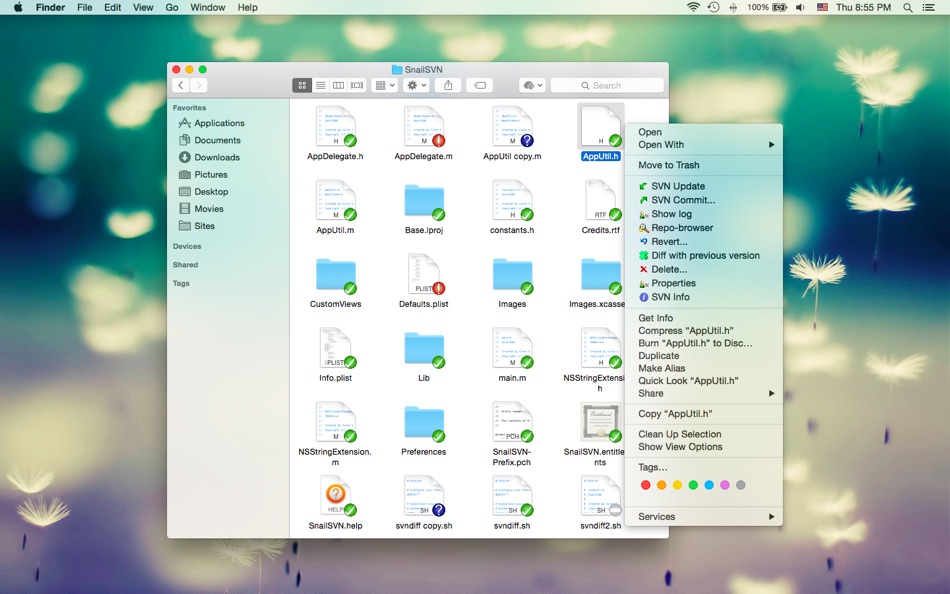
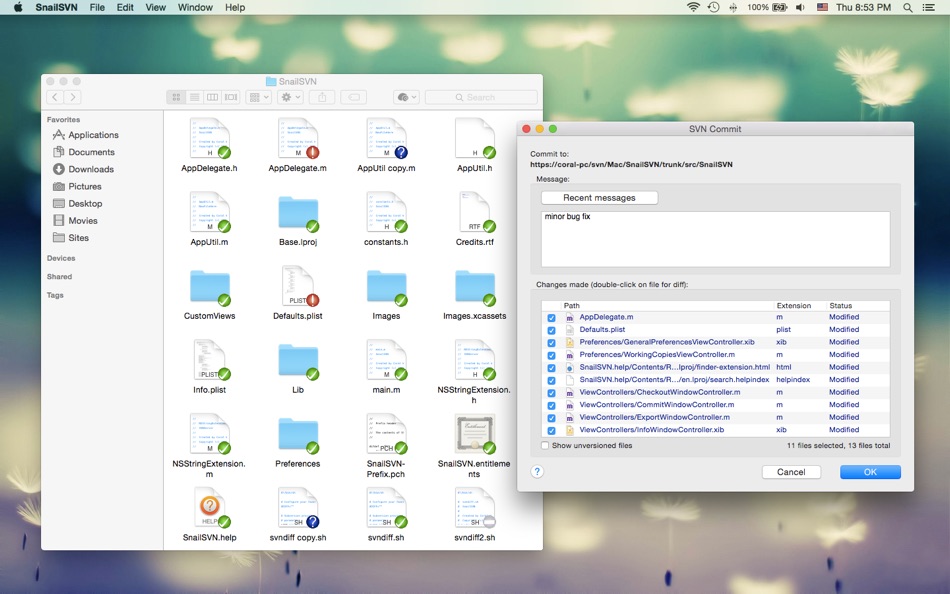
SnailSVN allows you to access the most frequently used SVN features, from the Finder context menu directly.
SnailSVN also adds icon overlays to your SVN working copies in Finder. It tracks your SVN working copies and updates the icon overlays automatically, giving you visual feedback of the current state of your working copies.
In a few steps, you can start using SnailSVN easily:
1. Enable "SnailSVN Extension" in "System Preferences » Extensions".
2. Checkout a SVN working copy with SnailSVN (File » SVN Checkout...) or add an existing SVN working copy to SnailSVN (SnailSVN Preferences » Working Copies).
3. Navigate to your working copy in Finder and right click to access the SnailSVN functionalities.
* FAQ
Q: There is no icon overlays / context menu for the files?
A: Please make sure that you've enabled "SnailSVN Extension" in "System Preferences » Extensions", and also make sure that you've added the working copy to SnailSVN Preferences.
If your SVN working copy is monitored by multiple Finder extensions, please make sure that SnailSVN Extension comes first in "System Preferences » Extensions » Finder", you can drag and drop the extensions to adjust the order.
If the problem persists, please disable "SnailSVN Extension" in "System Preferences » Extensions" and then enable it again. The last resort is to relaunch Finder or restart your computer.
Q: What kind of URL schemes does SnailSVN support?
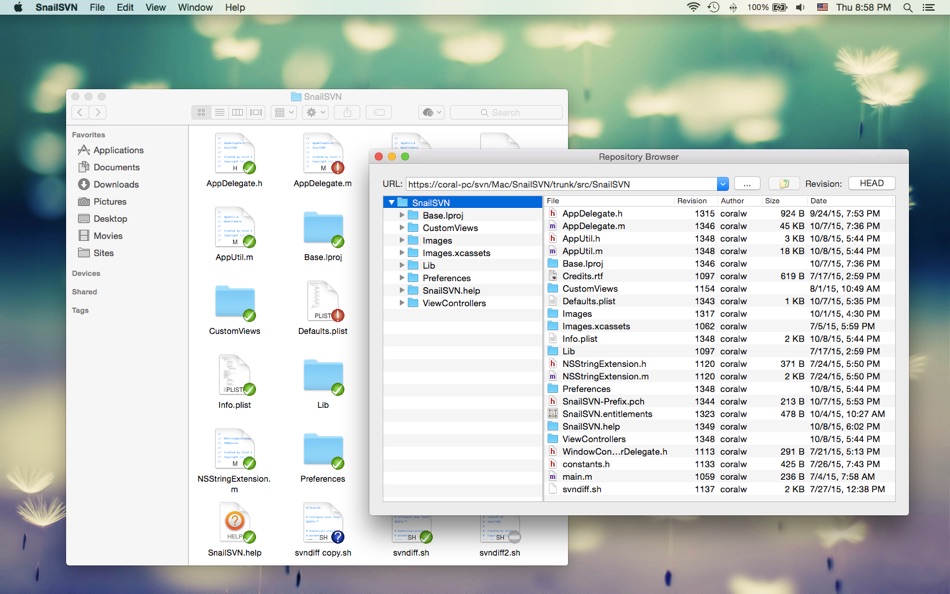
A: SnailSVN supports the following URL schemes:
• http://
• https://
• svn://
• svn+ssh://
• file://
Q: Does SnailSVN support shelving (shelve & unshelve)?
A: Yes. Please switch to Subversion 1.14.x or later in order to support shelving. (SnailSVN Preferences -> SVN Settings -> Settings)
The shelve & unshelve menu items are available in "SnailSVN Preferences -> Working Copies", the commit window, the "Check for modifications" window and the Finder context menu.
Q: How to mark multiple files as checked in the SVN commit window?
A: Please select the files you would like to commit and press the space bar (or right click and select "Mark as selected" from the context menu).
Q: Does SnailSVN work well with other SVN clients?
A: SnailSVN should work with any kinds of SVN clients that is compatible with Subversion 1.7.x, 1.8.x or 1.9.x, from the command line client to the GUI apps.
Q: Does SnailSVN work for file managers other than Finder?
A: SnailSVN is primarily a Finder extension, so it is likely that it will not work for other file managers.
Q: Can I use SnailSVN as a standalone SVN client?
A: Yes. Most SnailSVN functionalities are available in "SnailSVN Preferences -> Working Copies", the commit window and the "Check for modifications" window.
Ad
Capturas de ecrã


Histórico de preços
- Hoje: $14.99
- Mínimo: $14.99
- Máximo: $17.99
Monitorizar preços
Novidades
- Versão: 1.15.11
- Atualizado:
- • Improved diff/merge tool detection
• Supports copying paths with Command-C
Desenvolvedor
- 兰桂 吴
- Plataformas: iOS Apps (6) macOS Apps (66)
- Listas: 7 + 6
- Pontos: 47 + 151 ¡
- Classificações: 0
- Resenhas: 0
- Comentários: 0
- Descontos: 0
- Vídeos: 0
- RSS: Subscrever
Pontos (0)
0 ☹️
Classificações (0)
0 ☹️
Listas (1)
- SnailSVN – SVN for Finder

Resenhas (0)
Seja o primeiro a comentar 🌟
Informações adicionais
- Versão: 1.15.11
- Categoria:
macOS Apps›Ferramentas de programação - Sistemas operacionais:
macOS,macOS 10.10 ou superior - Tamanho:
22 Mb - Idioma compatível:
Chinese,English - Classificação do conteúdo:
4+ - Mac App Store Avaliação:
0 - Atualizado:
- Data de lançamento:
Contactos
- Site:
 https://langui.net
«SnailSVN – SVN for Finder». Plataforma: macOS. Categoria: Ferramentas de programação. Desenvolvedor: «兰桂 吴». Primeiro lançamento: . Última atualização: . Preço atual: $14.99. Preço mais baixo registrado: $14.99 (). Preço mais alto registrado: $17.99 (). Este título ainda não recebeu classificações ou comentários no AppAgg. Listas: públicas 1, privadas 0. Idiomas disponíveis: Chinese, English. AppAgg rastreia histórico de preços, classificações e feedback de usuários para «SnailSVN – SVN for Finder». Acompanhe futuros descontos e atualizações via RSS. AppAgg não hospeda aplicativos nem distribui software. Todas as marcas registradas, logotipos e capturas de tela pertencem aos seus respectivos proprietários.
Comentários (0)
Seja o primeiro a comentar 🌟
SnailSVN – SVN for Finder URL abreviado: Copiado!- 🌟 Compartilhar
- Mac App Store
Ad
Semelhantes
-
- SnailSVN Lite – SVN for Finder
- macOS Apps: Ferramentas de programação Por: 兰桂 吴
- Grátis
- Listas: 0 + 1 Classificações: 0 Resenhas: 0
- Pontos: 2 + 0 0 Versão: 1.15.11 SnailSVN is a TortoiseSVN-like Apache Subversion (SVN) client, implemented as a Finder extension. SnailSVN allows you to access the most frequently used SVN features via the Finder ... ⥯
-
- Peek — A Quick Look Extension
- macOS Apps: Ferramentas de programação Por: Big Z Labs LLC
- $7.99
- Listas: 4 + 3 Classificações: 0 Resenhas: 0
- Pontos: 4 + 0 0 Versão: 2.6.4 Accelerate your workflow with the Quick Look conveniences that only Peek can deliver: searching, jumping, scroll restoring, syntax highlighting, & more. -- Due to system limitations, ... ⥯
-
- Go2Shell
- macOS Apps: Ferramentas de programação Por: Alice Dev Team
- Grátis
- Listas: 1 + 2 Classificações: 0 Resenhas: 0
- Pontos: 6 + 0 0 Versão: 1.2.2 Go2Shell opens a terminal window to the current directory in Finder. The best way to use Go2Shell is to add it to the Finder toolbar, to do this just drag and drop the app onto the ... ⥯
-
- Shellcut - Open in Terminal
- macOS Apps: Ferramentas de programação Por: Leon Boettger
- Grátis
- Listas: 0 + 1 Classificações: 0 Resenhas: 0
- Pontos: 8 + 0 0 Versão: 1.5 Shellcut lets you open a new Terminal window directly from Finder, with the working directory set to the folder currently displayed in the Finder window. Shellcut supports Apple's ... ⥯
-
- Localiji
- macOS Apps: Ferramentas de programação Por: Nicolas Kick
- Grátis
- Listas: 0 + 3 Classificações: 0 Resenhas: 1 (1)
- Pontos: 7 + 0 0 Versão: 1.2.1 Localiji manages a local copy of your app localizations from App Store Connect and allows you to effortlessly sync the changes. Edit individual attributes, like your app s description, ⥯
-
- Penguin - Plist Editor
- macOS Apps: Ferramentas de programação Por: Triplane
- * Grátis
- Listas: 1 + 2 Classificações: 0 Resenhas: 0
- Pontos: 6 + 0 0 Versão: 2.2 Looking for an easier way to edit plist files? Penguin lets you edit any plist file in a beautiful and easy to understand tree view. Drag, drop, expand, reorder and modify your plist ... ⥯
-
- Remote Desktop Scanner Pro
- macOS Apps: Ferramentas de programação Por: Sascha Simon
- $0.99
- Listas: 0 + 1 Classificações: 0 Resenhas: 0
- Pontos: 10 + 0 0 Versão: 2.1.3 The Remote Desktop Scanner Pro lists all devices on your network that you can connect to via Remote Desktop or SSH. You can then connect with just one click. Remote Finder This app ... ⥯
-
- ViewMD
- macOS Apps: Ferramentas de programação Por: Kevin Dinn
- $5.99
- Listas: 0 + 1 Classificações: 0 Resenhas: 0
- Pontos: 8 + 0 0 Versão: 1.22 VIEWMD: YOUR MARKDOWN, BEAUTIFULLY RENDERED One-time purchase. No subscriptions. No distractions. Stop wasting time and energy fighting complex software. ViewMD is designed to boost ... ⥯
-
- Icon Resize
- macOS Apps: Ferramentas de programação Por: WAN LUTFI WAN MD HATTA
- Grátis
- Listas: 1 + 1 Classificações: 0 Resenhas: 0
- Pontos: 6 + 0 0 Versão: 1.12 Icons is very important for a developer. This tools help developer to quickly resize icon to multiple size for iOS or Mac. Actually any developer can develop this simple app. But why ... ⥯
-
- Petrify
- macOS Apps: Ferramentas de programação Por: Boy van Amstel
- * Grátis
- Listas: 0 + 1 Classificações: 0 Resenhas: 0
- Pontos: 8 + 0 0 Versão: 2024.1 Petrify is the easiest way to convert source code into images on Mac. Get your source code into Petrify, customize the image, and export it anywhere. Petrify features: - Easily drag ... ⥯
-
- Xversion
- macOS Apps: Ferramentas de programação Por: Jonathan Guy
- $28.99
- Listas: 0 + 0 Classificações: 0 Resenhas: 0
- Pontos: 0 + 0 0 Versão: 1.3.8 Xversion is a great way to manage your Subversion working copies and repositories. It's fast, powerful and so intuitive and easy to use you'll probably never need to read the manual. ... ⥯
-
- Power JSON Editor
- macOS Apps: Ferramentas de programação Por: 基伟 徐
- $4.99
- Listas: 1 + 2 Classificações: 0 Resenhas: 0
- Pontos: 2 + 0 0 Versão: 2.19.0 Power JSON Editor is a JSON editor for developers with Visual Tree View and multiple plugins like Array Table Editor and jq Processor, also with format converter plugins, it is easy to ⥯
-
- Moonshine
- macOS Apps: Ferramentas de programação Por: Prominic.NET, Inc.
- Grátis
- Listas: 1 + 0 Classificações: 0 Resenhas: 0
- Pontos: 0 + 0 0 Versão: 2.6.0 Moonshine is a free and open source middleweight IDE built with ActionScript 3 for ActionScript 3, Feathers, Apache Flex®, Apache Royale® development with Cloud and Desktop support. ... ⥯
-
- ShottyBlur
- macOS Apps: Ferramentas de programação Por: Elena Drozhzhina
- $9.99
- Listas: 0 + 1 Classificações: 0 Resenhas: 0
- Pontos: 2 + 0 0 Versão: 1.4.1 Take layered screenshots with a vibrancy effect. - Grab all windows or just an active app. - Hide ShottyBlur completely before a new screenshot by pressing Ctrl-H shortcut. - Every ... ⥯