
Gespeichert
Wähle den Namen, der im Menü Gespeichert angezeigt werden soll.
Fertig!
| Entwickler: | 龙 金 (16) | ||
| Preis: | * Kostenlos | ||
| Klassifizierungen: | 0 | ||
| Kommentare: | 0 Kommentar posten | ||
| Listen: | 1 + 0 | ||
| Punkte: | 0 + 0 ¡ | ||
| +1 Punkte | |||
Beschreibung

====Features:====
1. Five image kits for icon, launch image, image assets, app screenshot and Effect Text.
2. Lots of built-in size-templates for multiple platforms, such as iOS, macOS, watchOS, iMessage, Android etc.
3. Customizable size-templates
4. Support rounded corners, background color, resize mode, masks, scale / offset / rotation etc.
5. Support creating Contents.json, one click export into Xcode project
6. Support preview icon and splash for different sizes before export
7. Support clone template and copy / paste sizes
8. No deformation for exporting launch images
====Details:====
1. Four image kits for icon, launch image, image assets and app screenshot
App Icon Kit is for creating app icons;
App Splash Screen Kit is for creating app launch images;
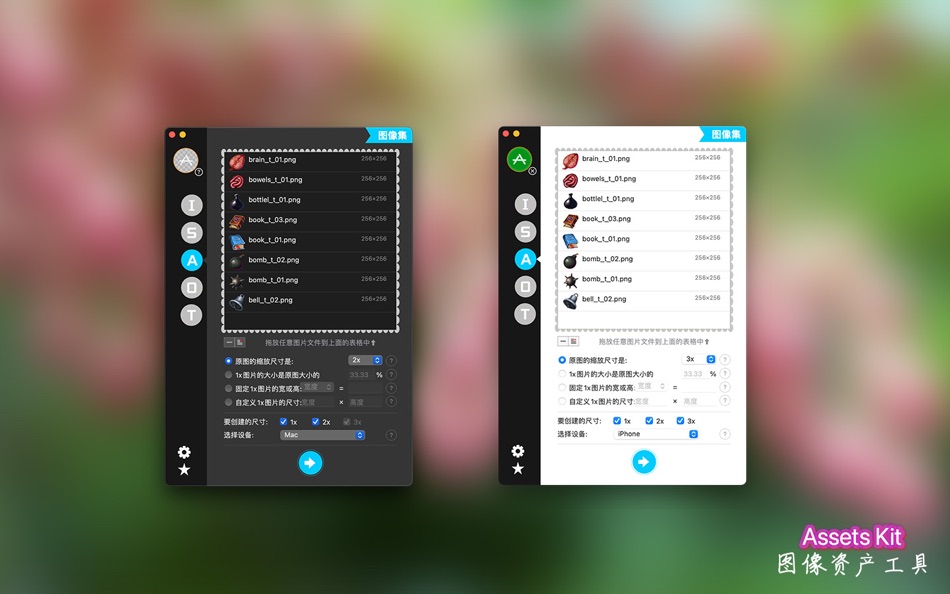
Xcode image Assets Kit is for creating image assets of Xcode, support dark mode images.
App Screenshot Kit is for creating app store iPhone screenshots and iPad Pro screenshots for your app. Batch export of screenshots is now supported;
Effect Text Kit can batch export effect texts.
2. Lots of built-in size-templates for multiple OS platform
There are lots of built-in icon and splash templates, such as iOS, macOS, watchOS, iMessage and Android etc.
Note: for iMessage icons, it doesn't contain four Host Application icons (29x29@2x, 29x29@3x and 1024x1024 icons), since they are square but iMessage icons are not. You can generate them by iMessage (Host) icon template separately.
3. Customizable size-templates
Besides built-in size-templates, you can also add and customize your own templates.
4. Support rounded corners, background color, resize mode, masks, scale / offset / rotation etc. for icon creation.
These features are only for icon kit.
Round corner: support iOS 6 and iOS 7 mode.
Background color: setting background color can force to remove alpha channel of image (if no round corner). Resize mode: support stretch, Aspect Fit, Aspect Fill.
Masks: for creating more image effects.
Scale / Offset / Rotation: adjust source image to get better effects.
5. Support creating Contents.json, one click export into Xcode project
It can generate Contents.json automatically for iOS, macOS, watchOS, iMessage icon and launch images and Xcode image assets, this can help you avoid drag-and-drop operation. Please check the help for more details.
Note: only built-in templates support generate Contents.json file.
6. Support preview icon and splash for different sizes before export
7. Support clone built-in template and copy / paste size
The built-in templates can't be modified, but you can clone it and modify the clone one. The size in template can be copied and pasted.
8. No deformation for exporting launch images
The Splash Screen Kit will not deform the output images, for this to work, you should provide a 2048x2048 (or 4096x4096 recommended for iOS) PNG where the logo or other important artwork is placed within the center 1000x1000 (or 2000x2000) pixels or so.
====NOTE:====
The images you provide should be RGB color mode.
The rounded corner feature of the icon should not be applied to iOS series icons.
For the app screenshot, the status bar (if visible) of the 6.5-inch is different from that of the 5.5-inch. Be careful not to confuse the use.
====Contact:====
If you have questions, you can click on the "?" button to get tips, and any questions, comments, or suggestions, welcome to contact us by Email: oeapp@outlook.com.
Terms of Use: https://www.apple.com/legal/internet-services/itunes/dev/stdeula/
Privacy Policy: https://ioeapp.github.io/2018/10/24/privacy-policy/
Screenshots



Preisentwicklung
-
* In-App Käufe - Aktueller Preis: Kostenlos
- Mindestens: Kostenlos
- Maximale: Kostenlos
Preise beobachten
Ad
Weitere informationen
- Veröffentlichungsdatum:
- Kategorie:
macOS Apps›Entwickler-Tools - Betriebssysteme:
macOS,macOS 10.13 oder höher - Größe:
12 Mb - Unterstützte Sprachen:
Chinese,English - Altersfreigabe:
4+ - Mac App Store Bewertung:
0
Neue Funktionen
- Version: 3.3
- Aktualisiert:
- + Fixed the issue where, during the export of the launch screen, on some platforms or systems, when exporting certain sizes, it would cause the program to crash.
+ In the text special effects function, resolved the issue where, on some platforms or systems, when checking the option to crop the image according to transparent pixels, it would lead to incorrect cropping of the picture, leaving only half of it.
+ Removed the watermark advertisement from the iOS launch screen.
+ Fixed some other minor issues.
Entwickler
- 龙 金
- Plattformen: iOS Apps (5) macOS Apps (11)
- Listen: 2 + 1
- Punkte: 12 + 10 ¡
- Klassifizierungen: 0
- Kommentare: 0
- Rabatte: 0
- Videos: 0
- RSS: Abonnieren
Listen (1)
- App Image Kit

Punkte (0)
0 ☹️
Klassifizierungen (0)
0 ☹️
Kommentare (0)
Seien Sie der Erste, der einen Kommentar abgibt 🌟
«App Image Kit». Plattform: macOS. Kategorie: Entwickler-Tools. Entwickler: «龙 金». Erste Veröffentlichung: . Letzte Aktualisierung: . Aktueller Preis: kostenlos. Dieser Titel hat noch keine Bewertungen oder Rezensionen auf AppAgg erhalten. Listen: öffentliche 1, private 0. Verfügbare Sprachen: Chinese, English. AppAgg verfolgt den Preisverlauf, Bewertungen und Benutzerfeedback für «App Image Kit». Verfolgen Sie zukünftige Rabatte und Updates über RSS. AppAgg hostet keine Anwendungen und vertreibt keine Software. Alle Marken, Logos und Screenshots gehören ihren jeweiligen Eigentümern.
App Image Kit Kurz-URL: Kopiert!- 🌟 Teilen
- Mac App Store
Ähnliches
-
- Image Prep
- macOS Apps: Entwickler-Tools Von: Mike West
- $0.99
- Listen: 0 0 0
- Punkte: 0 Version: 1.0 Image Prep for App submissions Stop wasting time manually resizing screenshots for App submission. Image Prep is a powerful utility designed specifically for developers and designers ... ⥯
-
- Image Resize - @2 @3 Creator
- macOS Apps: Entwickler-Tools Von: 晖 姚
- * $2.99
- Listen: 0 0 0
- Punkte: 0 Version: 2.1 Image Resize takes any image and creates a full set for images, icons or universal assets with 3 steps. Drop file or folder, select output type, select output folder. For iOS ... ⥯
- Neuer
- Image ML Annotator
- macOS Apps: Entwickler-Tools Von: James Studt
- Kostenlos
- Listen: 0 0 0
- Punkte: 0 Version: 1.0 Image ML Annotator helps you build labeled image datasets for object detection on macOS. If you are training a Create ML object detector, the slow part is often not the training ... ⥯
-
- Image Resizer Toolbox
- macOS Apps: Entwickler-Tools Von: Juan Vicente Guerrero Barria
- Kostenlos
- Listen: 0 0 0
- Punkte: 0 Version: 1.9 Helps you resize images for your iOS and OS X projects. Just drop an image, group of images or even a directory to get the corresponding 1x, 2x and 3x versions. NEW! Get the IRT Viewer ⥯
-
- Image Prepare
- macOS Apps: Entwickler-Tools Von: Denis Popov
- $1.99
- Listen: 1 0 0
- Punkte: 0 Version: 1.10 Created by developers and for developers. You can now easily make icons and images for your applications. Simply add an icon or an image to the App then choose the required devices and ⥯
-
- Simple Image Resizer Instantly
- macOS Apps: Entwickler-Tools Von: li bin
- $1.99
- Listen: 0 0 0
- Punkte: 0 Version: 1.1 Image Resizer is the simplest way to batch resize images on your Mac built for speed, clarity, and privacy. Drag your images into the window, choose Pixels or Percent, optionally lock ... ⥯
-
- Launch Kit Pro
- macOS Apps: Entwickler-Tools Von: Omer UCEL
- $0.99
- Listen: 0 0 0
- Punkte: 0 Version: 1.0 Launch Kit is the complete toolkit for app developers preparing their App Store submissions. Powered by advanced AI models including OpenAI, Claude, and Gemini, Launch Kit streamlines ... ⥯
-
- Base64 Image Encoder
- macOS Apps: Entwickler-Tools Von: Friendly, Inc.
- $3.99
- Listen: 1 0 0
- Punkte: 0 Version: 2.0 This handy utility will let you encode your images into base64. Converting images to Base64, and embedding them into HTML and CSS, is a great way to speed up your website or ... ⥯
-
- Network Kit
- macOS Apps: Entwickler-Tools Von: Fausto Ristagno
- $2.99
- Listen: 1 + 1 0 0
- Punkte: 8 Version: 9.2.1 Keep under control your network with Network Kit, an user friendly set of network tools that will help you to analyze your LAN, and not only that. NETWORK INFO A complete and easy to ... ⥯
-
- Dev Kit
- macOS Apps: Entwickler-Tools Von: Long Trieu
- $2.99
- Listen: 0 0 0
- Punkte: 1 Version: 1.1 Introducing the powerful Dev Kit: a comprehensive collection of tools designed to assist developers in their day-to-day tasks. This versatile toolkit includes a range of handy ... ⥯
- Neuer
- XCStrings Kit
- macOS Apps: Entwickler-Tools Von: Glenil Puca
- * Kostenlos
- Listen: 0 0 0
- Punkte: 0 Version: 1.08 XCStrings Kit es una herramienta profesional diseñada para trabajar de forma segura, precisa y eficiente con archivos .xcstrings, el formato moderno de localización de Apple para iOS y ⥯
-
- VAS Image Extractor
- macOS Apps: Entwickler-Tools Von: App Tyrant Corp
- Kostenlos
- Listen: 0 + 1 0 0
- Punkte: 1 Version: 1.0 Quickly and easily extract images out of your Visual Attributed String document files with VAS Image Extractor! VAS is the file format used in the Visual Attributed String Mac ... ⥯
-
- Developer's Tool Kit
- macOS Apps: Entwickler-Tools Von: Think Forward Media
- $0.99
- Listen: 0 0 0
- Punkte: 0 Version: 1.18.3 The Developer's Tool Kit is an indispensable tool for all developers! Features: Text Processing: Automatically create the perfect Git Branch from your task management issue names! ... ⥯
- Neuer
- JSON-Kit
- macOS Apps: Entwickler-Tools Von: Davit Darsalia
- $0.99
- Listen: 0 0 0
- Punkte: 0 Version: 1.0 JSON Kit is a dedicated macOS tool designed for developers who need to navigate and modify large JSON structures with speed and precision. Built natively for macOS, it eliminates the ... ⥯