
Αποθηκευμένα
Επίλεξε το όνομα που θα εμφανίζεται στο μενού Αποθηκευμένα.
Εγινε!
| Προγραμματιστής: | Gabor Hargitai (3) | ||
| Τιμή: | $19.99 | ||
| Κατατάξεις: | 0 | ||
| Σχόλια: | 0 Δημοσίευση σχολίου | ||
| Λίστες: | 1 + 1 | ||
| Βαθμοί: | 0 + 0 ¡ | ||
| Mac App Store | |||
Περιγραφή

Colibri is a native macOS audio player built from scratch on top of the BASS playback technology, supports cristal-clear bit-perfect playback of all popular lossless and lossy audio formats, uses only a tiny amount of computing power and offers a clean and intuitive user experience.
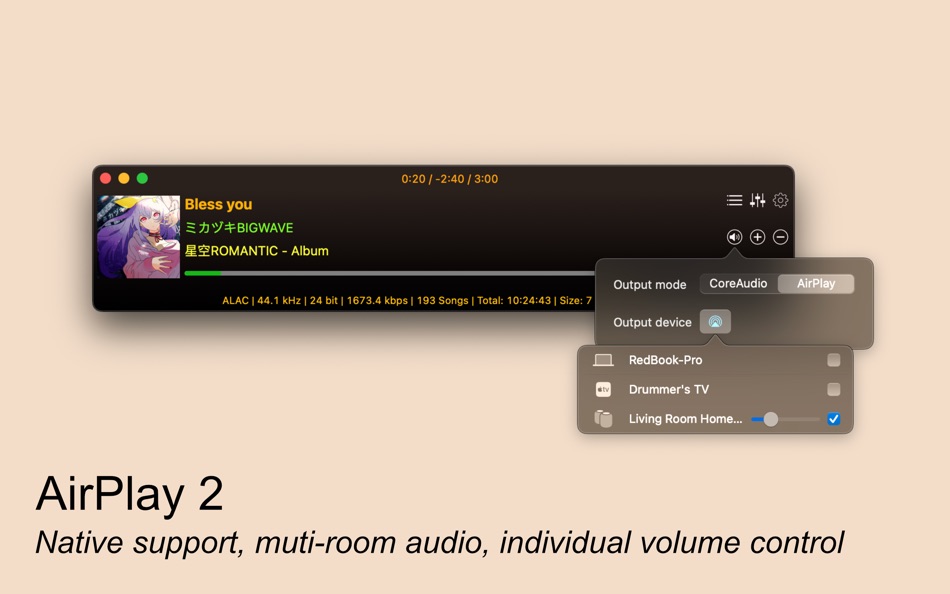
Now with native AirPlay 2 multi-room audio support. Stream your music to your Apple TV, HomePod or AirPlay-capable smart TV and devices.
Saves your battery
Colibri uses a barely noticable amount of computing power during the playback of your music.
Plays your audio
- FLAC, ALAC, WAV, AIFF, APE, TTA, DSD (DSDIFF and DSF encoding), WavPack
- Ogg Vorbis, MP1/MP2/MP3 and AAC/M4A
- network streams/online radio
- Chiptune and Tracker music
- MOD and MIDI files (with per song SoundFont support)
Feature packed
- 10-band Equalizer
- Automatic Sample Rate Switching
- RAM Disk support
- Permanent Pause
- Default audio output
- Remember last used device
- Multiple loop options
- Per-device configuration with auto-switching
- Forced frequency
- Initial volume setting
- Restore frequency on quit
- Frequency switching silence generation
Handles CUE Sheets
Reads, processes - and to some extent - sanitizes cue sheets
Supports gapless playback
Colibri is extensively designed from the ground-up to provide a true gapless listening experience - with or without using a Cue Sheet.
Picks up where you left off
Saves your current playlist upon quitting and re-opens your songs when you start it up again.
Avoids most problems
Colibri does its' best to avoid most problems before, during and after playback.
Understands your language
Colibri is capable of rendering the song information as it was intended to be shown: of all the tried metadata it had no problem with displaying cyrillic or kanji/katakana/hiragana characters mixed with ASCII.
Respects your privacy
Colibri does not phone home, collect usage data or modify files in any way.
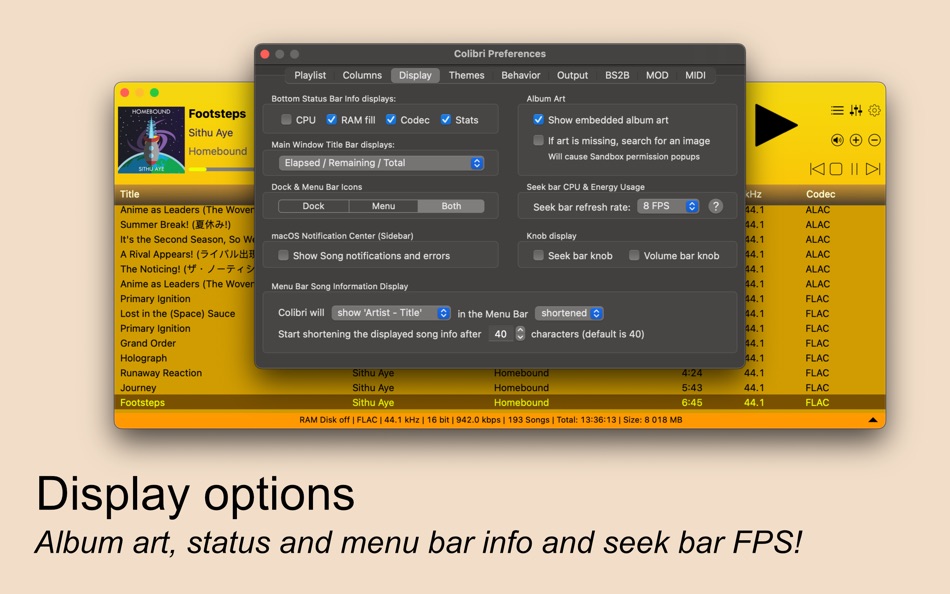
Displays album art - Colibri displays embedded cover art for FLAC files and ID3/iTunes artwork metadata for other files (mainly M4A / ALAC and MP3). When that yields not results then it looks in the folder where the current song resides for a cover art image.
Resides in your Menu Bar
Colibri can place an unobtrusively small icon in the Menu Bar for easy access and playlist control
Integrates with Finder
Colibri conforms all of Apple's strict requirements
Adjusts to your Display
Colibri's interface elements scale themselves nicely on every screen resolution and pixel density.
Ad
Στιγμιότυπα οθόνης




Ιστορία τιμών
- Σήμερα: $19.99
- Ελάχιστο: $1.99
- Μέγιστο: $19.99
Παρακολούθηση τιμών
Τι νέο υπάρχει
- Εκδοχή: 2.2.0
- Ενημερώθηκε:
- Thank you for using Colibri! This update fixes many reported issues and thoroughly cleans up the birdcage. Happy listening!
Fixes:
- an audio hiccup that could occur during song transition in CoreAudio mode
- DSD song change in PCM data sending mode doesn't apply EQ settings
- DSD song change in PCM data sending mode lowers the system volume
- playing a DSD song after a non-DSD song in DoP/DoPA data sending modes can cause noise to be played
- seeking using the left/right arrow keys can sometimes fail when a DSD song is played in DoP/DoPA mode
- multiple crashes during song loading while AirPlay mode is active
- multiple crashes when adding many folders at once from different storage media
- folders with multiple nested levels of Cue Sheets don't load recursively
- when Cue sheet reading fails, the fallback folder reading isn't triggered
- files without file extension are loaded when adding a folder
- adding a Cue sheet after restarting Colibri can mess up previously added Cue sheet song processed metadata
- when file metadata reading fails (or if it is empty), the filename is not shown
- multiple Sandbox related issues
Updates:
- FLAC module to 2.4.5.4
- WavPack module to 2.4.7.4
- Cue sheet processing now uses multi-pass file encoding detection
- reduced memory usage during AirPlay loop 'current song' mode
- removed deprecated CoreAudio calls
- Sandbox bookmarks are now refreshed when becoming stale
Πρόσθετες πληροφορίες
- Ημερομηνία έκδοσης:
- Κατηγορία:
macOS Εφαρμογές›Μουσική - Λειτουργικό σύστημα:
macOS,macOS 10.13 και νεότερες εκδόσεις - Μέγεθος:
19 Mb - Υποστηριζόμενη γλώσσα:
English - Αξιολόγηση περιεχομένου:
4+ - Mac App Store Εκτίμηση:
0 - Ιστοσελίδα:
 https://colibri-lossless.com
Προγραμματιστής
- Gabor Hargitai
- Πλατφόρμες: macOS Εφαρμογές (3)
- Λίστες: 1 + 2
- Βαθμοί: 1 + 0 ¡
- Κατατάξεις: 0
- Σχόλια: 0
- Εκπτώσεις: 0
- Βίντεο: 0
- RSS: Εγγραφή
Λίστες (1)
- Colibri

Βαθμοί (0)
0 ☹️
Κατατάξεις (0)
0 ☹️
Σχόλια (0)
Γίνε ο πρώτος που θα σχολιάσει 🌟
«Colibri». Πλατφόρμα: macOS. Κατηγορία: Μουσική. Προγραμματιστής: «Gabor Hargitai». Πρώτη κυκλοφορία: . Τελευταία ενημέρωση: . Τρέχουσα τιμή: $19.99. Χαμηλότερη καταγεγραμμένη τιμή: $1.99 (). Υψηλότερη καταγεγραμμένη τιμή: $19.99 (). Αυτός ο τίτλος δεν έχει λάβει ακόμη αξιολογήσεις ή κριτικές στο AppAgg. Λίστες: δημόσιες 1, ιδιωτικές 1. Διαθέσιμες γλώσσες: English. Το AppAgg παρακολουθεί το ιστορικό τιμών, τις αξιολογήσεις και τα σχόλια των χρηστών για «Colibri». Ακολουθήστε μελλοντικές εκπτώσεις και ενημερώσεις μέσω RSS. Το AppAgg δεν φιλοξενεί εφαρμογές ούτε διανέμει λογισμικό. Όλα τα εμπορικά σήματα, τα λογότυπα και τα στιγμιότυπα οθόνης ανήκουν στους αντίστοιχους κατόχους τους.
Colibri URL μικρού μήκους: Αντιγράφηκε!- 🌟 Κοινή χρήση
- Mac App Store
Παρόμοια
-
- Colibri DAC DSD Test
- macOS Εφαρμογές: Μουσική Με: Gabor Hargitai
- Δωρεάν
- Λίστες: 0 + 0 0 0
- Βαθμοί: 1 + 0 Εκδοχή: 2.1 A simple app that enables you to try different DSD playback modes such as DoP, DoPA and PCM. Simply load a DSD/FLAC/WAVE file, select your audio device and hit one of the playback ... ⥯
-
- iBal Rotary
- macOS Εφαρμογές: Παραγωγικότητα Με: AirSpayce
- $17.99
- Λίστες: 0 + 0 0 0
- Βαθμοί: 0 + 0 Εκδοχή: 1.105 iBal Rotary is a dedicated Helicopter weight and balance app for Mac OSX. Designed from the ground up for professional and private helicopter pilots, it provides for quick and easy ... ⥯