
Đã lưu
Chọn tên sẽ hiển thị trong menu Đã lưu của bạn.
Làm xong!
| Nhà phát triển: | Tapbots (4) | ||
| Giá bán: | $12.99 | ||
| Xếp hạng: | 0 | ||
| Bình luận: | 0 Đăng bình luận | ||
| Danh sách: | 4 + 4 | ||
| Điểm: | 4 + 0 ¡ | ||
| Mac App Store | |||
Mô tả

Clipboard History:
Pastebot saves everything you copy so that you can quickly recall them in the future. Save and organize frequently-used clippings into custom pasteboards and create keyboard shortcuts to access pasteboards and paste specific clippings.
Powerful Filters:
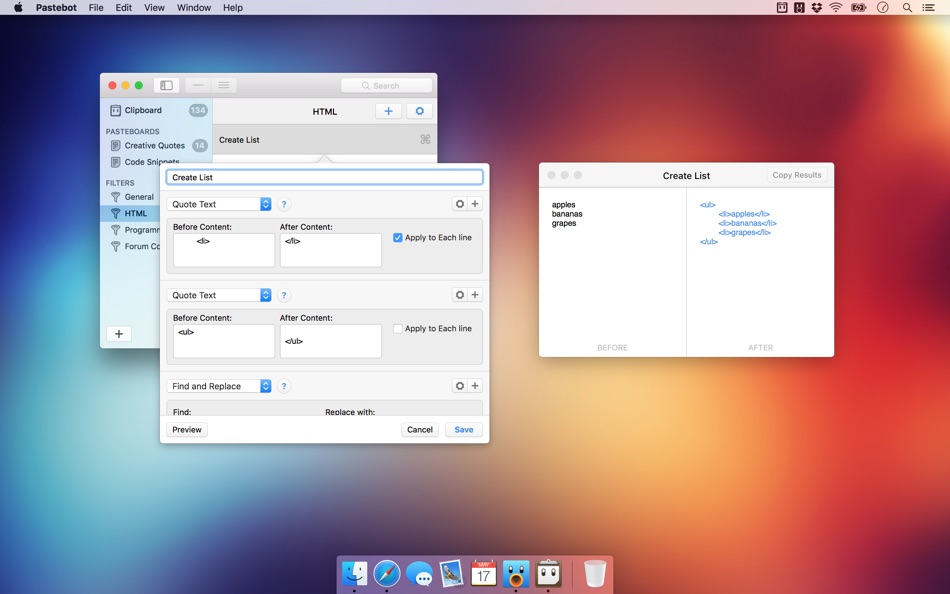
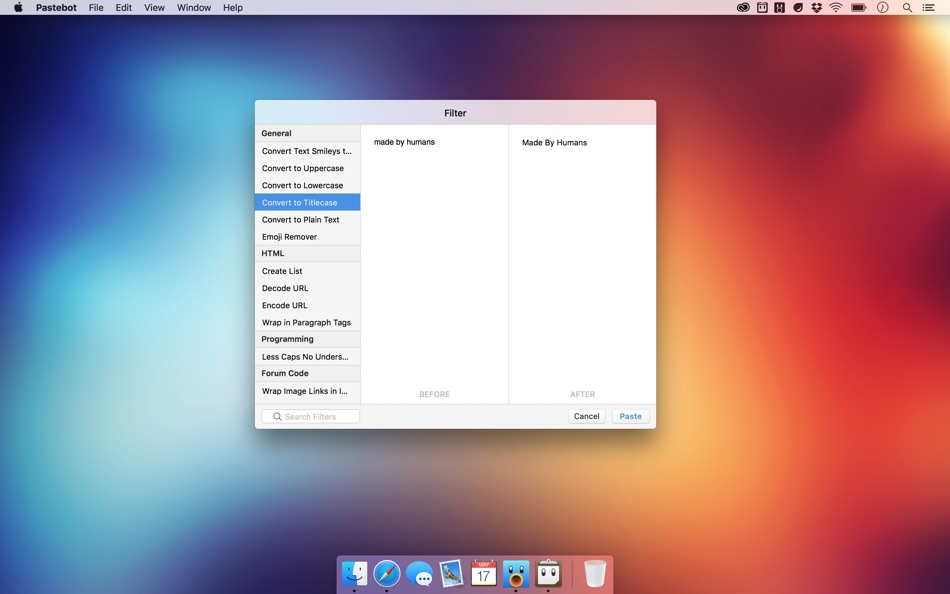
Build powerful filters with a live preview and apply them as you paste. Create keyboard shortcuts to quickly paste using your filters and export your filters to share with other Pastebot users.
Quick Paste Menu:
Pastebot is there when you need it and invisible when you don’t. Quickly access your clippings from any app and search, preview, or filter clippings before pasting. You can even set the order of clippings to paste in sequence.
iCloud Sync:
With iCloud enabled, your main clipboard, custom pasteboards and filters sync across all of your computers running Pastebot. Your clipboard and filters will be on every mac you work on.
Custom Pasteboards:
Create custom pasteboard groups to organize important clippings you want to save and re-use. Assign keyboard shortcuts to clippings you use most often.
Works with Universal Clipboard:
macOS Sierra’s Universal Clipboard works alongside Pastebot. Copy a clipping in Pastebot and paste it on your iOS device via Universal Clipboard.
Full Screen Support:
Pastebot works in full-screen and split-screen mode. Running in split-screen mode allows you to use Pastebot as a scratch pad.
Options:
Choose from various quick paste window styles to suit your preferences, always paste in plain text, enable release-to-paste and more.
Blacklist:
There are apps you copy from that you never want stored in Pastebot. Just add that application to the blacklist and Pastebot will ignore it.
Search:
Find a clipping quickly with Pastebot’s powerful search capabilities. Search based on content or metadata. You can search by application, date, data type and more.
Keyboard Shortcuts:
Pastebot features many keyboard shortcuts to satisfy any copy & paste maestro. Paste the previous item on the clipboard or paste the current clipping while applying the last used filter.
Ad
Ảnh chụp màn hình



Lịch sử giá
- Giá hiện tại: $12.99
- Tối thiểu: $9.99
- Tối đa: $12.99
Theo dõi giá
Thông tin bổ sung
- Ngày phát hành:
- Danh mục:
macOS Ứng dụng›Năng suất - HĐH:
macOS,macOS 10.14 trở lên - Kích thước:
9 Mb - Ngôn ngữ được hỗ trợ:
English - Xếp hạng nội dung:
4+ - Mac App Store Xêp hạng:
0 - Trang web:
 https://tapbots.com/pastebot
Nhà phát triển
- Tapbots
- Nền tảng: iOS Ứng dụng (3) macOS Ứng dụng (1)
- Danh sách: 5 + 5
- Điểm: 5 + 15,025 ¡
- Xếp hạng: 0
- Bình luận: 0
- Giảm giá: 0
- Video: 0
- RSS: Đăng ký
Danh sách (4)
- Pastebot




Điểm (4)
-

- 61 Andrey
- +1
-
- 3 Sergey
- +1
-
- 61 FUKASHI NOBE
- +1
-
- 2,979 바람처어럼
- +1


Xếp hạng (0)
0 ☹️
Bình luận (0)
Hãy là người đầu tiên nhận xét 🌟
«Pastebot». Nền tảng: macOS. Thể loại: Năng suất. Nhà phát triển: «Tapbots». Bản phát hành đầu tiên: . Cập nhật lần cuối: . Giá hiện tại: $12.99. Giá thấp nhất được ghi nhận: $9.99 (). Giá cao nhất được ghi nhận: $12.99 (). Tiêu đề này chưa nhận được xếp hạng hoặc đánh giá trên AppAgg. Danh sách: công khai 4, riêng tư 4. Điểm được theo dõi: xác nhận 4, gián tiếp 0. Ngôn ngữ có sẵn: English. AppAgg theo dõi lịch sử giá, xếp hạng và phản hồi của người dùng cho «Pastebot». Theo dõi ưu đãi và cập nhật trong tương lai qua RSS. AppAgg không lưu trữ ứng dụng hoặc phân phối phần mềm. Tất cả các nhãn hiệu, logo và ảnh chụp màn hình đều thuộc về chủ sở hữu tương ứng.
Pastebot URL ngắn: Đã sao chép!- 🌟 Chia sẻ
- Mac App Store
Tương tự
-
- VMTek
- macOS Ứng dụng: Năng suất Bởi: Cyaneous, Inc.
- * Miễn phí
- Danh sách: 1 + 2 0 0
- Điểm: 23 Phiên bản: 3.1.0 VMTek is the Mac virtualization platform you've been waiting for. Run multiple instances and versions of macOS*, Linux and other operating systems side-by-side on your Mac with ease. ... ⥯
-
- NotchBox - Easier Drag & Drop
- macOS Ứng dụng: Năng suất Bởi: 裕涛 兰
- * Miễn phí
- Danh sách: 2 + 1 0 0
- Điểm: 21 Phiên bản: 1.1.68 NotchBox Turn Your Mac s Notch into a Dynamic Hub NotchBox transforms your Mac s notch into a lively, interactive space just like the iPhone s Dynamic Island. From music playback to ... ⥯
-
- Mountain Duck
- macOS Ứng dụng: Năng suất Bởi: David Kocher
- * Miễn phí
- Danh sách: 2 + 6 0 0
- Điểm: 19 Phiên bản: 5.2.1 Mountain Duck lets you mount server and cloud storage as a disk on your desktop. With Smart Synchronization, files are synchronized to the local disk when opened to allow offline usage ⥯
-
- Soonie - Meeting Reminder
- macOS Ứng dụng: Năng suất Bởi: Unit Numberfive oHG
- Miễn phí
- Danh sách: 0 + 2 0 0
- Điểm: 17 Phiên bản: 3.1 You know how it goes: suddenly your meeting is here, and you were deep into something else. Soonie quietly lives in your Mac s menu bar and gently pops up to show you how much time you ⥯
- -100%
- ClipBoardy: Copy & Paste Tool
- macOS Ứng dụng: Năng suất Bởi: Tristan Jarrett
- ▼ Miễn phí
$0.99-100% - Danh sách: 0 + 1 0 0
- Điểm: 15 Phiên bản: 1.2.0 ClipBoardy is a lightweight, beautifully simple clipboard manager for macOS that keeps everything you copy exactly where you need it, ready instantly without breaking your focus. ... ⥯
-
- Bridges Link Formatting
- macOS Ứng dụng: Năng suất Bởi: Jonathan Ruiz
- Miễn phí
- Danh sách: 1 + 1 0 0
- Điểm: 14 Phiên bản: 2.1 Bridges is the best way to collect custom formatted links. Saving a link for your podcast, newsletter, or blog post has never been easier. If you ve ever had the task to collect links ... ⥯
-
- SoundPaste
- macOS Ứng dụng: Năng suất Bởi: Maxim Kuzmenko
- * Miễn phí
- Danh sách: 0 + 3 0 0
- Điểm: 14 Phiên bản: 1.6.0 Introducing SoundPaste the simple, revolutionary app that lets you copy and paste sound. Tired of saving and dragging sound files around? With SoundPaste, just record and paste. It s ... ⥯
-
- Awesome Copy Clipboard History
- macOS Ứng dụng: Năng suất Bởi: Evan Jones
- * Miễn phí
- Danh sách: 0 + 1 0 0
- Điểm: 14 Phiên bản: 5.18 AwesomeCopy is a full-featured clipboard history manager built for Apple users who value speed, design, and privacy. It keeps track of everything you copy - text, images, links, files, ⥯
-
- LaunchPalette – App Switcher
- macOS Ứng dụng: Năng suất Bởi: Seungwoo Choe
- * Miễn phí
- Danh sách: 0 + 3 0 0
- Điểm: 13 Phiên bản: 1.14 Switch between apps and projects in milliseconds, without breaking your flow. LaunchPalette brings keyboard-first navigation to macOS, letting you instantly jump to any app, project, ... ⥯
-
- Clipboard Manager - CopyQ
- macOS Ứng dụng: Năng suất Bởi: Umut Acerbatimur
- * Miễn phí
- Danh sách: 0 + 1 0 0
- Điểm: 13 Phiên bản: 1.5.2 Seeing your clipboard has never been easier. Press Option Command V and boom! your entire history appears. CopyQ stores everything you copy or cut, text, images, links, files and ... ⥯
-
- Unified Calendar Sync
- macOS Ứng dụng: Năng suất Bởi: Paulo Soares
- * Miễn phí
- Danh sách: 0 + 1 0 0
- Điểm: 13 Phiên bản: 1.3.1 Unified Calendar Sync is a lightweight macOS menu bar app that creates and maintains a dedicated unified calendar acting as your single source of truth. The app syncs events from ... ⥯
-
- Grila • calendar for typers
- macOS Ứng dụng: Năng suất Bởi: THE LOW-TECH GUYS SRL
- Miễn phí
- Danh sách: 0 + 1 0 0
- Điểm: 13 Phiên bản: 2.0.4 Grila is a keyboard-driven instantly available calendar. The calendar can be shown instantly using ⌥ Right Option + \ (backslash), which is configurable to any other hotkey. Navigating ⥯