
Tersimpan
Pilih nama yang akan ditampilkan di menu Tersimpan Anda.
Selesai!
| Pengembang: | Tien Thinh Vu (34) | ||
| Harga: | $13.99 | ||
| Peringkat: | 0 | ||
| Komentar: | 0 Kirimkan komentar | ||
| Skor: | $4,440 | ||
| Daftar: | 1 + 0 | ||
| Poin: | 0 + 0 ¡ | ||
| +1 Poin | |||
Deskripsi

Functions of the application:
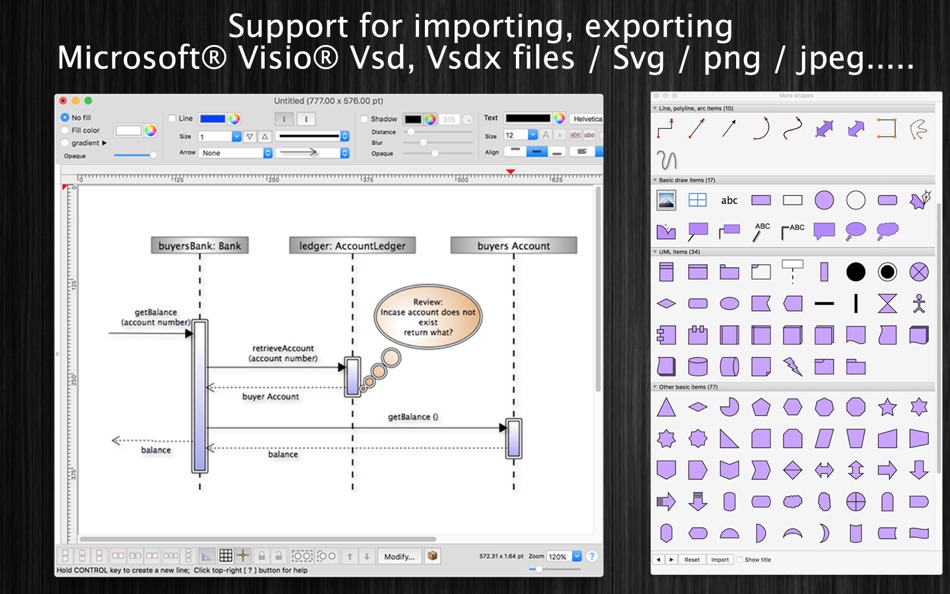
+ Support VISIO formats: VSDX, VSDM (Microsoft Visio Format)
+ IMPORT old VISIO formats: VSD, VSS (Import only)
+ Support many other formats: svg, png, jpeg, multi-pages tiff, pdf...
+ Sync document files to iCloud
+ SMART LINE / CONNECTOR:
Smart Line if attached to a shape will automatically change position every time when the main shape is moved, resized.
+ BASIC SHAPE (new):
There are 92 shapes to add to your diagram. You could add/change text to display inside the shape.
Drawing UML activity diagram will be easier using these shapes.
+ PRE-DEFINED IMAGES (new):
There are 1056 predefined nice images shapes for you to add to your diagram.
Shape types are as following:
- Computer
- Network
- Office
- Life
- Traffic
+ OVER 2000 BEAUTIFUL SYMBOLS:
More than that, there are over 2000 beautiful symbols for you to add to the diagram.
+ ADD IMAGE:
You could add any image file (support file type: gif, jpeg, png, bmp, pict, tiff) to display as an item inside the application.
Image file could be shown in following modes: Stretch / Fit inside bound / Fit outside bound.
The application also allows to DRAG/DROP many image files directly from Finder or pasted image from clipboard to current editing window to add them to the diagram.
+ GENERATE UML CLASS DIAGRAM from C++/JAVA SOURCE:
By dragging C++ header(*.h) or Java files, folders into the diagram window, the application will auto-generate UML class diagram for you. (Accurate rate: 90%)
+ ALIGN MULTIPLE ITEMS:
Select many items then do right-click mouse to select alignment options as following:
(also allow to auto-align with another objects)
- Left
- Right
- Top
- Bottom
- Center (Horizontal or Vertical)
- Distribute ....
+ OPEN/SAVE to "*.UMD3" file:
UMD3 (*.umd3) is the new file type created only for this application.
Press “Cmd + S" to save current diagram to an UMD3 file so that you could load it later for editing.
+ EXPORT TO IMAGE FILE:
Press "Cmd + E" to export current diagram to an image file with format of VSDX, SVG, PDF, TIFF or PNG or JPEG.
+ SUPPORT PRINT:
Press "Cmd + P" to print current document.
+ CAPTURE TO CLIPBOARD:
Press "Cmd + 4" or click on Capture button to export current diagram image to clipboard, then you could paste that image to another application.
Example: Open [Preview] application, press "Cmd + N" to paste above captured image to view or to save to an image file.
Of course, you could paste that image to Excel, Word application too.
-----------------
Other functions:
- Unlimited Undo/Redo (shortcut key: Cmd-Z / Shift-Cmd-Z)
- Copy / Paste (shortcut key: Cmd-C / Cmd-V)
- Duplicate select items (shortcut key: Cmd-D)
- Group / Ungroup Items (shortcut key: Cmd-G / Shift-Cmd-G)
- Lock/Unlock items position (shortcut key: Cmd-L / Shift-Cmd-L)
- Rotate left, rotate right (shortcut key: Cmd-J / Cmd-K)
- Press Cmd+T to move, resize group of items temporary
- Short cut key CMD+B, CMD+I to change text to Bold or Italic
- User could drag right mouse on a current shape to create a new attached object with line
- Double click on the canvas to create a new text box item
- Allow to switch current select object to another shape type
- Allow to change selected items display order
- Scale size of select items
- Path boolean operations supported
- Flip select items
- Shadow supported
- Snap to Grid
- Auto Align with another object when resize or move
- Change display order
- Export to png, jpeg, tiff, pdf image file (shortcut key: Cmd-E)
- Print supported (shortcut key: Cmd-P)
- Customizable color / Font / Size / Line Type
- Support gradient fill to shapes
- Customize measure unit and scale (point, cm, mm, inch….)
- Allow to Export image in 300dpi
- Allow user to select items then save them to Favorites list to reuse later
Jepretan layar


Sejarah Harga
- Harga saat ini: $13.99
- Minimal: $13.99
- Maksimum: $13.99
Pantau harga
Skor AppAgg
Skor estimasi untuk aplikasi ini
$4,440
Skor yang lebih tinggi biasanya berarti sinyal yang lebih kuat di AppAgg.
Berdasarkan: 🔥 popularitas · ⭐ rating pengguna · 🕒 kebaruan · 🏷️ promo · 🏬 data toko · 👥 aktivitas komunitas
Skor ini hanya untuk tujuan informasi. Ini bukan harga nyata, penawaran untuk menjual, atau valuasi pasar.
URL singkat: Disalin!
Ad
Yang Baru
- Versi: 5.7
- Terakhir diperbarui:
- - Improve UI
- Fix bugs
Previous updates:
- Support Apple Silicon
- Support macOS 11 Big Sur
- Support Find/Replace text
- Support multi-canvas (multi-tabs) for each document
- Improve Grid setting, Snap setting (add minor step setting...)
- Improve polyline object (support curve segment...)
- "CMD-9" to change zoom to fit to canvas size
- Allow to change arrow size of each line
- Allow to change theme color of all items inside current document
- Support fill setting: Pattern
- Add modify functions: Copy/Paste properties
- Add modify functions: Apply Gradient fill to multi objects
- Unit setting for each document: each document support different unit setting
- Allow to resize, move sub-object (which is inside a group) individually
- Allow to resize canvas from all directions
- User can move, resize object to outside of canvas's printable area
- Improve app's performance
- Support rich text format
- Allow to add hyperlink/description to shapes
- Hold SPACE-BAR to maneuver/scroll around document
- Hold ALT key then drag items to clone/duplicate
- Hold 'A' key then drag mouse to create a new smart connection line
- Add "keep proportion ratio" property
- Improve ColorWell UI
- Support rotated table
- Press shortcut key 'F' to edit shape's path, points
- Add more text-align setting
- Add 'Merge layers' function
- Improve UI of "More Shapes" dialog
- Support multi-languages: English, Deutsch, Français, 日本語, 한국어, Español, Português, Čeština, Dansk, Suomi, Italiano, Nederlands, Norsk, Polski, Русский, Svenska, ไทย, Türkçe, Tiếng Việt, 中文(中国), 中文(台灣)
- Improve print dialog (add Detail controls to print dialog)
- Allow users to copy/paste selected layer
- Add Decimal Precision setting
- Add more arrow types (architectural ticks....)
- Support sync to iCloud
- Import from Visio's VSD, VSS format
- Import multi-pages tiff format
Info tambahan
- Tanggal rilis:
- Kategori:
macOS Aplikasi›Grafis & Desain - OS:
macOS,macOS 10.11 dan yang lebih tinggi - Ukuran:
82 Mb - Bahasa yang didukung:
Chinese,Czech,Danish,Dutch,English,Finnish,French,German,Italian,Japanese,Korean,Norwegian,Polish,Portuguese,Russian,Spanish,Swedish,Thai,Turkish,Vietnamese - Rating Konten:
4+ - Mac App Store Peringkat:
0 - Situs Web:
 https://vutienthinh.wordpress.com/xdiagram/
 https://vutienthinh.wordpress.com/xdiagram/
Pengembang
- Tien Thinh Vu
- Platform: iOS Aplikasi (4) macOS Aplikasi (30)
- Daftar: 6 + 6
- Poin: 23 + 23 ¡
- Peringkat: 0
- Komentar: 0
- Diskon: 0
- Video: 0
- RSS: Berlangganan
Daftar (1)
- xDiagram

Poin (0)
0 ☹️
Peringkat (0)
0 ☹️
Komentar (0)
Jadilah yang pertama berkomentar 🌟
«xDiagram». Platform: macOS. Kategori: Grafis & Desain. Pengembang: «Tien Thinh Vu». Rilis pertama: . Pembaruan terakhir: . Harga saat ini: $13.99. Harga terendah yang tercatat: $13.99. Harga tertinggi yang tercatat: $13.99. Judul ini belum mendapat rating atau ulasan di AppAgg. Daftar: publik 1, pribadi 0. Bahasa yang tersedia: Chinese, Czech, Danish, Dutch, English, Finnish, French, German, Italian, Japanese, Korean, Norwegian, Polish, Portuguese, Russian, Spanish, Swedish, Thai, Turkish, Vietnamese. AppAgg melacak riwayat harga, peringkat, dan umpan balik pengguna «xDiagram». Ikuti diskon dan pembaruan di masa mendatang melalui RSS. AppAgg tidak menghosting aplikasi atau mendistribusikan perangkat lunak. Semua merek dagang, logo, dan tangkapan layar adalah milik pemiliknya masing-masing.
xDiagram URL singkat: Disalin!- 🌟 Bagikan
- Mac App Store
Serupa
-
- Art Master
- macOS Aplikasi: Grafis & Desain Oleh: Splash Colors
- * Gratis
- Daftar: 0 + 2 0 0
- Poin: 35 + 0 Skor: $10k Versi: 3.1.1 Art Master Your All-in-One Image Viewer & Graphic Converter for Mac Fast Reliable Powerful Art Master is the easiest and fastest way to open, view, and convert images and graphics on ... ⥯
-
- Initiater
- macOS Aplikasi: Grafis & Desain Oleh: Abdusodik Saidov
- * Gratis
- Daftar: 1 + 3 0 0
- Poin: 30 + 0 Skor: $9k Versi: 1.1.4 Capture Text and Graphics! Upgrade your productivity to the next level! Create text and graphic notes from captured parts! Initiater is an easy to use small macOS OCR (Optical ... ⥯
-
- PixelStyle Photo Editor
- macOS Aplikasi: Grafis & Desain Oleh: 秀英 朱
- Gratis
- Daftar: 0 + 2 0 0
- Poin: 19 + 0 Skor: $10k Versi: 4.5.0 The complete Mac photo editor for creators, designers, and everyday users. Multi-layer editing, powerful brushes, and smart AI tools all in one app. No subscription. AI FEATURES * AI ... ⥯
-
- Pixen
- macOS Aplikasi: Grafis & Desain Oleh: Furnace Creek Software LLC
- * Gratis
- Daftar: 1 + 2 0 0
- Poin: 16 + 0 Skor: $10k Versi: 6.1.2 Pixen is a native pixel art editor designed for working with low-resolution raster art, such as those 8-bit sprites found in old-school video games. Pixen packs all the tools pixel ... ⥯
-
- PhotoStage Professional
- macOS Aplikasi: Grafis & Desain Oleh: NCH Software
- * Gratis
- Daftar: 0 + 1 0 0
- Poin: 13 + 0 Skor: $7k Versi: 12.11 PhotoStage Professional Whether a home project or a business presentation, PhotoStage Professional allows you to create a dynamic slideshow from your photos and video clips in a quick ... ⥯
-
- Pixave
- macOS Aplikasi: Grafis & Desain Oleh: YoungHo Kim
- Gratis
- Daftar: 3 + 3 0 0
- Poin: 10 + 0 Skor: $5k Versi: 2.3.13 ** BEST OF 2015 APP BY APPLE ** ** FEATURED WORLDWIDE 2015, 2016 AS "BEST NEW APPS" BY APPLE ** Stay Inspired. There is a whole world that we get from images. A single picture can fill ⥯
-
- Art Text 4 - AI Graphic Design
- macOS Aplikasi: Grafis & Desain Oleh: Belight Software, ltd
- * Gratis
- Daftar: 3 + 3 0 0
- Poin: 9 + 0 Skor: $14k Versi: 4.5.9 Design eye-catching text based graphics, logos, postcards and greetings with Art Text - a graphic design app that powers up typography and lettering in your desktop publishing, social ... ⥯
-
- Master Dock
- macOS Aplikasi: Grafis & Desain Oleh: SECKIN SEFA DURASI
- * Gratis
- Daftar: 0 + 1 0 0
- Poin: 9 + 0 Skor: $5k Versi: 1.9 MasterDock revolutionizes how you interact with your dock. Whether you're a power user seeking maximum productivity or someone who loves personalizing their workspace, MasterDock ... ⥯
-
- Harmony of Colors
- macOS Aplikasi: Grafis & Desain Oleh: Herve Noury
- Gratis
- Daftar: 2 + 2 0 0
- Poin: 9 + 0 Skor: $7k Versi: 3.2 "Harmony of Colors" is a software program designed for designers, architects, graphic designers, artists, and anyone who needs a tool to choose and experiment with color palettes in ... ⥯
-
- SOCSS
- macOS Aplikasi: Grafis & Desain Oleh: toshifumi niwa
- Gratis
- Daftar: 0 + 1 0 0
- Poin: 8 + 0 Skor: $5k Versi: 1.6.6 SOCSS is a powerful feature-packed 2D vector drawing software, so that it can be used for Drawing, Landscape design, Newsletters, Brochures, Graphs & Charts, fine Illustrations, Office ⥯
Anda mungkin juga suka
Baru dilihat
Terakhir diperbarui:
Operator penelusuran yang dapat digunakan dengan AppAgg