
保存済み
保存済みメニューに表示する名前を選択してください。
完了
| デベロッパー: | Tien Thinh Vu (34) | ||
| 価格: | $13.99 | ||
| 評価: | 4,510 | ||
| ランキング: | 0 | ||
| コメント: | 0 コメントを投稿する | ||
| リスト: | 1 + 0 | ||
| ポイント: | 0 + 0 ¡ | ||
| +1 ポイント | |||
説明

Functions of the application:
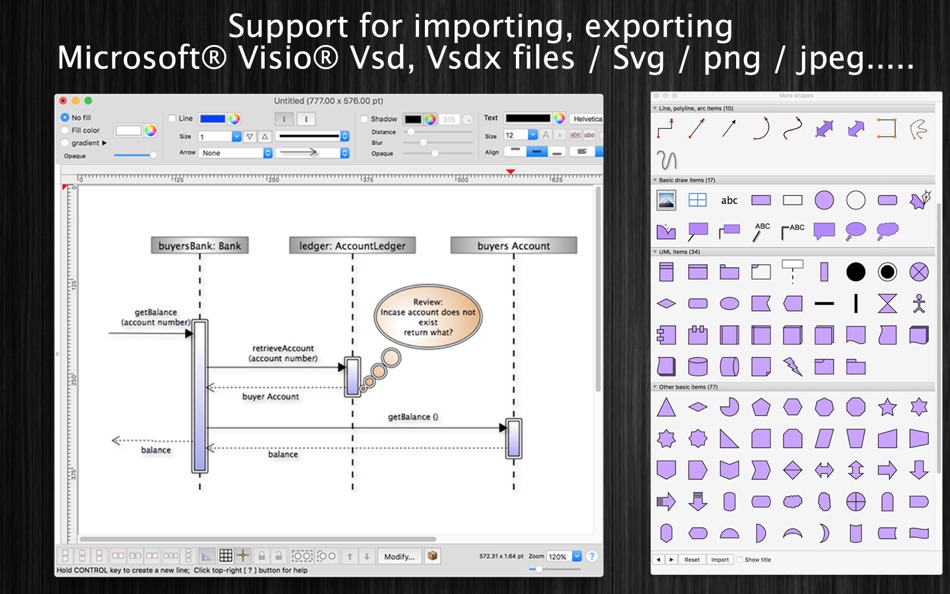
+ Support VISIO formats: VSDX, VSDM (Microsoft Visio Format)
+ IMPORT old VISIO formats: VSD, VSS (Import only)
+ Support many other formats: svg, png, jpeg, multi-pages tiff, pdf...
+ Sync document files to iCloud
+ SMART LINE / CONNECTOR:
Smart Line if attached to a shape will automatically change position every time when the main shape is moved, resized.
+ BASIC SHAPE (new):
There are 92 shapes to add to your diagram. You could add/change text to display inside the shape.
Drawing UML activity diagram will be easier using these shapes.
+ PRE-DEFINED IMAGES (new):
There are 1056 predefined nice images shapes for you to add to your diagram.
Shape types are as following:
- Computer
- Network
- Office
- Life
- Traffic
+ OVER 2000 BEAUTIFUL SYMBOLS:
More than that, there are over 2000 beautiful symbols for you to add to the diagram.
+ ADD IMAGE:
You could add any image file (support file type: gif, jpeg, png, bmp, pict, tiff) to display as an item inside the application.
Image file could be shown in following modes: Stretch / Fit inside bound / Fit outside bound.
The application also allows to DRAG/DROP many image files directly from Finder or pasted image from clipboard to current editing window to add them to the diagram.
+ GENERATE UML CLASS DIAGRAM from C++/JAVA SOURCE:
By dragging C++ header(*.h) or Java files, folders into the diagram window, the application will auto-generate UML class diagram for you. (Accurate rate: 90%)
+ ALIGN MULTIPLE ITEMS:
Select many items then do right-click mouse to select alignment options as following:
(also allow to auto-align with another objects)
- Left
- Right
- Top
- Bottom
- Center (Horizontal or Vertical)
- Distribute ....
+ OPEN/SAVE to "*.UMD3" file:
UMD3 (*.umd3) is the new file type created only for this application.
Press “Cmd + S" to save current diagram to an UMD3 file so that you could load it later for editing.
+ EXPORT TO IMAGE FILE:
Press "Cmd + E" to export current diagram to an image file with format of VSDX, SVG, PDF, TIFF or PNG or JPEG.
+ SUPPORT PRINT:
Press "Cmd + P" to print current document.
+ CAPTURE TO CLIPBOARD:
Press "Cmd + 4" or click on Capture button to export current diagram image to clipboard, then you could paste that image to another application.
Example: Open [Preview] application, press "Cmd + N" to paste above captured image to view or to save to an image file.
Of course, you could paste that image to Excel, Word application too.
-----------------
Other functions:
- Unlimited Undo/Redo (shortcut key: Cmd-Z / Shift-Cmd-Z)
- Copy / Paste (shortcut key: Cmd-C / Cmd-V)
- Duplicate select items (shortcut key: Cmd-D)
- Group / Ungroup Items (shortcut key: Cmd-G / Shift-Cmd-G)
- Lock/Unlock items position (shortcut key: Cmd-L / Shift-Cmd-L)
- Rotate left, rotate right (shortcut key: Cmd-J / Cmd-K)
- Press Cmd+T to move, resize group of items temporary
- Short cut key CMD+B, CMD+I to change text to Bold or Italic
- User could drag right mouse on a current shape to create a new attached object with line
- Double click on the canvas to create a new text box item
- Allow to switch current select object to another shape type
- Allow to change selected items display order
- Scale size of select items
- Path boolean operations supported
- Flip select items
- Shadow supported
- Snap to Grid
- Auto Align with another object when resize or move
- Change display order
- Export to png, jpeg, tiff, pdf image file (shortcut key: Cmd-E)
- Print supported (shortcut key: Cmd-P)
- Customizable color / Font / Size / Line Type
- Support gradient fill to shapes
- Customize measure unit and scale (point, cm, mm, inch….)
- Allow to Export image in 300dpi
- Allow user to select items then save them to Favorites list to reuse later
スクリーンショット


Ad
価格履歴
- 現在の価格: $13.99
- 最小値: $13.99
- 最大: $13.99
料金のチェック
AppAgg評価
4,510
AppAgg推定評価:
xDiagram
4,510 シルバー
評価が高いほど、AppAgg 上のシグナルが強い傾向があります。
基準: 🔥 人気 · ⭐ ユーザー評価 · 🕒 新しさ · 🏷️ セール · 🏬 ストアデータ · 👥 コミュニティ活動
最新のAppAggデータに基づいて毎日再計算されます。
短縮 URL: コピーしました!
新機能
- バージョン: 5.7
- 最終更新:
- - Improve UI
- Fix bugs
Previous updates:
- Support Apple Silicon
- Support macOS 11 Big Sur
- Support Find/Replace text
- Support multi-canvas (multi-tabs) for each document
- Improve Grid setting, Snap setting (add minor step setting...)
- Improve polyline object (support curve segment...)
- "CMD-9" to change zoom to fit to canvas size
- Allow to change arrow size of each line
- Allow to change theme color of all items inside current document
- Support fill setting: Pattern
- Add modify functions: Copy/Paste properties
- Add modify functions: Apply Gradient fill to multi objects
- Unit setting for each document: each document support different unit setting
- Allow to resize, move sub-object (which is inside a group) individually
- Allow to resize canvas from all directions
- User can move, resize object to outside of canvas's printable area
- Improve app's performance
- Support rich text format
- Allow to add hyperlink/description to shapes
- Hold SPACE-BAR to maneuver/scroll around document
- Hold ALT key then drag items to clone/duplicate
- Hold 'A' key then drag mouse to create a new smart connection line
- Add "keep proportion ratio" property
- Improve ColorWell UI
- Support rotated table
- Press shortcut key 'F' to edit shape's path, points
- Add more text-align setting
- Add 'Merge layers' function
- Improve UI of "More Shapes" dialog
- Support multi-languages: English, Deutsch, Français, 日本語, 한국어, Español, Português, Čeština, Dansk, Suomi, Italiano, Nederlands, Norsk, Polski, Русский, Svenska, ไทย, Türkçe, Tiếng Việt, 中文(中国), 中文(台灣)
- Improve print dialog (add Detail controls to print dialog)
- Allow users to copy/paste selected layer
- Add Decimal Precision setting
- Add more arrow types (architectural ticks....)
- Support sync to iCloud
- Import from Visio's VSD, VSS format
- Import multi-pages tiff format
情報
- リリース日:
- カテゴリ:
macOS アプリ›グラフィック&デザイン - オペレーティング システム:
macOS,macOS 10.11 以上 - サイズ:
82 Mb - サポートされる言語:
Chinese,Czech,Danish,Dutch,English,Finnish,French,German,Italian,Japanese,Korean,Norwegian,Polish,Portuguese,Russian,Spanish,Swedish,Thai,Turkish,Vietnamese - コンテンツのレーティング:
4+ - Mac App Store 評価:
0
 https://vutienthinh.wordpress.com/xdiagram/
デベロッパー
リスト (1)
- xDiagram

ポイント (0)
0 ☹️
ランキング (0)
0 ☹️
コメント (0)
最初にコメントしてください 🌟
概要
xDiagram 短縮 URL: コピーしました!- 🌟 シェア
- Mac App Store
«xDiagram». プラットフォーム: macOS. カテゴリ: グラフィック&デザイン. 開発者: «Tien Thinh Vu». 最初のリリース: . 最終更新日: . 現在の価格: $13.99. 記録された最低価格: $13.99. 記録された最高価格: $13.99. このタイトルはまだ AppAgg で評価やレビューを受けていません。 リスト: 公開: 1, 非公開: 0. 利用可能な言語: Chinese, Czech, Danish, Dutch, English, Finnish, French, German, Italian, Japanese, Korean, Norwegian, Polish, Portuguese, Russian, Spanish, Swedish, Thai, Turkish, Vietnamese. AppAgg は «xDiagram»の価格履歴、評価、ユーザーフィードバックを追跡します。 AppAgg はアプリケーションをホストしたり、ソフトウェアを配布したりしません。 すべての商標、ロゴ、スクリーンショットはそれぞれの所有者に帰属します。 今後の値下げと更新をフォロー: RSS で確認できます
類似
-
- Creative Convert
- macOS アプリ: グラフィック&デザイン 作者: Splash Colors
- フリー
- リスト: 1 + 1 0 0
- ポイント: 35 + 0 7K バージョン: 1.4.3 Creative Convert is a simple, beautiful app for converting JPG, JPEG, BMP, TIFF, PNG, PDF, Ai, SVG, PSD and/or EPS, PS (PostScript) files into separate Graphic file formats. Creative ... ⥯
- -100%
- Logo Art
- macOS アプリ: グラフィック&デザイン 作者: Abdusodik Saidov
- ▼ フリー
$9.99-100% - リスト: 1 + 3 0 0
- ポイント: 30 + 0 16K バージョン: 1.0.6 Drag and Drop Logo and Graphic Design Vector Application. Logo Art is a beautifully designed easy to use vector drawing application to help you create inspiring vector logo graphics. ... ⥯
-
- QR Creator Mini
- macOS アプリ: グラフィック&デザイン 作者: Pavel Kosykh
- フリー
- リスト: 0 + 1 0 0
- ポイント: 26 + 0 5K バージョン: 3.1.0 QR Creator Mini is a quick and effective solution to create QR-Codes. Features: Live creation QR-Codes; Save to image file; Resolution setting. ⥯
-
- PixelStyle Photo Editor
- macOS アプリ: グラフィック&デザイン 作者: 秀英 朱
- フリー
- リスト: 0 + 2 0 0
- ポイント: 19 + 0 12K バージョン: 4.5.0 The complete Mac photo editor for creators, designers, and everyday users. Multi-layer editing, powerful brushes, and smart AI tools all in one app. No subscription. AI FEATURES * AI ... ⥯
-
- Pixen
- macOS アプリ: グラフィック&デザイン 作者: Furnace Creek Software LLC
- * フリー
- リスト: 1 + 2 0 0
- ポイント: 16 + 0 12K バージョン: 6.1.2 Pixen is a native pixel art editor designed for working with low-resolution raster art, such as those 8-bit sprites found in old-school video games. Pixen packs all the tools pixel ... ⥯
-
- PhotoStage Professional
- macOS アプリ: グラフィック&デザイン 作者: NCH Software
- * フリー
- リスト: 0 + 1 0 0
- ポイント: 13 + 0 9K バージョン: 12.11 PhotoStage Professional Whether a home project or a business presentation, PhotoStage Professional allows you to create a dynamic slideshow from your photos and video clips in a quick ... ⥯
-
- Pixave
- macOS アプリ: グラフィック&デザイン 作者: YoungHo Kim
- フリー
- リスト: 3 + 3 0 0
- ポイント: 10 + 0 6K バージョン: 2.3.13 ** BEST OF 2015 APP BY APPLE ** ** FEATURED WORLDWIDE 2015, 2016 AS "BEST NEW APPS" BY APPLE ** Stay Inspired. There is a whole world that we get from images. A single picture can fill ⥯
-
- Art Text 4 - AI Graphic Design
- macOS アプリ: グラフィック&デザイン 作者: Belight Software, ltd
- * フリー
- リスト: 3 + 3 0 0
- ポイント: 9 + 0 16K バージョン: 4.5.9 Design eye-catching text based graphics, logos, postcards and greetings with Art Text - a graphic design app that powers up typography and lettering in your desktop publishing, social ... ⥯